Why you should host your own AI #
Writing texts, summarizing emails, creating images: generative AI has long since arrived in everyday working life. More and more companies are putting artificial intelligence to productive use, automating processes and unlocking new efficiency potential. In the process, AI tools are increasingly evolving from an experimental toy into a business-critical technology.
That is why concerns are growing in many places, as are the requirements regarding data protection, data sovereignty, cost control and IT security. Anyone who transmits sensitive company data, internal documents or source code to external cloud AI services should be clear about where that data ends up, to what extent it is protected and whether it is used to train the models.
When you self-host an AI, on the other hand, you move data processing into your own infrastructure. A local LLM (large language model) can run, for example, on an AI server in your company’s data center. This is how you create the technical basis for digital sovereignty.
Self-hosting AI: the key benefits at a glance #
- A high level of data protection: Sensitive data stays within your own server infrastructure and is not transmitted to external AI services.
- Digital sovereignty: With an open source model, you can train your own AI and act independently of the major AI providers.
- Full cost control: With a local AI, there are no usage-based token costs, and you are spared price increases from external cloud AI.
- More flexibility: You decide for yourself which AI model to use, which data to train it with and when to install new versions.
- Seamless integration: Via API interfaces, the local AI can be connected with databases, applications and automations to form a comprehensive system.
Local artificial intelligence vs. cloud AI #
Deciding whether to use cloud AI or to self-host AI is not an easy one. Both approaches have their advantages and disadvantages. Whether self-hosting or cloud AI is preferable depends above all on how much weight you give to certain criteria. So assess how high your requirements really are in terms of digital sovereignty, data protection, compliance, scalability, model size and total costs.
-
Cloud AI services often score with simple, usage-based scaling and a quick setup without any hardware installation. This means you do not have to procure and maintain GPU infrastructure, but use the provider’s AI servers instead. For individual tasks, test phases or highly fluctuating, barely predictable usage, cloud AI can be particularly attractive.
-
Local artificial intelligence on your own AI server, by contrast, offers full control over data processing. You decide for yourself which models to use, which systems they are integrated with and which data they process. With consistently high AI usage and data of high (confidential) value, self-hosting also becomes economically interesting.
| Criterion | Local AI | Cloud AI |
|---|---|---|
| Hardware | owned by you | rented as needed |
| Data control | very high | low, depends on the provider |
| Scalability | inflexible, depends on the hardware | very flexible and simple |
| Maintenance effort | high | low |
| Costs | high acquisition and operating costs | ongoing license costs, usually usage-based |
| Offline operation | possible | not possible |
Hardware & infrastructure: what does your own AI server need? #
If you want to self-host an AI, you should not only consider the capabilities of the models. What is decisive is the interplay of hardware, model size and specific business processes. The central question is therefore: how much computing power do you need for your AI processes? Above all, your own AI server needs a GPU, VRAM, SSD storage and cooling. With several parallel users, efficient GPU utilization and network bandwidth are also required.
GPU and VRAM #
Graphics processing units (GPUs) form the heart of AI servers today. For LLMs, the GPU’s available VRAM (video random access memory) is particularly relevant. This refers to the local memory of a graphics card, which serves as fast intermediate storage for creating texts, graphics and images.
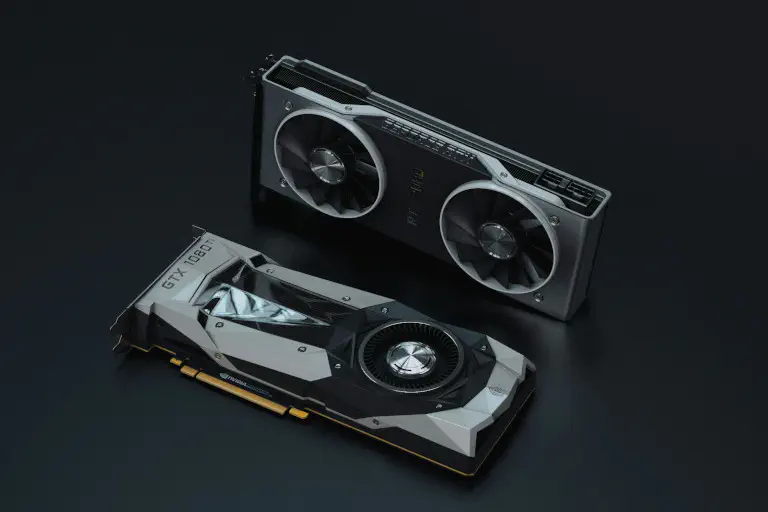
You do not always have to dig deep into your pockets for graphics cards. Small AI models can in some cases already be run on powerful consumer hardware with up to 12 GB, while larger models require considerably more GPU memory (usually more than 24 GB).
Physical infrastructure #
Your own AI server can release a lot of waste heat and have enormous power consumption and throughput. In order to self-host AI, you therefore need not only the components already mentioned, but also special cooling systems, cabling, networks, uninterruptible power supplies and, of course, server rooms to house your own AI server.
Suitable models for self-hosting AI #
Which AI models are best suited for using an AI locally? That depends mainly on the desired model size, the use case and the available hardware.
AI model sizes from 7B to 70B #
7B and 70B stand for the number of parameters of an AI model in billions, with 7 billion parameters corresponding to a small model and 70 billion parameters to a large one. Depending on the use case, a small, fast and inexpensive 7B model or a large, compute-intensive and costly 70B model may be the better choice when you want to self-host AI. The following overview serves as a rough guide:
- 7B models are ideal for straightforward tasks such as chats and simple automations. They can understand ordinary texts, write summaries or answer simple questions. With complicated logic puzzles or deep specialist knowledge, however, they make mistakes. In return, they need little electricity and computing power and can already run on an ordinary gaming PC.
- 70B models can solve complex problems, take on more demanding business tasks and discuss difficult topics like an expert. But they take longer to compute and respond and have high VRAM requirements. As a result, they cost significantly more electricity to operate and require expensive professional graphics cards that are normally found in data centers.
| Aspect | 7B models | 70B models |
|---|---|---|
| Model size | small | large |
| Response speed | very fast | noticeably slower |
| Logic | simple | complex |
| Hardware requirements | relatively low | very high |
| Costs | inexpensive | expensive |
| Typical areas of use | e.g. simple automation, chatbots | e.g. complex analyses and demanding tasks |

Quantization #
Beyond that, you should pay attention not only to the size of the model, but also to quantization. That is because quantized model variants need considerably less VRAM than full-precision models. Quantization refers to reducing the computational precision of AI models, for example from 32-bit floating-point numbers to 8-bit integers. This involves a trade-off between the speed and the accuracy of the calculations.
Quantization reduces the computational effort and can make large models practicable for local AI systems by increasing the response speed at the same hardware computing power. A sensible strategy when self-hosting AI is to start with a quantized model first. This lets you test what response speed and quality your specific use case demands before you invest in a more powerful GPU infrastructure.
Open source models you can use to self-host AI #
If you want to self-host AI, non-commercial open source models in various sizes and with various capabilities are particularly suitable. One very popular model is Llama 3.3, which currently counts as the standard for your own AI server with powerful hardware. Here you can see a comparison of Llama 3.3 from the US corporation Meta with a European model from Mistral and a Chinese alternative from Alibaba. All models are open source and use Q4 quantization, which reduces the memory requirement to roughly a quarter compared to full precision.
| Name | Provider | Size | Main area of use | VRAM required |
|---|---|---|---|---|
| Llama 3.3 | Meta | 70B | all-rounder with complex logic | 42 to 45 GB |
| Qwen 2.5 Coder | Alibaba | 32B | programming and data analysis | 20 to 24 GB |
| Mistral Large 2 | Mistral | 123B | business applications and agents | 75 to 80 GB |
Installing and running AI locally: Ollama, vLLM & co. #
If you want to install an AI locally, you no longer have to develop a complex software architecture today. A few tools can make getting started considerably easier.
Ollama #
Ollama is open source software that enables you to run AI locally. With Ollama, you can download freely available language models directly onto your computer and make them available to a wide range of applications via a standardized interface. One disadvantage is that Ollama does not have a graphical user interface for Linux, which is why it requires prior technical knowledge.
vLLM #
Just like Ollama, vLLM is an open source inference engine for large language models (LLMs). By comparison, however, the setup and the use cases are more demanding. vLLM is designed for high throughput and multiple GPUs and is particularly suitable for your own AI server with many parallel requests. It stands out for making the operation of AI models on your own hardware faster, more efficient and more scalable.
LM Studio #
Thanks to an easy-to-use desktop app with a graphical user interface, LM Studio scores as a low-threshold alternative to Ollama and vLLM. LM Studio integrates the Hugging Face platform, which provides access to a range of AI models. As soon as you have downloaded and installed a suitable model, you can interact with the chatbot right away. In return, however, LM Studio is also more resource-hungry and not open source.
Open Web UI #
Another interesting component in case you want to self-host AI is Open Web UI. With this self-hosted AI platform, you can create a user-friendly web interface for AI models that you run locally with Ollama or vLLM, for example. This turns an initially inaccessible local LLM into an application that people without technical expertise can use as well.
Example architecture for self-hosting AI #
A typical architecture could look like this, for example:
User → Open Web UI → Ollama or vLLM → local LLM
This way, you can install an AI locally and connect applications via APIs. If you run AI locally, you should also consider monitoring, authentication, permissions, backups and updates from the outset. Starting an LLM on your own AI server is technically only the first step on the way to a secure productive system.
No-code AI and workflows: integrating AI smartly #
The greatest added value often comes not from the AI itself, but from embedding it in business processes. A local artificial intelligence can, for example, analyze new records from an internal database, classify texts or summarize incoming documents. Via an API interface, the result can then be passed on to a CRM system, for instance, or start an automation.
Thanks to no-code AI – for example with a no-code AI workflow builder – you can model such processes largely without classic programming. This reduces the development effort and makes AI functions accessible to citizen developers in the company. If you self-host both the no-code AI workflow builder and the AI itself, data processing takes place exclusively within your own infrastructure.
SeaTable’s AI automations #
At SeaTable, the choice is yours: benefit from the scalability and convenience of the cloud or install SeaTable on premises on your own infrastructure. As an AI no-code platform, SeaTable opens up interesting possibilities for you, such as combining no code, relational databases and AI automations: use powerful functions such as Summarize, OCR, Extract, Classify and Custom Prompts.
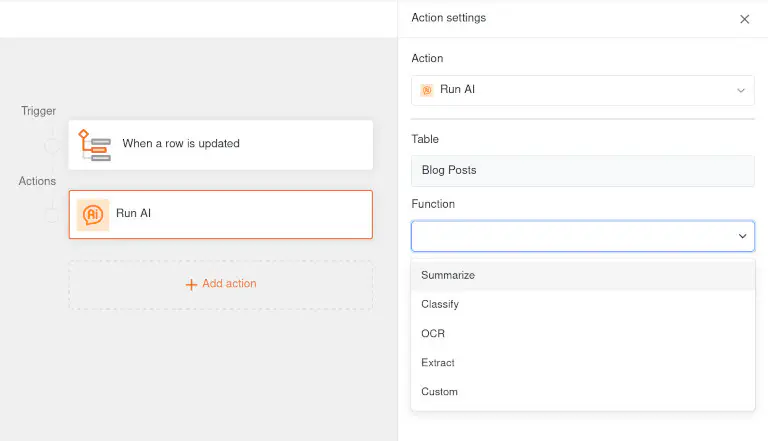
SeaTable Cloud uses a Gemma 4 from Google with 4 billion parameters as its AI model. For cloud users, AI automations run on our own AI server in Germany. Your data never leaves this infrastructure at any point and does not flow to Google or other US providers.
For full control, you can self-host not only SeaTable Server, but your AI as well. This way, you can automate workflows without having to transmit sensitive information to an external cloud AI. The SeaTable AI component is based on LiteLLM and therefore supports the connection of a wide range of models – including all LLM services with an OpenAI-compatible API. In our admin manual, you will find the instructions for deploying SeaTable AI and example configurations for numerous popular LLMs.
Connecting AI agents with SeaTable #
Would you like to hold a real-time dialog about your database in SeaTable or edit it with individual prompts in natural language? Then an AI agent is exactly the right solution! Behind this approach is the SeaTable MCP server. MCP (Model Context Protocol) is an open standard that enables AI models to interact actively with data sources. This allows the chatbot to access your database in SeaTable directly and answer questions about it – with no detours and no loss of information.
This works best with powerful AI models (e.g. Claude Desktop from Anthropic) that can answer complex questions and work with your data in multiple steps. For data protection reasons, it is important to understand that you are granting the AI agent access to the data in your SeaTable base. You control the AI agent’s permissions via the API token that you generate in SeaTable. If you self-host an AI, you can install both SeaTable and the MCP server on your own infrastructure and connect them with the local AI (via Ollama or LM Studio, for example). That way, your data never leaves your system at any point. You can find more information on this here.
Conclusion: self-hosting AI gives you digital independence #
When you host your own AI, you decide on the AI model yourself, operate your own AI server and retain full control over your data. This is particularly interesting for companies with high data protection requirements and for the public sector. However, anyone who wants to self-host AI should plan the infrastructure realistically: GPU and VRAM largely determine the possible model size, while quantization can optimize the speed.
With the right architecture and open source software such as Ollama or vLLM, AI can be run locally and integrated into existing company processes via APIs. No-code AI tools like SeaTable, meanwhile, enable you to automate your workflows efficiently and to analyze and edit your no-code databases with AI agents, without having to transmit sensitive business data to an external cloud AI.
FAQ: self-hosting AI #
What is the biggest advantage of hosting your own AI?
What hardware do I need for my own AI server?
How does the performance of local AI differ from commercial cloud AI?
Can I connect a local AI with no-code tools and automations?
Which open source models are suitable for running an AI locally?
TAGS: Digital Transformation IT Security & Data Privacy Integrations & Automations