
What is IT infrastructure? #
IT infrastructure refers to the entirety of all technical components that your company needs to operate, manage and use IT systems. This includes hardware, software and network components.
Key Take-aways #
- The most important requirements for your IT infrastructure are the availability, scalability and security of your IT systems.
- The operating model (on-premises, cloud or hybrid) is decisive for the strategic development of your IT infrastructure.
- Due to digital transformation, your IT infrastructure should also be suitable for the use of AI, IoT and mobile working.
- Keep an eye on which hardware, software, cloud services and technologies are in use in order to avoid shadow IT.
- Key aspects of IT infrastructure security include regular updates and patches, strong passwords, encryption, multi-factor authentication, backups, functioning incident management and clear IT governance.
What IT infrastructure components are there? #
IT infrastructure forms the foundation of your company and consists of the following building blocks.
Hardware #
Hardware forms the physical backbone of your IT systems. This includes:
- Computers and mobile devices: e.g. desktop PC, laptop, smartphone, tablet
- Peripheral devices: e.g. monitor, printer, headset, telephone, keyboard, mouse
- Servers and storage components: e.g. NAS, CPU, GPU, RAM, SSD, HDD, mainboard
- Structural infrastructure: e.g. rooms, server racks, cooling systems, power supply

Software #
Software refers to programs that run on the hardware to enable business processes . Examples of this are:
- Operating systems: e.g. Windows, Linux or macOS
- Database management systems: e.g. MySQL, MongoDB or Redis
- Applications such as office programs, ERP or CRM systems
- Web browsers: e.g. Firefox, Chrome, Safari, Edge
Networks #
Networks consist of communication channels that connect different devices to one another and control data transfer. Important aspects are:
- Network devices (routers, switches)
- Cabling and wireless networks (Wi-Fi, LAN, fiber optics)
- Network security (firewalls, VPN, gateways)
Cloud services #
Via the internet, you can use cloud services, i.e. external infrastructure, platforms or software that third-party providers make available in data centers:
- IaaS: Infrastructure as a Service means that you outsource your need for servers and access external data centers via the cloud.
- PaaS: Platform as a Service offers the opportunity to draw on the development environments of cloud providers, in which you can create, test and deploy applications.
- SaaS: Thanks to Software as a Service, you can use applications in a cloud, making local installations unnecessary.
What operating models are there in IT infrastructure management? #
In principle, three types of IT infrastructure provision are distinguished in companies: traditional infrastructure (on-premises), cloud infrastructure and hybrid infrastructure.
Traditional infrastructure #
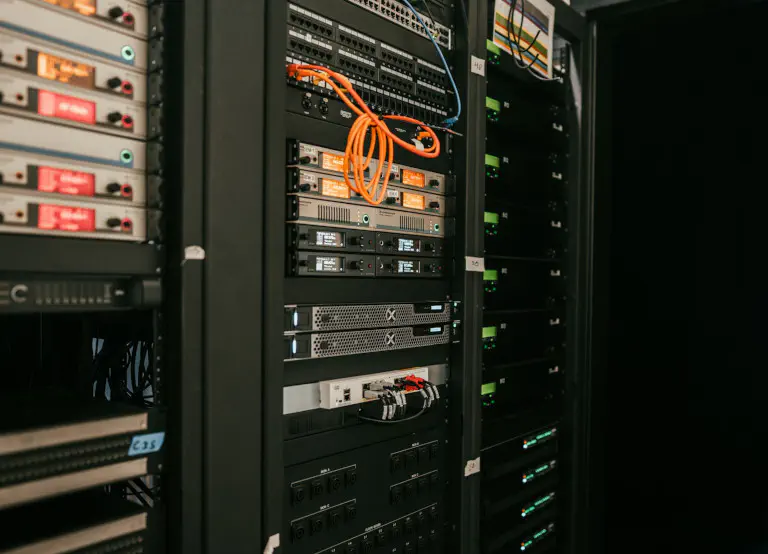
As recently as the 2000s, there was almost exclusively traditional IT infrastructure; a company owned all of the IT infrastructure it required itself. This means that you store all data on your own servers in an office building or on-premises data center. A major advantage of this is digital sovereignty , i.e. independence from large, mostly US cloud providers. However, it is very time-consuming and costly to purchase, operate and maintain your own servers.
Cloud infrastructure #
You do not own cloud infrastructure yourself. Instead, you rent resources such as storage space, computing power or software from cloud providers. As a result, cloud computing offers far greater scalability and flexibility than traditional IT infrastructures. However, there is usually a lack of true data sovereignty, as you are technologically dependent on your cloud providers.
Hybrid infrastructure #
Only a few companies still rely exclusively on on-premises solutions today, and just as few pursue a cloud-only strategy. In most cases, this results in a mix of local IT infrastructure and cloud services, which is referred to as hybrid cloud or hybrid IT.
Requirements for a modern IT infrastructure #
The IT infrastructure must handle business-critical processes without interruption, enable scalability and be equipped to deal with security threats. In addition, there are new requirements due to digital transformation and disruptive changes such as AI and remote work. Last but not least, sustainability and energy efficiency are also becoming increasingly important when choosing IT infrastructure solutions.
Availability
Scalability
Security
Cost efficiency
Internet of Things (IoT)
Artificial intelligence (AI)
The home office was just the beginning: why mobile working requires a solid IT infrastructure #
In recent years, the home office and remote work have increasingly found their way into the working world. This development is based on the fact that digitalized office activities can be carried out just as well from home or on the move. Daily office attendance is no longer necessary. For employees, remote work promises a better work-life balance, less commuting time and more freedom; for employers, it promises savings on office space, parking spaces and travel allowances as well as the expansion of the talent pool beyond regional borders.

However, location-independent working has far-reaching consequences for the IT infrastructure in your company. If you want to enable your employees to work remotely, they need mobile devices such as laptops and company cell phones, but also workplace equipment such as additional monitors, keyboards and mice for the home office. Stable internet connections are required for location-independent access to company data, real-time collaboration and smooth communication. In short: high-performance, flexible and secure IT infrastructure solutions are the backbone of mobile working and the home office. Important aspects for your remote IT team are:
-
Mobile Device Management (MDM): Configure, secure and manage all mobile devices – no matter where in the world they currently are – centrally in your remote IT team. Device encryption is essential to ensure that the mobile IT infrastructure does not become a security risk in the event of loss or theft.
-
Secure network connections: Use VPN (Virtual Private Network), encrypted Wi-Fi access and remote desktop solutions when employees access the company network remotely. This ensures that company data does not fall into the wrong hands.
-
Identity & Access Management (IAM): Identity and access management verifies the user’s identity and regulates which systems and data the authorized person is allowed to access. Widely used methods for this are single sign-on and multi-factor authentication.
-
Cloud solutions: Your employees can access data and applications in the cloud from anywhere in the world. They only need an internet connection and a browser, which makes location- and device-independent working incredibly easy. Instead of storing data and documents distributed across local computers, there is a central version that is accessible to everyone at any time.
4 tips for the strategic development of IT infrastructure in your company #
Determine the status quo #
Before you design a new IT infrastructure, you should take stock : Which hardware, software and technologies are already in use? Which cloud services are being used? Is there any shadow IT or data silos in the specialist departments? What budget does the IT department have and what personnel resources are available?
Define requirements and goals #
The next step is to determine the requirements for the IT infrastructure. In doing so, you should always keep an eye on the strategic goals you are pursuing with the development of the new IT infrastructure. Do you want to enable mobile working, operate your own AI servers or use more cloud resources? Do you want to save costs while ensuring high availability, scalability and security? For example, it makes little sense to want to build and operate an expensive, high-performance IT infrastructure in your company if you lack the necessary IT specialists and financial resources to do so.
Plan ahead #
Building an IT infrastructure requires a lot of forward planning. Depending on the operating model and the scope of the project, the lead times vary greatly. If you want to build your own data center from scratch, for example, you have to reckon with several years of construction time before it goes into operation. Procuring certain IT infrastructure components can also take several months. Booking IT infrastructure solutions via cloud providers, on the other hand, is much faster and easier.
Observe laws, data protection and compliance #
Depending on the industry and company location, your IT infrastructure may be subject to certain regulations. When building your IT infrastructure, you should therefore observe legal data protection and compliance requirements. For example, companies in the critical infrastructure sector in Germany are obliged to protect their IT infrastructure to a particular degree against failures and other threats. They must also maintain the highest level of data security and GDPR compliance, which is hardly possible with IT infrastructure solutions from non-European players (e.g. US cloud providers).

IT infrastructure checklist for mobile working #
- Cloud-based, traditional or hybrid infrastructure: First decide on an operating model, as this has far-reaching consequences for your IT Service Management .
- Well thought-out mobile device management: Do you have an overview of all mobile devices, are they sufficiently secured and technically up to date?
- No VPN bottleneck: Can your employees access your company or cloud servers from any location via fast, stable and secure network connections?
- Avoid data silos and data loss: Have you instructed your employees to store all data and documents centrally and synchronized in real time on your server – instead of countless local versions on different devices?
- Granular role and rights management: Can every employee access the systems they need for their tasks, but only see, edit or delete the data that corresponds to their authorization level?
SeaTable as the control center for modern IT infrastructure management #
As an AI no-code platform , SeaTable can support your remote IT team with a variety of tasks. For example, SeaTable is suitable for:
- automated and AI-supported processes
- inventorying devices
- bug tracking and software testing
- incident management and ticketing
- relational databases
- citizen development
SeaTable offers a central database with granular role and permission management as well as robust security functions such as single sign-on and two-factor authentication. It breaks down data silos, can be connected to existing IT systems via integrations and API and enables location-independent working and collaboration in real time. Decide for yourself whether you want to use the SeaTable Cloud or install SeaTable Server on your own infrastructure:
- The SeaTable Cloud impresses with its scalability and convenient setup in just a few minutes. It is hosted exclusively on servers in Germany and therefore meets the highest data protection requirements.
- If you prefer full data sovereignty and physical control, you can also install SeaTable Server on-premises. In that case, you are responsible yourself for the necessary performance, availability and security of the server infrastructure.
Discover helpful templates that make it easier for you to get started with SeaTable:
Manage support tickets in a central system with a knowledge base.
Record devices and their conditions as well as software licenses and updates.
Systematically test software versions and fix errors.
Plan and control the strategic development of your IT infrastructure.
Frequently asked questions about IT infrastructure #
Why does location-independent working often fail due to traditional IT infrastructures?
How does modern IT infrastructure management protect against data loss in public?
How do you succeed in building an IT infrastructure in your company in compliance with data protection regulations?
What absolutely belongs on an IT infrastructure checklist for mobile working?
An IT infrastructure checklist for mobile working includes, among other things:
- the decision in favor of an operating model (on-premises, cloud or hybrid)
- fast, stable and secure network connections
- identity, access, role and permission management
- central data storage with real-time synchronization