Table of Contents
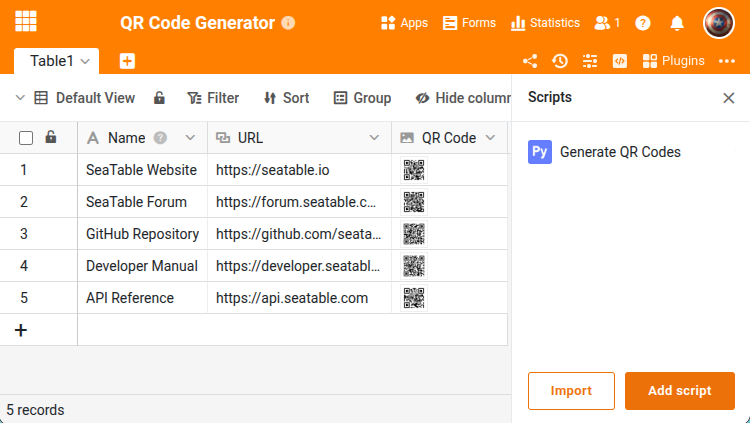
This script reads text content (e.g. URLs, product IDs) from a column, generates QR code images and stores them in an image column. The script iterates through all rows in the table and is therefore suitable for manual execution or as an automation — not as a button script.
Prerequisites
The table requires at least two columns:
- A text or URL column with the content to be encoded as a QR code.
- An image column where the generated QR code will be stored.
The script
Adjust the four variables at the beginning to match your table structure. The script skips rows that have no text value or already contain a QR code. Set OVERWRITE = True to regenerate existing QR codes.
from seatable_api import Base, context
import qrcode
from io import BytesIO

base = Base(context.api_token, context.server_url)
base.auth()

TABLE_NAME = "Table1"
TEXT_COLUMN = "URL"
IMAGE_COLUMN = "QR Code"
OVERWRITE = False

rows = base.list_rows(TABLE_NAME)
for row in rows:
    text = row.get(TEXT_COLUMN)
    existing = row.get(IMAGE_COLUMN)
    if not text or (existing and not OVERWRITE):
        continue

    qr = qrcode.QRCode(version=2, error_correction=qrcode.constants.ERROR_CORRECT_M, box_size=10, border=4)
    qr.add_data(text)
    qr.make(fit=True)
    img = qr.make_image(fill_color="black", back_color="white")

    buf = BytesIO()
    img.save(buf, format='PNG')
    buf.seek(0)

    info = base.upload_bytes_file(str(text) + '.png', buf.read(), file_type='image')
    base.update_row(TABLE_NAME, row['_id'], {IMAGE_COLUMN: [info.get('url')]})

print("QR codes generated.")
Execution
The script can be started in three ways:
- Manually in the Python editor of the base
- Via automation (e.g. scheduled or on new rows)
- Via button — for this the script would need to be adapted to process only the current row
Learn more about this here .
For the complete function reference, visit the SeaTable Developer Manual .