Table of Contents
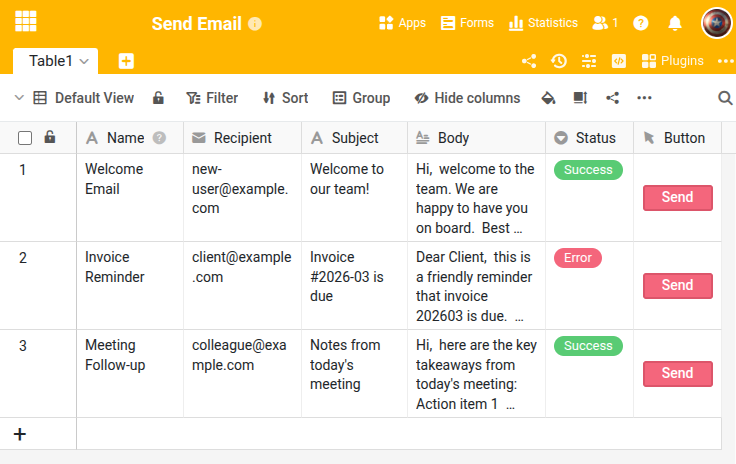
This script sends an email via SMTP based on the data of the current row. It is designed as a button script: you click a button in a row and the script reads the recipient, subject and body from the corresponding columns. The send status is written back to a single-select column.
Prerequisites
The table requires the following columns:
- Recipient (Email) — recipient address
- Subject (Text) — email subject
- Body (Long text) — email content
- Status (Single select) — set by the script to “Success” or “Error”
A button column must also be set up to execute the script.
The script
Adjust the SMTP credentials and column names to your configuration. The script uses context.current_row to read the data from the row where the button was clicked.
from seatable_api import Base, context
import smtplib
from email.mime.text import MIMEText
from email.mime.multipart import MIMEMultipart

base = Base(context.api_token, context.server_url)
base.auth()

# SMTP configuration
SMTP_SERVER = "smtp.example.com"
SMTP_PORT = 587
SMTP_USER = "your-email@example.com"
SMTP_PASSWORD = "your-app-password"

TABLE_NAME = "Table1"

# Read data from current row
row = context.current_row
if not row:
    print("ERROR: This script must be run via a button.")
else:
    recipient = row.get('Recipient', '')
    subject = row.get('Subject', '')
    body = row.get('Body', '')

    if not recipient:
        print("ERROR: No recipient specified.")
    elif not subject:
        print("ERROR: No subject specified.")
    else:
        msg = MIMEMultipart()
        msg['From'] = SMTP_USER
        msg['To'] = recipient
        msg['Subject'] = subject
        msg.attach(MIMEText(body or '', 'plain'))

        try:
            with smtplib.SMTP(SMTP_SERVER, SMTP_PORT) as server:
                server.starttls()
                server.login(SMTP_USER, SMTP_PASSWORD)
                server.send_message(msg)
            base.update_row(TABLE_NAME, row['_id'], {'Status': 'Success'})
            print(f"Email sent to {recipient}")
        except Exception as e:
            base.update_row(TABLE_NAME, row['_id'], {'Status': 'Error'})
            print(f"Failed: {e}")
SMTP servers
Common SMTP settings:
| Provider | Server | Port |
|---|---|---|
| Gmail | smtp.gmail.com | 587 |
| Outlook / Microsoft 365 | smtp-mail.outlook.com | 587 |
| Custom server | Your SMTP server | 587 or 465 |
For HTML emails, replace 'plain' with 'html' in the MIMEText call.
For the complete function reference, visit the SeaTable Developer Manual .