Table of Contents
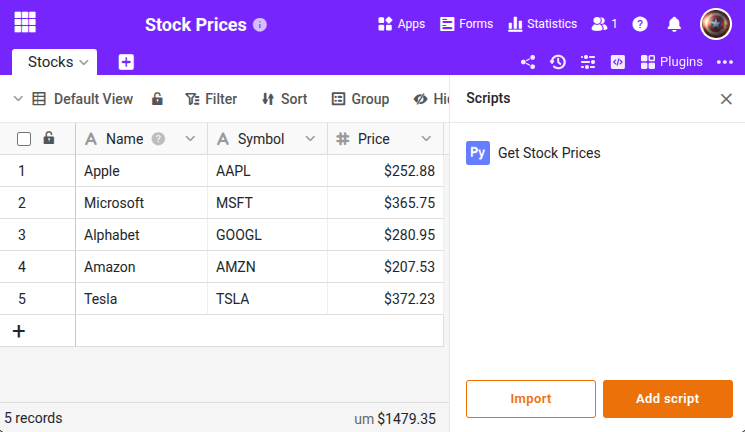
This script retrieves current stock prices from the Twelve Data API and writes the prices into a SeaTable table. It demonstrates how to call external APIs from a SeaTable Python script. The script iterates through all rows and is suitable for manual execution or as a scheduled automation.
Prerequisites
- A free API key from Twelve Data
- A table with columns
Symbol(text) andPrice(number)
The script
Enter your API key in API_KEY. The script checks whether a valid key is set and aborts immediately on an API error.
from seatable_api import Base, context
import requests

base = Base(context.api_token, context.server_url)
base.auth()

TABLE_NAME = "Stocks"
API_KEY = "your-api-key"

if API_KEY == "your-api-key":
    print("ERROR: Please set your Twelve Data API key first.")
    print("Get a free key at https://twelvedata.com/")
else:
    rows = base.list_rows(TABLE_NAME)
    for row in rows:
        symbol = row.get('Symbol')
        if not symbol:
            continue

        url = f"https://api.twelvedata.com/price?symbol={symbol}&apikey={API_KEY}"
        response = requests.get(url)
        data = response.json()

        if 'price' in data:
            base.update_row(TABLE_NAME, row['_id'], {
                'Price': float(data['price'])
            })
            print(f"{symbol}: {data['price']}")
        else:
            print(f"API error: {data.get('message', 'unknown error')}")
            break

    print("---")
    print("Stock prices updated.")
You can replace the Twelve Data API with any other financial data provider. Adjust the URL and response parsing accordingly.
For the complete function reference, visit the SeaTable Developer Manual .