Municipal property management made simple – template for councils
Excel lists, paper files and data silos in individual departments obscure the view of the municipal property portfolio. Contracts expire unnoticed, notice periods are missed, and properties, responsibilities and projects remain disconnected. Maintenance intervals, inspection deadlines and space requirements end up in separate files, which makes reliable, well-founded decisions difficult. With the free SeaTable template, you bring your municipal property management together in one no-code system – from the property register to project planning: everything linked, traceable and GDPR-compliant with servers in Germany.
More clarity, less workload
Your benefits in municipal property management
-
Flexible and e-gov ready
Adapt the property management template to your municipal requirements in modular steps – without any programming effort. Add tables, columns and views as needed and meet the requirements of modern digital public services with ease.
-
Link needs and projects
Record the requirements and space needs of individual departments and derive refurbishment, conversion or relocation projects directly from them. Every project remains traceable back to the original request at all times – from idea to completion.
-
Granular access control
Use access permissions to control who can view or edit which data. This way, you protect sensitive information without creating data silos – and every department sees exactly what it actually needs for its daily work and decisions.
-
Transparent evaluation
Assess your entire portfolio against individual criteria and compare the results with actual demand. This makes strategic decisions on holding, converting, selling or developing properties transparent, comprehensible and justifiable.
-
GDPR-compliant management
SeaTable meets the highest security requirements and is hosted exclusively on certified servers operated by European companies in Germany. Your sensitive property and contract data stays in Europe and is reliably protected at all times.
-
Actively manage vacancies
See at a glance which properties are vacant or which uses are about to expire. This allows you to plan follow-up uses or conversion projects in good time and avoid long, costly vacancy periods across your entire property portfolio.
Who uses SeaTable?
Leading companies worldwide rely on SeaTable

















100.000+
Downloads in the first year of Docker Hub
1.500+
Daily users on SeaTable Cloud
4.6
Review on Capterra
Why councils choose SeaTable
Manage municipal properties digitally
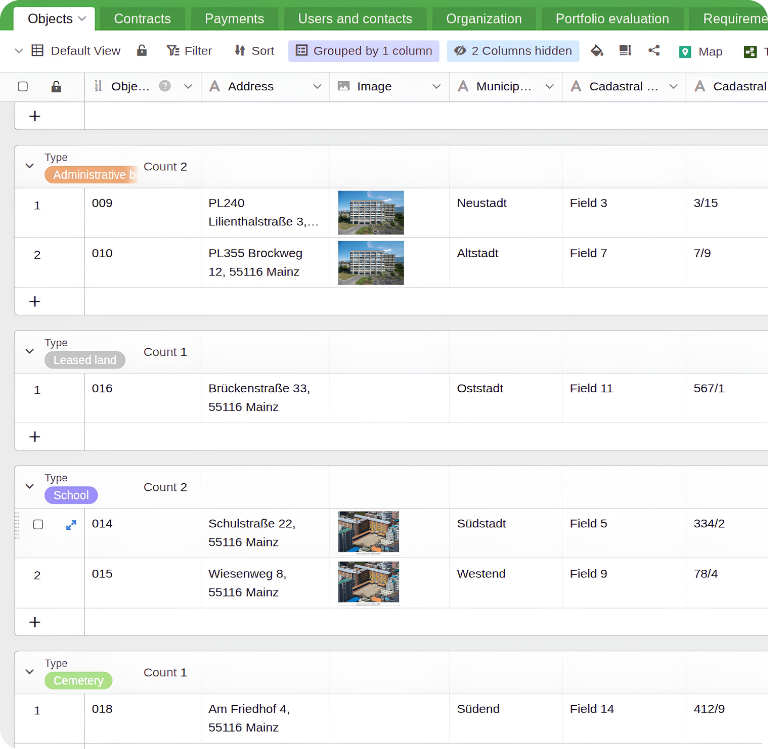
With the AI no-code platform SeaTable, you get a modern, privacy-compliant solution for municipal property management. Instead of maintaining information in separate spreadsheets, you link properties, contracts, payments, contacts and responsibilities. From the property register to rental and lease agreements, all information is in one place. The template for municipal real estate management can be flexibly adapted to your workflows and provides the data foundation for digital facility management in the public sector.
Always up to date: Every change is immediately visible to all authorised users. Caseworkers and management always work with the same information – no more outdated copies.
Real-time collaboration between departments: The property office, building authority, schools and sports office and the finance department use one system and work together in real time.
Central register: Maintain land and buildings in one central directory. The property office and specialist departments work on the same data basis – without duplicate entries.
Integrated automations: Use built-in automations for lean processes, for example to send notifications automatically before notice periods or inspection deadlines expire. This reduces manual effort.
On-premises: For even more data control, SeaTable Server is available as an on-premises solution that you can operate in your own data centre or with your municipal IT service provider.
How the template works
Municipal property management in practice
Easy data entry with web forms
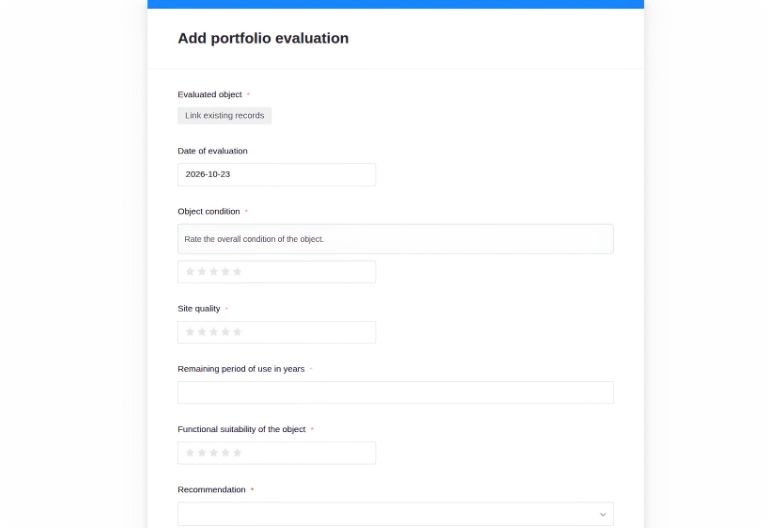
If you are tired of filling in spreadsheets in Excel, you will love SeaTable. Record space requests and project evaluations conveniently via web form – even colleagues without SeaTable experience can submit entries. Each new entry is automatically saved with the current date in the corresponding table and is immediately available for further processing.
Link properties, departments and contracts
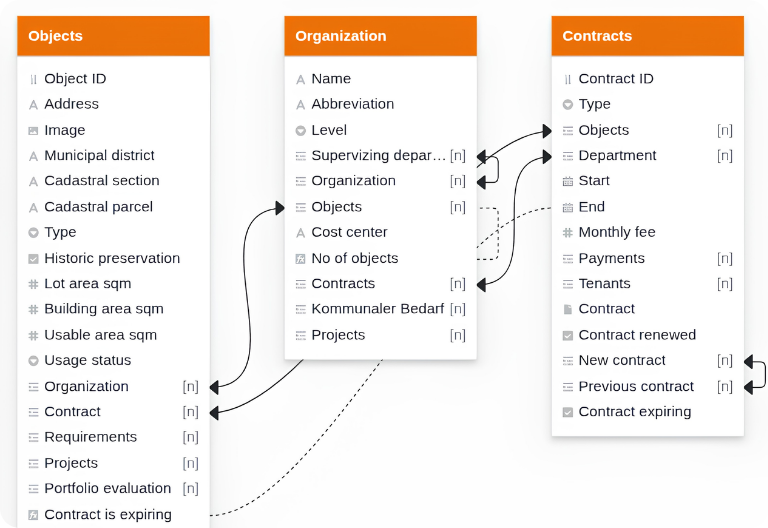
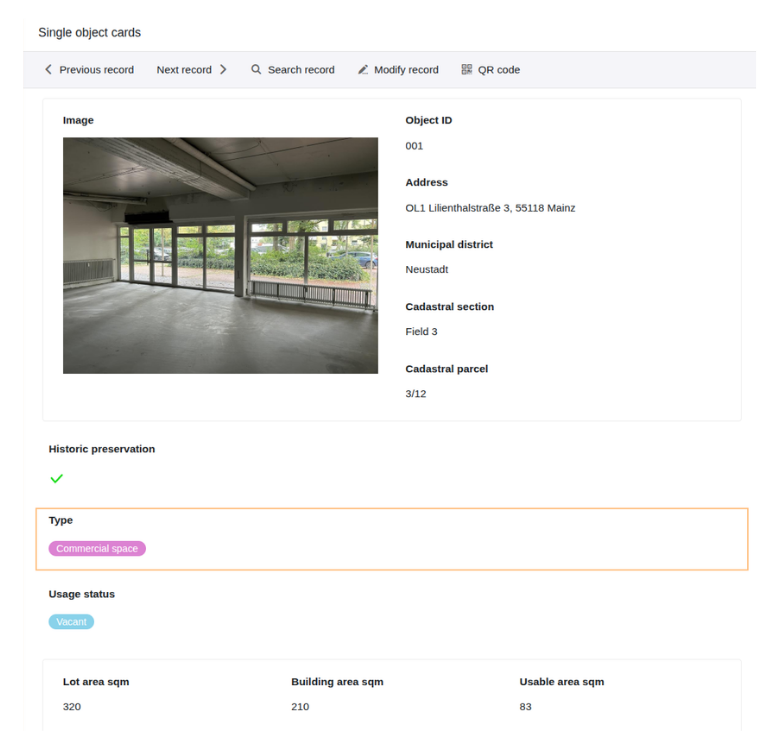
The “Objects” table is the heart of the municipal property management template. It contains all owned and leased land and buildings with address, type of use, ownership status and floor area. In “Contracts”, you record rental and lease agreements, heritable building rights and usage agreements, and in the “Organization” table, you assign each property to a responsible department. All tables are linked, so no information is maintained twice.
Evaluate the portfolio and define measures
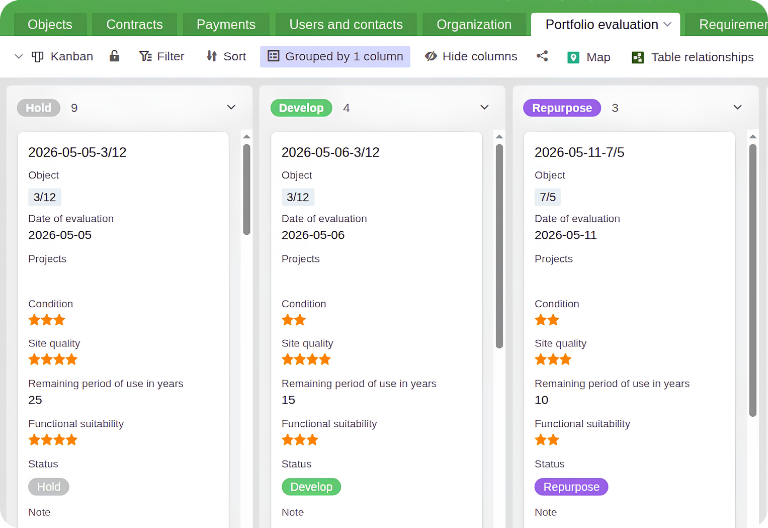
In the “Portfolio evaluation” table, you assess the condition, location, remaining useful life and suitability of a property on defined reference dates. On a Kanban board, you assign a measure to each property via drag and drop, such as hold, repurpose, sell or develop. A link to the “Projects” table shows you immediately which specific project is connected to an evaluation result.
Record requirements and plan projects
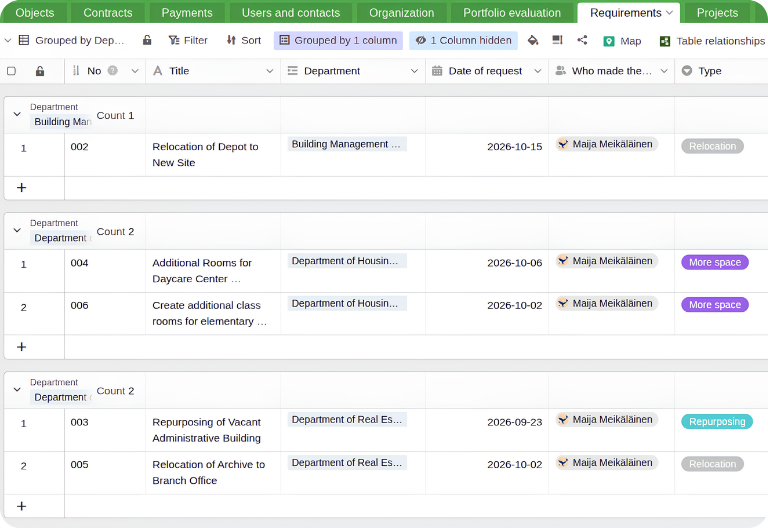
Departments report their space requirements in the “Requirements” table, such as an additional nursery group or a new office location. By linking a requirement to a property, you check whether the demand is covered. In “Projects”, you organise your project management and see directly via a link column which project is derived from which requirement.
From property register to decision basis
With SeaTable’s integrated App Builder, you create custom front ends for facility management in the public sector via drag and drop. The template already includes two ready-made apps: an internal one for evaluations, requirement requests, property gallery, property cards and project overview, and one for prospective tenants with an enquiry form and a gallery of vacant properties. Create as many additional apps as you like and adapt the existing ones as needed to organise your municipal property management efficiently and transparently.
Organise your municipal property management in a modern, digital way – with SeaTable
Less manual work, more clarity
Property management with built-in AI
With SeaTable, municipal administrations benefit from powerful, GDPR-compliant AI-powered automations. For example, digitise your old files and extract contract data automatically. This allows you to implement professional, modern and digital facility management in the public sector with far less manual effort – while your data remains securely in Europe.
Summarise contracts quickly
Use the Summarize function to automatically summarise contracts or correspondence. Caseworkers grasp all the key points at a glance, noticeably shorten processing times and can respond much faster to queries from other departments, tenants, citizens or council members.
Categorise properties
With the AI function “Classify”, you categorise your properties automatically. The AI reads fields such as type of use, usable floor area or listed-building status and writes the classification into a separate column – consistently, traceably and without manual sorting.
OCR for legacy paper files
With OCR, you read text from photos or screenshots of old contracts or documents and write it into the corresponding columns. This digitises analogue records step by step and makes historic contract and property information searchable for all authorised departments.
Transfer contract data
Use the Extract function to automatically transfer information such as rent amount or contract term from documents into your tables. This reduces effort, avoids manual input errors and keeps your contract data complete, up to date and consistent across all properties.
Tailored AI automation
With Custom Prompts, you define your own AI instructions – for example, to turn requirement requests or bullet points into detailed, well-structured project descriptions including a risk assessment. This way, the AI adapts to your specific administrative processes.
Derive recommendations
Derive initial project recommendations from property evaluations or requirements for your strategic municipal property management – for example, whether a conversion or a new building makes more sense. The final decision always remains with you and your committees.
Transparency & data protection
Manage municipal properties in a legally compliant way
SeaTable is a modern AI no-code solution with App Builder and integrated automations. It offers all the functions municipalities need for digital facility management in public administration. The focus is on central data storage, data protection and traceable documentation of your contracts and decisions – a reliable basis for audits, accountability and well-founded decisions.
Transparent change history
New entries and changes receive a timestamp and can be tracked via the integrated logs. This allows you to trace at any time who changed which data and when – an important basis for audits and accountability.
All data in one central place
Property data, contracts, evaluations, requirement requests and projects are linked in one database. Information is entered only once – and is immediately available to all authorised departments – without duplicates or conflicting versions.
GDPR-compliant hosting in Germany
The SeaTable infrastructure runs exclusively on certified servers operated by European service providers in Germany. Your data does not leave Europe and is processed in line with the GDPR and public sector data protection requirements.
Secure login with 2FA and SSO
SeaTable supports two-factor authentication and single sign-on. You control precisely who can access which data and when, and integrate SeaTable seamlessly into your existing identity and access management.
FAQ – Managing municipal properties with SeaTable
-
Can I create a space register or building passport with the template?
-
Yes. The “Objects” table already contains columns for address, type of use, ownership status and floor area in square metres. You can simply add another linked table or additional columns for building passport data, such as energy ratings or year of construction.
-
Can several departments collaborate on public sector facility management?
-
Yes, no problem. With SeaTable, the property office, building authority, parks department or schools and sports office work together in one collaborative database. The “Organization” table is designed for exactly this purpose and lets you easily assign and filter responsibilities.
-
Can contracts and images be linked directly to property master data?
-
Yes. The “Objects” table includes a column for image uploads, and in the “Contracts” table you can store contracts and other relevant documents in a file column and display them directly on the property via a lookup column.
-
We work with external partners. Can they access the data too?
-
Yes. In public sector facility management, you can easily grant external users access to your data. Granular permission management lets you share exactly the data that is relevant to your partners while keeping sensitive information hidden.
-
Is using the SeaTable AI really secure for public bodies?
-
Yes. SeaTable hosts its own AI model on servers of the German provider Exoscale in Frankfurt. When you use the integrated AI functions to modernise your municipal property management, your data remains within the SeaTable infrastructure at all times.
-
Can caretaker services and maintenance be managed with SeaTable?
-
Absolutely. Our template library includes a ready-made caretaker services template that adapts flexibly to municipal needs. You can integrate maintenance into the municipal property management template just as easily as a separate to-do list.