
Modern and Flexible: What the Right ERP System for Small and Medium-Sized Businesses Must Offer #
An ERP system for small and medium-sized businesses serves as the digital backbone of the entire company. However, traditional systems were designed for stable processes, not for agile adjustments and dynamic workflows. Furthermore, such systems often cater to the needs of large enterprises with well-resourced IT departments that handle administration. SMEs, in particular, need to be able to react agilely in a constantly changing market environment and increasingly fierce competition. As an ERP system for small businesses with limited IT resources or for SMEs, traditional solutions are often too inflexible, too oversized, and frequently too expensive.
However, the market has been changing for several years, and there are now modern, flexible alternatives. With no-code and low-code solutions , even companies without a large IT team can create customized ERP systems themselves. Employees in line-of-business departments, known as citizen developers , can independently set up new processes and make adjustments. And there’s another advantage: The acquisition costs for your ERP system drop significantly with no-code/low-code solutions.
Key Facts: #
-
Today, SMEs need flexible, scalable ERP systems.
-
No-code and low-code tools enable SMEs to build their own ERP systems without external developers or a large IT department.
-
With a no-code ERP builder like SeaTable, you can build your own ERP system in just a few steps.
-
Thorough planning and analysis of your own processes and requirements are crucial for choosing the right no-code tool.
Cloud or on-premises? What is the best choice for your business #
A key question when selecting new software solutions today is always choosing the right deployment model. And even if you want to build your ERP with no-code tools , some providers let you choose between cloud solutions and an on-premises installation. Both options have their merits, and what works best for your business depends primarily on your specific requirements. Let’s take a closer look at the pros and cons of both options below.
Cloud ERP Software: Flexible, Scalable, Fast #
A cloud ERP system stands out primarily for its low upfront costs, rapid implementation, and automatic updates. The provider manages the entire infrastructure and handles maintenance, allowing you to focus your resources solely on your core business.
Additionally, many cloud solutions can be easily scaled and flexibly adapted as the company grows, without requiring a complete overhaul of the system.
In particular, the elimination of ongoing IT costs is an often-underestimated advantage. This is because many companies, especially sole proprietorships and small businesses, primarily focus on the implementation effort when choosing an ERP system. However, for seamless integration with their tool stacks, API interfaces or webhooks must be set up, and regular security updates must be installed.
The advantages of a cloud ERP system:
-
No costs for your own servers or system maintenance
-
Automatic updates and support from the provider
-
Easy scalability as the business grows
On-premise ERP: Maximum Control #
A traditional on-premise installation offers, above all, maximum data control and—at least with open-source or open-core solutions—more in-depth customization and branding options than a cloud solution. This deployment is therefore particularly suitable for companies with strict compliance requirements, such as ERP systems in the public sector or in highly regulated sectors such as healthcare. However, these advantages come at a price: costs may be higher, in-house IT resources are required, and updates must be performed in-house.
The advantages of an on-premise solution:
-
Maximum data control
-
Possible even with the strictest compliance requirements
-
More customization and branding options
Building an ERP System with No-Code or Low-Code? The Benefits for SMEs #
According to a Gartner study, by 2024, 65 percent of all application development will already involve no-code or low-code, with the trend on the rise. This trend is also evident in ERP systems for small and medium-sized enterprises. But what exactly do no-code and low-code actually mean?
What Are No-Code and Low-Code Applications #
With no-code tools, users can develop customized solutions without programming knowledge or having to write code. Such systems either offer a visual user interface where the desired elements are placed via drag-and-drop or are based on a customizable database structure with a tabular interface. Some providers, such as SeaTable, offer a combination of both, with a relational database as a table and a visual App Builder . A tool is referred to as a low-code tool when no-code platforms can be supplemented with custom code as needed.
Strategic Advantages of No-Code ERP at a Glance #
The key difference from traditional ERP projects lies in the speed and autonomy you gain through no-code tools. Where traditional systems either allowed no customization at all or required months-long projects to do so, a skilled employee in your business department can complete the same task in just a few hours.
-
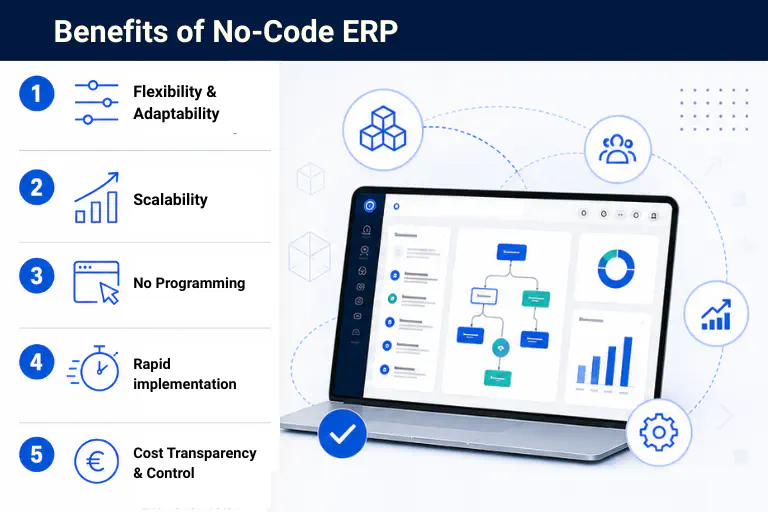
Flexibility and Adaptability: Your business departments can independently expand and modify their respective processes and workflows without having to wait for IT support or external service providers.
-
Process Automation Without Development Effort: Integrated automation enables lean, automated workflows for recurring data maintenance processes or automatic notifications.
-
Rapid implementation and short time-to-value: Instead of months, a no-code ERP system is up and running in just a few weeks. Changes are implemented iteratively during ongoing operations without system downtime.
-
Cost control: With a no-code ERP builder, you save on external developer and consultant costs. Transparent user fees allow for more reliable cost planning than fluctuating project budgets.
-
Scalability as your business grows: No-code systems like SeaTable scale with your business without extra costs for additional data packages, rigid data limits, or add-ons. Permission structures can be customized in detail, and new licenses can be added as teams grow.

No-Code ERP in Practice: How to Build an ERP System with SeaTable #
The following ERP system setup with SeaTable demonstrates how easily you can create a customized and flexible ERP system for sole proprietorships and SMEs using no-code and low-code solutions. However, simple here should not be equated with fast or easy. Contrary to common misconceptions , a robust no-code ERP system, like all software and application projects, requires careful analysis and planning.
Step 1: Process Analysis #
This step is essential for any ERP system migration in order to create a robust requirements specification. However, with no-code solutions, you should proceed even more carefully here, because unlike with standard SaaS solutions, you do not have to adapt your processes to the system’s predefined framework in a no-code tool. On the contrary, you can build your ERP system to fit your processes—and should therefore have a precise understanding of them beforehand.
Step 2: Define the Data Structure #
Now define your data structure. In SeaTable, you create tables that represent your business areas. You can create as many tables as you like within a base and link them together. A simple ERP system for small businesses could, for example, consist of tables for Customers, Suppliers, Products, Orders, Inventory, and Invoices. These links create a consistent data model. As a starting point for your ERP, SeaTable offers various templates that you can flexibly expand and customize.
Step 3: Set up the CRM module #
A linked table for contacts, communication history, quote status, and customer segmentation is often sufficient as a CRM foundation. If you want to map more granularly structured CRM data, SeaTable offers various templates, including one for a CRM tool , which can be easily integrated into your ERP.
Step 4: Integrate inventory management #
Product and inventory tables with automated stock calculations form the basis of your inventory management. Links to order data from your CRM tables ensure that you’re always working with real-time data. SeaTable also offers a template for warehouse management and inventory control.
Step 5: Purchasing and Order Management #
To map your purchasing process transparently and efficiently, it’s best to use integrated forms in SeaTable. This allows your employees to easily submit orders or requests, and new entries are automatically created in your table.
Step 6: Automations #
SeaTable’s built-in AI-powered automations replace manual routine tasks. Automatically send payment reminders via email, notify customers immediately of status changes, or generate inventory alerts as soon as stock levels fall below defined minimums. In SeaTables, this is done using an intuitive automation editor.
Step 7: Reporting Dashboards and Self-Service Portals #
With SeaTables’ built-in App Builder, you can create engaging real-time dashboards featuring sales overviews, open items, inventory levels, or inventory turnover. In addition, you can build role-based self-service portals: Employees, customers, or suppliers gain targeted access to exactly the data relevant to them via a custom app interface—without insight into the underlying database structure.
Step 8: Integration and Data Migration #
Using the SeaTable API and native integrations—for example, for email clients or Google Calendar—you can connect existing systems such as e-commerce platforms, accounting software, external payment providers, or supplier ordering systems directly to your ERP. You can easily migrate existing data via CSV export or through the API. This ensures your ERP system migration proceeds smoothly without data loss or system downtime.
6 No-Code ERP Builders Compared #
The market for no-code ERP systems for small and medium-sized businesses and sole proprietorships has grown significantly in recent years. As a result, SMEs are in the fortunate position of being able to choose from a wide range of capable providers. It’s worth taking a closer look here, as the differences in flexibility, price, scalability, data protection, and user-friendliness are sometimes substantial. Below, we briefly introduce the six most important providers.
-
SeaTable: SeaTable is an AI no-code solution based in Germany that was developed specifically for companies with a high level of data protection awareness and complex process requirements. Tables, forms, workflows, and dashboards can be configured entirely visually; open API interfaces enable the integration of existing tools. SeaTable offers both a GDPR-compliant cloud with a German data center and a self-hosting option. The pricing model is based on a monthly license per user, with no add-ons, paid plugins, or data packages. This makes SeaTable easily scalable. Another plus is SeaTable’s integrated App Builder for user-friendly applications and frontends.
-
Ninox: Ninox is a low-code database platform also developed in Germany. Complex relational data models and custom business logic can be implemented using a proprietary scripting language, though this does require at least basic coding knowledge. Ninox also offers cloud-based and self-hosting options in Germany, but does not provide a free on-premises version.
-
Airtable: The no-code solution Airtable stands out for its user-friendliness and extensive template library. For companies with GDPR requirements, however, Airtable warrants critical consideration: As a U.S.-based provider without a self-hosting option, all data is stored on U.S. servers. Additionally, Airtable is relatively more expensive than other providers and offers only a limited free version.
-
Adalo: Adalo enables the visual creation of native mobile and web apps and is suitable for simple, data-driven applications. For complex ERP processes with extensive automation and large datasets, however, the platform reaches its limits. Adalo should be viewed more as an entry-level solution for sole proprietors than as a full-fledged no-code ERP builder.
-
AppMaster: AppMaster generates real backend code from visual models, enabling significantly more complex architectures than pure no-code tools. The platform is particularly suitable for SMEs with technical resources that want to build a scalable, customized ERP system. However, the significantly higher price and steeper learning curve make AppMaster unattractive for beginners and companies with limited IT resources.
-
Xentral: Strictly speaking, Xentral is not a free ERP builder, but a modular, expandable no-code ERP system for retail, e-commerce, and manufacturing. Its strength lies in its immediate readiness for use with broad functional coverage; its weakness is its lower flexibility when it comes to company-specific processes. For SMEs who prefer to align their processes with the system rather than the other way around, Xentral is a solid choice. In comparison, Xentral is also significantly more expensive and does not offer an on-premises solution.
| Flexibility | Usability | GDPR | Price/Month | Free Plan? | Self-hosting | |
|---|---|---|---|---|---|---|
| SeaTable | 5/5 | 5/5 | 5/5 | starting at €7/user | ||
| Ninox | 4/5 | 4/5 | 5/5 | starting at €25/user | ||
| Airtable | 4/5 | 5/5 | 2/5 | starting at approx. €17 per user | ||
| Adalo | 3/5 | 4/5 | 3/5 | starting at approx. €30 per user | ||
| AppMaster | 5/5 | 3/5 | 3/5 | starting at approx. €166 | (Enterprise) | |
| Xentral | 3/5 | 3/5 | 5/5 | starting at approx. €99 |
Conclusion #
There is no such thing as the ideal ERP system for small and medium-sized businesses. It is created only through the right combination of platform, deployment model, and the most precise representation of a company’s own processes. Just a few years ago, companies had to either develop their own systems at great expense or adapt their own processes to rigid system solutions. Thanks to no-code and low-code tools, however, the situation has changed fundamentally.
Today, even as a small or medium-sized business, you can build, customize, and scale tailor-made ERP solutions yourself. This allows you to respond more quickly to changing market conditions and customer requirements and gain an advantage over your competitors.
SeaTable offers a particularly low-barrier entry point: as a GDPR-compliant AI no-code solution in the cloud or as a self-hosted solution that ensures complete data control. Those who want to take the digital transformation of their business into their own hands will find a powerful, flexible, and scalable foundation here.
FAQs – No-Code ERP System for Small and Medium-Sized Businesses #
What is the difference between no-code and low-code ERP?
Are cloud-based ERP systems like SeaTable GDPR-compliant?
How long does it take to set up a low-code/no-code ERP system?
Is a no-code ERP solution also suitable for companies with complex processes?
Can no-code ERP systems be connected to existing tools?
Can a no-code ERP builder also map complex processes in the public sector?
TAGS: No Code & Low Code Tools & Plugins Digital Transformation