Table of Contents
Bases in SeaTable always belong to a user or a group. Therefore, you can share bases either with groups or with individual users. This article highlights sharing a base with an entire group.
Here you can decide individually for each base whether it should be a read share or a read and write share.
You can share your bases both from the home page and from within a base.
Share a base from the home page
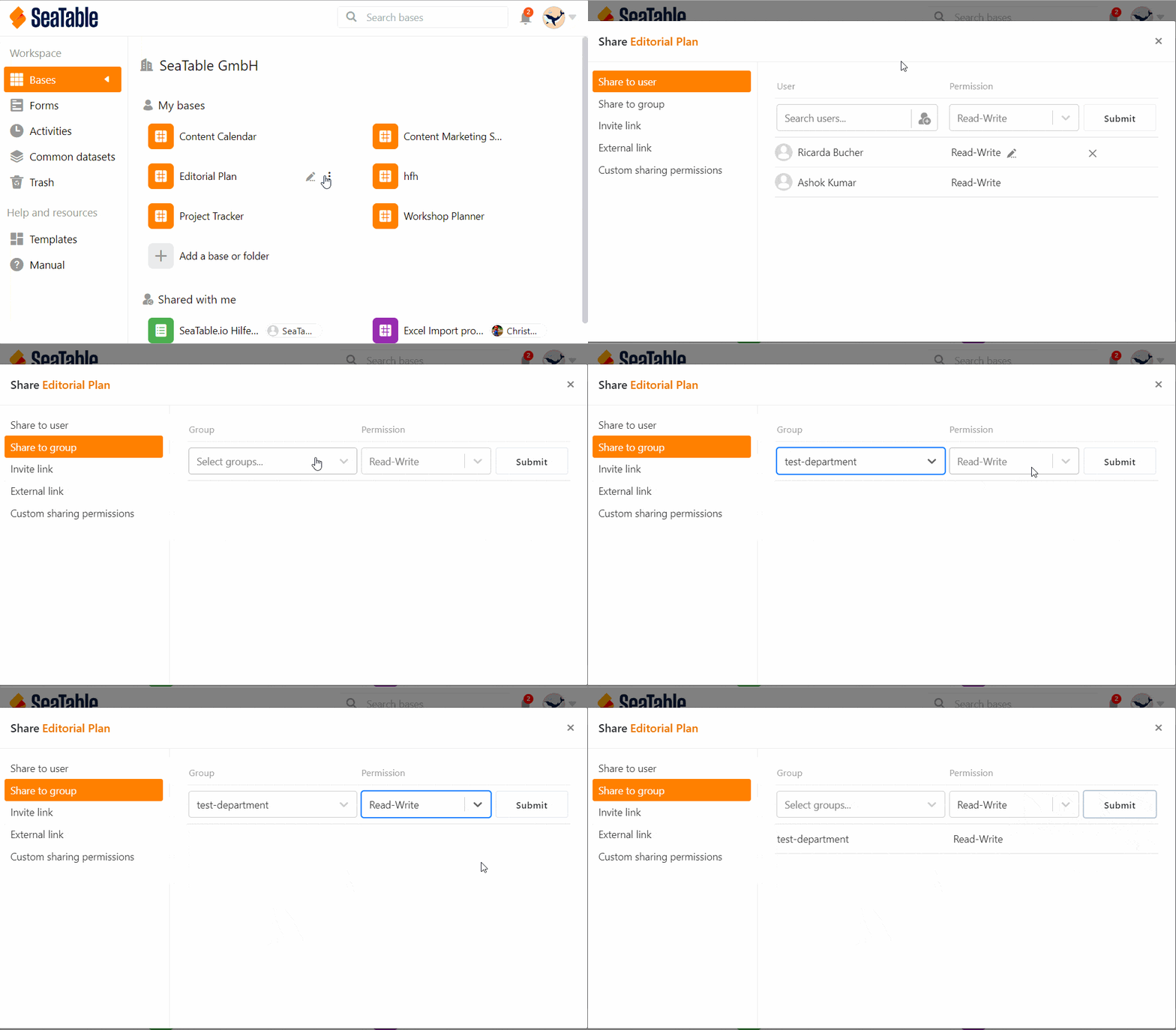
- Go to the home page of SeaTable.
- Move the mouse cursor to the base you want to share and click the three dots that appear on the right.
- Click Share.
- Go to Share with group.
- Select the desired group to which you want to share the base.
- Set whether you want to assign read and write permissions or read-only permissions.
- Click Submit.
Share within a base

If you are currently in a base, you can also create a share without having to switch to the home page. To do this, click the Share icon at the top right of the base options. The window that opens to create a share looks just like the one on the home page. Just follow the above clicking instructions starting from step 4.
Limitations
- You can only share bases with groups you are already a member of.
- Bases that you have created yourself can be shared at any time, while bases that belong to a group can only be shared with other groups by owners and administrators.
- A group that has been shared a base by you has no owner rights and thus cannot change the name of the base, for example.
To learn how to share individual tables and views of a base with a group, see the article Create a custom sharing permission.