Table of Contents
Do you have data that you want to share with a larger number of people or even make publicly available? For these use cases, external links are just the thing!
External links provide read-only access to the data in a base without the need to log in to SeaTable. In addition, external links can be embedded in web pages, making small and large data collections easily available online.
Consequently, external links offer you lots of exciting opportunities. This post explains what they are and how to use them.
Functionality and types of external links
An external link is a URL that you can use to access a data collection in SeaTable with read access. Such a data collection can be a base or a view.
- External link for a base: By calling this external link, the visitor can see all data stored in a base, including all tables. The visitor can also access all existing views and statistics. In addition, they can use the evaluation tools grouping, sorting and filtering.
- External link for a view: Such an external link grants read access to a specific view of a table. Other views and tables in the base as well as hidden rows and columns remain hidden from the users of the external link. Read more about it in the article Creating an external link for a view.
External links are basically public links, i.e. the link can be accessed by anyone, regardless of whether they are logged into SeaTable or not. This is also one of the main differences from the invitation link.
External links are suitable whenever you want to make data in bases accessible to external persons. This could be the results of a survey, a price list, or the timing of an event or product release. A special use of external links is their embedding in web pages, which you can learn more about below.
How to create an external link for a base
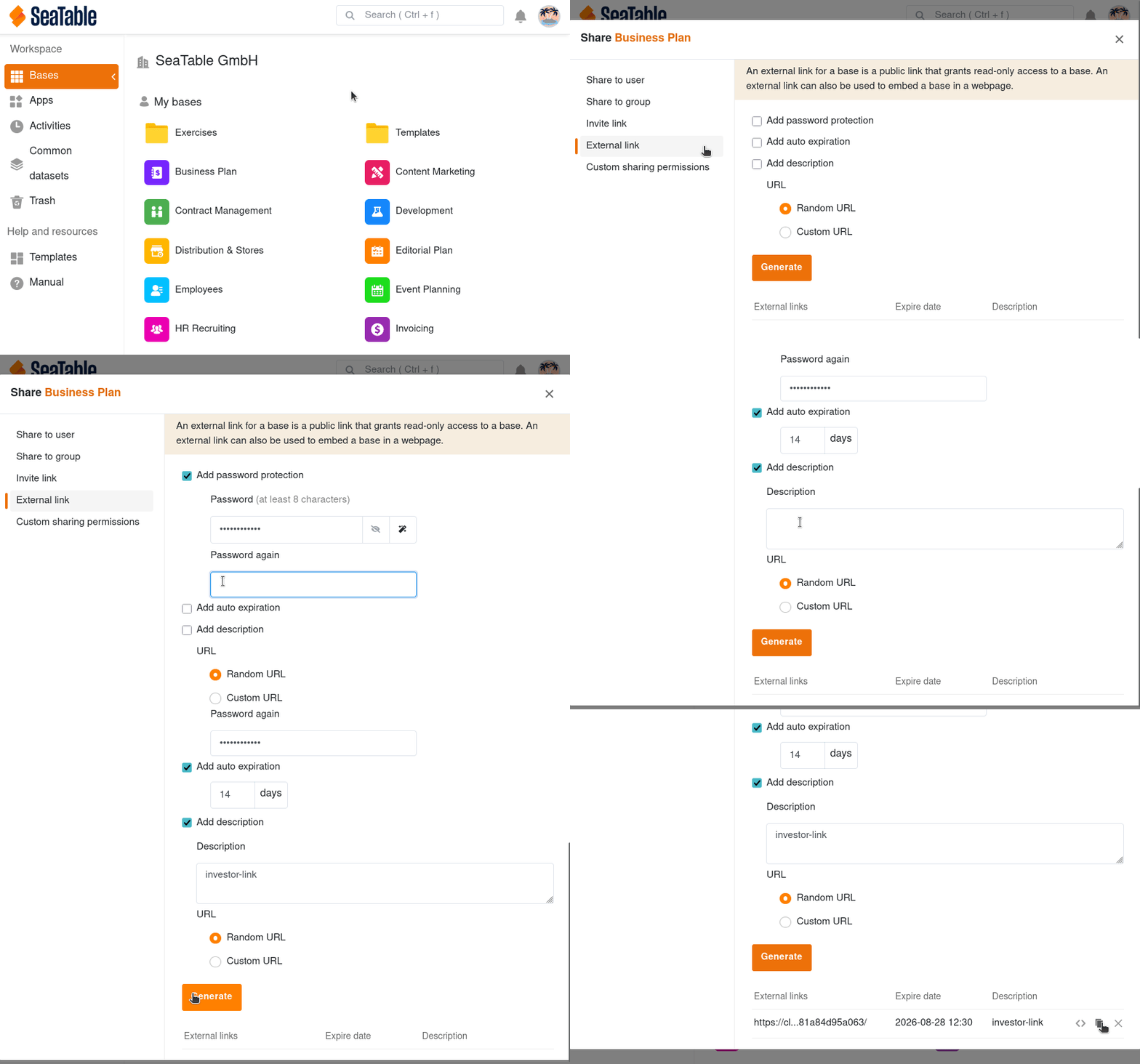
- Go to the home page of SeaTable.
- Move the mouse cursor to the base you want to share and click the three dots that appear on the right.
- Select the Share option.
- Click External Link.
- Decide whether you want to add password protection, an expiration date and a description by activating the corresponding check boxes.
- Select whether you want to generate a random URL or specify a custom URL.
- Click Create.
Now you can copy the link and share it with as many people as you like.
Embedding an external link in a web page
External links are great for publishing a certain number of records on a website. The visitors of the website see the content that has been shared, but they are not able to modify the content.
With a simple embed tag, you can integrate a base or view into a web page using an external link. For example, the SeaTable templates are embedded in our website using external links.