Municipal Daycare Navigator: Manage Spot Allocation Digitally
Decentralized registration leads to confusing multiple applications and duplicate placements. Childcare capacity goes unused, demand planning rests on inaccurate occupancy figures, and daycare directors and parents face more work than necessary. Our free municipal daycare navigator template brings structure to the allocation of childcare spots. Whether you are a youth welfare office, an independent provider, or a municipality: with SeaTable’s daycare finder, you manage parent inquiries, demand planning, and spot assignments transparently and in line with the GDPR, all in a flexible no-code database.
Central Daycare Portal
Municipal Demand Planning and Spot Allocation Without the Paperwork
-
Transparent Daycare Portal
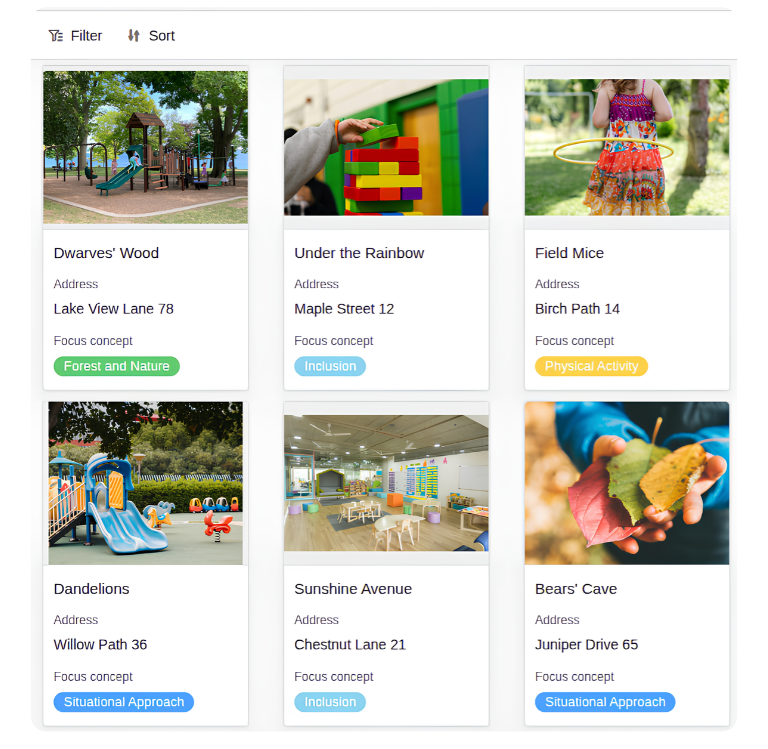
Facilities, profiles, and open childcare spots in your municipality are gathered in one place, across all providers. Parents find suitable daycare centers without any detours, and your administration receives fewer routine inquiries.
-
GDPR-Compliant AI Use
Use SeaTable’s integrated AI functions for summaries or classifications, for example of incoming inquiries. Thanks to SeaTable’s own AI server, you stay GDPR-compliant, even when you process sensitive data from parents and children.
-
Documents at One Click
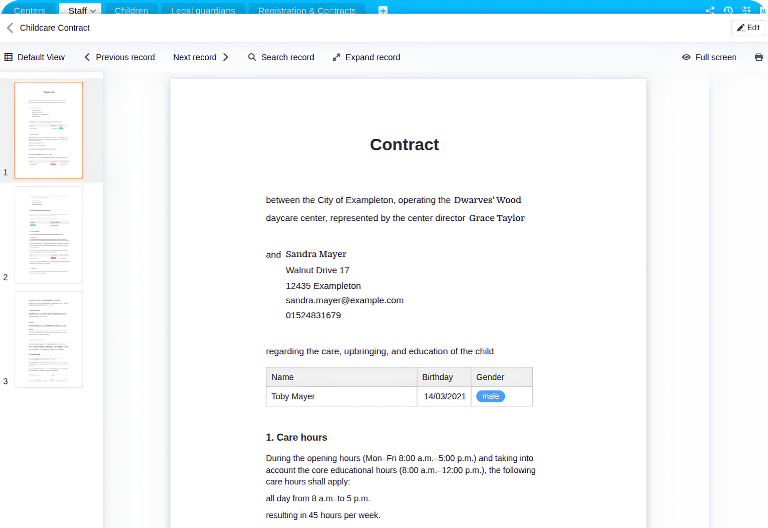
Create childcare contracts or fee invoices directly in the daycare navigator and send the documents straight by email with the click of a button. The data comes from your tables, so it no longer needs to be retyped for each document.
-
Flexibly Customizable
Adapt tables, fields, and views to your municipality’s specific requirements, without any programming. Your daycare database grows with your needs and can be extended step by step whenever new providers or processes are added to it.
-
Capacity Visible at Once
Parents and youth welfare offices see at a glance which daycare centers are fully booked and where spots are still open. This gives you a reliable basis for municipal demand planning and makes it much easier to keep it up to date.
-
Records Stored Centrally
Vaccination records and other documents are stored once with the parent and child master data and are then available to authorized persons. This way, nobody needs to request or search for the same document more than once in the future.
Who uses SeaTable?
Leading companies worldwide rely on SeaTable

















100.000+
Docker Hub downloads in the first year
1.500+
Daily users on SeaTable Cloud
4.6
Rating on Capterra
Your Benefits at a Glance
Your Municipal Daycare Navigator in SeaTable
With the AI no-code platform, you get a modern solution for digital daycare management and a municipal daycare database. Instead of maintaining information in separate systems and spreadsheets, you link facilities, staff, registrations, and master data in one central daycare database. Integrate independent providers, municipal facilities, youth welfare offices, finance departments, and resident registration offices. This lets you manage capacity centrally and avoid double placements, with everyone working from the same current figures.
Always up to date: Every change to a daycare center’s master data or occupancy rate is instantly visible in the system, so data reconciliation is no longer necessary.
Real-time collaboration between daycare centers and agencies: Youth welfare offices, independent providers, and municipal daycare centers work in the same data at the same time.
Integrated automations: Use built-in automations to streamline your processes, reduce manual effort, and free up more time for the tasks that matter in daycare administration.
Granular access control: Use access permissions to define exactly who can view or change which data in the daycare navigator, from entire tables down to individual rows.
On-premises: For even more control over your data, SeaTable Server gives you an on-premises solution that you can operate entirely within your own IT infrastructure.
Daycare Navigator Overview
From Registration to Contract Delivery, Made Simple
All Daycare Centers in One Central Daycare Database
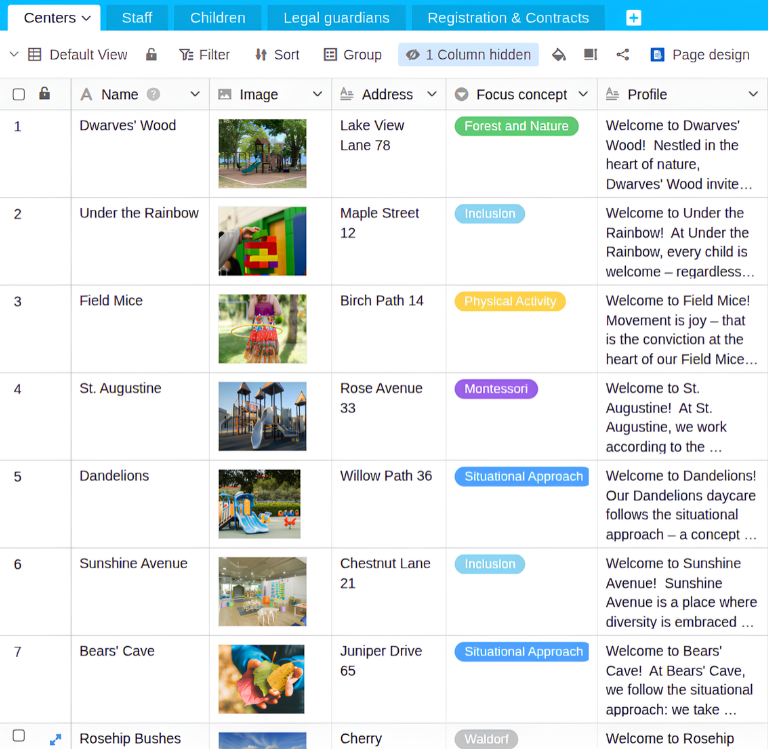
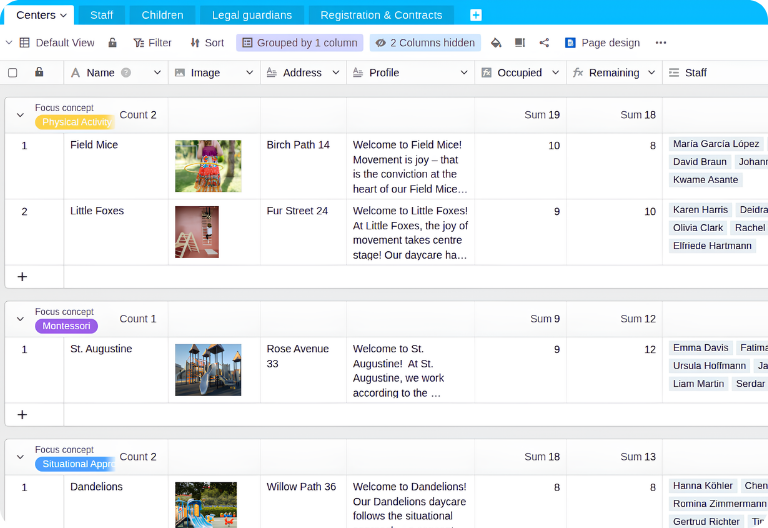
In the “Centers” table, you store the master data of all daycare centers in your municipality, including capacity, occupancy, image, and concept. This data feeds the gallery view in the app. A formula calculates the remaining spots, so you can see the occupancy rate of every facility in real time. Group the table, for example by focus concept, to compare facilities at a glance.
Parent-Child Links and Contact Details
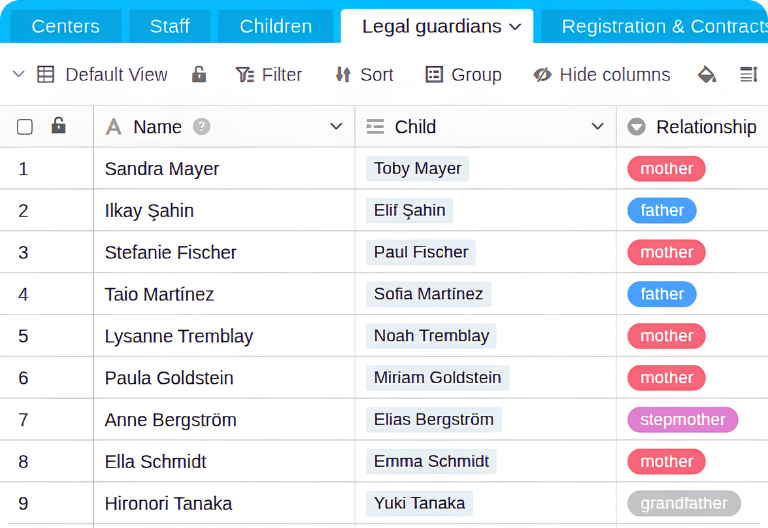
The two linked tables “Children” and “Legal guardians” form your digital family records. Here you store personal and contact details, emergency contacts, vaccination records, allergies, and pickup authorizations. The “Children” table is also linked to the “Centers” table, so filters and groupings let you create group lists for each facility with ease.
All Staff Master Data at a Glance
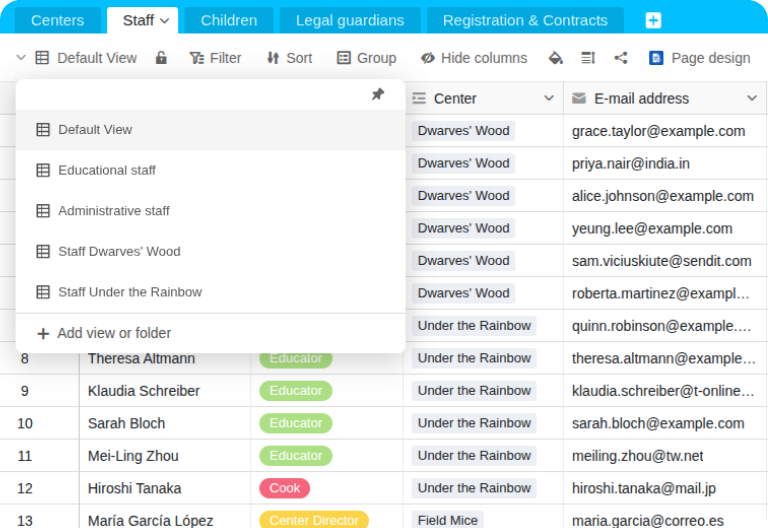
In the “Staff” table, you store all staff master data in the daycare database. Upload important records such as criminal background checks, ID documents, and proof of measles protection to file columns. Separate views, for example for educational or administrative staff, keep staff planning clear. If needed, you can easily integrate a shift schedule into your daycare navigator.
Manage Childcare Spots with the Daycare Navigator
Registrations from your municipal daycare finder flow into the “Registration & Contracts” table. If you wish, you can also set up automatic notifications to the daycare director. Details such as care hours and lunch feed directly into the automatic calculation of parent fees. Once a spot has been assigned, you create contracts and invoices at the click of a button or automatically.
Your Municipal Daycare Finder, No Coding Required
With SeaTable’s integrated App Builder, you use drag-and-drop to create a municipal daycare portal as the first point of contact for parents. This takes pressure off your administration and the daycare centers. Parents can get all the information they need in one place through the gallery and the profiles of each daycare center, then register their children directly with their preferred facilities using a form. All information is stored centrally and is immediately available to daycare centers and youth welfare offices. Daycare directors can also create their own apps for internal purposes or for working with parents.
Create transparency and reduce workload with SeaTable’s daycare navigator
Smart, GDPR-Compliant AI Use
Daycare Navigator with Integrated AI
With SeaTable, municipalities and providers use GDPR-compliant, AI-powered automations. For example, you can automatically read out applications and supporting documents, categorize inquiries, or summarize long letters. The results are written directly into the appropriate columns of your daycare database. This allows you to manage registrations with less manual effort.
Create Short Profiles
With Summarize, you create concise About Us texts about your daycare center for the daycare finder. The AI condenses your concept, educational focus, and team information into a memorable text for the daycare profile, so you no longer have to write it by hand.
Extract Key Information
With the AI function Extract, you pull relevant information such as name, date of birth, or desired start date from documents and enter it into the matching columns of the registration. Data no longer has to be transferred manually, which also helps reduce errors.
OCR for Legacy Files
With OCR, you read text from photos or screenshots of old contracts and documents and automatically write it into the appropriate columns. This digitizes paper records and keeps important information retrievable at any time, directly in your central daycare database.
Classify Incoming Inquiries
Use Classify to automatically assign incoming inquiries to categories such as registration, special needs support, transfer request, or complaint. Your team sees immediately what is urgent, can respond in the right order, and saves valuable time every single day.
One-Click Reply Letters
Use Custom Prompts to pre-draft acceptance letters, rejection letters, or replies to parents, or to check registration data for completeness. This creates lean, digital processes, reduces manual effort, and leaves your team with more time for parents and children.
Read Vaccination Records
Using OCR and Extract, you read the vaccination record date from scans or photos and automatically enter it for the child. Instead of time-consuming searches through paper files, you get searchable records directly in your daycare database, ready whenever needed.
Data Security for Authorities
Municipal Daycare Navigator: Compliant, Transparent, and Flexible
With SeaTable, you use a modern AI no-code solution with an App Builder and integrated AI-powered automations. SeaTable offers everything municipalities and independent providers need for a digital daycare navigator and connected daycare administration. The focus is on centralized data storage, the highest level of data protection, and traceable documentation of registrations, spot allocations, and contracts.
Full Transparency of Changes
New entries and changes receive a timestamp and can be traced through the integrated logs. This keeps registrations, spot allocations, and contracts fully documented and easy to follow, including at a later point in time.
Central Data in One Database
Facilities, children, authorized pickup persons, and registrations are linked in one collaborative database. All departments and providers involved work from the same data instead of keeping separate lists and spreadsheets.
GDPR-Compliant Data Hosting
The SeaTable infrastructure runs exclusively on certified servers operated by European service providers in Germany. No data is transferred abroad, so sensitive data on children and parents remains protected in line with the GDPR.
Secure Login with 2FA and SSO
SeaTable supports two-factor authentication and single sign-on. You also control exactly who can access which data, with fine-grained permissions that can be set for individual tables, columns, and even rows.
FAQ: SeaTable’s Daycare Navigator for Municipalities
-
What can municipalities do with SeaTable's daycare navigator?
-
Our template is an all-in-one solution for digital municipal daycare administration. Municipalities, youth welfare offices, and providers centrally manage facilities, childcare spots, registrations, and contracts. Daycare centers maintain their master data in the same database, which also powers a municipal portal.
-
Can several departments and daycare centers work in the template together?
-
Yes, no problem. In SeaTable, daycare administrations, youth welfare offices, and finance departments collaborate in one shared database. Everyone works with the same data in real time, and access permissions determine who can see or change what.
-
Can the daycare navigator prevent double placements and duplicate registrations?
-
Yes, absolutely. Every registration is linked to a child, a legal guardian, and a facility. A formula shows you the remaining spots at each facility in real time. Multiple registrations can easily be avoided with filters and duplicate checks.
-
Can I adapt the template to my municipality's requirements?
-
Yes, every SeaTable template is fully customizable. Add columns, tables, or views and adjust existing tables to your requirements. Add formulas and automations as needed, for example for priority levels, registration deadlines, or parent fee brackets, to build your tailor-made daycare navigator.
-
Can sensitive data be hidden so that each daycare center sees only its own data?
-
Yes, of course. With role-based access rights and granular permissions, administrators define exactly who may view or edit which information. You can also set permissions for individual tables, columns, and even rows.
-
Can parent fee invoices and childcare contracts be created in the template?
-
Yes. Simply create document templates in the Page Designer plugin and generate ready-to-send PDFs with one click. Details such as care hours and lunch are already part of the registration data, so they can flow directly into your contracts and fee invoices.
-
Is the daycare database GDPR-compliant for sensitive child and parent data?
-
Yes. SeaTable Cloud runs on certified servers of the Swiss service provider Exoscale in Germany. No data is transferred abroad. For even more control, role-based permissions limit access to sensitive data, and SeaTable Server is available as an on-premises option.
-
Can SeaTable also be self-hosted as a daycare navigator and management tool?
-
Yes, absolutely. For public administrations, our SeaTable Server and SeaTable Dedicated solutions are ideal, as they allow you to host SeaTable in your own infrastructure and keep control of your data.