SeaTable – Your Shift Schedule Template for Managers and Planners
With SeaTable’s online shift scheduler, you bring structure to your staff planning: build your shift schedule online by clearly assigning early, late and night shifts while keeping employee availability, leave and time tracking in one central view. Instead of messy paper plans or rigid Excel lists, you use a flexible, collaborative system for your duty roster, shift model and absence management. Managers, HR and team leads instantly see where staff shortages arise, which shifts are already covered and where a shift swap is needed – start now with the SeaTable shift schedule template and create your digital shift plan!
Digital staff scheduling
Shift Schedule Template for Your Staff Planning
-
Plan shifts precisely
Build your shift schedule online for early, late and night shifts in one central template. Organize duty rosters transparently, avoid gaps in coverage and keep working hours and weekly totals reliably in view at all times, even as demand shifts.
-
See availability centrally
Employees, work areas and availability are managed centrally. When building the shift plan, you factor in availability, the leave planner and absence management, cutting back-and-forth queries with every new shift assignment you make across teams.
-
Weekly hours, automated
The template calculates working hours and planned totals automatically as soon as you assign shifts and build the schedule. You spot over- or under-staffing early, review shift models faster and keep optimizing your rosters continuously over time.
-
Control access precisely
Define exactly who may edit, approve or view their own shift schedule online. Managers, team leads and staff collaborate in a secure environment, without exposing sensitive personnel data to everyone across your organization at any time.
-
Adaptable to any model
Adapt the shift schedule template flexibly to your company size, areas and working-time models. Whether hospitality, retail, medical practice, trades or production, you build a digital shift plan that truly fits your team and its day-to-day.
-
Spot gaps immediately
Use calendar and timeline views to spot shift swaps, absences and staff shortages early. You manage shift schedules online far more clearly, react faster to changes and keep your business reliably staffed and covered every single day.
Who uses SeaTable?
Leading companies worldwide rely on SeaTable

















100,000+
Downloads in year one on Docker Hub
1,500+
Daily users on SeaTable Cloud
4.6
Rating on Capterra
Your benefits at a glance
Use the shift schedule template online
With the flexible AI no-code platform SeaTable, you build a shift schedule that adapts to your shift model, your company size and your staff planning. Create your shift schedule online, coordinate duty rosters, employee availability, absence management and time tracking in one system. Whether you run a small café, a retail store or multi-shift production, everything stays in one place and updates in real time for the whole team. Use it as a modern alternative to paper plans, Excel or rigid HR tools – also as a flexible alternative to Personio.
Always up to date: Your shift schedule online is maintained in real time. Changes to shift swaps, absences, leave or sick notes appear instantly, so everyone works from the same current plan and never on outdated data.
Access anywhere: Work online with our shift scheduler – in the office, in the store or on the go. Team leads and staff can view the current shift schedule online and submit their own shift preferences when needed.
Better overview: Calendars, grouped views and color coding show at a glance who works when, which shifts are open and where a staff shortage looms – making it far easier to build a balanced, fair shift plan.
Flexibly scalable: From a small café to multi-shift production, the template adapts to your company size. Start simple, build a basic shift plan first and expand your online scheduler with more processes over time.
Automated & integrated: Connect shift planning with notifications, approvals and digital workflows, so your duty roster fits seamlessly into your HR processes and other templates.
A practical team example
How the shift schedule template works
Shift schedule table with automatic links
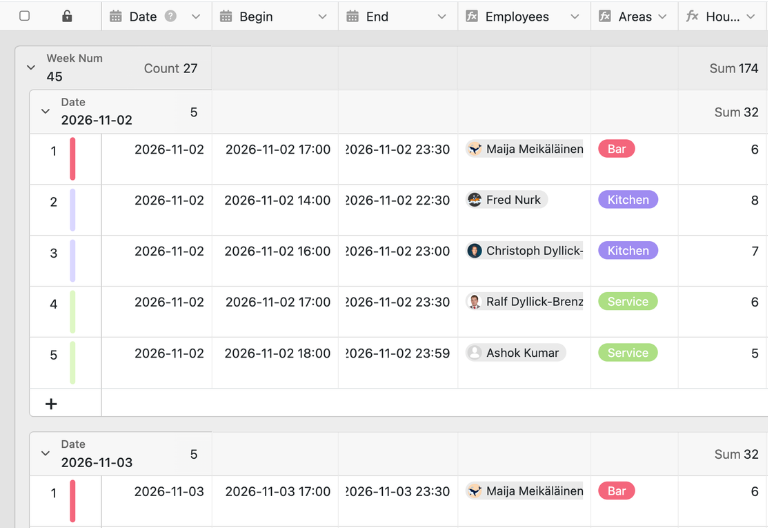
In the first table, you plan your daily duty roster with working hours, employees and work area. You enter the shift times in the matching columns and select the staff number in the “No.” column. This number is linked to the “Employees” table, so lookup and formula columns such as employees, areas, hours and calendar week fill in automatically. This is how you build the shift schedule, manage it online in a structured way and adapt it to new requirements at any time.
Calendar and employee table working together
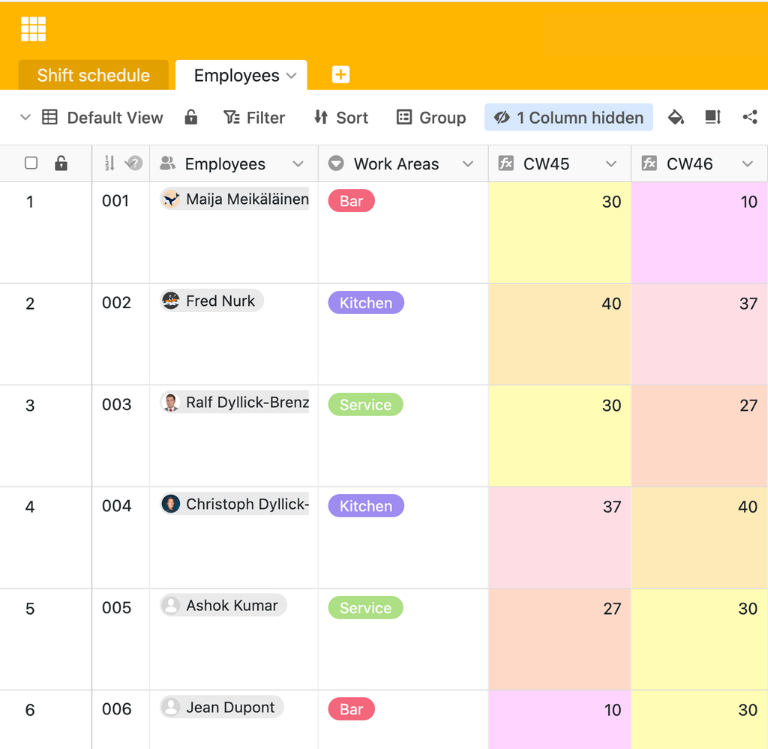
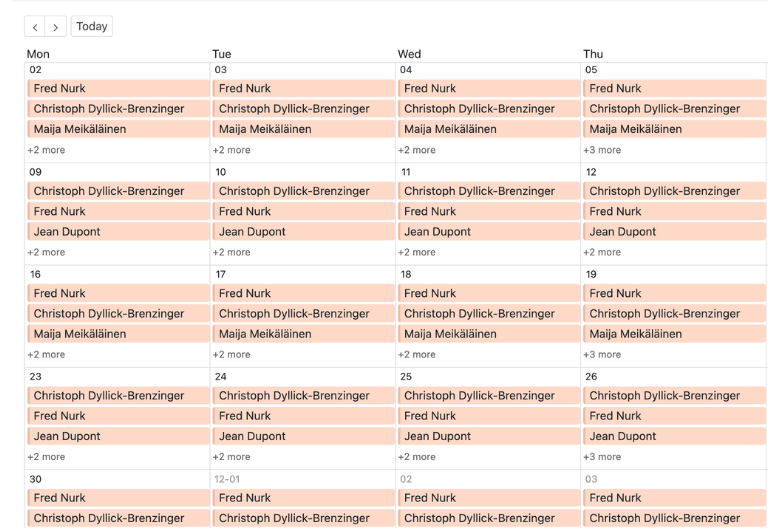
The calendar view shows the shift schedule chronologically and makes it immediately clear who is assigned when, where overlaps occur or which shifts are still open. The second table also lists every employee with work areas and further details such as part-time, full-time or individual agreements. For each calendar week you can check planned hours and see at once whether someone is scheduled for too many or too few – a solid basis for balancing rosters and optimizing them continuously.
Your custom shift scheduler app
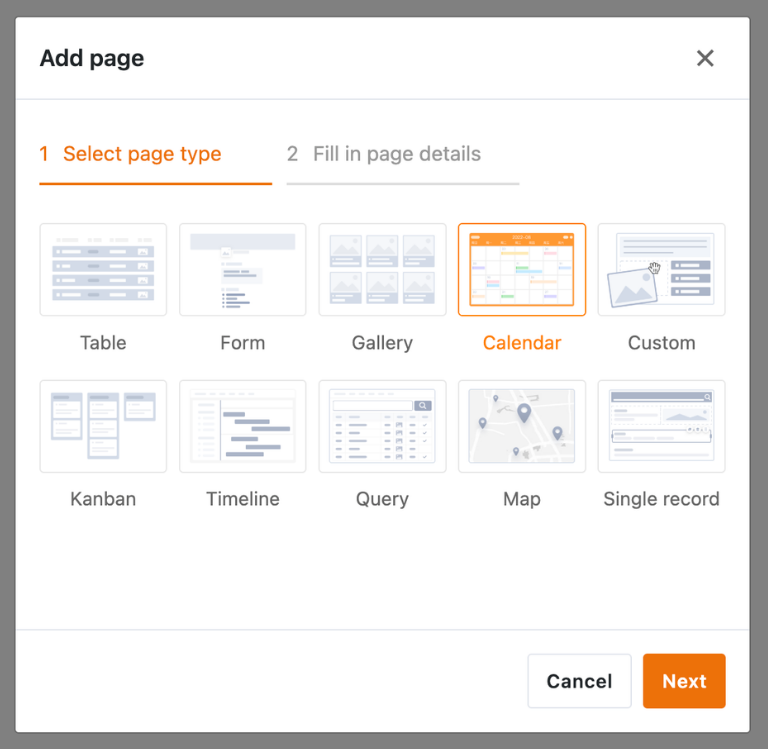
With the built-in App Builder, you turn the shift schedule template into a custom shift scheduler app for managers, staff planners, HR and teams. Combine staff scheduling with personalized views, so employees only see their own shift schedule online, while team leads manage complete duty rosters, availability and absences. Add further fields for time tracking, the leave planner, on-call duty or flexible shift models where needed, and use permissions to control exactly who may plan, approve or trace changes – turning the template into a tailored online shift scheduler with which you create and share digital shift plans with ease.
Plan shifts, availability and working hours transparently – with SeaTable
Smart automation for rosters
AI-powered shift planning
With SeaTable, you use powerful AI features that automate your shift schedule template, staff planning and team coordination. Your online shift scheduler becomes an intelligent system for duty rosters, time tracking, absence management and transparent coverage planning. You automate repetitive steps, cut manual work and give managers reliable, up-to-date insights every day.
Assign shifts intelligently
With Classify, entries in your online shift scheduler are sorted automatically by shift model, area, location or assignment type. As you build the schedule, it becomes clearer which early, late or night shift belongs to which team and staffing need across your organization.
Read requests in structure
With Extract, you pull information from leave requests, availability or sick notes automatically and transfer it into your shift schedule template. This makes absence management and staff planning more consistent, noticeably faster and far less prone to manual data-entry errors.
Capture Images Using OCR
With OCR, you can digitize items such as photos of posted notices or documents and transfer relevant content into your online shift scheduler. This helps you reduce media discontinuities, keep schedules up to date, and document changes in a traceable manner all in one place.
Summarize plans at a glance
With Summarize, the AI creates short overviews of open shifts, unusual weekly hours, absences or bottlenecks. Managers and HR get a clear, readable summary in seconds, without reviewing every single duty roster manually line by line before making a staffing decision.
Automate rules via prompt
With Custom Prompt, you define your own AI rules for your shift schedule online – for rest periods, preferred work areas, fair distribution or automatic alerts when a shift is understaffed. Your planning adapts flexibly to your own operational requirements and rules.
Assess coverage instantly
With AI-powered status checks, you instantly see whether shifts are fully covered, where staff shortages loom and which teams look over-planned. This turns your online shift scheduler into a sound basis for fast, confident staffing decisions in your daily operations.
Transparency for your team
A transparent, secure shift schedule template
SeaTable is a modern AI no-code database solution with automations and an App Builder, and it offers every function you need for a professional, digital shift schedule template. The focus is on overview, collaboration and flexible adaptation – from a simple duty roster through employee availability and the leave planner to built-in time tracking, as a scalable alternative to paper lists or shift planning in Excel.
A flexible Excel alternative
Organize your shift schedule online far more flexibly than in Excel – with linked tables, calendar views, personalized filters and automations for managers, HR and teams, all kept in sync in one shared workspace.
Connect planning and time tracking
Link your shift schedule, time tracking and other HR templates in one shared structure, and manage your duty roster, absences and hours centrally instead of chasing updates across scattered spreadsheets and files.
GDPR-compliant EU hosting
When you use SeaTable Cloud or the built-in AI, personal data stays in Europe – the infrastructure runs exclusively on servers located in Germany, giving your shift planning and your whole team a compliant, dependable data foundation.
Secure access with 2FA and SSO
SeaTable supports two-factor authentication and single sign-on, so you control exactly who can access your data and keep your entire staff planning protected at every level of your growing organization and its teams.
FAQs about the SeaTable shift schedule template
-
Why is a digital shift scheduler so important?
-
An online shift scheduler creates transparency in staff planning, because all shifts, availability, leave and changes are visible centrally. You avoid communication gaps, react faster to absences, and can build, update and share the shift schedule with your team without media breaks.
-
How is a classic shift schedule template structured?
-
A classic shift schedule template usually contains shifts, employees, work areas and time slots. The SeaTable template extends this structure with linked data, calendar views, weekly hours and flexible views, so you can build, check and evaluate shift schedules online more easily.
-
Can I use the template for irregular hours and part-timers?
-
Yes, the shift schedule template also suits flexible working-time models, part-timers and changing hours. You can integrate individual agreements, areas, weekly hours and availability into the planning and build your duty roster so that it fits each of your teams.
-
Is SeaTable free to use for small teams and start-ups?
-
Yes, you can use the template free of charge in SeaTable Cloud. You only need a free account and can start right away to manage shift schedules online, assign employees and organize your staff planning digitally in one place.
-
How does the template help me meet rest periods and working-time rules?
-
The shift schedule template helps you plan working hours in a structured way and check weekly hours transparently. Combined with clear rules, views and optional automations, you spot faster where assignments must change to meet rest periods and build compliant shift schedules.
-
Can I show employees only their own shift schedule online?
-
Yes, with personalized views and permissions, employees see online only the shifts relevant to them. Team leads and HR still keep full access to the complete duty roster and the entire staff planning at all times.
-
Is the template suitable for different industries and company sizes?
-
Yes, the online shift scheduler is flexibly adaptable and suits small teams as well as growing businesses. Whether retail, hospitality, trades, medical practice or production, you can tailor the shift model and structure to your requirements as you build the schedule.
-
Can I extend the shift schedule template?
-
Yes, thanks to no-code you can add extra columns, views, automations or linked tables without any programming. Step by step, you develop the template into a digital shift scheduler that fits your processes exactly and supports even complex shift schedules.