Table of Contents
Available with Enterprise
You can only create new rows in normal SeaTable views. You can then move the rows of the view manually or automatically to the big data storage.
Move rows manually to the big data storage
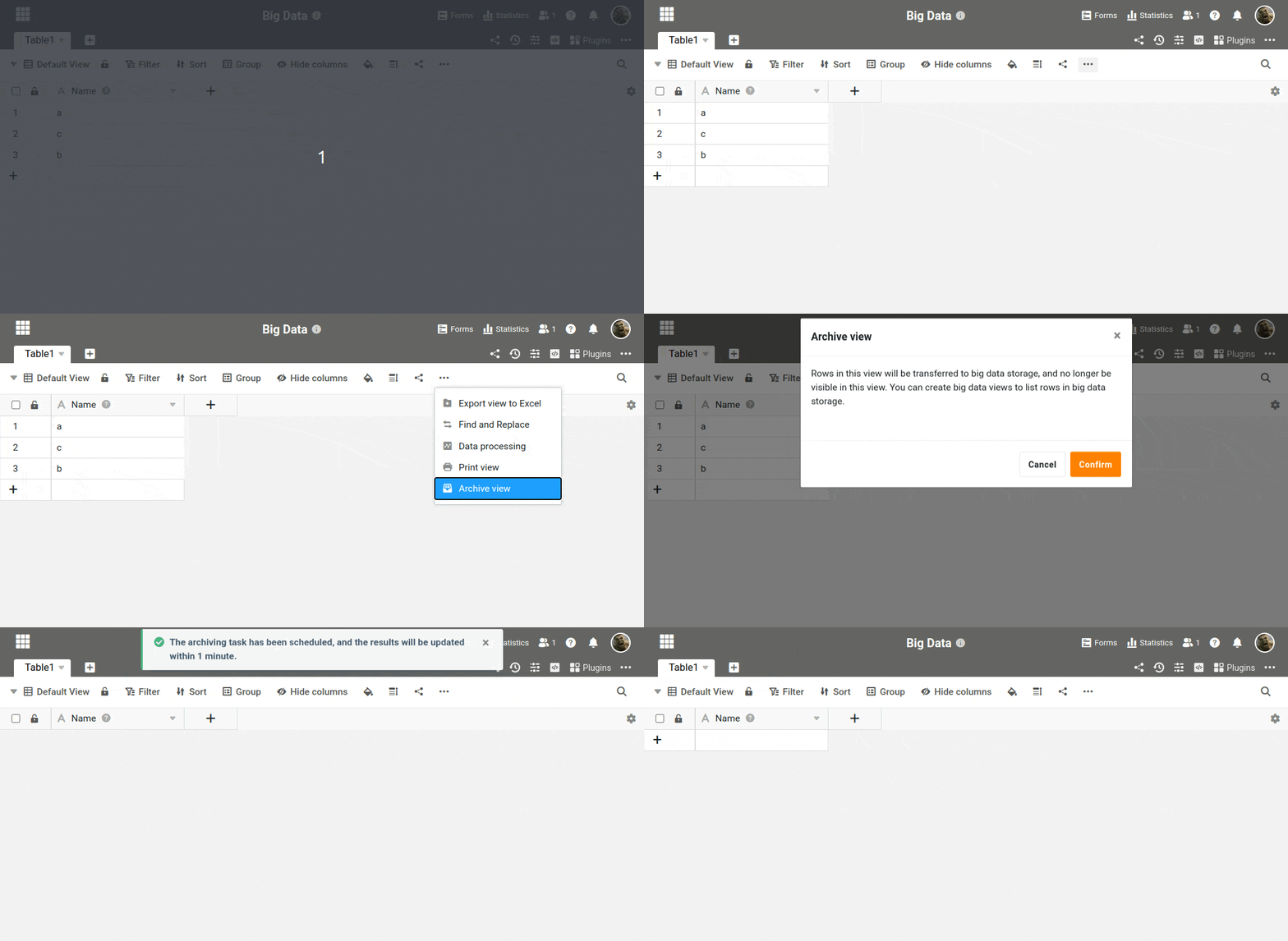
- Click the three dots in the view options.
- Select the Archive View option.
- Confirm the move of all visible rows to the big data storage.
The rows are then transferred to the big data storage. As a result, they are no longer visible in the normal view. Create a big data view to display data in the big data storage.
Automated archiving
You can also create an automation rule with the action “Archive” so that SeaTable automatically moves the rows in a view to the big data storage at a certain time.
You can find out more about this under Automation actions.
How can you tell whether data is stored in big data storage or not?
Rows that are archived in the Big Data storage have a small gray triangle in the numbering column.
Good to know:
- In a normal view, you will not see rows from the big data storage.
- All rows can be displayed in a big data view, regardless of where they are currently stored.
Retrieve records from the big data storage
You can find out how to retrieve records from the big data storage in this article.