SeaTable – Your professional quote writing template
No more tediously formatted Word or Excel quotes. With SeaTable’s quote template, you can create professional quotes, automate calculations, and send PDFs directly by email—customizable, scalable, and GDPR-compliant. The quote template adapts to your processes—from sole traders to teams in B2B sales.
Write an offer online
Writing quotations Template for structured quotation processes
-
Standardized
The template ensures consistent offers. All mandatory information, prices, discounts, and VAT are maintained centrally and automatically transferred.
-
Automated
Link customer and product data, use formulas for discounts and net/gross amounts, and create quotes with a single click.
-
Statistics
Analyze your offers with statistical views—for example, closing rates, offer totals by employee, or sales potential by industry.
-
Audit-proof
All offers are stored centrally—with history, comments, and permissions. This allows you to keep track of versions, approvals, and statuses at all times and avoid outdated offers.
-
Multilingual
Create your quotation templates in multiple languages or for different countries and automatically use the appropriate quotation version depending on the customer’s country.
-
Follow-up reminder
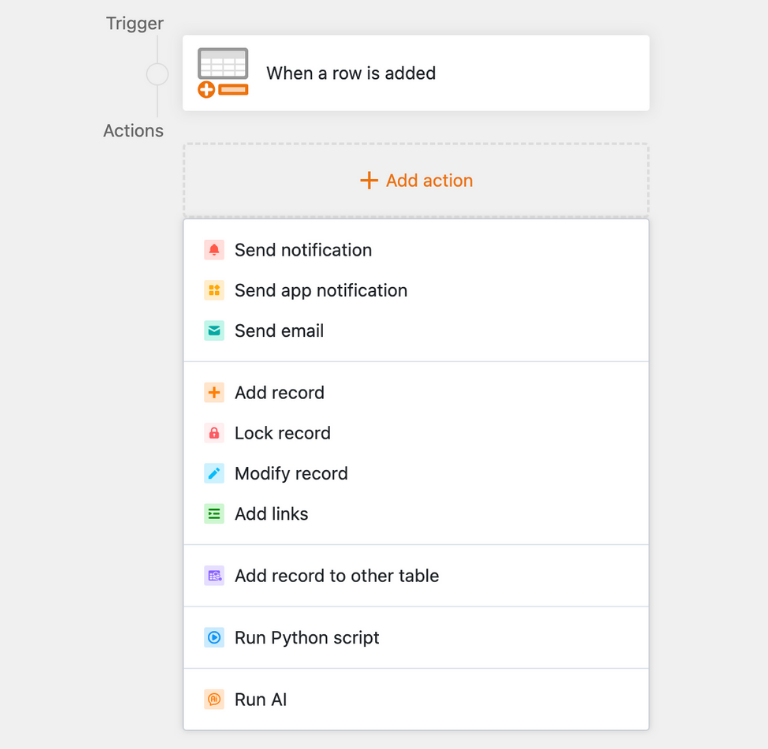
Set reminders and workflows for follow-ups to never miss a deal. For example, trigger automatic notifications when offers are about to expire, no response has been received yet, or a follow-up call is due.
Who uses SeaTable?
Leading companies worldwide rely on SeaTable

















100.000+
Downloads in the first year of Docker Hub
1.500+
Daily users on SeaTable Cloud
4.6
Review on Capterra
Your advantages at a glance
Quote template from SeaTable
The AI no-code solution SeaTable impresses with its flexibility and adaptability. With our quote writing template, you can digitize your quotation process and map even complex sales workflows from initial contact to order confirmation.
Get to the quote faster: Use predefined quote templates, linked product and customer data, and automatic calculations for discounts and taxes—so you can write quotes in minutes instead of hours.
Everything in one place: The quote template bundles all relevant information in one place so that sales, management, and back office always work with the same, up-to-date data.
Legally compliant documentation: Store your terms and conditions, payment terms, and validity periods directly in your quote template and ensure consistent content in every quote—even special requirements such as small business regulations can be included.
Scalable: The proposal templates grow with your sales team—from sole proprietors to larger sales organizations with multiple pipelines, regions, and languages.
Automated & integrated: Connect your quote template to CRM, email marketing, or accounting via n8n or Zapier and avoid duplicate data entry.
Create and track quotes
How the quote writing template works
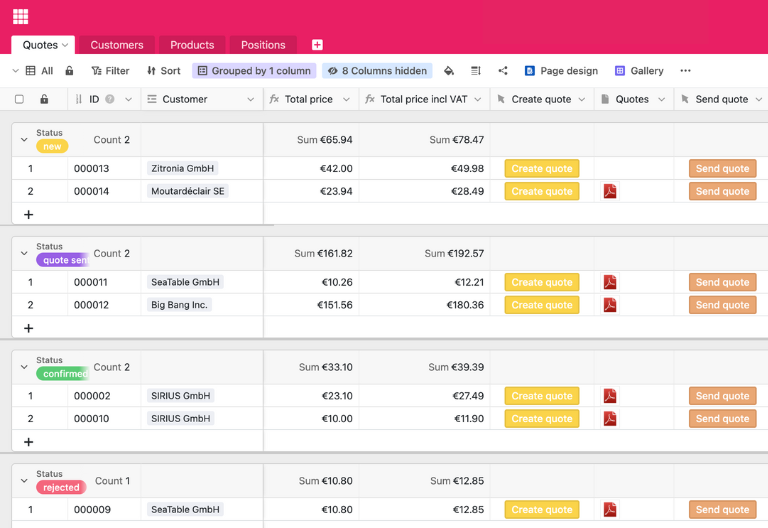
Record all offer data
Customer, responsible sales representative, items, discounts, validity date, and status. Serial number, creation time, and expiration date are set automatically, while discounts and net and gross prices are calculated using formulas.
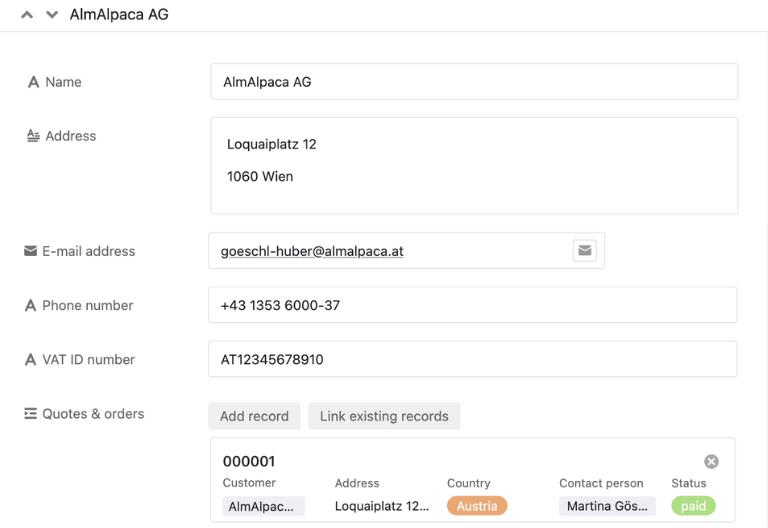
Link customer data
Save company data such as name, address, contact person, email, phone number, country, and VAT ID. This information is automatically transferred to the respective quote via links and lookup columns.
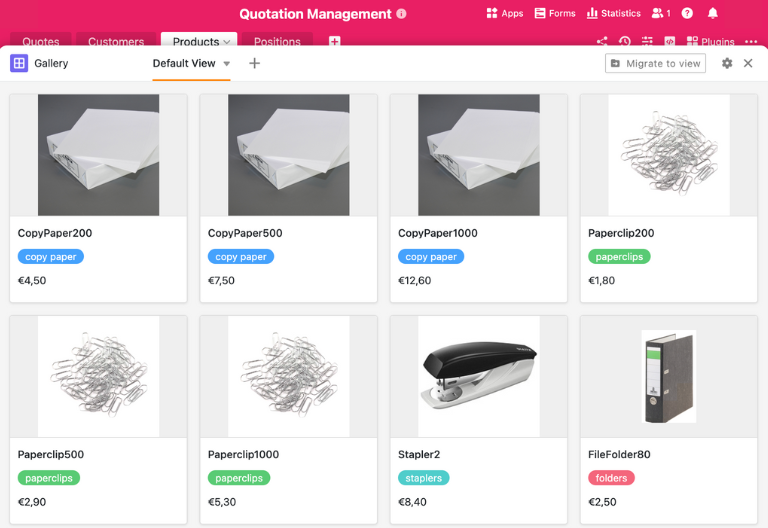
Maintain product catalog
Your product and service portfolio, including descriptions, categories, and prices, all in one place. The gross price including VAT is calculated from the net price using a formula, and rollup formulas add up the items in the offer.
From quotation to order confirmation
You can generate an order confirmation directly from confirmed quotes and thus map the next step in the sales process—ideal in combination with the order confirmation template by SeaTable.
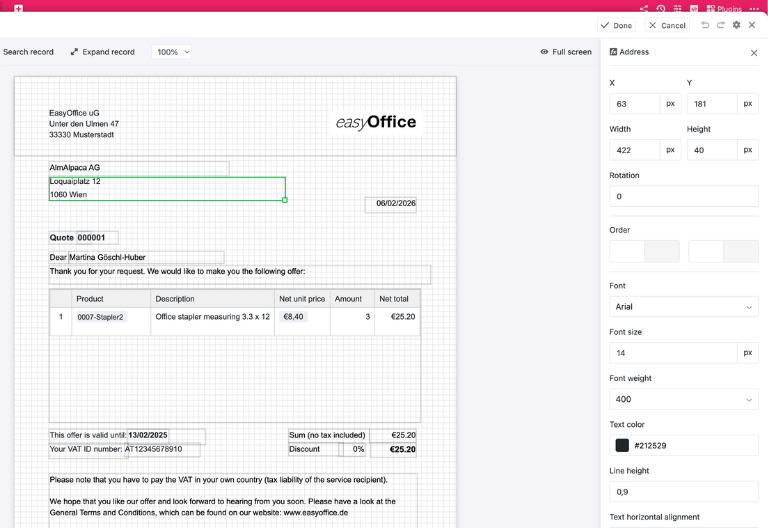
Your personalized quote app
With the integrated no-code app builder, you can transform the quote writing template into a customized quote app. Create web forms for new quote requests, guided interfaces for sales, and Kanban views for quote statuses such as “new,” “sent,” “negotiating,” or “won,” and share focused views with internal and external stakeholders. This turns the quote writing template into the central hub of your sales department.
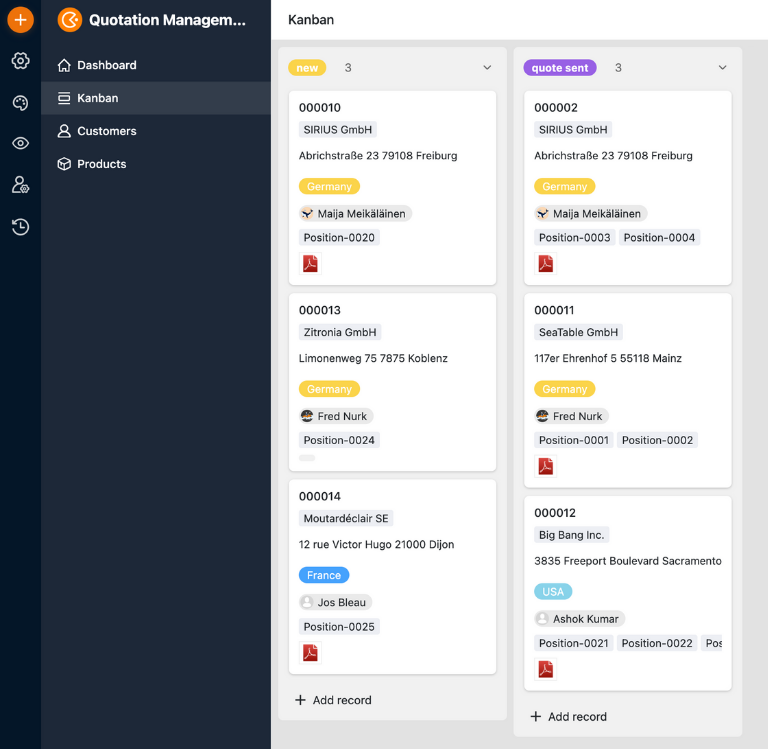
Write professional quotes in minutes – with SeaTable
Smart automation
AI-supported quotation creation with SeaTable
With SeaTable, you benefit from powerful AI features , that speed up your quote creation and management. Automate recurring tasks, reduce errors, and free up more time for sales calls—whether you use a quote template for small businesses or professional quote templates for complex B2B deals. The quote writing template can be combined with AI workflows to automatically generate qualified quotes from inquiries.
Automatic text modules with Classify
Have requests for quotes classified automatically. The AI function “Classify” recognizes product categories, industries, or regions and adds appropriate text modules and responsibilities.
Extract information from queries with Extract
The Extract function reads unstructured inquiries, emails, or PDFs and transfers relevant data such as budget, desired services, terms, or quantities directly into your quote template.
Summarize offers with Summarize
Summarize automatically creates short summaries of longer proposal documents or email threads so that management and sales can quickly see what the proposal is about.
Individual AI prompts with Custom Prompt
Define your own AI instructions, for example for alternative offer variants, upselling suggestions, or personalized introductory texts for different customer segments.
Automated quote checks & approvals
Automatically generate initial draft contracts with the most important terms and conditions from approved offers. This saves you manual copy-and-paste work, reduces transcription errors, and significantly speeds up your entire contract process.
Derive draft contracts from offers
Automatically generate initial draft contracts with the most important terms and conditions from approved offers. This saves you manual copy-and-paste work, avoids errors, and significantly speeds up your contract process.
Security and transparency
Quotation template for small businesses and medium-sized companies
SeaTable is a modern AI no-code database solution with automation and app builder, offering all the features you need for a digital, integrated quotation process. Whether you’re a small business owner or part of a sales team in a medium-sized company, protecting your data is our top priority.
GDPR compliant
If you use SeaTable Cloud or the integrated AI, all offer data remains in Europe—the infrastructure is operated exclusively on servers in Germany.
2FA and SSO
SeaTable supports common authentication techniques such as two-factor authentication and single sign-on, allowing you to control who can access your data.
FAQs about the SeaTable quote template
-
Can I use SeaTable's free quote template?
-
Yes, you can use the quote template free of charge. Simply create a free SeaTable account and add the quote template to your Base to create quotes online right away—even as a quote template for small businesses without VAT registration. The quote template is therefore an ideal introduction to a digital quoting process.
-
Is SeaTable an alternative to the quote template in Excel?
-
Yes, SeaTable is a powerful Excel alternative Specially designed for collaborative quotation processes. Unlike an Excel quotation template, multiple people can work simultaneously, leave comments, and use AI functions.
-
Can I import my existing Excel quote template into SeaTable?
-
Yes, you can import your existing quote template in Excel as .xlsx, .xls, or CSV and then customize the structure. You can then benefit from links, formulas, automations, and PDF creation directly from SeaTable. This allows you to migrate your existing quote template step by step to a modern, collaborative system.
-
Can I save quotes directly as PDF files and send them by email?
-
Yes, with the Page Design plugin, you can generate a quote PDF at the touch of a button and send it directly to the customer via email using a button, as long as an email account is stored in SeaTable.
-
Can I generate an order confirmation and invoice from the quote?
-
Yes, based on the same data, you can also generate order confirmations and invoices, allowing you to map the entire process from quotation to payment in SeaTable.
-
Does SeaTable support custom offer layouts in my corporate design?
-
Yes, with the help of the Page Design plugin, you can design quotation templates in your corporate design—including logo, colors, headers, footers, and recurring text modules.
-
Can I create an order confirmation and invoice directly from a quote?
-
Yes, you can map your entire process from quotation to invoicing in SeaTable. From a confirmed quotation, you can generate an order confirmation and then use the appropriate Invoice Template a legally compliant invoice.
-
Can I connect my quotation processes to other systems?
-
Yes, SeaTable can be integrated via Integrations How to connect n8n and Zapier with CRM systems, accounting software, email services, or collaboration tools to automate your quotation process end-to-end.
-
Is the quote template also suitable for small businesses and the self-employed?
-
Yes, the Small Business Quote Template is ideal for freelancers, small businesses, and agencies who want to write and track professional, error-free quotes without expensive specialized software.
-
Is there support available if I have questions about the quote template?
-
Yes, if you have any questions, you can use the help section documentation, ask in the community forum, or contact support directly by email.