Invoice Template: Say Goodbye to Manual Errors and Duplicate Data Entry
Financial specialists, office managers at startups and small businesses, and freelancers are all familiar with the problem: every invoice template in Word or Excel has to be filled out, formatted, and checked from scratch. Customer data gets copied, invoice numbers are accidentally duplicated, and reminders get overlooked. With SeaTable’s digital invoice template, you enter customer, product, and project details just once, generate invoices as PDFs with a single click, track outstanding and paid amounts in clear, organized views, and automate recurring invoicing steps—from creating the invoice to archiving it.
Digital invoicing instead of manual work
Why Your Current Invoice Template Is Holding You Back
-
Enter data only once
Enter customer data, projects and services once in a central table and reuse this information every time you create an invoice. Let the template fill all fields automatically, avoid repeated typing, reduce errors in your team and save noticeable time on every invoicing run.
-
Assign invoice numbers easily
Assign invoice numbers automatically instead of tracking them in scattered lists. Let each new invoice receive a unique, sequential number, avoid duplicates, keep the sequence correct and give your accounting team a clear, reliable basis for checks, exports and financial reporting.
-
See all outstanding amounts
Use Kanban boards and filtered views to see at a glance which invoices are new, sent, overdue or paid. Prioritise reminders based on real‑time status, answer questions about payment progress faster and keep full visibility of all outstanding amounts in one central overview.
-
Manage customer data central
Manage customer data in a single database instead of entering the same information for every invoice. Pull name, address, VAT ID and contact person into the template automatically so invoicing, CRM and accounting always use one shared, up‑to‑date and consistent customer record.
-
Adapt the structure to needs
Adapt the structure of your invoice template to your needs instead of forcing your process into rigid forms. Add fields for project, cost centre, discount, payment terms or notes and use the Page Design plugin to generate branded, professional invoices with just a single click.
-
Generate PDF invoices with ease
Generate a print‑ready PDF invoice with one click and store it directly on the invoice record. Trigger button actions to send invoices via email immediately, keep every document attached to the right entry and handle the complete invoicing workflow in one continuous digital process.
Who uses SeaTable?
Leading companies around the world rely on SeaTable

















100.000+
Downloads in Docker Hub's first year
1.500+
Daily users on SeaTable Cloud
4.6
Review on Capterra
Your benefits at a glance
Invoice template instead of a Word invoice and Excel list
With SeaTable, a flexible, AI-powered no-code platform, a simple invoice template becomes a seamless digital invoicing process: You organize products, customers, and invoices in linked tables, automatically generate invoices as PDFs, and send them directly via email. Financial specialists gain a clear overview, office managers reduce routine work, and freelancers create their invoices in minutes instead of hours. The invoice template for small business owners is just as easy to set up as more complex scenarios involving sales tax and international invoicing. If needed, connect your template directly to the CRM template von SeaTable, to consolidate customer and billing data in one place.
Enter once, use anywhere: Customer data, services, and projects are stored once in the cloud solution and are available at any time—whether for analysis or for sending reminders—without the need for duplicate data entry.
Automated Invoicing Workflow: Formulas calculate net totals, sales tax, and gross amounts; clicking buttons triggers PDF generation and sending—your invoice template becomes a true automation solution.
Views for every need: Table views, statistics, and Kanban boards provide different roles—from financial specialists to freelancers—with exactly the perspective they need to keep track of open items.
Audit-proof archiving: Every PDF invoice generated from the template is stored in the corresponding row. This creates a clean archive instead of scattered files in folders or email inboxes.
Real-world example
How to Avoid Billing Errors and Duplicate Work
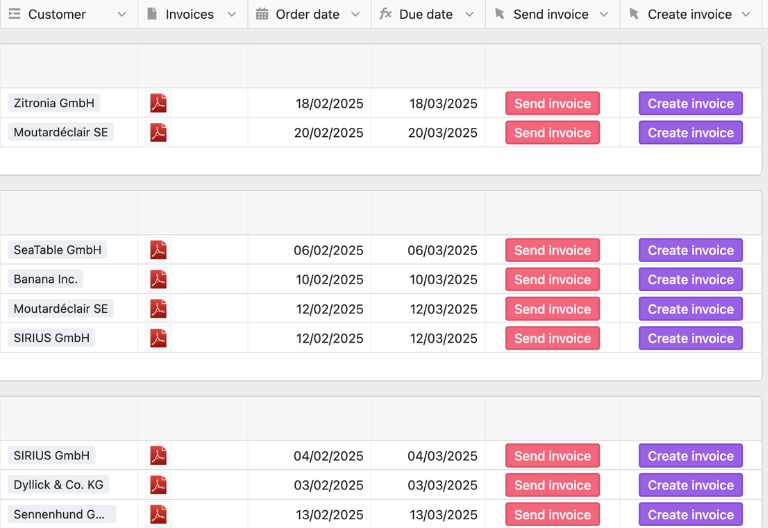
Invoices table: All invoices in one place
The “Invoices” table contains everything you need to create an invoice: customer, contact person, invoice date, payment terms, status, and net and gross amounts. When you create a new row, the invoice template automatically assigns a sequential invoice number. Link and lookup columns retrieve customer data and items from other tables, while formulas calculate discounts, sales tax, and the total amount—grouped by status such as “new,” “invoice sent,” “overdue,” and “paid.”
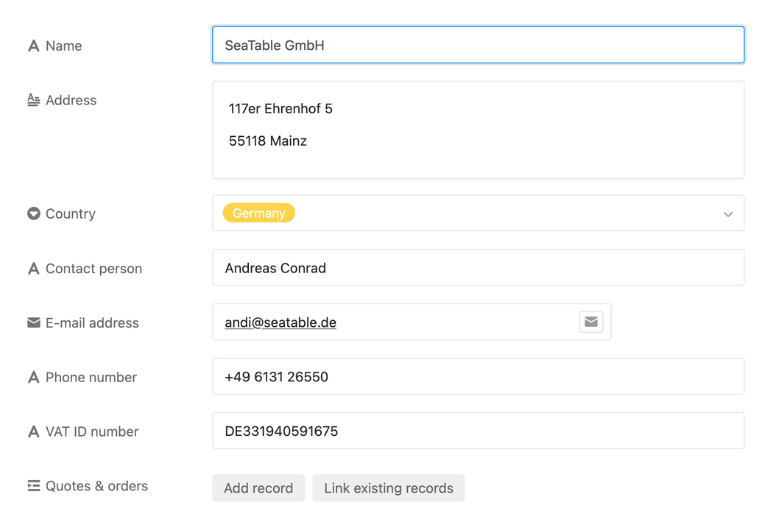
Customers Table: No Longer Maintain Duplicate Customer Data
In the “Customers” table, you can store company names, addresses, contact persons, email addresses, phone numbers, countries, and VAT IDs. This customer database forms the backbone of your invoice template: Through links, the billing address and tax-related information are filled in automatically, without office managers or freelancers having to copy data from old invoices—an important step toward an integrated CRM template.
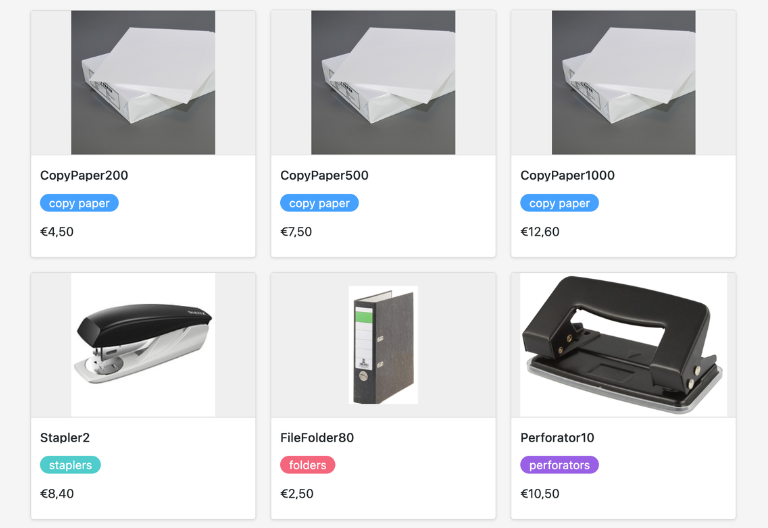
Products Table: Centralized Management of Services and Prices
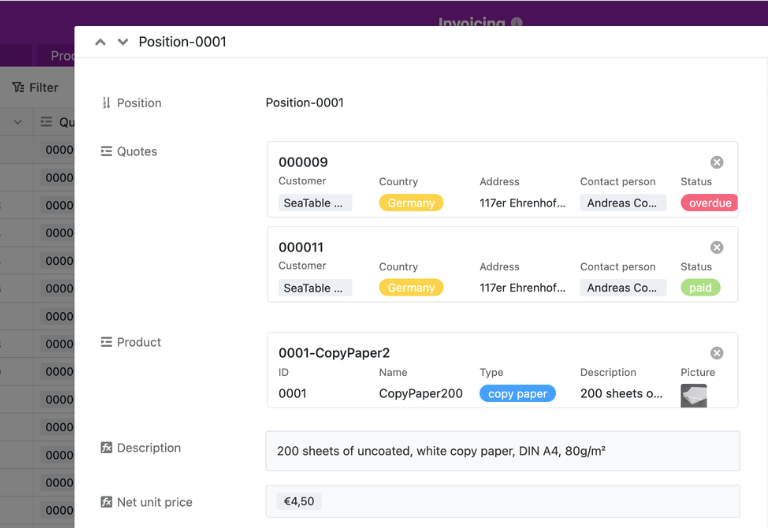
In the “Products” table, you list your products or services along with their descriptions, categories, and net prices. A formula calculates the gross price, including sales tax. The products are linked to the line items, so every invoice template automatically pulls the latest prices and descriptions—whether you are invoicing a few services or hundreds of items.
Item Table: Automatically transfer items to the invoice template
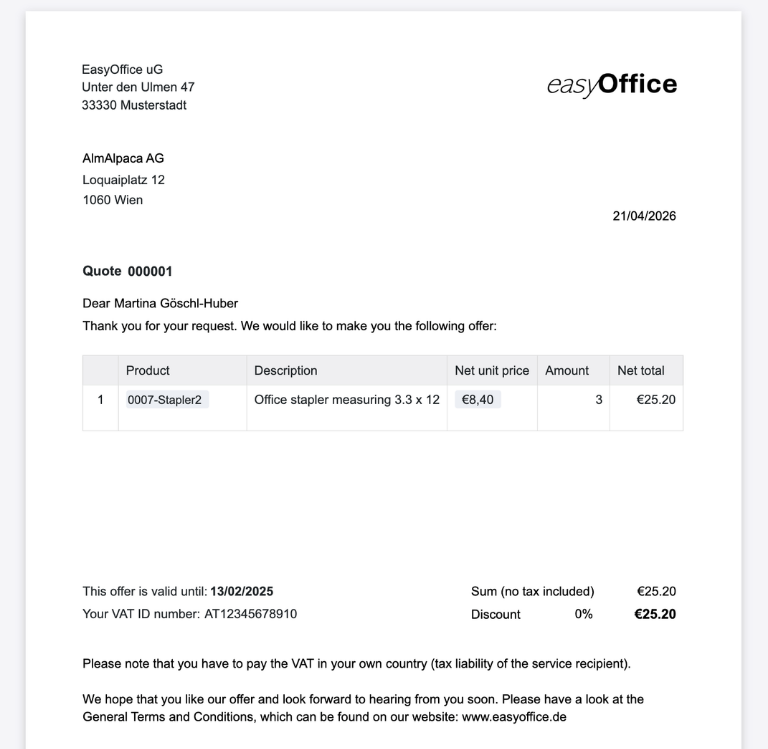
In the “Items” table, you link products to quantity details—the template calculates the net amount per item using a formula and transfers these values to the Invoices table via rollup columns. The Page Design plugin uses all linked data to generate a complete PDF invoice with a single click, which matches your invoice template and is saved directly in the Invoices table.
Invoice Template: Your Interactive App Solution
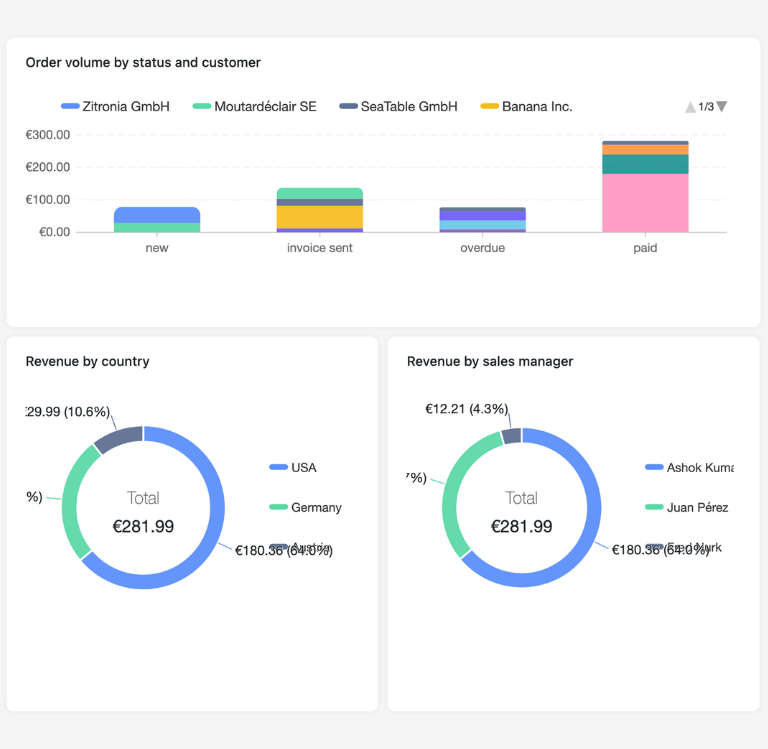
With the built-in no-code app builder, you can transform your invoice template into an interactive invoicing app that adapts to every role: Financial specialists view key metrics, open items, and sales statistics; office managers control invoicing, PDF export, and delivery via a clear frontend; and freelancers work with a streamlined invoice template that automatically fills in all required fields. Various views—such as Kanban for “Paid/Open,” filtered lists by customer, or statistics by time period—ensure transparency in the invoicing process, while permissions control who can create, approve, or simply view invoices.
Create, send, and archive invoices—with the SeaTable invoice template
Smart Automation
Fewer clicks, fewer errors: Automation for your invoicing
With SeaTable, you can use powerful AI automation, that automate your invoice templates, customer management, and billing processes. This turns your digital invoice template into a smart hub for invoicing, payment tracking, and accounting analysis—significantly more efficient than a manually managed invoicing system.
Organize invoices clearly
Automatically organize invoices by project, customer type, or country, and replace manual assignments with clear rules. Use existing service descriptions and notes as a basis, enter appropriate categories into defined fields, and ensure that reports, filters, and grouped views in your invoice template work reliably at all times.
Import order data automatically
Import data from quotes, order confirmations, or order lists directly into your invoice template and eliminate the need for copying and pasting. Automatically recognize fields such as item, quantity, and price; enter values into the correct columns; and significantly speed up the invoicing process—all without additional Excel pivot tables, intermediate files, or manual reconciliations within your team.
Organize receipts neatly
Assign delivery notes, signed documents, or other supporting documents directly to the corresponding invoice and centralize all documents in one place. Use automation to respond to new files, set status fields, add notes, and notify the appropriate personnel, so that no one has to spend time searching for supporting documents for a specific invoice or manually sifting through email attachments.
Retrieve key figures directly
Generate key metrics such as revenue by period, accounts receivable, or overdue amounts directly from your invoice template, eliminating the need for additional financial reports. Use existing table values and status fields, present them in text and charts, and provide financial specialists and office managers with meaningful insights to support reporting and planning.
Rules for the billing cycle
Define your own rules for your invoicing process and automate reminders, status updates, and validity checks. Respond to date changes or new entries, update fields in your invoice template, and permanently eliminate many manual verification steps so you can focus more on analysis, planning, and communication with customers.
Manage by status instead of lists
Manage your accounts receivable process using status views in the invoice template and eliminate the need for manually maintained Excel lists of open, overdue, and paid invoices. Automatically set status and date fields based on events, use Kanban boards and filtered tables, and immediately identify which invoices require attention and which processes have already been fully completed.
Transparency and real-time collaboration
More transparency instead of billing chaos
SeaTable is a modern, AI-powered no-code database solution with automation features and an app builder, offering all the functionality you need for a professional digital invoice template. It focuses on traceability, collaboration, and flexible customization—from a streamlined template for individual invoices to an integrated solution with a customer database, PDF generation, and reporting, serving as a scalable alternative to rigid individual templates.
Growing with the demands
Whether you’re dealing with a few invoices a month or a growing volume of invoices involving multiple parties, the template adapts to your process. Tables, views, and automations can be expanded step by step without having to rebuild your system.
Combine customer data and invoices
Link your template to customer data, quotes, or other processes to create a centralized database instead of isolated silos. This ensures that teams consistently access the same information and avoid unnecessary follow-up questions or data entry errors.
Invoice data securely stored in Europe
If you use SeaTable Cloud or the built-in AI, your customer and billing data remains in Europe—the infrastructure is hosted exclusively on servers in Germany.
Control access clearly and securely
SeaTable supports two-factor authentication and single sign-on, allowing you to specify exactly who is authorized to view and edit invoices, customer data, or reports.
FAQ – Frequently Asked Questions About SeaTable's Invoice Template
-
What mandatory information must be included on an invoice template?
-
A complete invoice template should include, at a minimum, the name and address of the issuer and the customer, tax ID or VAT ID, date of issue, a sequential invoice number, the nature and scope of the service, as well as the net/gross amount including sales tax and the applicable tax rate. The SeaTable template maps these fields as columns and converts them into a standardized PDF invoice.
-
Is this invoice template suitable for small business owners?
-
Yes, you can customize the template for small businesses by configuring the sales tax fields accordingly and adding a reference to the small business regulation in the text template. You can save the resulting small business invoice template as a separate layout and reuse it.
-
Can I export the template as a PDF?
-
Yes, with the Page Design plugin, you can generate a PDF invoice from any invoice template with just one click. The invoice is saved directly to the record and can then be emailed to the customer directly from SeaTable.
-
Is the template free to use?
-
The template is available to you for free in the SeaTable Cloud. With an account, you can start creating digital invoices right away without having to install any additional invoicing tools.
-
Can I import existing invoice or customer data?
-
Yes, you can import existing customer and invoice lists as CSV files and then continue working with the SeaTable template. This allows you to quickly take advantage of automatic calculations, the PDF generator, and clear status overviews without having to re-enter your existing data.
-
Is the invoice template also suitable for teams?
-
Yes, financial specialists and office managers in particular benefit from the fact that multiple people can work on the same template at the same time. You can use permissions to specify who is allowed to create, edit, approve, or simply view invoices.
This content block is not yet defined!
This content block is not yet defined!