Project Time Tracking Template: Budget Control Instead of Excel Chaos
Manual timesheets, cluttered Excel spreadsheets, scattered project lists, and a lack of transparency regarding hours already worked: traditional methods of project time tracking slow project managers down. Times are recorded late, reports for financial control and billing take up unnecessary time, and project time tracking remains prone to errors. With SeaTable’s project time tracking template, you can document working hours, activity reports, time budgets, employees, projects, and clients centrally on a collaborative platform—including dashboards for real-time analysis, budget monitoring, resource planning, and project control. Track project time efficiently, improve time management within the project, and turn your project time tracking into a reliable foundation for productivity, billing, and control..
Organize project time tracking online
Project Time Tracking Template for Your Day-to-Day Project Work
-
Effectively eliminate data silos
Consolidate project timelines, timesheets, employees, clients, and budgets into a single, centralized template. Instead of relying on scattered Excel spreadsheets and individual activity reports, everyone involved works from a shared, up-to-date foundation for project management, cost control, and billing—making project time tracking finally consistent and transparent.
-
Instant view of work hours
Track actual hours, time budgets, and utilization in real time. Project managers can immediately see how far projects have progressed, where overtime is occurring, and which teams have available capacity—without having to manually consolidate timesheets or reports. This turns project time tracking into an operational management tool.
-
Secure budgets early on
Visualize planned budgets, recorded working hours, and billable hours directly in the dashboard. The template highlights variances early on, supports project management, and improves budget monitoring without the need for time-consuming Excel analyses—ideal if you want to closely integrate time and budget data.
-
Plan Your Billing Safely
Create a robust foundation for time tracking, invoicing, and financial management. Project time tracking remains traceable, audit-ready, and transparent, so that project managers, finance teams, and team leaders can always work with reliable data—from ongoing data entry to the final activity report.
-
Flexibly customize workflows
You can add fields for cost centers, project phases, approvals, or internal notes to your template at any time. The template’s no-code structure adapts to your processes in project management, capacity planning, and time tracking—without the need for IT support or rigid structures.
-
Enter teams together
Multiple team members can simultaneously enter times, update projects, and document activities. This turns project time tracking into a shared foundation for collaboration, resource planning, and efficiency—rather than an isolated administrative process.
Who uses SeaTable?
Leading companies around the world rely on SeaTable

















100.000+
Downloads in Docker Hub's first year
1.500+
Daily users on SeaTable Cloud
4.6
Review on Capterra
Your benefits at a glance
Centralize project time tracking in one place
With the flexible, AI-powered, no-code platform SeaTable, you can implement a project time tracking system that adapts perfectly to your project management workflows. Replace manual timesheets and cluttered Excel spreadsheets with an interactive tool featuring drag-and-drop functionality, dashboards, and automated analysis—ideal for real-time monitoring, budget tracking, and team collaboration. If needed, connect your template directly to other databases, such as a central project management tool.
Real-time data: Any changes to project timelines, actual hours, or budgets are immediately visible—no more tedious reconciliation of outdated timesheets or Excel files in your project time tracking system.
True collaboration: Project managers, team leaders, employees, and external stakeholders work together in a shared database—with clearly defined responsibilities, comments, and status fields for end-to-end project time tracking.
Interactive Template: Switch between timesheet tables, client and project views, and budget monitoring dashboards with the project time tracking template—which includes flexible views for workload and capacity.
Centralized Storage: Projects, clients, time budgets, activity reports, and billing documents are all stored directly within the project time tracking system—no need for separate folders or dealing with file clutter. This ensures that data is always traceable for controlling and analysis purposes.
Real-world example of project time tracking
From time tracking to invoicing—seamless
Time table for all entries
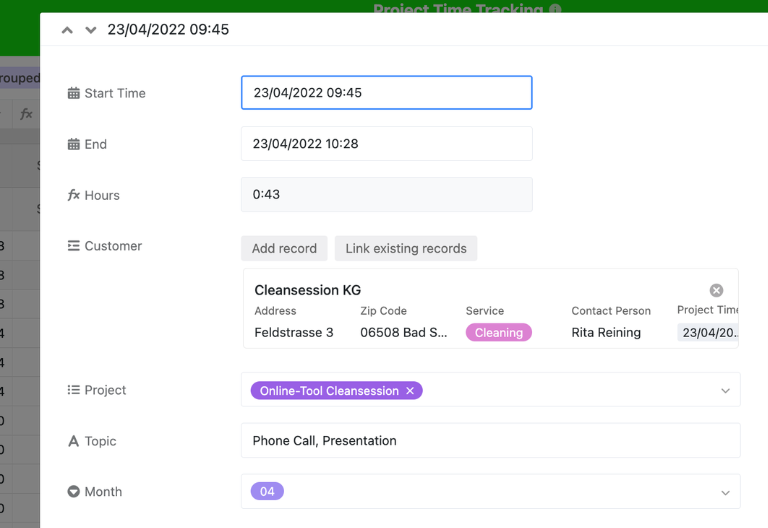
In the “Time” table, you record every minute of work by project: start time, end time, subject, month, and person responsible. A formula automatically calculates the hours worked. This makes project time tracking a reliable foundation for time management within the project, cost control, and billing.
Link customers centrally
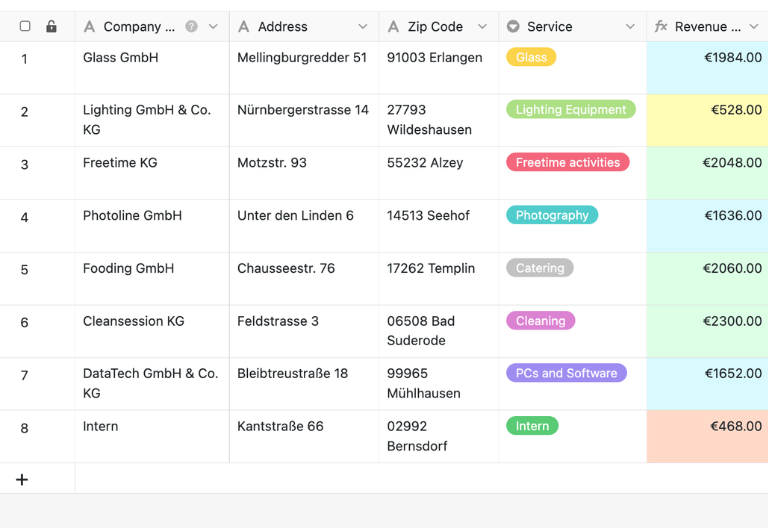
In the second table, you can manage all customers, including company names, contact persons, addresses, and other billing information. By linking to project time tracking, you can aggregate monthly hours per customer—ideal for accurate time tracking and precise invoicing.
Use views for analysis
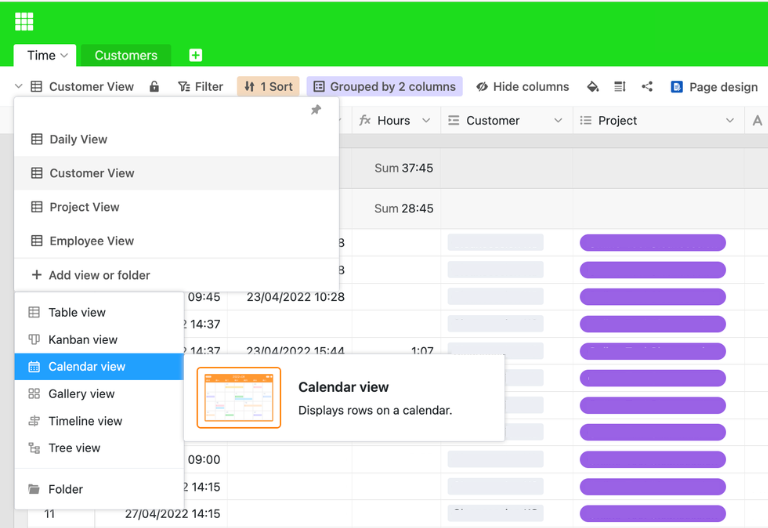
With views such as Daily View, Customer View, Project View, and Employee View, you can analyze your project time tracking from various perspectives. This allows you to immediately identify which projects are exceeding time budgets, where productivity is increasing, and how team capacities are evolving.
Derive billing automatically
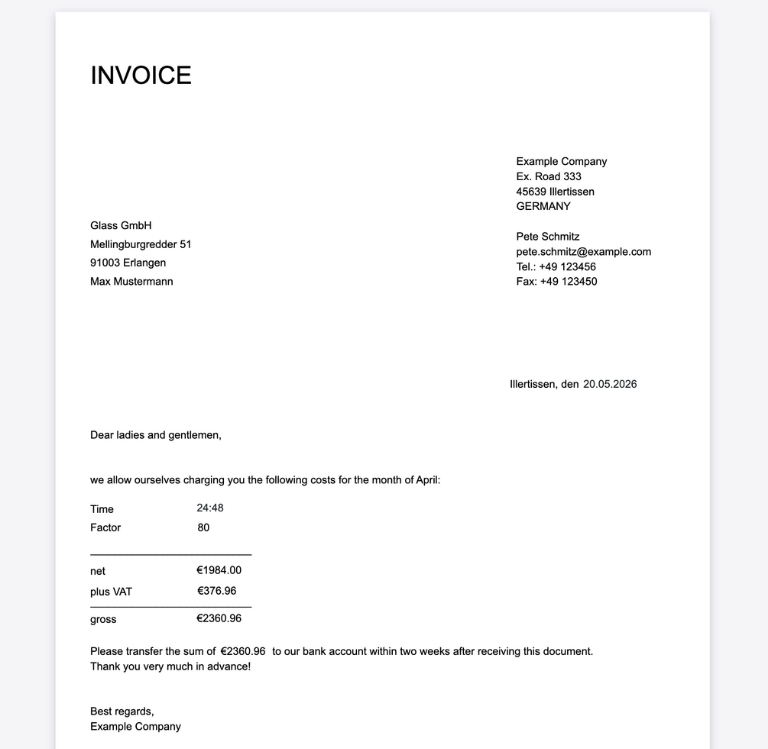
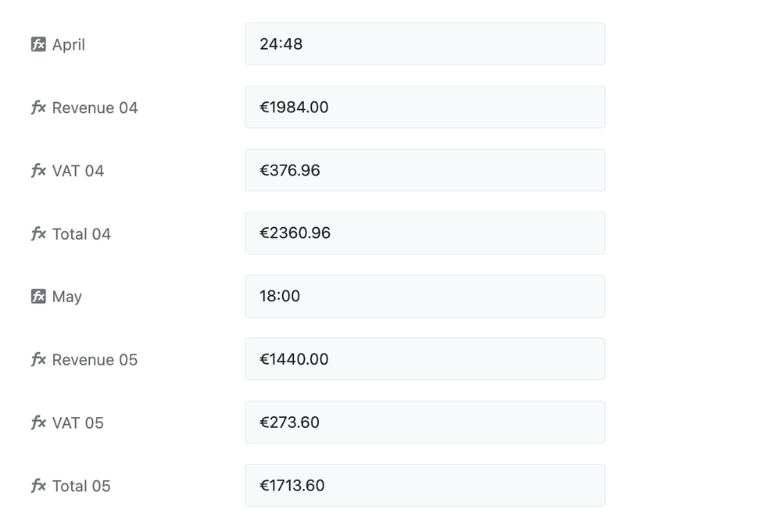
Rollups and formulas tally the hours recorded for each month and client. You can then calculate hourly rates, sales tax, and the total amount directly within the template. This way, project time tracking seamlessly integrates time reporting, project management, and billing.
Your Custom Project Time Tracking App
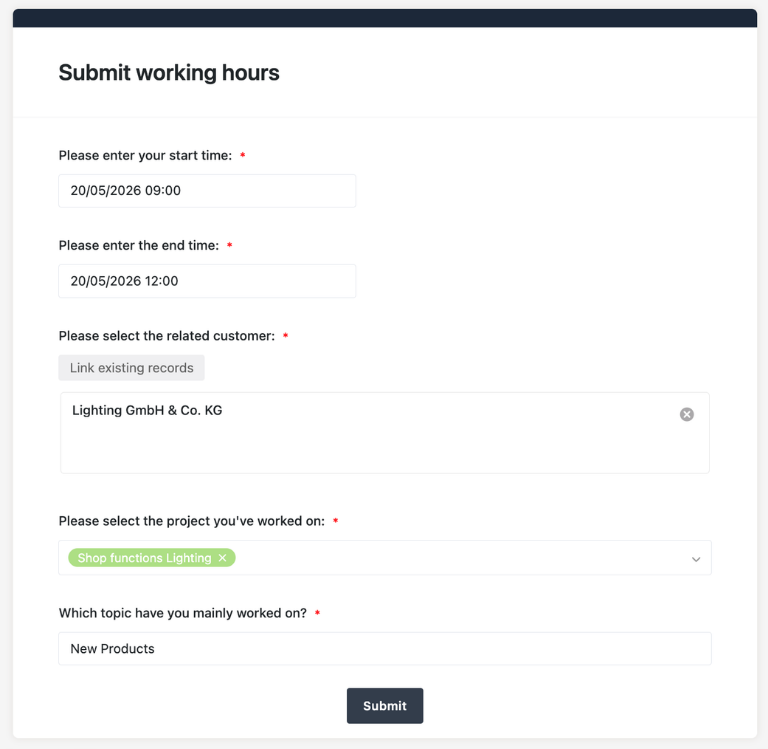
With the built-in no-code app builder, you can transform the project time tracking template into a custom app for project managers, teams, and external collaborators. Combine forms for tracking project hours, overviews of time budgets, Kanban views for approvals, and targeted filters for projects, clients, or individual team members—all the way to specialized views for resource planning, billing, and capacity planning. Share specific sections as a frontend with stakeholders and use permissions to control who can view or edit which data—this turns the project time tracking template into a tailor-made tool for your organization.
Keep track of time, budgets, and resources—with SeaTable’s project time tracking template
Smart automation for time tracking, projects, and billing
AI-powered project time tracking
With SeaTable s project time tracking tool, you can take your project time tracking to the next level. Automate timesheets, project management, and reports with powerful AI automations turning this template into a smart hub for timesheets, budgets, tasks, and resource planning. This will give you real-time insights instead of Excel chaos and help you improve efficiency, productivity, and budget monitoring in the long term.
Assign time entries efficiently
With Classify, SeaTable automatically assigns entries to projects, clients, activity types, or cost centers. The AI analyzes content from descriptions and subject areas, keeping your project time tracking template neatly structured, filterable, and ready for analysis for financial reporting, resource planning, and billing.
Import data from documents
With Extract, AI transfers data from PDFs, performance reports, or external timesheets directly into your project time tracking system. Times, project names, employees, and billing-related information are recognized and entered into columns—without the need for manual entry and with significantly fewer sources of error in project time tracking.
OCR for notes and receipts
Using OCR, SeaTable scans screenshots or photos of timesheets and transfers the information into the project time tracking template. This makes even decentralized time records digitally accessible, searchable, and analyzable—ideal for hybrid teams and remote work.
Generate reports automatically
With Summarize, SeaTable generates concise reports on project timelines, budget status, workload, and billable hours. The AI consolidates large volumes of time entries into easy-to-understand overviews for project managers, team leads, and finance—perfect for real-time analysis and project management.
Define rules for times
With Custom Prompt, you can define custom rules for your project time tracking—such as checking for missing entries, flagging critical budget variances, or structuring activity reports. This allows the AI to adapt precisely to your internal project management processes.
Detect deviations in real time
With AI-powered automation, you can continuously analyze recorded project times and identify overtime, budget risks, or available capacity early on. The results are automatically incorporated into the dashboards and views of your project time tracking template—enabling faster decision-making and better control.
Transparency and real-time collaboration
Scale flexibly, quickly, and reliably
SeaTable is a modern AI-powered no-code database solution with automation features and a built-in no-code app builder, offering all the tools needed for professional, cloud-based project time tracking. Key features include real-time monitoring, collaboration, and customization—from tracking project hours to serving as a centralized tool for managing your projects’ time budgets, invoicing, and dashboards, providing an alternative to Excel and paper timesheets.
An alternative to Excel and timesheets
Manage your project time tracking more efficiently than in Excel or on paper—with linked tables, views, forms, and automations for project managers and teams.
Link project times centrally
Link the template to your time tracking and other project databases. Centralize your time tracking, budgets, clients, and staff for maximum transparency.
GDPR-compliant
With SeaTable, you can track project hours in compliance with data protection regulations, either in the European cloud or on your own server. All processing takes place exclusively in data centers located in Germany.
2FA and SSO
Using two-factor authentication and single sign-on, you can precisely control which users have access to time records, budgets, and billing data. This allows you to reliably protect sensitive information from unauthorized access.
FAQs About the SeaTable Project Time Tracking Template
-
Is the project time tracking template legally compliant?
-
This template helps you document project hours in a structured, traceable, and transparent manner. For industry-specific or legal requirements, you should also review your internal compliance and legal guidelines.
-
Can I use the template for multiple projects at the same time?
-
Yes, you can manage as many projects, clients, and employees as you like in a single central template. This allows you to keep track of time budgets, workload, and billable hours across all projects.
-
Can the recorded times be exported directly for invoicing?
-
Yes, project time tracking can be used directly as the basis for invoicing. Using formulas, rollups, and the page design plugin, you can format invoice data at the customer level and export it as a PDF—turning your project time tracking into a seamless invoicing process.
-
Will the use of the template in SeaTable always be free?
-
You can use the template for free in the SeaTable Cloud. All you need is an account, and you can start tracking project hours digitally right away.
-
Can external freelancers also track their hours in the template?
-
Yes, external freelancers or project-based partners can also—depending on their permissions—enter time in the project time tracking system. This results in comprehensive time reports that span both internal and external resources.
-
Why is digital project time tracking better than Excel?
-
Excel quickly reaches its limits: manual data entry, missing links, error-prone timesheets, and time-consuming reporting. The SeaTable template integrates time tracking, projects, clients, dashboards, and billing into a single centralized system.
-
Is project time tracking also suitable for growing teams?
-
Yes, SeaTable is scalable and grows with your needs. Whether you’re a small team or a larger project organization, you can add additional fields, views, automations, and workflows at any time to further optimize your project time-tracking processes.
-
Does the template fit with other project workflows?
-
Yes, expand your project time tracking with SeaTable templates for projects and processes to create a centralized platform for project management, resource planning, and controlling.