Museum & Art Administration Inventory – digital, centralised and always up to date
Index cards, folders, hard drives – analogue processes slow down museum inventory management on a daily basis. Loss of knowledge when staff change, confusing loan procedures and inflexible museum software make digital art management unnecessarily complicated. With the SeaTable template, you can consolidate exhibits, provenance data, condition photos and loan agreements into a central inventory – including a gallery view, a Kanban board for restorations and automated deadline reminders. This allows curators and museum management to maintain an overview at all times – from the storeroom to the exhibition.
Digital inventorying in the museum
Inventorying at the museum – without the hassle of paperwork
-
Goodbye to paper clutter
Replace index cards, Excel spreadsheets and folders with a digital inventory. Your museum inventory management runs centrally, structured and accessible from anywhere – whether in the storeroom, the office or on the move with your tablet.
-
Where is the exhibit now?
Keep track of every artefact: in storage, on display, under restoration or on loan. Your museum inventory management shows the status of each object in real time – without queries or time-consuming searches within the team.
-
Loan deadlines always in view
Automated reminders alert your team before return deadlines expire or condition checks fall due. Curators and administrative staff always maintain a clear overview of all current loan agreements and outstanding tasks in the loan process.
-
No more loss of knowledge
When a curator leaves, all object data, provenance information, restoration notes and contracts remain fully intact in the system. Museum inventory management preserves institutional knowledge permanently, regardless of individual staff changes.
-
Photos straight from storage
Upload condition photos, reports and PDFs directly from the warehouse – via smartphone or tablet. Each exhibit receives its own digital file with photographic documentation, provenance details and a condition report within your art management system.
-
Adaptable rather than rigid
SeaTable adapts to your museum – not the other way round. Add fields for provenance, insurance value or exhibition history without IT support. Your museum collection management system grows flexibly alongside your requirements and projects.
Who uses SeaTable?
Leading companies worldwide rely on SeaTable

















100.000+
Downloads in the first year of Docker Hub
1.500+
Daily users on SeaTable Cloud
4.6
Review on Capterra
Your benefits at a glance
Your entire collection in one place
With SeaTable, a flexible AI-powered no-code platform, you can create a museum inventory template that adapts perfectly to your workflows. Replace rigid museum software and error-prone Excel spreadsheets with an interactive digital inventory featuring a gallery view, Kanban board and automated deadline reminders – ideal for art management, loan processing and collaborative collection documentation in museums, galleries and cultural institutions. Connect your template to other databases as required and experience how modern exhibition and art management works in practice.
Up-to-date information: Any change to an exhibit’s location, condition or loan status is immediately visible to everyone – no more checking against out-of-date lists.
Genuine collaboration: Curators, conservators and administrative staff work together on the digital inventory – with comments, status fields and clearly defined responsibilities.
Interactive template: Switch between gallery view for visual overviews of items, Kanban view for restoration status, and tabular detailed planning.
Centralised storage: Condition reports, expert reports, loan agreements and provenance data are stored directly with the object – without the need for separate folders, hard drives or filing cabinets.
A real-life example
Every exhibit under control – from registration to the loan agreement
Object table for the inventory
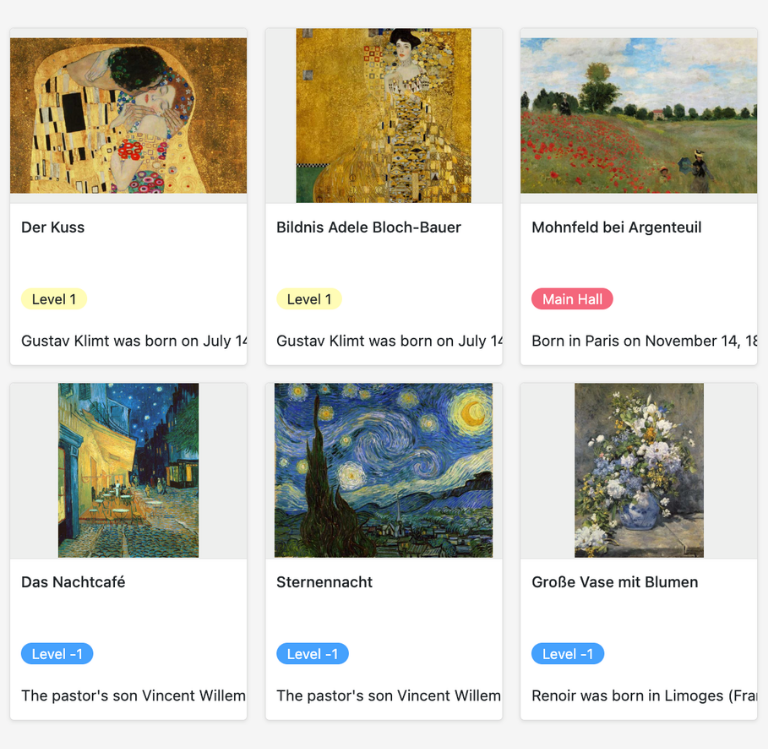
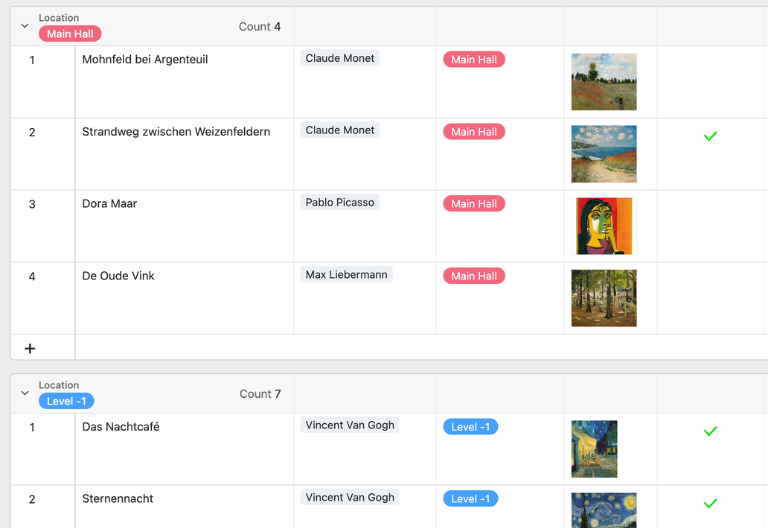
In the “Objects” table, you can record full details of each exhibit: object name, artist, photo, location, description, condition and provenance. The integrated gallery view transforms your digital inventory into a visual catalogue – ideal for day-to-day inventory work at the museum and for presenting to curators or lenders.
Artist table for full documentation
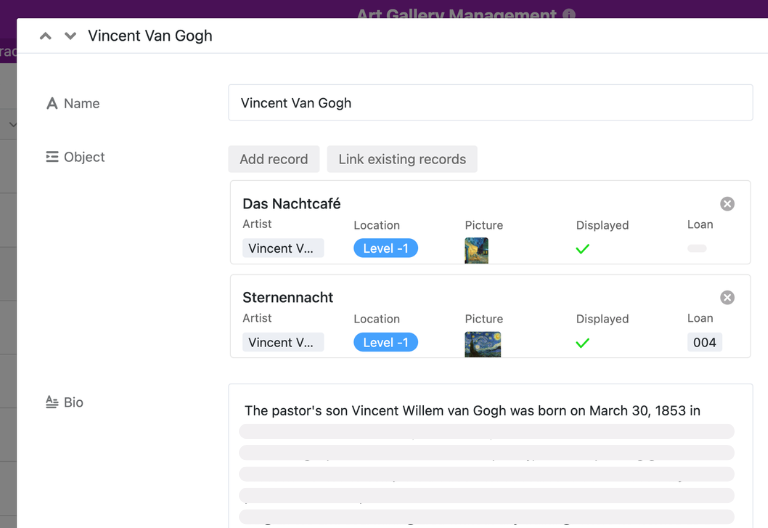
The “Artists” table allows you to collate all the information about the artists in your collection: biographies, dates of birth, nationality and associated works. The direct link to the object table ensures that your collection management system for museums remains complete and up to date at all times, without the need for duplicate entries.
Interlibrary loan table showing deadlines and agreements
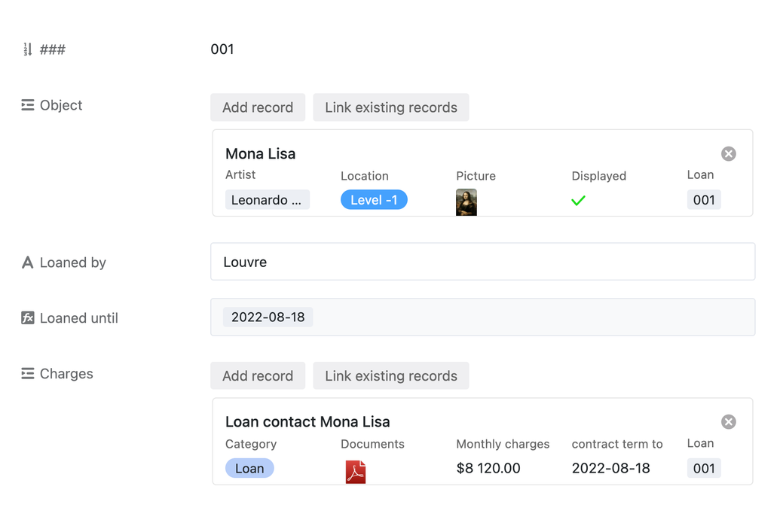
The “Loan” table allows you to manage all loan transactions: loan items, loan agreements, loan dates, return deadlines and monthly costs are automatically imported from linked tables. Automated reminders notify your team well in advance of expiry dates – ensuring seamless loan management without the need for manual tracking.
Restoration Kanban for a clear overview
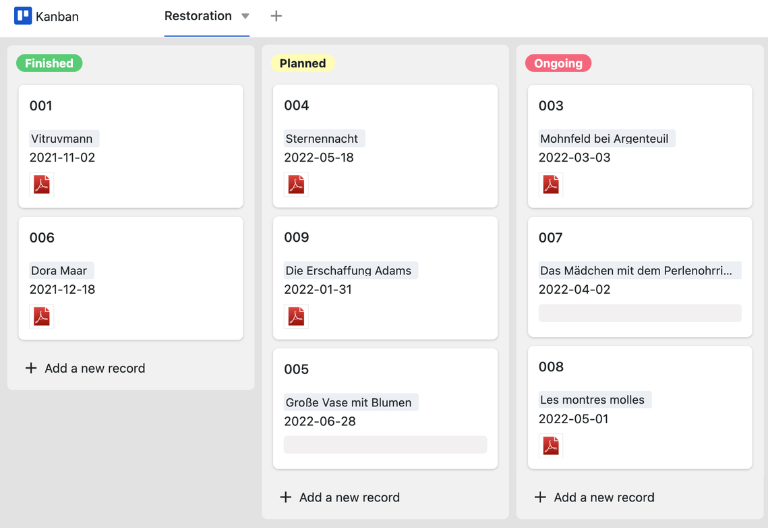
Once all objects, artists and loan transactions have been recorded, you can visualise ongoing restoration projects on the Kanban board by status: Planned, In Progress, Completed. With before-and-after documentation and status fields, curators and conservators can keep track of every restoration project in your collection at all times.
Why SeaTable is your alternative to traditional museum software
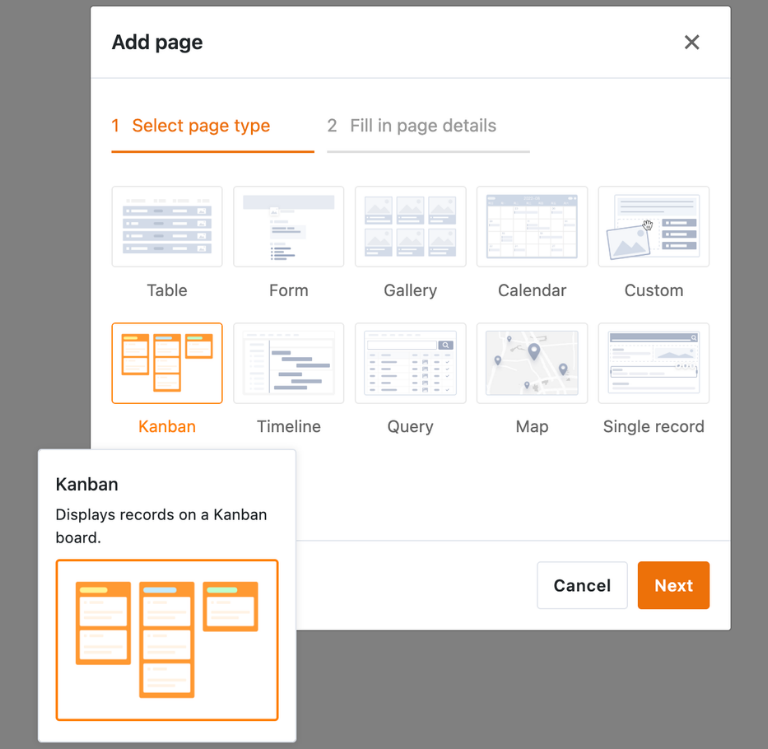
Using SeaTable’s integrated no-code app builder, you can create a bespoke art management app from the museum inventory template – with absolutely no programming knowledge required. Combine forms for mobile object recording in the storeroom with gallery views for visual collection overviews, Kanban boards for restoration status, and list views for loan transactions. Share specific sections as a front-end with curators, conservators or external lenders, and use permissions to control who can create objects, upload condition photos or view loan periods – turning the template into a central platform for your digital art administration and collection management for museums and galleries. Find out how easy it is to create an app without any programming knowledge .
Every exhibit is digitally recorded – accessible anywhere via SeaTable
Smart automation for museums and galleries
When AI takes over your museum inventory
With SeaTable, you can make use of powerful AI features that automate your museum inventory management, loan processes and collection documentation. Thanks to powerful AI features your template will become a smart hub for digital art management, provenance research and collection optimisation – more efficient than traditional museum software or manual Excel spreadsheets.
Sort items automatically
With Classify, SeaTable assigns exhibits to categories, periods or collection areas. The AI reads fields such as object description or material and enters the classification into the inventory – filters and views of your collection are always kept up to date.
Reading data from documents
With Extract, the AI transfers content from loan agreements, expert reports or inventory lists into your template. Object descriptions, dimensions and details of provenance are recognised and entered into the appropriate fields – without the need for manual typing in your digital inventory.
OCR for index cards and files
Using OCR, SeaTable extracts text from images, such as index cards or old inventory ledgers. The recognized text is assigned to the corresponding items in the system—making analog archival material digitally accessible and immediately searchable.
Status reports at the touch of a button
With Summarize, SeaTable automatically generates concise reports: on loaned exhibits, ongoing restorations or due condition assessments. The AI summarises table fields and provides clear overviews for board meetings and collection management in museums.
AI guidelines for interlibrary loans
With Custom Prompt, you can define AI instructions for your museum’s inventory management – such as alerts for expiring loan periods or missing provenance details. The AI processes your spreadsheet data and provides recommendations directly within the digital inventory.
Keeping an eye on restoration work at all times
AI-powered status overviews allow you to see all ongoing restoration work at a glance: which exhibits are in the workshop, and which are awaiting approval? Your museum’s inventory system consolidates this data into clear dashboards for curators and museum management.
Transparency and real-time collaboration
Collection management for museums – secure, flexible, collaborative
SeaTable is a modern AI-powered no-code database solution featuring automation tools and an app builder, offering all the features you need for professional museum inventory management. The focus is on comprehensive documentation, collaboration and flexible customisation – from simple object recording with condition photos to complete digital art management including loan transactions, restoration planning and an artist database – as a scalable alternative to rigid museum software such as MuseumPlus, VINO or digiCULT.
An alternative to traditional museum software
Organise your museum inventory more efficiently with SeaTable than with MuseumPlus, VINO or Excel – thanks to linked tables, customised views, mobile object recording and automations for curators, conservators and administrative staff.
Combining art administration and interlibrary loans
Link objects, artists, loan agreements and restorations within a single system. Your digital inventory brings together all relevant information – ensuring maximum transparency in your collection management for museums and galleries.
GDPR-compliant
If you use SeaTable Cloud or the integrated AI, all data relevant to the collection remains in Europe – the infrastructure is hosted exclusively on servers in Germany.
2FA and SSO
SeaTable supports two-factor authentication and single sign-on, allowing you to control exactly who can access your inventory, property photos and curatorial reports.
FAQ – Frequently asked questions about museum inventory management using SeaTable
-
Can I import my existing data from Excel or other systems?
-
Yes, you can import existing Excel lists, CSV exports from museum software such as VINO or MuseumPlus, and other structured inventory data directly into your SeaTable template. You can then link objects to artists, loan agreements and restorations, and immediately enjoy the benefits of digital, collaborative collection management with SeaTable.
-
Can I monitor interlibrary loans with automatic deadlines?
-
Yes, SeaTable supports your lending process with automated notifications: you’ll receive reminders before return deadlines expire or condition checks are due. The loan agreement, loan date, return deadline and monthly costs are directly linked to the associated items – giving you a comprehensive overview without the need for manual tracking.
-
Is it possible to save high-resolution photos and reports directly at the property?
-
Yes, every item in your museum’s inventory is assigned its own digital file, which includes a section for uploading high-resolution condition photos, as well as a file field for PDFs such as expert reports, restoration reports or insurance documents. Photos can be uploaded directly from the storeroom using a smartphone or tablet.
-
Can I adapt the template to the specific needs of my museum?
-
Yes, SeaTable is designed as a flexible no-code platform. You can add fields for provenance, inventory number, insurance value, exhibition history or specific collection categories without any IT knowledge. The template adapts to your needs – whether you run a small local history museum or a large art museum.
-
Can several staff members work on the art administration at the same time?
-
Yes, SeaTable is designed as a collaborative platform. Curators, conservators, administrative staff and external partners can work on the digital inventory simultaneously – with individual access rights, a commenting function and status fields. Every change is immediately visible to everyone and is recorded in a traceable manner.
-
Is the template for the museum inventory available free of charge?
-
Yes, you can use the template for free in the SeaTable Cloud. All you need is a free account and you can start digital inventory management at your museum straight away – including gallery view, loan management and restoration planning. Paid plans are available for advanced features such as AI automation and unlimited rows.
-
Can SeaTable also be used by galleries and cultural organisations?
-
Yes, the template is suitable for museums, galleries, cultural associations and art collections of all sizes. Whether you want to manage a temporary exhibition with just a few works or an extensive permanent collection with thousands of exhibits, SeaTable’s collection management solution for museums and galleries adapts flexibly to your needs.
-
Does SeaTable support provenance research and documentation of origin?
-
Yes, for each exhibit, you can record full provenance details in your museum’s inventory: acquisition history, previous owners, circumstances of discovery and legal information. Supporting documents such as deeds of acquisition or research reports can be saved directly as PDFs alongside the object – ensuring complete provenance documentation in accordance with museum standards.