Your flexible club management software for members, teams and facilities
With our free club administration template, you bring structure to everyday club life. Manage members, courses, payments and events centrally and coordinate your team and volunteer tasks. Add fee groups, teams, sports facilities and sponsorship contracts whenever you need them. Whether football club, tennis club or multi-sport club with hockey and gymnastics: your club management software combines ready-made admin features with flexible extensions – so the board, treasurer and team leads work with shared data instead of scattered lists. Start with the proven basic structure and expand your solution step by step as your club grows.
Connect members, teams, venues
Digital club administration for your sports club
-
Manage members centrally
Replace scattered lists with a central database for your sports club. Maintain contact details, active and passive memberships and fee groups in a clear structure, and keep information up to date for everyone authorized to see it.
-
Link sections and teams
Assign members to several sections and teams without entering their master data twice. Football, tennis or hockey: linked records make team assignment in a multi-sport club transparent and simplify coordination between all sections.
-
Keep track of facilities
Extend your database with pitches, halls and training times. A booking schedule in the calendar view clearly displays all scheduled slots. This helps those in charge coordinate the use of your sports facilities and spot potential conflicts.
-
Ease the volunteer load
Bundle tasks and responsibilities for the board, treasurer and coaches in one place. With the right permissions, you share relevant information selectively, make volunteer handovers easier and avoid unnecessary back-and-forth by email.
-
Manage sponsor contracts
Add sponsor management with contacts, contracts, terms and agreed services in return. Record pledged amounts and incoming payments together, so your board always keeps track of open commitments and the next steps with each sponsor.
-
Shape workflows freely
Adapt your club management software to your own processes without coding. Add fields, views or tables for inventory, changing rooms and tournaments. Your solution grows with the needs of your club instead of forcing you into rigid structures.
Who uses SeaTable?
Leading companies worldwide rely on SeaTable

















100.000+
Downloads in the first year of Docker Hub
1.500+
Daily users on SeaTable Cloud
4.6
Review on Capterra
Your benefits at a glance
Club management software, not isolated lists
The template links six areas: members, team, courses, payments, organization and events. You see at a glance who uses which offers, which invoices belong to them and who takes on which tasks. Your club management software already includes calendars, payment overviews and a registration form – and can be extended specifically for the needs of your sports club, from fee groups to facilities. Linked records replace duplicate data entry, and every change is instantly visible to everyone involved. This way, the board, treasurer and coaches work on the same up-to-date basis, even when volunteer roles change.
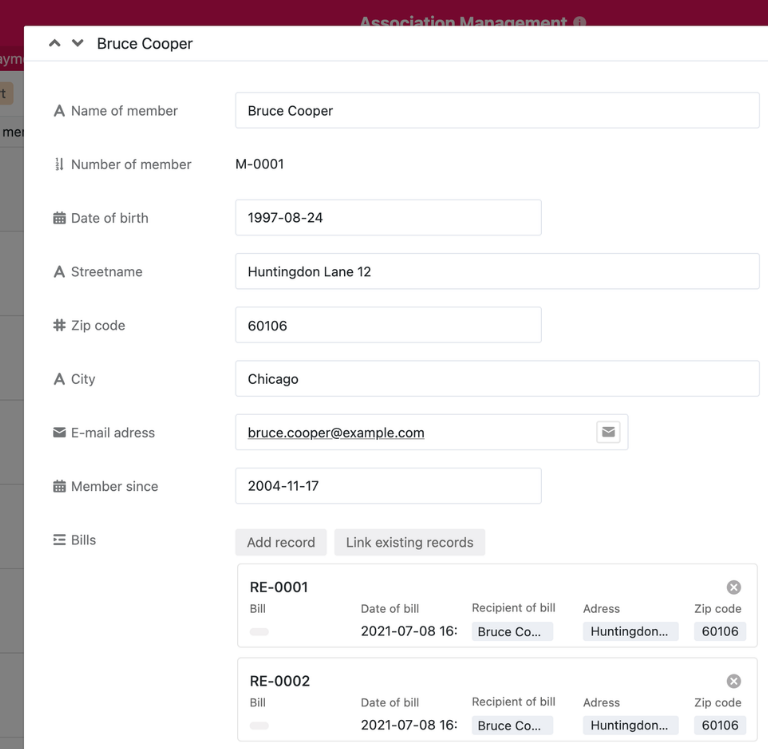
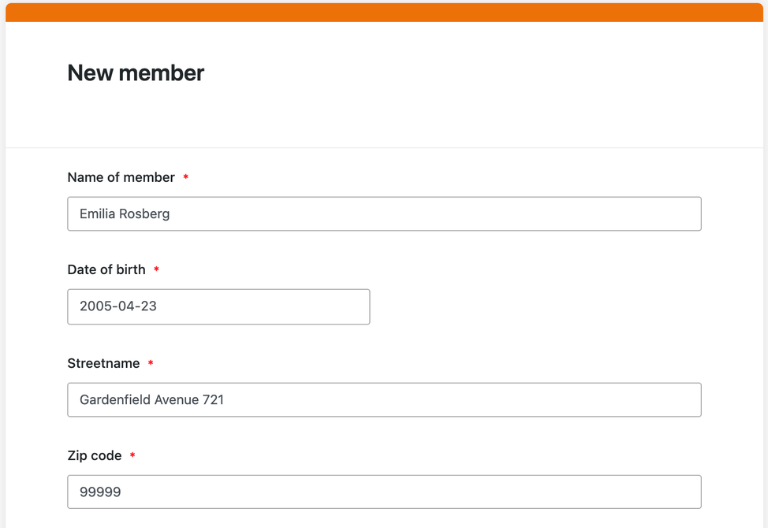
Central membership management: Record contact details, membership numbers and joining dates. Linked courses, invoices, events and tasks stay traceable for each member. New registrations reach the database via the web form.
Courses and dates in the calendar: Store course periods, training times and coaches. Separate calendars for courses, events and tasks keep club planning clear. For a booking schedule, add pitches, halls and changing rooms.
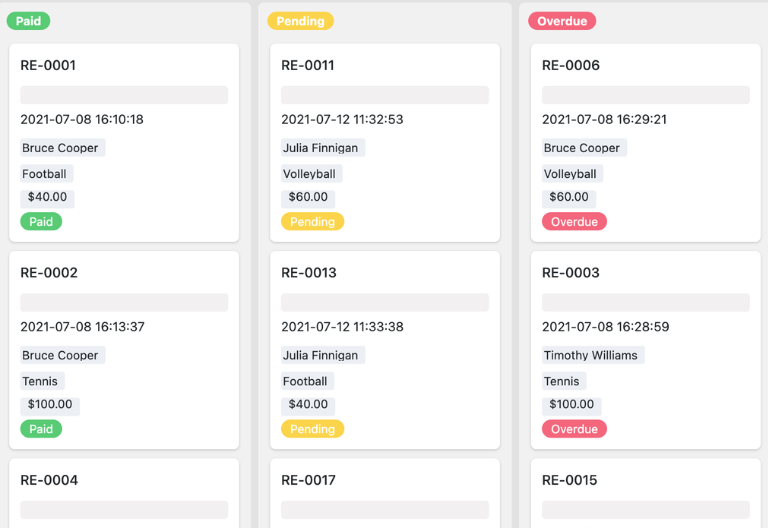
Track payments transparently: Invoices are numbered automatically and can be stored as files. Amounts come from linked course prices. A Kanban board and statistics show payment status; a notification flags overdue invoices.
Coordinate team and volunteers: Link coaches and team leads to courses, events and organizational tasks. Also record members who help out and document which tasks have already been completed.
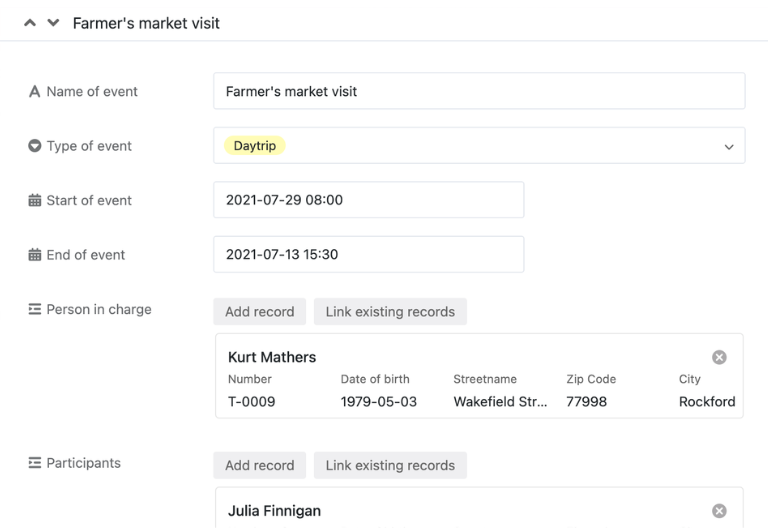
Plan club activities together: Organize events with start, end, organizers, participants and cost per member. For larger tournaments or club parties, extend your workflows with an event planner.
Six tables, four work areas
How your club management software works
Manage members and club team centrally
In “Members” you maintain master data, membership numbers and joining dates. Links show related invoices, courses, events and organizational tasks. New members sign up via the web form, and the administration is notified automatically. In “Team” you record coaches and team leads with their contact details and see which courses they run and where they help out.
Plan courses, training times and events
The “Courses” table links course names, prices, durations and training times with members, coaches, payments and organizational tasks. In “Events” you plan activities with start, end, organizers, participants and cost per member. Dedicated calendars display courses and events clearly. For facility management, simply add the related pitches, halls or changing rooms.
Keep invoices and payment status in view
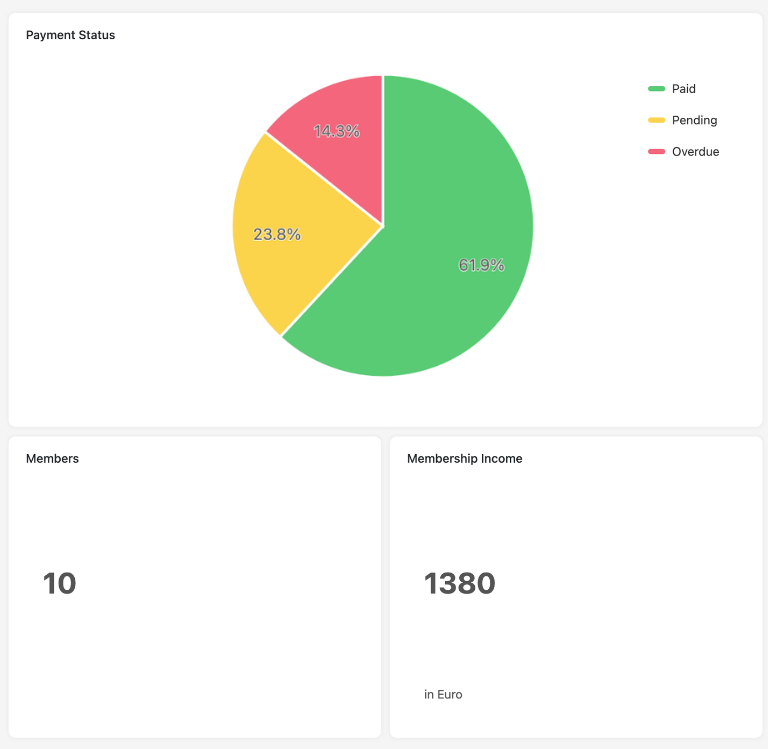
In “Payments” invoices automatically receive a number and creation date. You link recipient and course, store invoice files and track payment status. The amount is derived from the assigned course price. Kanban and statistics provide an overview; when a status changes to overdue, the administration is notified. The Page Design plugin provides an invoice template.
Coordinate tasks and club organization
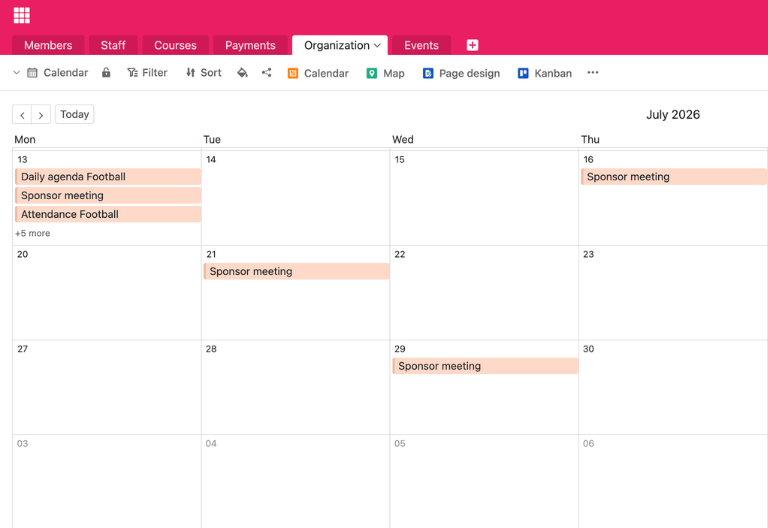
In “Organization” you record tasks with an automatic project number, type, date and a done checkbox. Link responsible team members, helping members and related courses; store reports as attached files. A dedicated calendar shows organizational dates. Further statistics on members and events as well as a member map complete the overview of your entire club.
Your custom club management software as an app
With the no-code App Builder, you design role-based interfaces for your club management software. Coaches get suitable team overviews, the treasurer works with financial data and the board keeps track of open tasks. Configure targeted access rights for each role. If needed, add inventory lists, changing room management or a project plan for your next club project – all without programming and based on the same shared club data. Each person sees only what matters for their role, which makes onboarding new volunteers noticeably easier.
Use free club management software and organize your club digitally
Less routine for volunteers
AI support for club administration
Extend your club management software with AI functions whenever you need them. They support the processing of texts and images you provide – from incoming requests and contracts to receipts and meeting notes. Those in charge should review financial data, resolutions and personal data before using the results any further. The final decision always stays with your team.
Assign requests correctly
With Classify, you automatically assign incoming texts to categories such as membership, training, sponsorship or organization. The AI supports pre-sorting of your requests. Those in charge check the assignment and then handle each request in the right area of your club.
Extract contract data
With Extract, you transfer details from provided contract texts or emails into structured fields. This lets you prepare contact persons, terms and amounts for sponsor management. Check the results carefully before you use them as binding information in your club.
Read receipts digitally
With OCR, you capture text from photographed receipts or other image files and prepare it for your tables. This simplifies digital filing and record keeping in your club. Check recognized names, figures and dates before deriving bookings or further steps from them.
Condense meeting notes
With Summarize, you condense longer meeting notes and stored reports into concise summaries. The board and section heads get a quick overview of all topics discussed in the meeting. Review the summary and add binding resolutions, responsibilities and deadlines.
Design your AI workflows
With Custom Prompt, you write individual instructions for recurring writing tasks in your club. For example, have drafts of member updates created from stored information. Volunteers save valuable time on writing and keep full editorial control over the final result.
Prepare status reports
Let the AI draft a clear report for the board based on the status details you provide. Open tasks, planned measures and documented developments become easier to grasp. Check all figures and statements carefully before passing the report on to your committees and members.
Shared data, clear roles
Transparent and secure club administration
SeaTable combines relational data structures with views, automations and the App Builder. This lets you build club management software that adapts to your organization and its sections – not the other way around. Start with the template, extend it step by step, add new tables whenever your club needs them and keep all club data in one place as a flexible alternative to Excel.
Import existing club data
Prepare existing Excel or CSV exports from your current club software for import. Check available export options, field mapping and duplicates beforehand; please note that this does not set up a direct synchronization.
Connect your club projects
Link tasks for tournaments, club parties or facility maintenance directly with your club data. This turns your club management software into a shared working basis for the board, coaches and all volunteers.
Organize in line with GDPR
Take legal bases, data minimization and deletion periods into account from the start. Whether your processing is GDPR-compliant also depends on the contracts, settings and organizational measures of your club.
Secure access in a targeted way
Use suitable permissions and available login methods such as two-factor authentication or single sign-on. Align access to sensitive member and financial data with the respective roles and responsibilities in your club.
FAQs about the SeaTable club management software
-
Can sports clubs use this club management software for free?
-
You can use the template within the free SeaTable plan; check the current limits for users, storage and features. It already includes members, team, courses, payments, organization and events. Extra needs may require a paid plan. The payment overview does not replace accounting or bank-based fee collection.
-
Is the template suitable for multi-sport clubs with several sports?
-
Yes. Linked member, team and course tables form a basis for various sports and show who attends which courses and who coaches them. For a multi-sport club, add sections, teams, active or passive memberships and fee groups to map football, tennis, hockey or gymnastics. A ready-made section structure is not included.
-
How does the template help manage sports facilities and training times?
-
The course table already contains course periods and training times, shown in the course calendar; further calendars show events and tasks. For a full booking schedule, add pitches, halls and changing rooms and link them to dates. Automatic detection or prevention of double bookings is not included.
-
Can I manage sponsorship contracts and income with the software?
-
Yes. Extend the template with sponsor contacts, contract files, terms, pledged amounts and services in return. The existing payment table focuses on member invoices for courses, so adapt it or add a separate table for sponsorship. A bank connection or complete sponsor management is not part of the initial features.
-
How can we adapt the club management software to our club’s needs?
-
Add columns, linked tables, forms and views without coding. Start with the member, course and payment workflows, then add team assignment, inventory or facilities. Import checked Excel or CSV exports from your current software – without a direct sync. Test changes with a few records and define roles and access rights.