
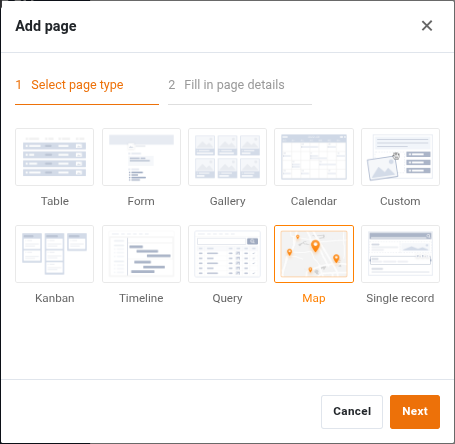
In the App Builder, the number of page types increases to 10. The new addition is the Map page type. For the other page types, SeaTable 6.1 expands the capabilities of link columns. These can now be configured consistently and assigned fine-grained permissions. App users can also look forward to a print option for dashboards as well as enhanced filter and sort functions.
In the Base Editor, the link column takes center stage with a functional upgrade: dynamic filter rules make it possible to control the selectable rows depending on the respective source row — each row thus gets its individual selection. Also new are the two view types Tree and Timeline, which replace the plugins of the same name. In the Base Logs, filters provide a better overview of activity within a base.
A lot has also happened in the integrations area. SeaTable 6.1 introduces a connection to Google Calendar and an import function from Airtable. Alongside the improved Table Relationships plugin comes the new AI Chat Plugin , which enables analysis and data modifications using natural language.
SeaTable 6.1 is now available for download from the well-known Docker repository ; as always, the changelog contains the complete list of all changes.
The new release will be rolled out to SeaTable Cloud on March 25. The update comes with an upgrade to the Free and Plus subscriptions. Automations, previously exclusive to the Enterprise subscription, will also be available in Free and Plus subscriptions going forward. Free teams receive 100 automation runs per month; Plus teams receive 500 runs per month per team user. The price remains unchanged. Free stays free and the price of the Plus subscription does not change.
More powerful Apps #
Spatial distributions can be visualized in bases using the Map plugin . The new Map page type now makes this possible in apps as well. Using page presets, as on other pages, records can be hidden and the scope of displayed records can be restricted. The display value and hover effect can also be configured.
SeaTable 6.1 standardizes the settings options and permission concept for link columns in the App Builder. On pages of the type Gallery, Kanban, Calendar, Timeline, and Single Record, three permissions can be individually activated:
- Create and link new entries
- Link existing entries
- Edit linked entries
In SeaTable 6.2, a fourth permission Remove existing links will be added. On Dashboard and Query page types, link settings will continue to be unavailable, as these two page types generally do not allow editing.
The Column settings for the linked table allow individual adaptation of these permissions to the specific use case. The app admin can define which columns are displayed in the linked table, which are editable, and which are required fields.
Sort and filter functions have been added to the Gallery, Kanban, and Calendar page types in the new version. These allow app users to adjust the scope of the displayed data and its presentation — a noticeable gain in clarity as the volume of data grows.
The new print function on the Dashboard page offers more flexibility. When activated, it allows you to easily print a page on paper.
More powerful Base Editor #
Two new view types #
The new Tree view type displays records in a hierarchical structure with expandable and collapsible nodes — a tree structure — enabling intuitive visualization of the hierarchical relationships between records. The hierarchy between records is determined by the links between tables. The tree view is particularly suitable for managing product categories and project organizations.
The second new view type, Timeline View, arranges records on a timeline and is therefore the first choice when temporal relationships and dependencies are in the foreground.
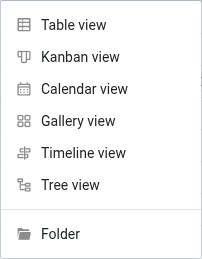
The new views replace the plugins of the same name. The reimplementation as views is more than just a change in the user interface. As full-fledged views, they can be selectively shared via view shares and considered in custom shares, which is simply not possible with a plugin. The tree view also adds functional improvements. For each hierarchy level, the columns to be displayed can be selected. With the tree plugin , this was limited to the top level.
Filter rules in link columns #
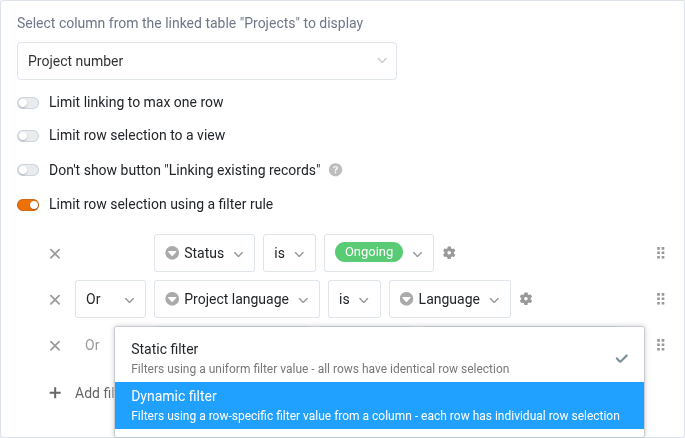
Somewhat hidden in the link column settings is one of the most useful new features: the option Limit row selection with a filter rule. This allows the selection of linkable rows to be restricted based on simple or complex rules. The filters themselves can be static or dynamic:
- Static filter: A uniform filter value is used to filter the rows in the linked table (e.g., only rows that do not have the value “archived” are linkable). The effect is thus analogous to the option Restrict links to a view.
- Dynamic filter: The filter value used to filter the rows in the linked table is a column value of the active row (e.g., only rows whose status is identical to the status of the active row are linkable). Rows with different filter values therefore have different linkable rows.
Filter options in the base logs #
Administrators will appreciate the filter options in the Base Logs . The logs can be filtered by user, table, and time period. Combined filters are also possible, of course. Anyone who wants to track or undo changes in a base with many users will quickly come to appreciate the new clarity.
More Integrations #
Switching from Airtable to SeaTable has never been easier with SeaTable 6.1: simply select Import base from Airtable when creating a new base, enter an Airtable Base ID and a Personal Access Token in the import dialog, and you’re done. SeaTable handles the rest.
The second new integration involves Google Calendar. The new automation action Manage appointments in Google Calendar makes it possible to create appointments directly from SeaTable in a Google Calendar and update existing ones.
Upgrade of the table relationship plugin #
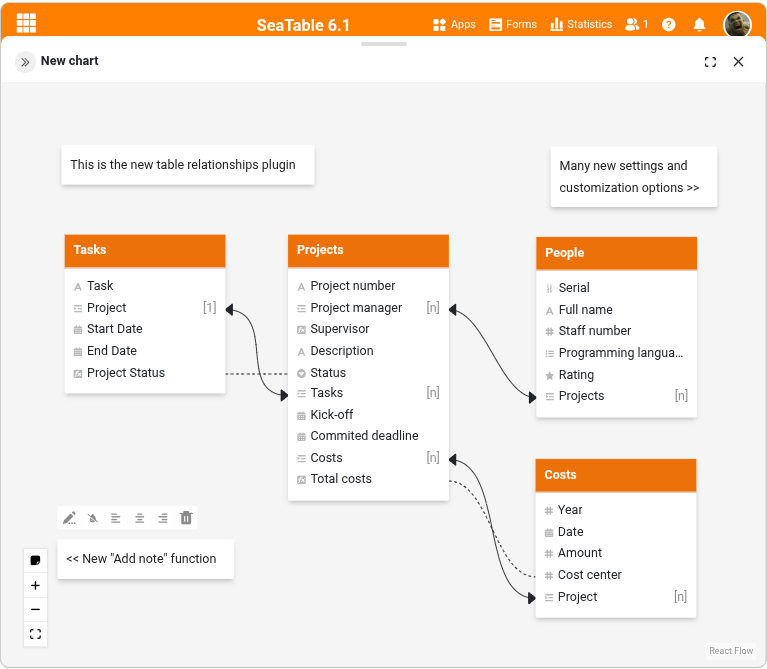
The Table Relationships plugin is a familiar feature and receives an extensive upgrade with SeaTable 6.1:
- Tables can be individually hidden
- Displayed columns can be controlled via view selection
- Links within a table can be hidden
- Extensive formatting functions
- Export function
- Reset diagram function
- Note function
This makes it possible to create clear relationship diagrams even for complex bases.
Chat with an artificial intelligence #
Brand new is the AI Chat Plugin. It allows bases to be edited and analyzed in natural language. Create records, change values, link rows, create analyses — in German, English, French, and other languages. The plugin particularly shines for ad-hoc analyses beyond the standard functions.
An example prompt for analyzing an address list could be: “List all people from the address list who live in a city with more than 1 million inhabitants.” The model then evaluates the residential addresses, determines the population of the place of residence, and generates the results list on this basis.
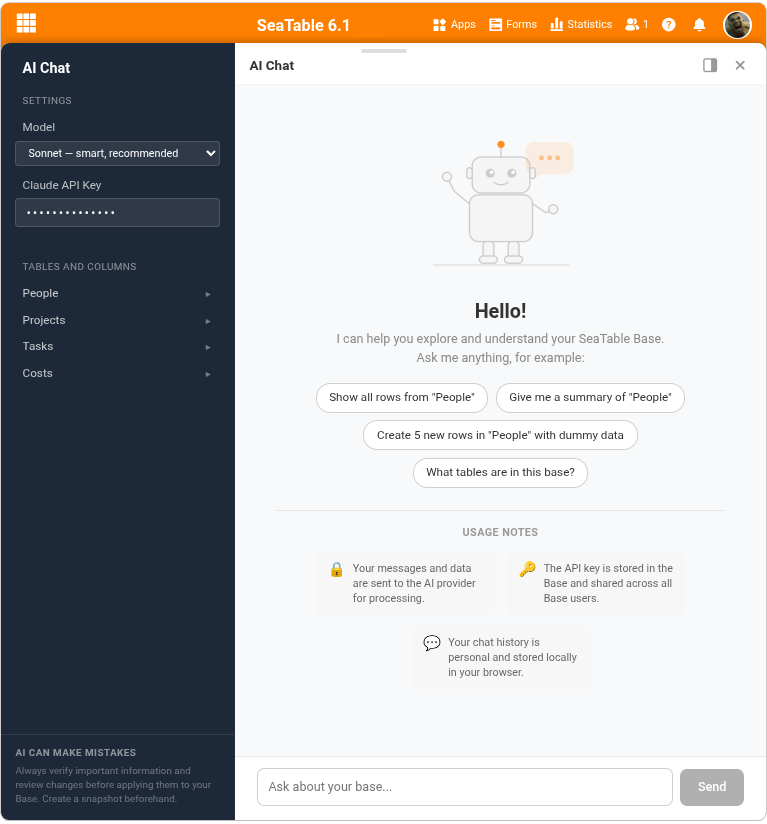
To use the plugin, you must store an API token for one of the supported LLMs in the plugin settings . Supported models include those from Anthropic, OpenAI, and Mistral. Additional models will be added soon.
And even more #
-
Forms — both classic and those in apps — can now be designed with multiple pages. This noticeably improves clarity as soon as many fields are involved.
-
E-mail columns allow the storage of e-mail addresses in the format ‘Display Name < mail@example.com >’. Sending e-mails to such addresses previously failed — both in automation rules and with buttons. This is a thing of the past with SeaTable 6.1.
-
The new Archive automation action makes it possible to automate the transfer of records from the base to the big data backend . The action is offered for both periodic triggers.
Deprecations #
With SeaTable 6.2, two features will be removed from SeaTable.
- The e-mail synchronization feature via IMAP will be removed from SeaTable with version 6.2. We ask affected users to replicate the synchronization via one of the supported automation platforms — Make, n8n, or Zapier.
- With SeaTable 6.2, support for apps based on the Gallery or Data Query App Builder from SeaTable version 4.3 and earlier will also end. We recommend migrating these apps to the Universal App Builder , which offers considerably more possibilities.
SeaTable 6.2 is expected to be released in mid/late May 2026.
TAGS: