Table of Contents
The status bar is located at the bottom of your tables and basically fulfills two different functions, which are explained in more detail in this article:
- Function 1: Counting the rows in a view
- Function 2: Specify a value calculated from all records (e.g. sum, average, etc.) for number-based columns.
Thanks to the status bar you always have these statistical basic values in view as soon as you have opened a table.
Counting the rows in a view
The status bar indicates at the lower left margin the number of all rows that are in the currently opened table view. If you filter in a view , the status bar counts only the remaining table records.
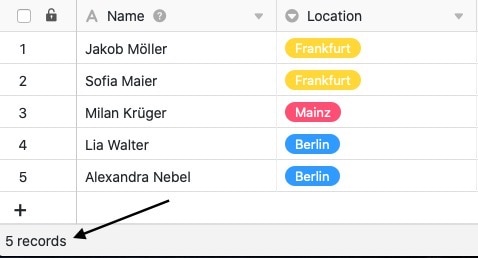
In addition, you can select rows – then it refers only to the selected records.
Specification of a value calculated from all records
For number-based columns, the status bar for each column gives a value calculated from all records.
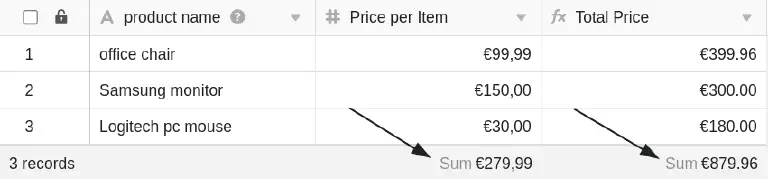
Calculation options
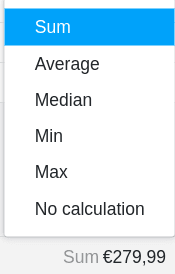
For number-based columns, the following calculation options are available in the status bar :
- Calculation of the sum of all records of the column
- Calculation of the average value from all records of the column
- Calculation of the median from all records of the column
- Determination of the maximum value from all records of the column
- Determination of the minimum value from all records of the column
- No calculation
Compatible column types and formats
For the following column types, the statusrow reflects a calculated value:
- Number columns
- Number
- Percent
- Currency
- Duration columns
- Rating columns
- Numerical values in formula columns
For the following column types, the status bar does not reflect a calculated value, although they (may) contain numbers:
- Date columns
- Created time and Last modified time
- Automatic number
- Numbers in text columns