AI in SeaTable
AI features for your data – no code and GDPR-compliant
With SeaTable, you use artificial intelligence right where your data lives: AI automations analyze documents and texts automatically, the AI Chat answers questions about your database, the AI App Builder creates apps from a description, and with MCP you connect AI agents such as ChatGPT or Claude to your bases. All without programming skills and GDPR-compliant – with an AI model in German data centers and no data transfer to US providers.
The key facts
AI in SeaTable at a glance
SeaTable is an AI no-code platform for relational databases, automations and apps with built-in artificial intelligence. You can use AI in four ways: in AI automations, in the AI Chat, in the AI App Builder and via MCP with AI agents such as ChatGPT, Claude or Cursor. The default model is SeaTable AI: the open-weights model Qwen 3.8 27B, which runs in German data centers operated by our infrastructure partner Exoscale. Status: SeaTable 7.0, November 2026.
-
AI automations
Summarize, classify, extract and recognize text (OCR) – automatically in the background.
Read more -
AI Chat
Ask your own base questions in natural language – the chat reads and writes data.
Read more -
AI App Builder
Create HTML pages for your SeaTable app in a conversation with the AI – by describing them instead of coding.
Read more -
MCP and AI agents
Connect ChatGPT, Claude, Claude Code or Cursor to your bases via the SeaTable MCP Server.
Read more -
Data protection and security
AI model in German data centers, no model training with your data, full control over permissions.
Read more -
AI credits and pricing
Every subscription includes a monthly allowance of AI credits per user.
Read more
Get started now
Try AI in SeaTable for free
Sign up for free and try AI automations, the AI Chat and the AI App Builder directly in SeaTable Cloud. Every subscription includes a monthly allowance of AI credits.
AI automations
Handle recurring tasks automatically
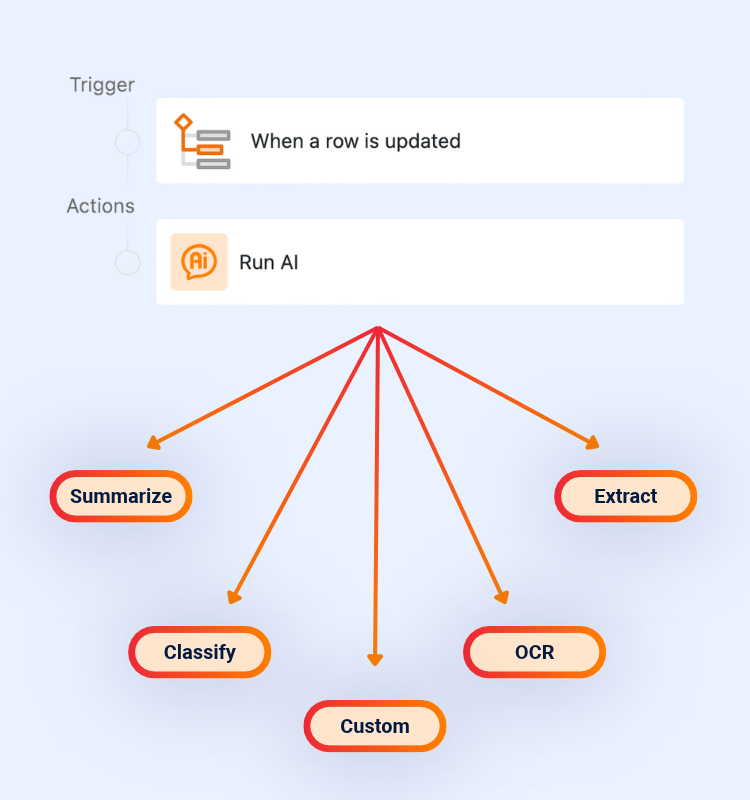
AI actions are available right in the automation editor. An incoming invoice is uploaded, and the AI writes the invoice number, date and amount into the matching columns – for every new entry, without code.
Four ready-made AI actions
Summarize, classify, extract and recognize text (OCR) – plus your own prompts for individual tasks.
Structured results
The AI writes its results into defined columns of your base, so you can filter, analyze and process them right away.
Traceable
Every run is recorded in the automation’s execution log. You can see the credit usage in the team administration.
AI Chat
Ask your own database questions
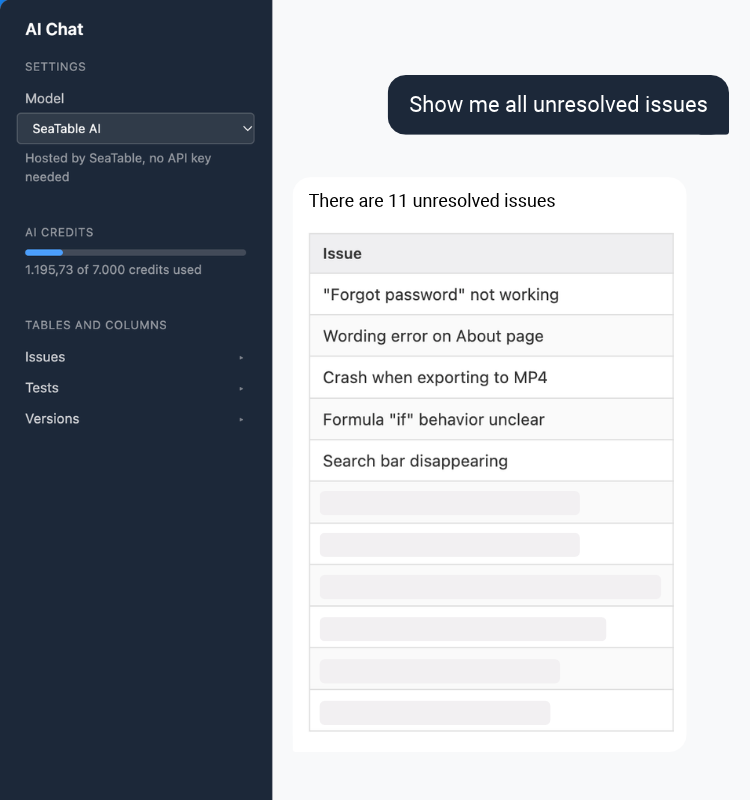
Open the AI Chat in your base and ask, for example: “How many open deals over €10,000 have had no contact for 30 days?” The AI knows the structure of your base and queries exactly the relevant data.
Query and analyze data in natural language
Create records, change values and link rows
Confirmation before data is changed or deleted
In English, German, French and other languages
Uses SeaTable AI by default, no API key of your own required
Optionally with models from Anthropic, OpenAI or Mistral via your own API key
Available in SeaTable Cloud and SeaTable Dedicated
AI App Builder
Create apps by describing them
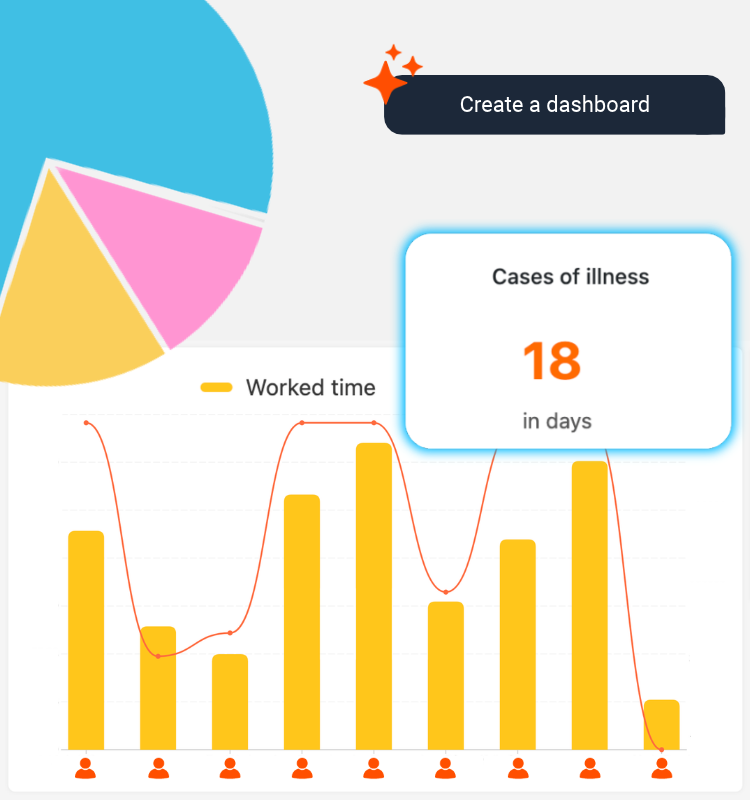
In the App Builder, you create HTML pages in a conversation with the AI. You describe what the page should do and how it should look – the AI builds a first version that you refine in the conversation and publish with a single click.
Assistant for name, UI style, data sources and permissions
Preview of every version right in the chat
Full history saved, earlier versions can be restored
Insight into every step of the AI through its reasoning process
Base data never reaches the AI model, only prompts and schemas
MCP and AI agents
Connect AI agents directly to your data
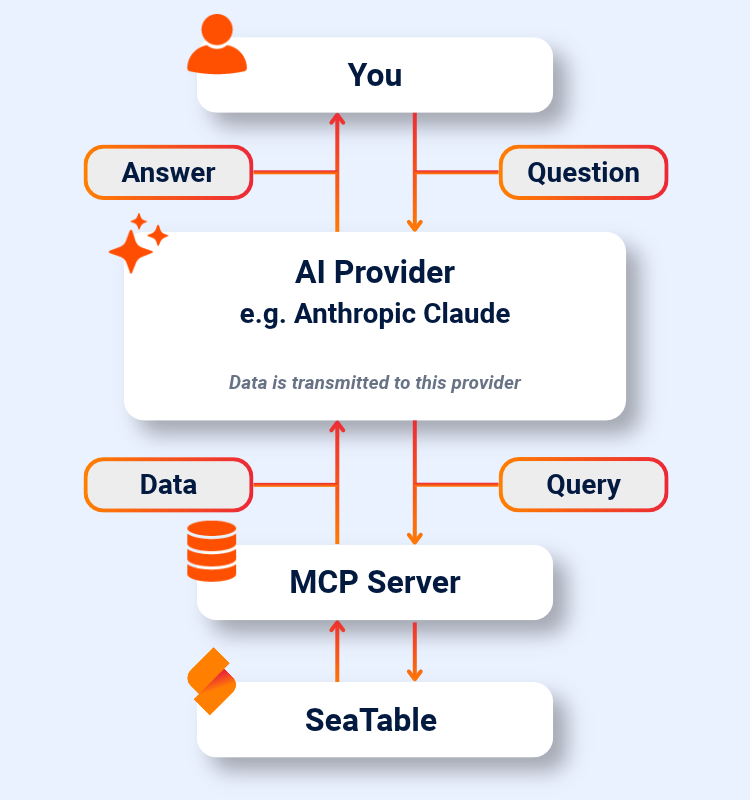
With the Model Context Protocol (MCP), AI agents access your bases directly – no CSV export, no copy and paste. The agent reads, analyzes and writes to your base, just as if you were asking a colleague.
Official SeaTable MCP Server
Connect ChatGPT, Claude Desktop, Claude Code or Cursor to SeaTable. You’ll find step-by-step guides in the Help Center.
Permissions via API token
You decide which bases the agent can access and whether it has read-only access.
Work in the tools you know
Use your SeaTable data in the AI tool your team already works with.
Examples from teams and industries
AI in practice
This is how teams use SeaTable’s AI features in their daily work. You’ll find more examples in the solutions for your team.
Classify support tickets
Incoming requests are analyzed, categorized and prioritized by an AI automation before they reach the responsible team. More about IT service management.
Summarize job applications
The AI summarizes cover letters and CVs so your HR team can review applications faster. More about applicant management.
Check project status
In the AI Chat, ask for projects with a deadline in the next 7 days or have reports created from meeting notes. More about project management.
Read receipts with OCR
The AI reads the invoice number, date, amount and supplier from invoices and triggers the approval workflow.
AI without losing control
Data protection and control when using AI
SeaTable Cloud is hosted by the Swiss provider Exoscale in ISO 27001-certified data centers in Germany. The AI model runs there as well. More about security and data protection.
AI model in Germany
SeaTable AI (Qwen 3.8 27B) runs in Exoscale’s German data centers. No transfer to OpenAI, Google or other US providers.
No model training
Data that SeaTable processes with its own AI model is not used to train AI models.
Confirmation before changes
The AI Chat asks before it changes or deletes data – once, for the session or not at all.
Permissions via API token
For AI agents, the API token determines which bases are visible and whether access is read-only.
Transparent costs
Every subscription includes a monthly allowance of AI credits per user. You can see the usage in the team administration.
Traceable
Every AI automation is recorded in the execution log, so it is always clear which data was processed.
The Airtable alternative with data sovereignty
Currently using Airtable?
SeaTable combines database, automations, App Builder and AI in one system – with an AI model in German data centers and full control over your data.
Video
AI automations explained in a few minutes
Resources on AI in SeaTable
Guides, background information and news about SeaTable’s AI features.
AI Help Center
Step-by-step guides to AI automations, the AI Chat and AI agents in the Help Center.
Connect AI agents
Guides for ChatGPT, Claude Desktop, Claude Code and Cursor under What are AI agents?
What's new in SeaTable 7.0?
AI App Builder, AI Chat out of beta and the new AI model: all the details in the SeaTable 7.0 release notes.
Background on AI and data protection
Why AI and data sovereignty belong together: read the article AI in SeaTable: Automate Processing or Ask Directly.
Frequently asked questions about AI in SeaTable
-
What is an AI no-code platform?
-
An AI no-code platform like SeaTable is software that lets business users or citizen developers build databases, automations and apps and use artificial intelligence without programming. Typical features are visual editors, predefined AI actions such as summarizing, classifying or text recognition, and operation in natural language, for example via an AI chat.
-
What AI features does SeaTable offer?
-
SeaTable offers four ways to use AI. AI automations summarize, classify, extract and recognize text via OCR. The AI Chat answers questions about your base and edits data. The AI App Builder creates HTML pages from a description. Via MCP, you connect AI agents such as ChatGPT, Claude or Cursor to your data.
-
When should I use AI automations, the AI Chat, the AI App Builder or MCP?
-
AI automations are suited to recurring, clearly defined tasks that should run in the background. The AI Chat is ideal for open questions and analyses directly in SeaTable. With the AI App Builder, you create your own interfaces such as dashboards or data entry forms. Use MCP if your team already works with ChatGPT, Claude or Cursor.
-
How does SeaTable's AI differ from Airtable AI?
-
With Omni and Field Agents, Airtable offers extensive AI features, for example to create apps from a description or to fill fields automatically. SeaTable focuses on data sovereignty: the default model SeaTable AI runs in German data centers, and data is neither transferred to US providers nor used for model training. How the two platforms compare overall is shown in our comparison of the best Airtable alternatives.
-
Which AI model does SeaTable use?
-
SeaTable Cloud uses SeaTable AI by default. It is powered by the open-weights model Qwen 3.8 27B with 27 billion parameters, developed by Alibaba. It runs in German data centers operated by our infrastructure partner Exoscale, which also runs the servers for SeaTable Cloud.
-
Does my data leave the EU when I use AI?
-
No. With AI automations, the AI App Builder and the AI Chat with the default model, your data stays in German data centers. Only if you deliberately choose an external model from Anthropic, OpenAI or Mistral in the AI Chat, or connect an external AI agent via MCP, is the queried data transferred to that provider.
-
How much does AI usage cost and what are AI credits?
-
AI features are billed via AI credits. Every subscription includes a monthly allowance of AI credits per user; the figures are listed on the pricing page. In the AI Chat, 1 million input tokens correspond to 500 AI credits and 1 million output tokens to 1,500 AI credits.
-
Which AI agents can be connected via MCP?
-
The SeaTable MCP Server works with AI agents such as ChatGPT, Claude Desktop, Claude Code and Cursor. You’ll find step-by-step guides in the Help Center.
-
Do I need programming skills?
-
No. You set up AI automations in the visual editor, and you use the AI Chat and the AI App Builder in natural language. SeaTable is an AI no-code platform for business users without programming skills.