
With version 7.0, SeaTable takes a big step forward in artificial intelligence. Two features stand out: in the App Builder, you can now generate HTML pages with AI simply by describing what the page should do and how it should look. And the AI Chat plugin, introduced as a beta in SeaTable 6.1, is now ready for production. Both are backed by a more powerful AI model that, for SeaTable Cloud, runs on the infrastructure of our partner Exoscale.
But there is more to SeaTable 7.0 than AI. The SDK for HTML pages, which AI-generated pages use as well, receives four improvements requested by our users. Automations gain two new actions for linked records, and two existing actions become more versatile. Behind the scenes, the release contains numerous bug fixes and security improvements that address the immediate risk posed by AI-powered bots and auto-generated exploits. Smaller improvements to forms, statistics and two-factor authentication round off the release. One feature is retiring: new data query apps can no longer be created, while existing ones continue to work.
This morning, we updated SeaTable Cloud to version 7.0. We recommend that all administrators of self-hosted systems follow suit, not least because of the security improvements. The Docker image for SeaTable 7.0 is available for download from Docker Hub. As always, you will find the complete list of changes in the changelog.
Generating HTML Pages with AI #
SeaTable 7.0 lets you create HTML pages directly in the App Builder using an AI chat. You describe in natural language what the page should do and how it should look, and the AI builds it for you. To generate the page, the AI uses SeaTable’s SDK for HTML pages (more on the SDK in the next section). As a result, an AI-generated page can be just as capable as one written by hand.
Getting started is easy: click the AI icon in the left ribbon. A wizard guides you through the setup: give the project a name, choose a UI style, define the page’s data sources and permissions, and describe the page you want. The AI then generates a first version and displays it in a preview. From there, you refine the page in a conversation with the AI until it does exactly what you need. One click on “Publish” adds the page to your SeaTable app.
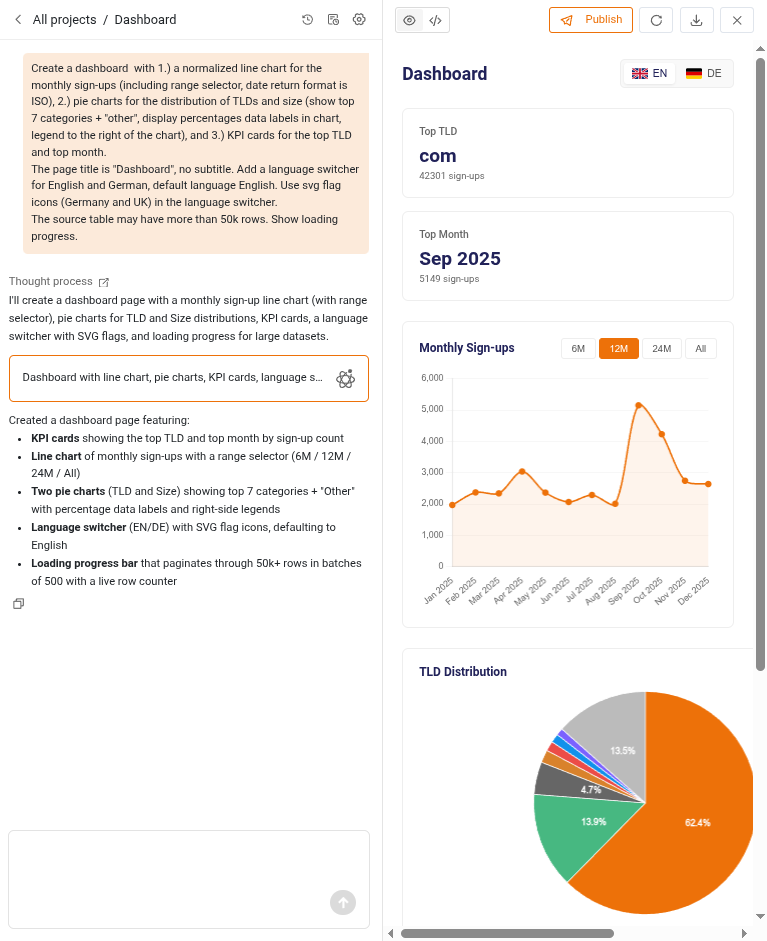
The chat keeps the entire conversation along with every version of the page. This means you can pick up where you left off at any time, or go back to an earlier version if a change didn’t work out. Conversations and unpublished pages are retained for 365 days. And if you’d rather fine-tune a page by hand, you can download it and edit it manually.
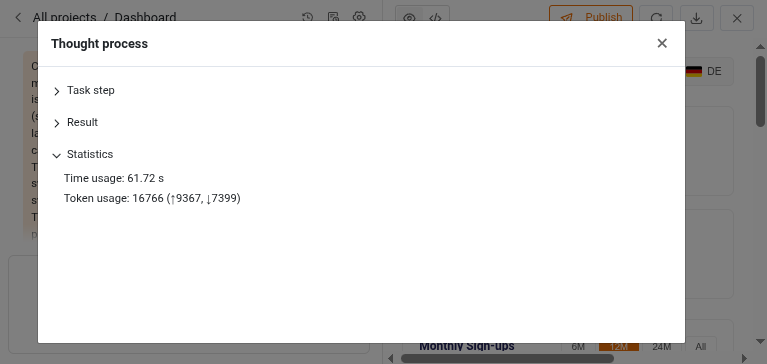
If you’re curious about what happens behind the scenes, click the “Thought process” link in the chat. For each step, it shows the system prompt, your input and the result returned by the AI. A statistics section adds the time and the number of tokens the step consumed.
On SeaTable Cloud, page generation runs on a powerful open-weights model hosted by our infrastructure partner Exoscale, which also operates the servers of SeaTable Cloud. Your prompts and base schemas are therefore not processed by any other third party. The data stored in your bases is never sent to the AI model in the first place. Self-hosters can either use a cloud model from one of the frontier labs or connect a self-hosted model of their choice. SeaTable supports all LLMs with an OpenAI-compatible endpoint.
Enhanced SDK for HTML Pages #
The SeaTable SDK for HTML pages connects your custom pages to the data in your base, both for pages you write yourself and for pages generated by AI. Based on user feedback, SeaTable 7.0 adds four improvements that make it considerably more powerful.
First, the SDK now works with the names of users. Previously, it could only read row data from the base and had no way of looking up names, so pages could only display internal usernames such as a1b2c3…@auth.local. Now your pages can show who is who at a glance.
Second, the SDK can identify the signed-in user. Until now, a page had no way of knowing who was viewing it. With the new getCurrentUser() method, pages can filter data on the current user, for example to show each team member only their own tasks.
Third, the SDK provides new methods to add and remove individual links in link columns. Previously, the updateRow() method could only update a link column as a whole, replacing all existing links. The new methods make it easy to add a task to a project, insert an item into a quotation or remove a participant from a seminar, without touching the other links.
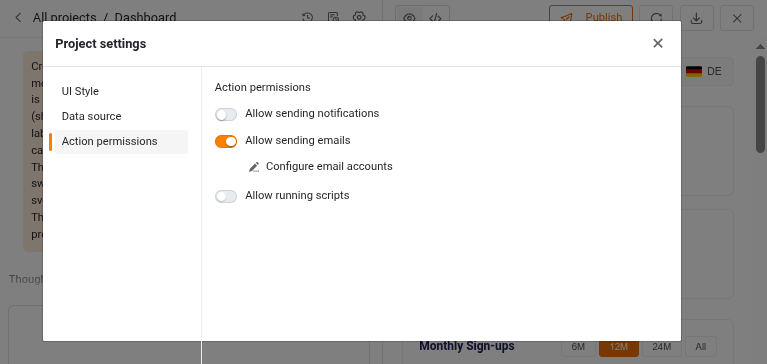
Fourth, the SDK supports three new actions: send an email, send a notification and run a script. With them, HTML pages can send messages and run scripts at the click of a button, for example to confirm a booking by email right from the page. The email accounts and scripts you want to use must be set up in the base.
AI Chat Plugin Ready for Production #
The AI Chat plugin was introduced as a beta feature in SeaTable 6.1. It lets you edit and analyze bases in natural language: create records, change values, link rows or analyze data, in English, German, French and other languages. (Changes to the base schema are not supported.)
With SeaTable 7.0, the plugin leaves the beta phase. Based on user feedback, we have improved both the plugin and the MCP server it uses. Requests are now considerably more efficient, which significantly reduces token consumption. We have also updated the list of supported cloud AI models.
The plugin has also become much easier to use. During the beta phase, you had to provide your own API token for a supported LLM. On SeaTable Cloud, the plugin now uses our own AI model hosted by Exoscale by default. The tokens consumed are converted into AI credits and deducted from your AI credit balance: 1 million input tokens equal 500 AI credits, and 1 million output tokens equal 1,500 AI credits. If you prefer not to use the default model, you can choose one of the other supported models from the frontier labs.
Improved Automation Rules #
SeaTable 7.0 brings two new automation actions, makes two existing actions more versatile and gives the automation log more detail.
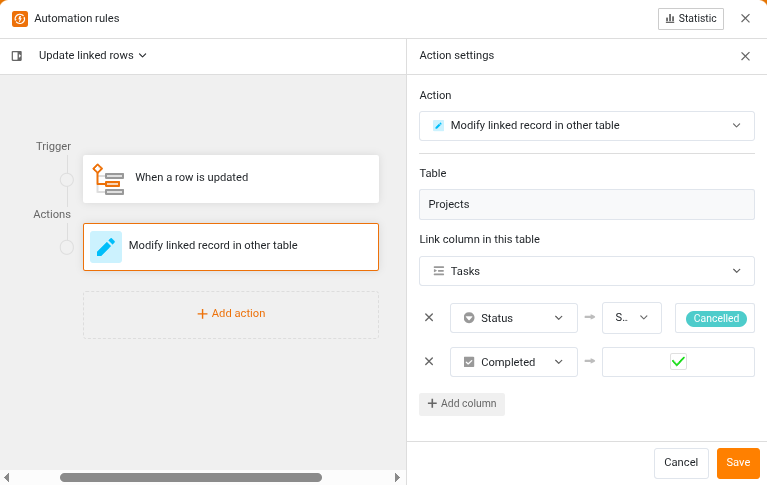
The first new action, “Add record to linked table”, works much like the existing action “Add record to other table”: it creates a new record in another table. In addition, it links the new record to the record that triggered the automation. The second new action, “Modify linked record in other table”, complements the first one by modifying existing linked records in other tables. For example, when the status of a record changes, all dependent linked records can be updated immediately. Both new actions are available with the trigger “When a row is updated”.
The action “Convert page to PDF” generates a PDF from a page design template and saves it to a file column. In SeaTable 6.x, it was only available with the scheduled time trigger. Now you can use it with all triggers that have a row context: “When a row is added”, “When a row is updated” and “At scheduled time for records that match condition(s)”. This opens the door to fully automated workflows. For example, a customer submits a request for a quotation, SeaTable generates the quotation (with or without the help of AI), and the quotation is sent to the customer by email.
The action “Manage events in Google Calendar” can now also delete events from a calendar.
Finally, the automation log is more informative: in addition to the trigger time, it now also records when the execution ended.
And Much More #
Multi-page forms can now display a progress bar, so respondents can see how far along they are. In addition, submission messages now support rich text.
The statistics in SeaTable apps have been rebuilt using D3.js, a widely used and powerful JavaScript library for data visualization. This technical change paves the way for more customizable charts in the future. The statistics in the base will follow in the next minor release.
When you set up two-factor authentication, SeaTable now displays the secret key, so you can store it in your password manager.
And one more thing: native SeaTable apps for iOS and Android are coming soon. Final tests are currently underway. Stay tuned!
Removed Feature: Data Query Apps #
With SeaTable 7.0, we have removed the builder for data query apps. New data query apps can no longer be created. Existing data query apps are not affected and continue to work as usual.
For new apps, please use universal apps instead. They can provide the same functionality as data query apps, and more. You can find out how to build them on the help pages for universal apps.