SeaTable – Your SWOT Analysis Template
Systematically analyze your company with SeaTables’ SWOT analysis template—from strategic initiatives to individual projects. Leverage strengths, overcome weaknesses, seize opportunities, and manage risks—in a structured, transparent, and collaborative way.
Perform SWOT analysis online
SWOT Analysis Tool for Strategic Planning
-
Structured
The SWOT analysis template provides a clear structure with four categories: strengths, weaknesses, opportunities, and threats—ideal for brainstorming in marketing and strategic discussions in project teams.
-
Flexible
Customize the SWOT analysis template to suit your requirements—whether for individual products, campaigns, projects, or entire business areas in the operations environment—without IT support.
-
Transparent
Your team collaborates in real time. With automatic change tracking and commenting features, everyone always has access to the latest analysis results and strategies.
-
AI automation
SeaTable’s integrated AI-powered automations enable intelligent categorization and prioritization—GDPR-compliant thanks to its own AI server.
-
Action plan
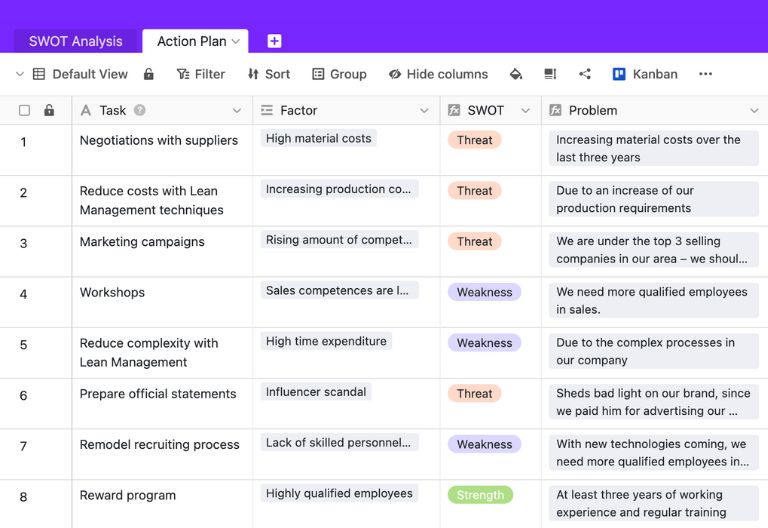
With the integrated action plan table, you can derive concrete measures directly from the SWOT analysis, assign responsibilities, and track implementation.
-
Permissions
With individually adjustable permissions, you can determine who is allowed to view or edit the SWOT analysis and strategies – for guaranteed confidentiality.
Who uses SeaTable?
Leading companies worldwide rely on SeaTable

















100.000+
Downloads in the first year of Docker Hub
1.500+
Daily users on SeaTable Cloud
4.6
Review on Capterra
Your advantages at a glance
Perform digital SWOT analysis with SeaTable
The AI no-code solution SeaTable impresses with its flexibility, transparency, and real-time collaboration. With our SWOT analysis template, you benefit from real-time updates, visual Kanban prioritization, and direct strategy derivation—for business planning that really works: in the project portfolio, in marketing strategies, in day-to-day operations, and at the C-level. If you have previously used a SWOT analysis template Excel you can import your data in just a few steps and continue working with it in SeaTable as a modern, collaborative solution.
Real-time collaboration: Your entire team works synchronously on a SWOT analysis – from project management and marketing to operations and management.
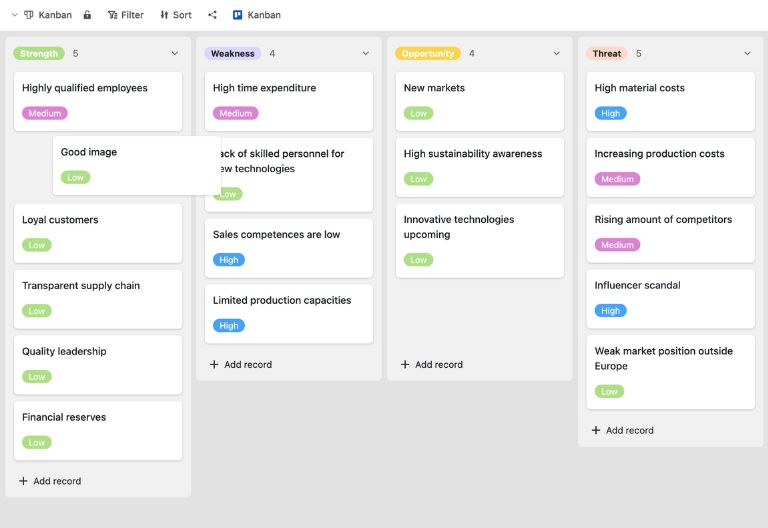
Make strategies visible: With the integrated Kanban view, you can visualize SWOT factors and prioritize them using drag-and-drop—ideal for workshops, board presentations, and strategic debates.
From analysis to action: The direct link between SWOT analysis and action plan makes strategies immediately implementable—with clear responsibilities and deadlines.
Scalable: From small teams to large strategy workshops involving multiple departments, the SWOT analysis template grows with your requirements.
Structured analysis
How the SWOT analysis template works
Identify and structure SWOT factors
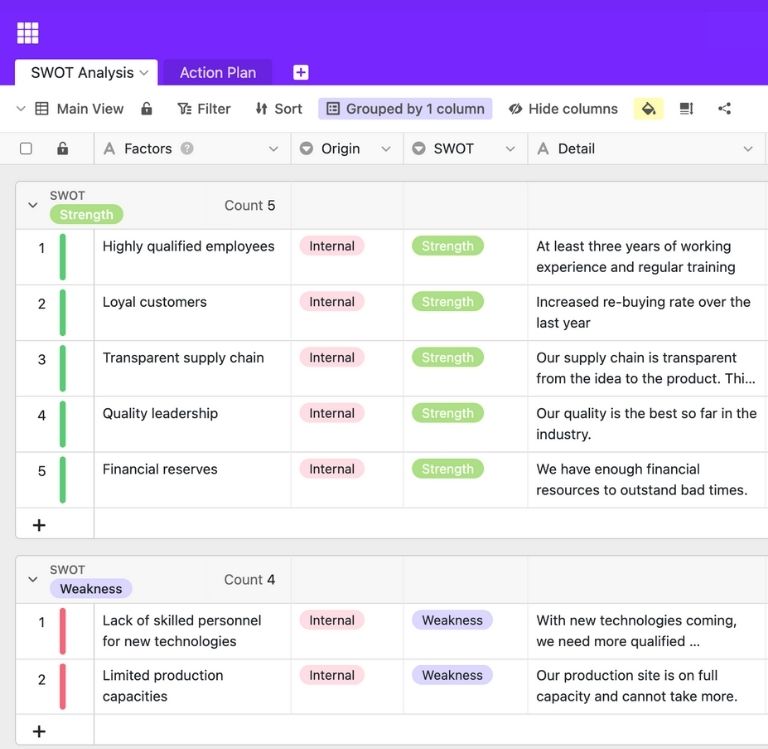
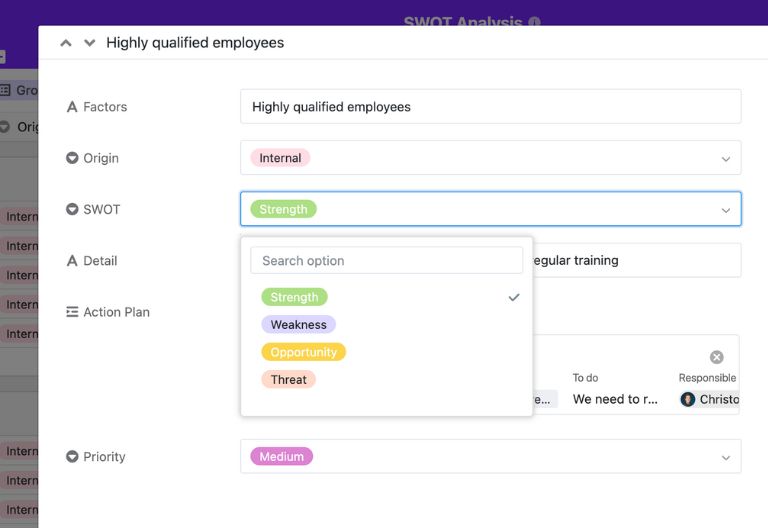
Define all relevant factors in a structured manner in the template. Enter a factor, determine its origin (internal or external), and evaluate its impact (positive or negative). This will reveal whether it is a strength, weakness, opportunity, or risk—the basis of your SWOT analysis template and other SWOT analysis templates, which you can use to analyze different areas of your business.
Visualize and prioritize factors
Use the template’s integrated Kanban view to visually group all SWOT factors and rank them by relevance. Drag and drop cards between the four categories and prioritize them by urgency or strategic importance. This helps you identify patterns, focal points, and blind spots—perfect for strategy workshops and boardroom presentations.
Derive and evaluate strategies
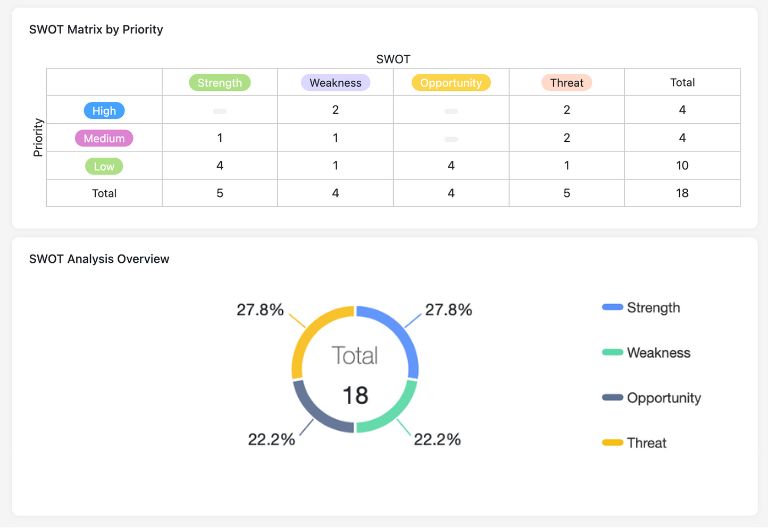
The SWOT analysis yields four strategic combinations: S+O (build on strengths), S+T (hedge risks with strengths), W+O (make up for weaknesses with opportunities), and W+T (avoid weaknesses). The template helps you identify and discuss these combinations and derive concrete, actionable strategies from them—such as growth initiatives for marketing, efficiency programs for operations, or C-level portfolio decisions.
Create and follow an action plan
In the Action Plan tab, you link each strategy to specific measures. These include task descriptions, responsible persons, deadlines, and status. This way, your SWOT analysis templates become a living implementation plan rather than a paper tiger, and you can keep track of progress at any time—including status overviews, responsibilities, and due dates for project managers and management teams.
Create your SWOT dashboard with the App Builder
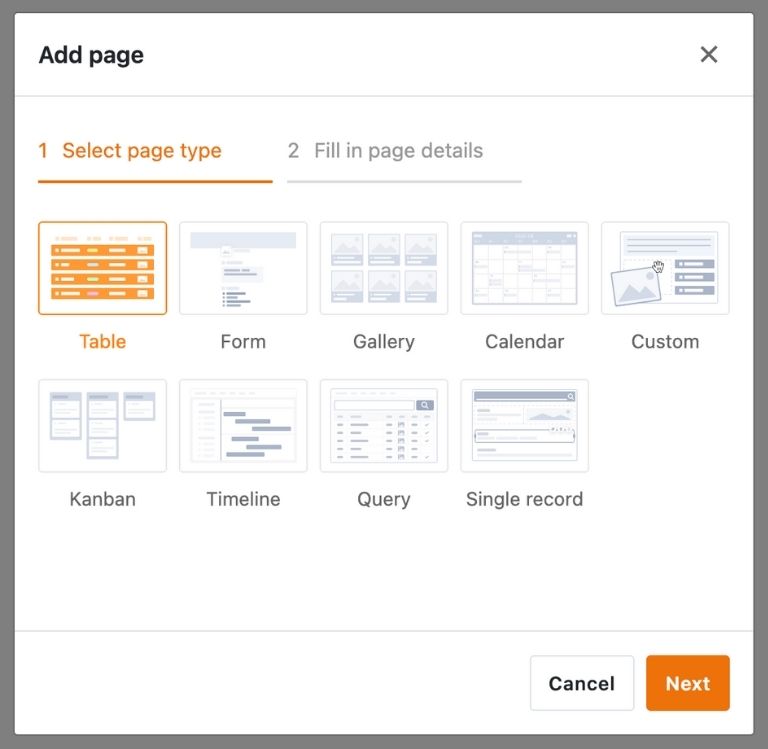
With SeaTable’s integrated no-code app builder, you can create your own customized strategy front end with minimal effort. Use the web form for collaborative entry of SWOT factors, create different views for different perspectives—e.g., a management view with a Kanban board for priorities, detailed views for project managers and marketing managers, and operational overviews for the operations team—all working on the same data basis. Share your SWOT results with stakeholders or the board via a link and use granular permissions for secure confidentiality. Password protection and user-defined access provide additional security.
Develop strategies that work – with SeaTable
Smart automation
AI-supported strategy development with SeaTable
With SeaTable, you benefit from powerful AI features , that take your SWOT analysis to the next level. Automate recurring tasks and save valuable time in strategy development.
Multilingual SWOT analyses
Automatically translate SWOT factors into other languages with a custom prompt—ideal for international teams or global strategy workshops. Each team member works in their own language, and the AI consolidates the results centrally in a shared analysis.
Text recognition with OCR
OCR makes scanned documents and whiteboard photos searchable. The recognized text is sent directly to your SWOT analysis template, where it can be evaluated in a structured manner and used for further analysis.
Document analysis with Extract
With Extract, you can evaluate market studies, reports, or competitive analyses and automatically transfer relevant text passages into your tables—a practical basis for deriving SWOT factors.
AI support for categorization
The Classify feature analyzes text content and can assist you in classifying factors—for example, by suggesting whether an aspect tends to be a strength, weakness, opportunity, or risk. You make the final decision and fine-tuning.
Executive summaries with Summarize
Summarize creates short summaries from extensive SWOT tables or stored documents, which are ideal for board presentations, portfolio reviews in project management, or marketing and operations reports for the management team.
Discussion prompts with custom prompts
With custom prompts, you can have the AI suggest questions, hypotheses, or wording variations that stimulate your strategic discussion—for example, on possible responses to specific risks or on how to exploit identified opportunities.
GDPR compliant & confidential
Security for your strategy data
SeaTable is a modern AI no-code platform with automation and app builder, offering all the features you need for digital, confidential strategic planning. Protecting your strategic information is our top priority.
GDPR compliant
SeaTable Cloud and SeaTable AI are operated exclusively in Germany. Strategy data and documents remain within the EU—a plus for compliance-sensitive companies.
2FA and SSO
SeaTable supports all common authentication techniques and enables two-factor authentication and SSO. Because you decide who gets access to your strategic planning.
FAQs about SeaTable's SWOT analysis template
-
Can I use SeaTable's SWOT analysis template for free?
-
Yes, you can use the SWOT analysis template free of charge. In the template library, you will find a template with sample data that you can customize directly.
-
How does digital SWOT analysis differ from traditional methods?
-
Paper, whiteboards, or simple SWOT analysis Excel templates are static and difficult to maintain collaboratively. SeaTable offers centralized, cloud-based SWOT analysis templates with real-time collaboration, Kanban view, action plans, and optional AI automations.
-
How does the Kanban view work in the SWOT analysis template?
-
The Kanban view automatically assigns your factors to the categories of strength, weakness, opportunity, and risk. You can rearrange factors and visualize priorities using drag-and-drop—ideal for workshops.
-
Can I involve multiple teams in the SWOT analysis?
-
Yes, thanks to approvals and role-based permissions, multiple departments can work on the same SWOT analysis at the same time—without version chaos.
-
Can I import my existing SWOT analysis?
-
You can import existing SWOT lists as Excel or CSV files, for example, and then edit them in SeaTable’s SWOT analysis templates.
-
What specific AI functions are available to me?
-
SeaTable offers dedicated AI steps such as Summarize, Classify, OCR, Extract, and Custom Prompts, which you can incorporate into automations—for example, for text recognition, classification, or content summarization.
-
Are the AI functions suitable for sensitive strategy data?
-
Yes, SeaTable AI runs on its own server component, data processing takes place in the EU and is designed to meet high data protection requirements – an important advantage for strategy and competitive analysis .
-
Is there any support available if I want to get started with the SWOT analysis template?
-
Yes, you can find instructions and best practices for SWOT analysis in the SeaTable help section and blog; support is also available if you have any questions about using the template.