Student Planner Template for University, Bachelor & Master's Studies
Bring real structure to your study routine! With our digital template, you organize lectures, term papers, exams, ECTS credits and grades in one central place. SeaTable’s flexible student planner combines a semester planner, grade calculator and module overview in one interactive no-code database. Instead of scattered calendars, notes and Excel lists, you work with a personalized student planner featuring a calendar view, Kanban board and linked tables. Whether Bachelor, Master or state exam – with this online template, students keep deadlines, credit points and the exam period in view. Create your individual plan and organize your studies digitally, flexibly and stress-free!
Digital study management
Student Planner Template for Semesters, Grades & Deadlines
-
Structure your study routine
Bundle lectures, exams, term papers and personal study phases in one system! This keeps your studies clearly organized, reliably avoids duplicate work and helps you track your entire study routine across every semester at a single glance.
-
Module & deadline overview
Modules, lecturers, submission deadlines, exam registration and key dates in one central place. With a linked module overview, you instantly see which tasks are still open, which deadlines are coming up and what takes priority this semester.
-
Grades & ECTS at a glance
Enter grades and ECTS credits directly to document your progress in every module. This not only keeps your academic results in view but also lays the foundation for a personal grade calculator that grows with you across the entire semester.
-
Collaborate in study groups
Collaborate in real time with fellow students or your study group. In a shared base, you gather tasks, exam dates and documents centrally. Roles and permissions ensure everyone sees and edits only the content that is truly relevant to them.
-
Flexible student planner
Adapt the template flexibly to your subject, your university or your university of applied sciences. Add fields for reading lists, grade averages, semester organization or custom filters and build a plan that fits your personal workflow exactly.
-
Calendar & Kanban view
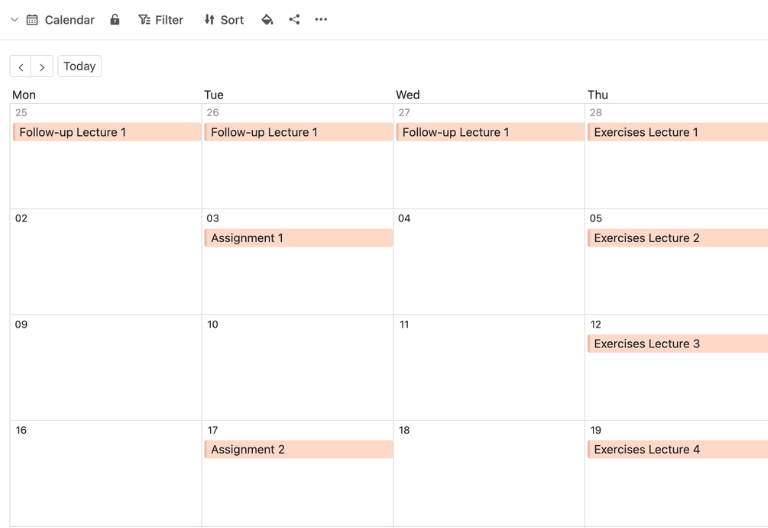
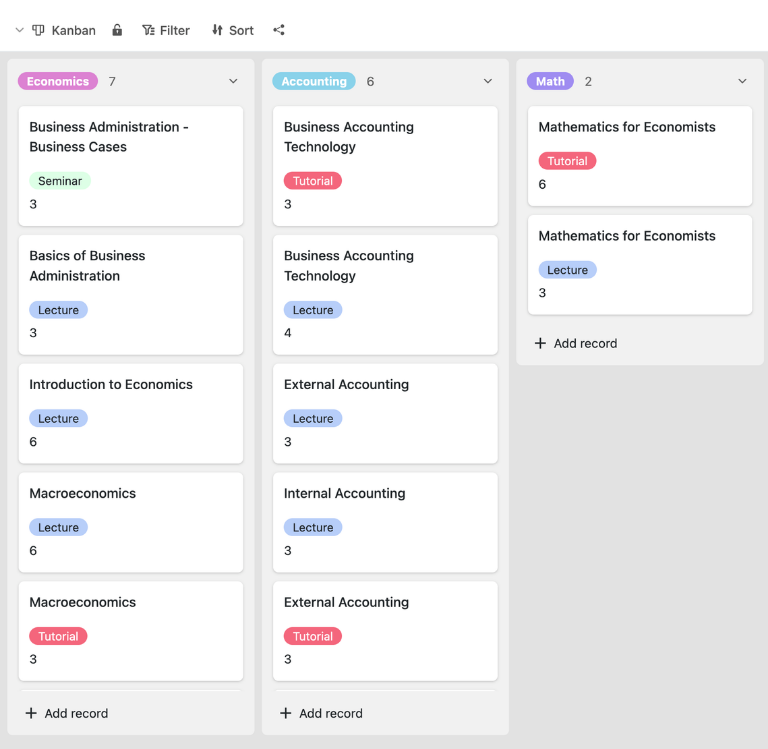
Use the calendar view and Kanban board to steer deadlines, lecture periods and term papers visually. Color-coded deadlines, clear status columns and a digital semester planner help you spot milestones in every exam period right on time.
Who uses SeaTable?
Leading companies worldwide rely on SeaTable

















100,000+
Downloads in the first year on Docker Hub
1,500+
Daily users on SeaTable Cloud
4.6
Rating on Capterra
Your benefits at a glance
Semester planner made easy, step by step
With SeaTable’s flexible AI no-code platform, you build a student planner that adapts to your real study routine. Replace rigid calendars, isolated grade lists and cluttered Excel files with an interactive planner featuring a module overview, semester planner, calendar view and Kanban board. This is how students in Bachelor, Master or state-exam programs organize lectures, term papers, ECTS credits and exams in a single system. If needed, connect your template directly to a to-do list to map tasks, deadlines and self-organization even more precisely.
Live data: Every change to lectures, grades, deadlines or credit points is visible instantly – perfect for a plan that always stays up to date, for you and your entire study group.
Real collaboration: Use the template together with your study group and collect tasks, dates and information in one shared database instead of scattered files and mails.
Interactive template: Switch flexibly between the calendar view for deadlines, the Kanban view for term papers and the tabular module overview for your semester organization.
Central storage: Grades, lecturer contacts, exams, reading lists and documents live directly in the student planner – instead of spread across calendars, emails and files.
A real-world example
How to use the student planner template
Schedule table for courses & lectures
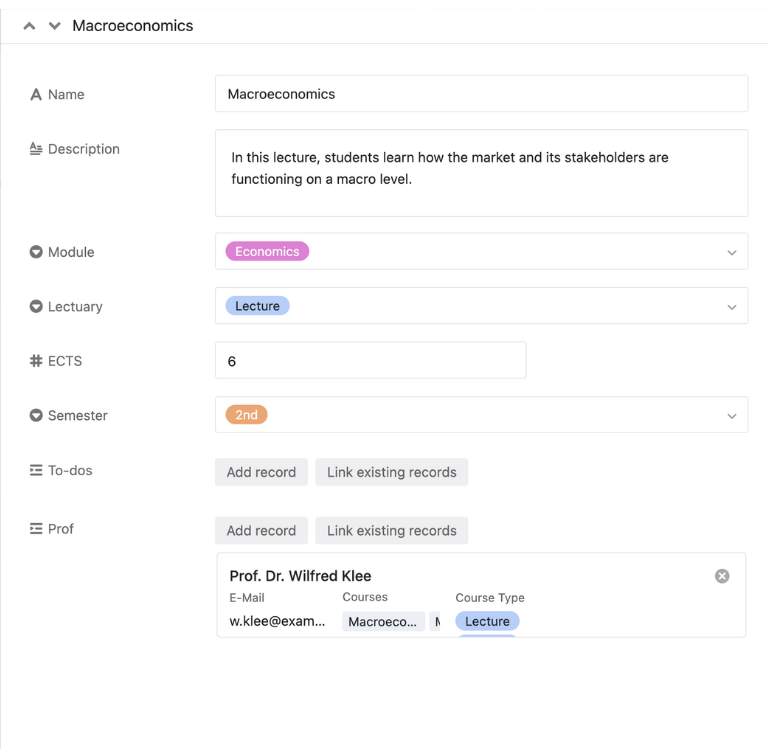
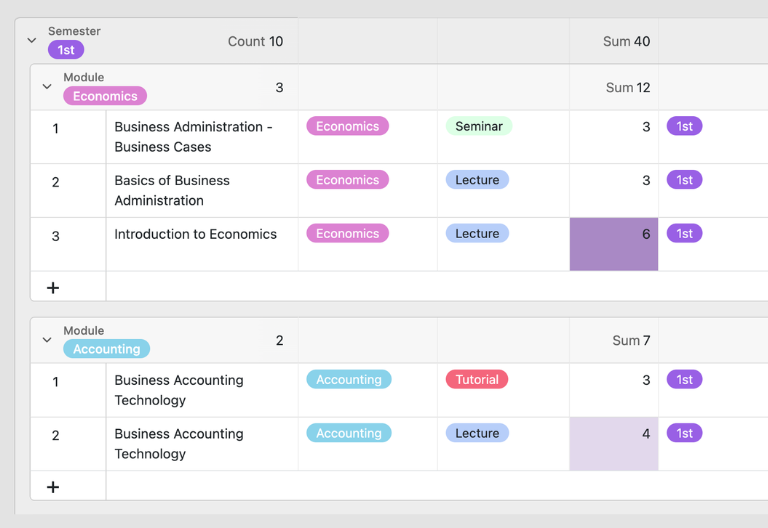
In the “Schedule” table, you gather all courses and lectures of your semester with title, information, credit points and further details. This central module overview forms the heart of your student planner and is linked directly to tasks and professors, so you can always see which to-dos and contacts belong to which course, all in one connected view.
To-do table for exams & term papers
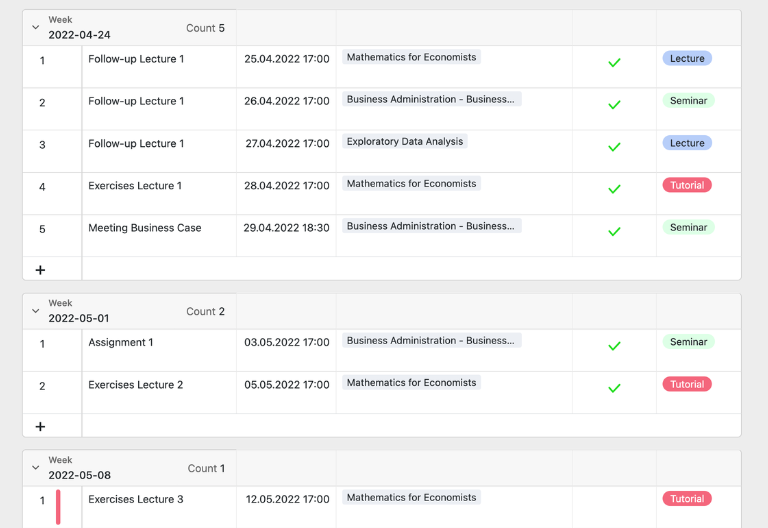
In the “To-Do’s” table, you capture all semester-related tasks such as exams, assignments, preparation, follow-up work or meetings. You add the date, time and reference to the matching course. Open entries are highlighted in color until they are marked as done via checkbox – ideal for visual deadline control and clear priorities throughout the semester.
Professors table for your contacts
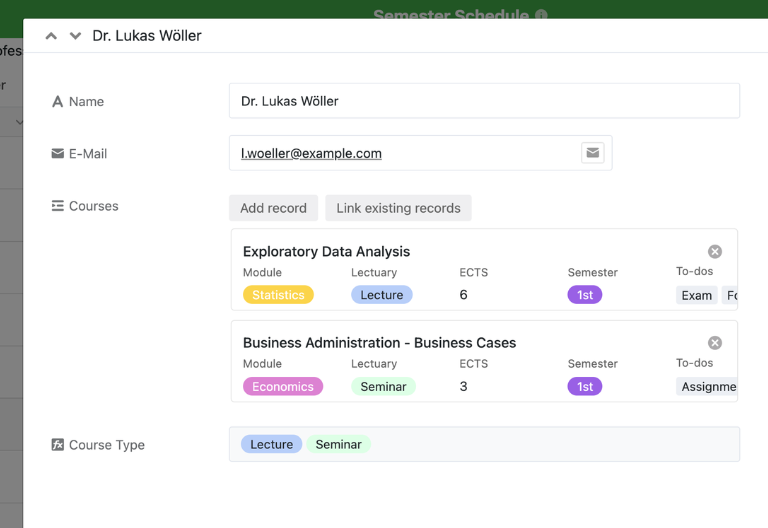
In the “Professors” table, you document the contact details of your lecturers and link them directly to the relevant courses. This turns your student planner not only into a semester planner for dates, but also into a central hub for organizational information around courses, questions and exams throughout the entire semester, so nothing important gets lost.
Calendar view for semester dates
With the integrated calendar view, you see your to-dos either as a weekly overview or a daily agenda and keep lecture periods, submissions and exams reliably in view. This lets you use the planner as a clear semester planner that brings dates, tasks and your personal semester organization together in one single, clear view for the whole week and the entire semester.
Your interactive student planner app
With the integrated no-code App Builder, you turn the template into an interactive app for your entire study routine. Combine forms for new modules, fields for grades, ECTS credits, lecturers and submission deadlines with a calendar view, Kanban boards and filtered overviews – right through to specialized apps for the exam period, exam registration or term papers. Share targeted views with your study group and use permissions to define who may see, add or update content. This turns the digital student planner into a flexible system for self-organization, semester organization and academic documentation.
Organize your student planner, semester planner and grades digitally – with SeaTable
Smart automation for students
AI-powered study planning
Discover the powerful AI features in SeaTable! Your student planner becomes a smart assistant that clearly simplifies semester organization, self-organization and task management. Turn the template into an intelligent hub for your module overview, term papers, exams, grades and ECTS credits. Instead of static calendars or spreadsheets, you work with a flexible no-code database that actively supports you in your everyday study life.
Auto-categorize modules
With Classify, the AI automatically assigns your courses, exams and tasks to the right categories. This helps you see faster which entries belong to the lecture period, exam period or term papers, and keeps your module overview cleanly structured without manual sorting.
Extract deadlines from text
With Extract, the AI reads key information from emails, course descriptions or PDF documents and transfers dates, lecturers, exam registrations or submission deadlines. This reduces manual upkeep and lets you capture relevant data far faster and more consistently.
Digitize notes from images
The OCR function recognizes text from photographed scripts, whiteboards or lecture slides and makes it directly reusable. This lets you move content from university straight into tasks, reading lists or module notes, without copying or re-typing everything by hand.
Condense course information
With Summarize, the AI condenses extensive course materials, minutes or meeting notes into a compact form. This gives you usable overviews of content, tasks and open points much faster and saves valuable time, especially during stressful phases of the semester.
Define your own AI rules
With Custom Prompt, you define your own rules for your student planner, for example how to phrase to-dos, how to prioritize term papers or how to assess open deadlines. This lets the AI adapt precisely to your study routine, your semester organization and your way of working.
Evaluate your study status
AI-powered status views continuously analyze your plan and show which tasks are open, where deadlines are becoming critical or which modules still need attention. This lets you spot bottlenecks early and steer exams, submissions and semester goals proactively.
Transparent real-time teamwork
A transparent and flexible student planner template
SeaTable is a modern AI no-code database solution with automations and an App Builder, offering every function you need for professional study planning. The focus is on transparency, flexible customization and clear semester organization – from simply managing lectures and deadlines to a linked student planner with semester planner, module overview, grade calculator and task management, as a scalable alternative to static calendars, Excel files or isolated grade lists.
An alternative to static planners
Organize your study routine in SeaTable far more flexibly than in calendars, Excel or Word – thanks to linked tables, personalized views, forms and automations for university, university of applied sciences and study group.
Link your studies and literature
Connect your student planner directly to a bibliography, so that books, sources, seminar texts and materials run together in a structured way with modules, term papers and your semester organization.
Data protection, German standard
When you use SeaTable Cloud or the integrated AI, your data on courses, grades and study documents stays in Europe – the infrastructure runs exclusively on servers located in Germany, in line with strict European standards.
Secure login, controlled access
SeaTable supports two-factor authentication and single sign-on, so that only you and the people of your choice gain access to your student planner, your module overview and your semester-related data.
FAQ – Common questions about the SeaTable student planner
-
Can I use this template as a full student planner on my smartphone?
-
Yes, you can use the planner on your smartphone or tablet as well. This keeps lectures, deadlines, term papers and exams in view on the go and gives you access to your digital semester planner at any time and from anywhere.
-
Does the semester planner help me calculate my current grade average?
-
Yes, you can record grades and credit points directly in the student planner and build your own personal grade calculator from them. This documents your results centrally and keeps your current standing in the semester transparent at all times.
-
Can I visually highlight deadlines and due dates for term papers?
-
Yes, the template supports a visual layout of your tasks and deadlines. With the calendar view, color coding and filtered views, you recognize important due dates and critical deadlines noticeably faster and keep every submission under control.
-
Is SeaTable free to use for students and study groups?
-
Yes, you can use the template free of charge in the SeaTable Cloud. This lets students and study groups test the digital planner with no barrier to entry and organize semesters, tasks and dates directly in one shared base.
-
How can I customize the planner to filter extra criteria like reading lists?
-
You can extend the planner flexibly and add your own fields, filters and views. This lets you map reading lists, additional module attributes, individual priorities or specific requirements from Bachelor, Master or state-exam programs in a targeted way.
-
What makes a good student planner for university?
-
A good student planner combines scheduling, module overview, deadline control and grade documentation in one system. Exactly this mix of a semester planner and a personal grade database helps you organize your study routine in a structured and efficient way.
-
Can I link exams, lectures and submissions with each other?
-
Yes, that is exactly what the template is designed for. You link courses, to-dos, professors, exams and due dates in one shared database and create a planner that goes far beyond a classic calendar.
-
Is SeaTable also suitable as a long-term planner across several semesters?
-
Yes, you can use the template not just for a single semester but as a long-term semester planner across several semesters. This is especially helpful when you want to document your study progress, grades and credit points over the long run.