SeaTable – Your Customizable Procrastination App for More Structure
Do you want a structured system to finally overcome procrastination, but do not know where to start? The best intentions often fail as soon as you face a blank page and have to build an anti-procrastination structure yourself. With SeaTable, you start with ready-made, customizable templates for your personal procrastination app and move straight into a structured routine. Simply copy the templates you need and enter your tasks, goals and deadlines right away. Whether to-do list, work breakdown structure, habit tracker or cleaning schedule – with SeaTable as your app to beat procrastination, you keep every area of your life in view in one central place and make progress visible.
Your anti-procrastination tool
With SeaTable, your procrastination app becomes a daily companion
-
Flexibly customizable
Get started in just a few minutes with ready-made templates and adapt them step by step to your own needs and ideas. Add columns, views or priority tags whenever you like – no programming skills required and no blank page to start from.
-
AI-powered automations
Use the integrated AI functions for smart data processing, for example to summarize or prioritize tasks automatically. Or turn the goals you have achieved into motivating affirmations that keep you on track and motivated day after day.
-
Automatic deadline reminders
Use the built-in notifications to receive automatic deadline reminders and make sure important tasks are never simply forgotten. Appointments and to-dos stay in view even on hectic, busy days instead of quietly slipping off your radar.
-
Clear prioritization
Assign a priority tag to every task and see at a glance what is urgent and what can wait. This clear prioritization is the foundation of an effective app to beat procrastination and helps you tackle the right task first every single day.
-
Ready to use on the go
Use SeaTable fully in sync on your smartphone, tablet and PC. Your procrastination app is always available, wherever you are – on the go, at the office or at home, you add new tasks spontaneously and tick off completed ones right away.
-
Make progress visible
Progress bars show how many tasks you have already completed and give you the sense of reward that scattered paper notes simply cannot provide. Every task you tick off becomes visible and motivates you to tackle the next one on your list.
Who uses SeaTable?
Leading companies around the world rely on SeaTable

















100.000+
Downloads in Docker Hub's first year
1.500+
Daily users on SeaTable Cloud
4.6
Review on Capterra
Structure and productivity
Overcome procrastination instead of postponing
The AI no-code platform SeaTable offers you far more than classic to-do lists. It gives you a fully fledged procrastination app that you can configure exactly the way you need to overcome procrastination. You benefit from the combination of ready-to-use templates, a spreadsheet-like interface and a flexible no-code database in the background. Instead of juggling several separate apps, you organize tasks, projects, habits and household chores in one account and keep track at all times. This saves you time and helps you turn good intentions into routines that last.
Many templates, one account: to-do list, work breakdown structure, habit tracker, cleaning schedule and many other templates are bundled in one place instead of being spread across isolated solutions.
Ready to use immediately: copy the anti-procrastination template you need and enter your tasks right away instead of starting from a blank page and losing valuable time on setup.
Individually expandable: add your own columns, priority tags or subtasks without any programming skills and adapt your procrastination app step by step to new goals and routines.
Share with friends and family: easily share your app with other people. This gives you active support from those around you instead of quietly postponing deadlines and letting new routines slide.
GDPR-compliant: at SeaTable, your data is hosted in line with the GDPR on servers run by the Swiss company Exoscale in Frankfurt, Germany, with European data protection standards.
Four templates, one system
Our recommendations for your procrastination app
Here's how it works
The habit tracker turns resolutions into lasting habits
Build new habits in a structured way
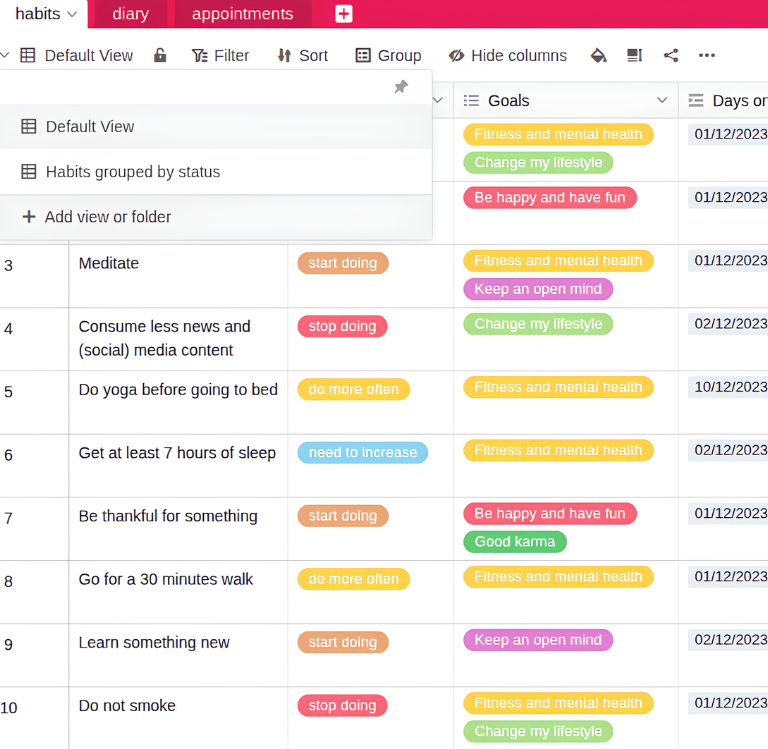
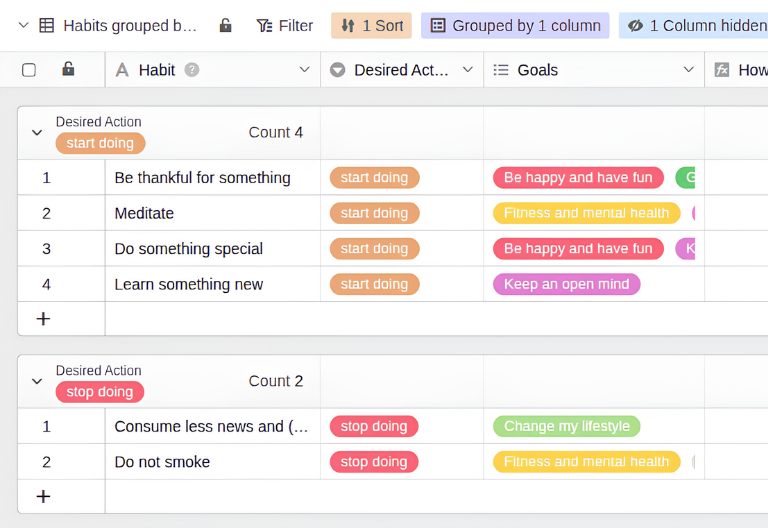
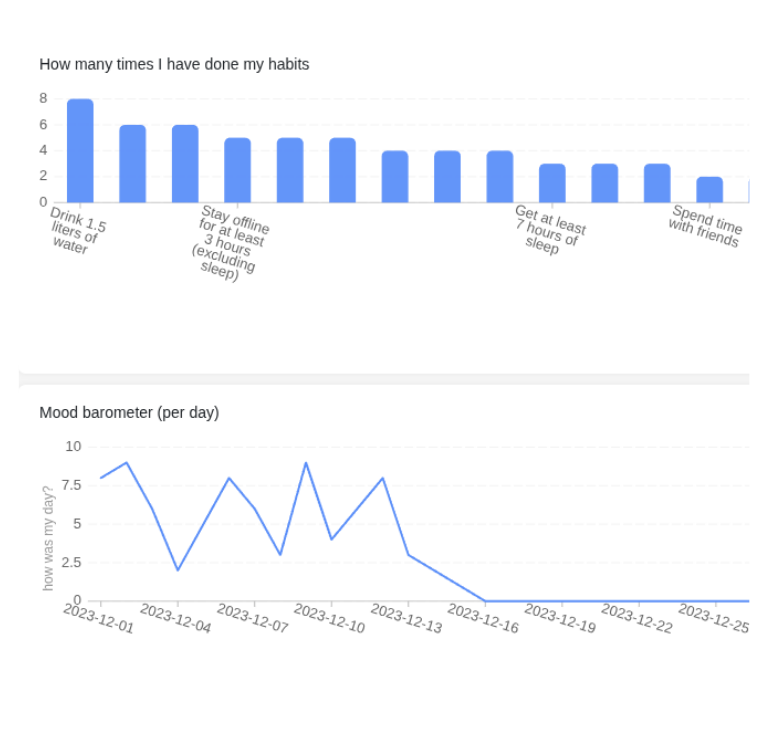
In the habit tracker, record which action you want to take and which goal you are pursuing with it. The column “Days on which I did it” is linked to the Diary table and automatically documents every successful day. A count link in the column “How many times” adds up how often you have already achieved your new habit, so your progress remains measurable at all times.
Keep daily routines and mood in view
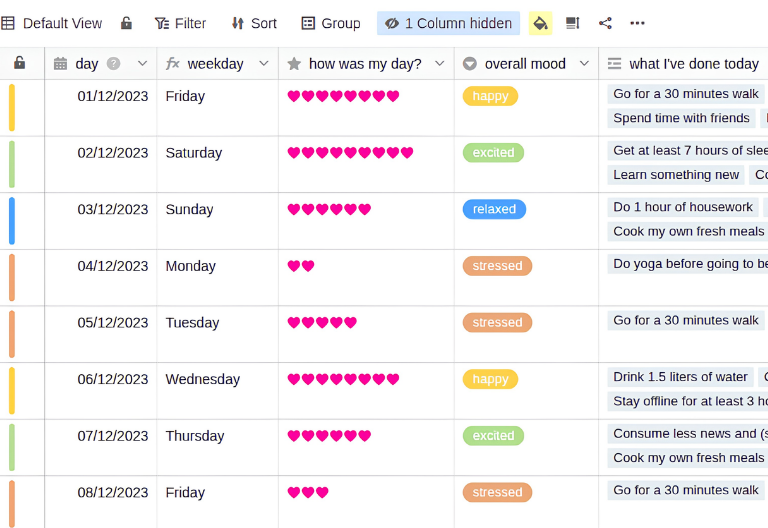
In the “Diary” table, you log your day and link new entries to the routines and habits from the “Habits” table. The heart of this table are the columns “Overall mood” and “How was my day?”, which let you track whether your new routines improve your mood in the long term. This way, you can see over time which habits really do you good and which ones you should adjust.
Calendar view for your deadlines
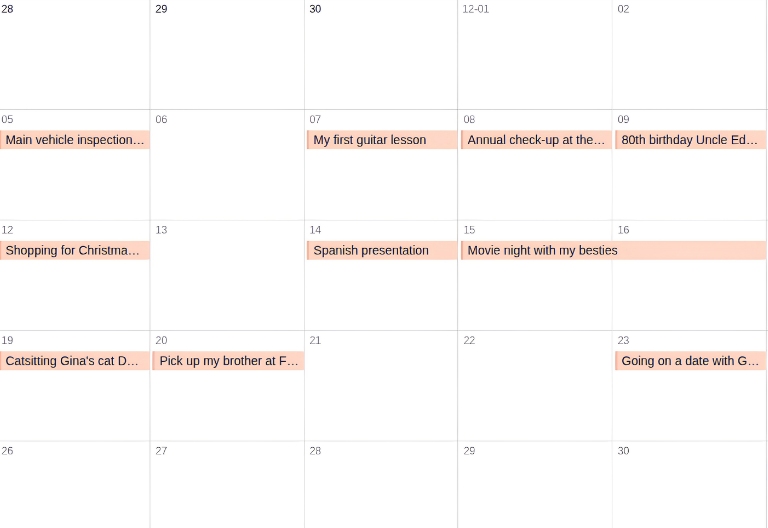
The “Appointments” table works like a classic calendar with a start and end time for every appointment. The “Upcoming appointments” view automatically hides past events, so the calendar view only shows the deadlines that are actually still ahead of you. The calendar is a key building block for making tasks visible and planning your week realistically.
Stop putting things off with your tailor-made procrastination app
Using SeaTable as a procrastination app every day
SeaTable not only provides the no-code database in the background but, with the no-code app builder, also a clear frontend for your personal procrastination app. With the integrated app function, you create separate apps for each base and conveniently access the calendar view, progress bars, table overview and dashboard. This way, you set up your personal procrastination app on your smartphone, tablet and PC and adapt your templates to changing needs at any time – without any programming skills and without switching between different tools.
Your smart AI assistant
Procrastination app with built-in AI
With SeaTable, you benefit from powerful, integrated AI automations. This lets you extend your procrastination app with smart support for prioritization and task entry – GDPR-compliant with a dedicated AI server in Germany. You need no additional tools, no external subscriptions and no technical knowledge: the AI functions are available directly in your base and can be combined flexibly with all your templates.
Summarize tasks with AI
Use the Summarize function to automatically condense task descriptions and assign priority tags. This saves time when maintaining your to-do list and gives you a compact overview of what really matters to you, even for extensive tasks with many notes and details.
Automatic prioritization
Use the Classify function to prioritize tasks automatically based on topics, deadlines or task descriptions. This way, you immediately see which to-dos need your attention first and no longer lose time on tasks that can easily wait until later in the week or month.
Extract important details
Use the Extract function to capture all relevant information such as dates or locations from PDFs automatically and write it to separate columns. You no longer have to copy these details manually and can plan your next steps directly in your procrastination app.
Read text from images
Use the OCR function to read content from photos or screenshots and transfer it directly to the right fields of your procrastination app. Useful information from letters, flyers or screenshots ends up in your system in seconds instead of getting lost somewhere.
Define your own AI rules
With Custom Prompts, you can define individual rules for your procrastination app, for example to highlight overdue tasks automatically. This lets you tailor the AI exactly to your working style and the way you want to organize your everyday life and routines.
Motivating affirmations
Automatically generate comments and affirmations based on successfully completed tasks and daily plans to keep you motivated every day. Every step forward is acknowledged, and regular positive feedback helps you stick with your new routines and goals in the long run.
Focus on your successes
The benefits of your digital anti-procrastination template
From the first task to a lasting routine, the SeaTable templates offer all the functions you need for structured productivity and effective day-to-day organization. The focus is on transparency about open tasks, simple data entry and the flexible expandability of your personal procrastination app. Dashboards make successes and positive developments visible and show you at a glance how far you have already come.
Full transparency at a glance
See at a glance how many tasks are still open and which deadlines are coming up. With the calendar view and dashboard charts, you make progress visible and create the sense of reward that scattered paper notes cannot provide.
Flexibility for everyday life
Forget scattered sticky notes and rigid single-purpose apps for to-dos, routines and household chores. Adapt the digital templates to your own ideas and create exactly the views and priority tags you need for your everyday life.
FAQs – Habit Tracker & Procrastination App with SeaTable
-
Can I transfer my existing Excel spreadsheets to SeaTable?
-
Yes, that is no problem. You can easily transfer existing spreadsheets to your procrastination app via XLSX or CSV import. Your data is then immediately available in tables and can be extended with views and priority tags.
-
Can I really use SeaTable as a procrastination app on my smartphone?
-
Yes, that works smoothly. SeaTable is available on smartphones, tablets and in the web browser, so your procrastination app is always with you – on the go, at the office or at home. Forms, calendar view and progress bars adapt automatically to the screen, so you add tasks spontaneously and tick them off right away.
-
Which SeaTable templates are best for getting started?
-
The classic to-do list is ideal for getting started, as it shows the basic principle of the anti-procrastination template: capture tasks, add priority tags and tick them off. For bigger plans, start with the work breakdown structure and split them into subtasks with clear deadlines. Both combine with other templates.
-
How does the habit tracker help you use an app to beat procrastination?
-
The habit tracker links your desired habits to a diary and automatically counts how often you have actually reached a goal. An integrated histogram compares aspiration with reality and shows on which days you slipped back into procrastinating. With this app to beat procrastination, a good intention becomes a routine.
-
Can I use the anti-procrastination templates from SeaTable for free?
-
Yes, all SeaTable templates can be used with a SeaTable account that is free forever. You can expand, customize and combine them as you like, without any additional costs for separate apps to beat procrastination.
-
Do the templates require extensive setup before I can start?
-
No, that is exactly the idea behind the SeaTable templates: copy the anti-procrastination template into your account with one click and enter your own tasks, habits or appointments right away. Tables, forms and views are preconfigured, so you skip the blank-page syndrome and become productive immediately.
-
Can I use several templates at once to organize my entire everyday life?
-
Yes, the to-do list, work breakdown structure, habit tracker and cleaning schedule can run in parallel in your SeaTable account and can even be linked if needed. This way, you avoid a sprawl of isolated apps and organize tasks, routines and household chores in one central place.