The smart geocaching app for adventurers
Do you hide trackables, log your finds in your logbook, and yet still can’t remember at the end of the year which caches are still active and what’s inside them? With SeaTable’s free geocaching app, you can easily organize your caches digitally, collect find logs, and share the information with others. Flexible, structured, and secure!
Your caches, your app, your adventure
With the geocaching app, you can keep track of everything
-
Flexible and intuitive
Our template is very easy to customize. Use various views, data relations, and app page types to design a geocaching app exactly the way you want it.
-
Easily manage logs
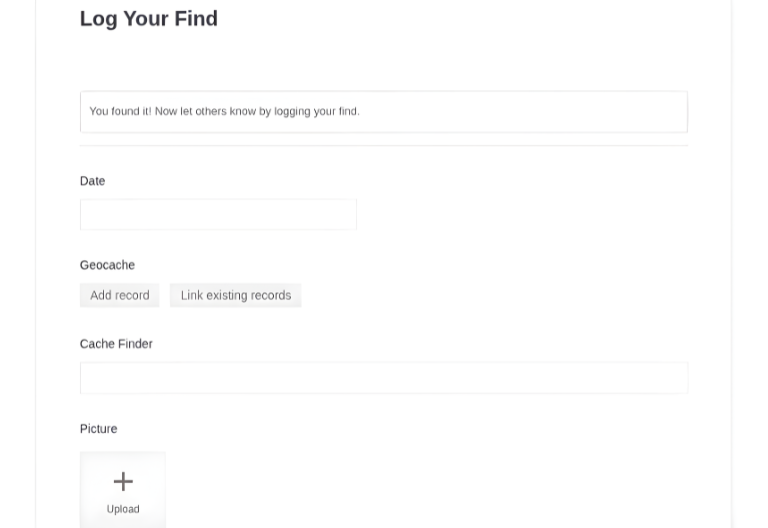
Enter data on the go, right on site, conveniently via QR code and form. This way, you can view new findings in real time.
-
Map view
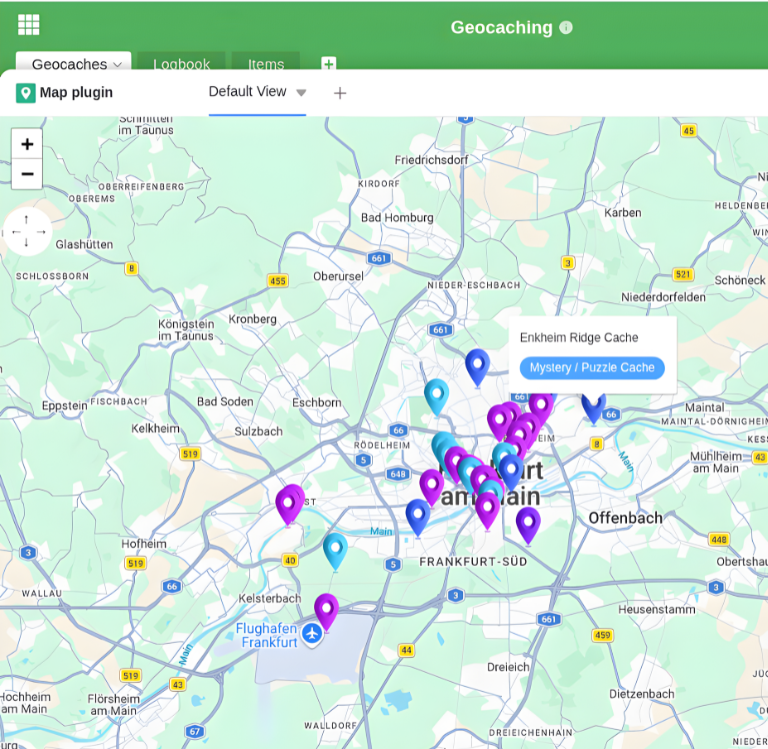
View all cache locations on an interactive world map. This makes it easy for you to check cache distribution and to plan new hides.
-
AI-powered automation
Take advantage of the built-in AI-powered automations for streamlined workflows and smart data processing. We host our own AI server in Germany.
-
Everything in one place
With SeaTable’s geocaching app, you can always keep track of cache locations, logbook entries, trackables, and statistics.
-
Statistics & Analysis
Informative dashboards show you at a glance how many active caches you have and how many finds have been logged.
Who uses SeaTable?
Leading companies worldwide trust SeaTable

















100,000+
Downloads in the first year on Docker Hub
1,500+
Daily users on SeaTable Cloud
4.6
Rating on Capterra
SeaTable Geocaching App
Cache Management Made Easy
With the AI no-code platform SeaTable, you’ll have a geocaching management tool that offers far more than just lists or maps. After all, geocaching is all about fun, adventure, and connecting with others. With our app, you can easily manage and track your caches with linked entries and interactive visualizations.
Always up to date: Enter new entries in seconds and continue your hunt with cache information that updates in real time.
Always at your fingertips: You can open your geocaching app from anywhere to, for example, make new log entries or document caches.
Team Collaboration: Grant access to the app to friends, your geocaching club, or your co-cache owner (CO).
Perfect for every cache owner: Our geocaching app grows with your adventures. Whether you’re organizing five caches just for yourself or a multi-cache network for your community.
GDPR-compliant: SeaTable is hosted exclusively on servers belonging to a Swiss provider located in Germany.
It's that easy
Geocaching app with lots of features
Document your listings
Each listing is easily documented using an input form, including coordinates, cache type, difficulty rating, and terrain rating. The map view lets you visualize all your caches on an interactive map and immediately see where new caches are worth hiding. Click on a marker to view all available details about that cache.
Logbook management
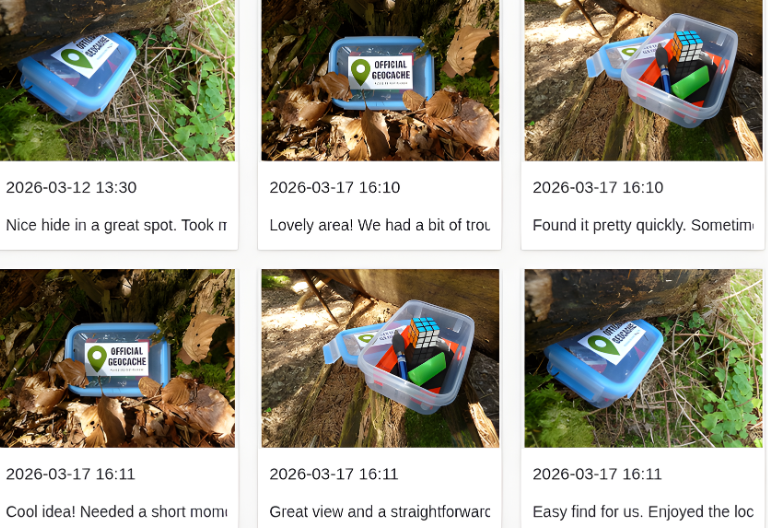
Cacher name, date, photos, and comments are saved in the “Logbook” table, easily via a convenient web form with a QR code. The Gallery View in Base displays all entries with photos and customizable additional information as clear index cards. This allows you to relive every find and the special moments of discovering your caches.
Manage trackables and swag
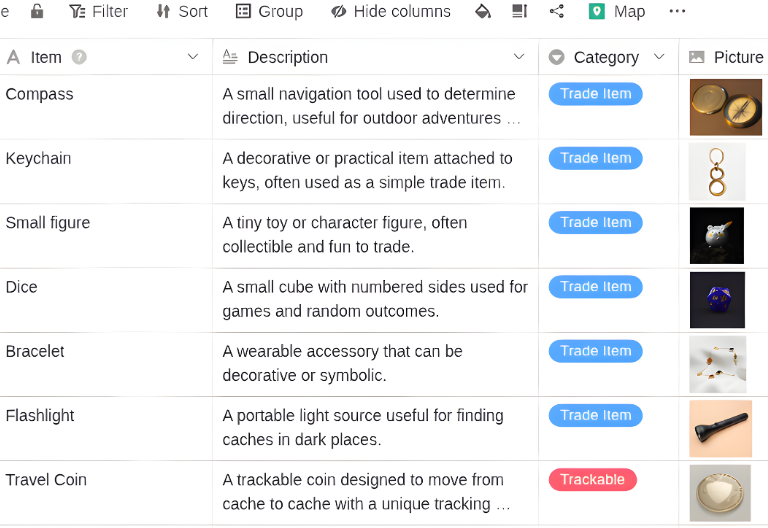
The “Items” table provides a handy overview of all items placed in a cache, categorized by type and directly linked to the respective cache. This allows you to keep track of a cache’s current inventory and history, so you can plan restocks and replacements in a timely manner.
Found Item Statistics at a Glance
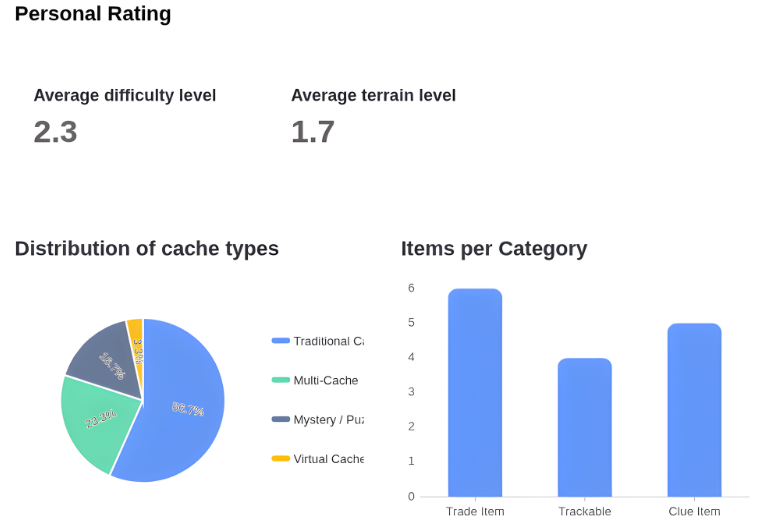
With the customizable Stats, you can always keep track of your geocaching activities and cache statuses. Analyze difficulty levels, total number of finds, or cache types. Gather feedback from your community about trackables and caches.
Start your geocaching adventure with SeaTable's free app
Your app as your geocaching hub
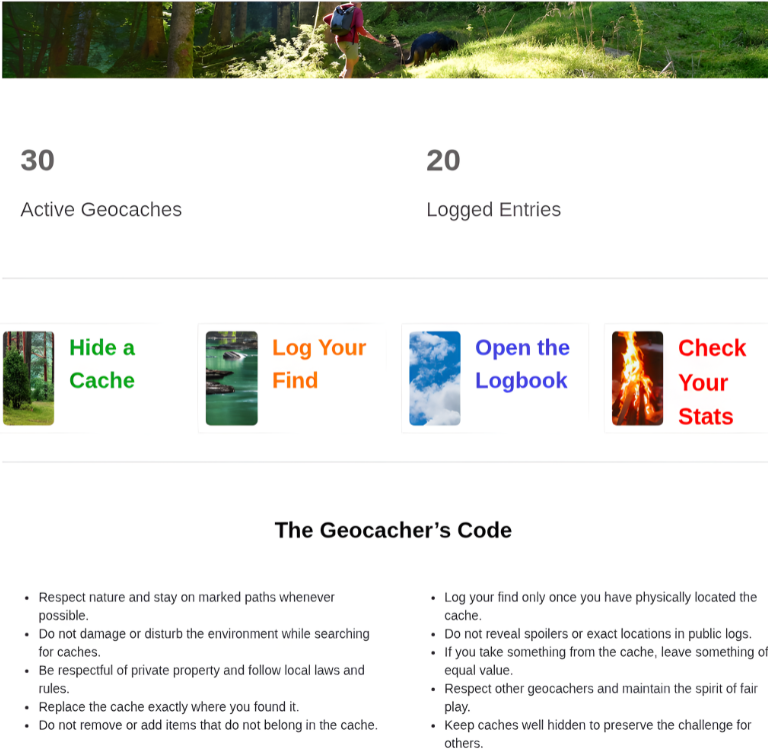
SeaTable’s built-in no-code app builder lets you create the front end of your geocaching tool. The customizable analytics dashboard shows you key metrics at a glance, such as the number of active listings, average difficulty level, and relative frequency of cache types. You can create new caches and log entries directly using simple forms—even on the go from your smartphone.
Your smart assistant
Geocaching app with built-in AI features
With SeaTable, you can take advantage of powerful, built-in AI-powered automations and our AI chat plugin. Receive automatic notifications as soon as a new log entry is created, or use our AI features—for example, for classifications or summaries—all in compliance with GDPR thanks to our own AI server in Germany.
Automatic summaries with Summarize
With “Summarize,” you can condense long Finder notes into one or two sentences. This gives you concise feedback for the gallery view or the dashboard.
Automatic Classification with Classify
Use “Classify” to categorize log entries, for example, into “Positive,” “Neutral,” or “Damaged.” This saves you the trouble of assigning categories manually.
Automatic data extraction with Extract
People often casually include information about the cache in their notes. With “Extract,” you can search each entry for specific details and enter them into separate cells.
Automatic text recognition from images with OCR
Some finders simply take a photo of their entry in the physical cache logbook. With “OCR,” text is automatically extracted from the images and entered into a text field.
Custom AI rules with custom prompts
Automatically generate short descriptions for your geocaches by combining information from multiple columns and saving it as a teaser in a separate column.
Automatic translation of the listing description
If you make your listings available internationally, you can automatically translate your geocache description into other languages and offer multilingual listings.
Available at any time
Your geocaching manager for full control
The SeaTable geocaching app offers all the features you need as a cache owner, from your first find to your hundredth cache. It focuses on transparency regarding your active listings, straightforward data entry, and flexible customization to suit your personal geocaching setup. All of this is provided with the highest data protection standards and GDPR-compliant hosting in Germany.
Cache activity
Use the Geocaching Manager to keep track of your log entries and see right away which caches haven’t been found in weeks or have been damaged. This way, you can take action in a timely manner.
Manage trackables
In the Geocaching app, you can immediately see what’s inside each cache, when items were last swapped, and which Travel Bugs have been on the road for a long time. That way, every hide is worth a visit.
FAQs – Geocaching with SeaTable
-
Can I import existing cache data from Excel?
-
Yes, you can easily import CSV- or XLSX files into SeaTable without any problems. This makes it incredibly easy to import existing cache data from geocaching tools you’ve created yourself into Excel or another spreadsheet solution.
-
Can I use the Geocaching app to manage caches from different regions?
-
Yes, the map view provides a world map that allows you to display coordinates from any region.
-
Do I need technical knowledge to customize the app?
-
No, SeaTable is a no-code solution and generally requires no technical knowledge or programming skills. You can customize all settings within the app for your geocaching needs and add additional tables, links, or automations. You can easily create new app pages using a drag-and-drop editor.
-
Is the SeaTable geocaching tool free to use?
-
Yes, you can use our template for free indefinitely. All you need is a free SeaTable account, and you can get started right away.
-
Can I share the Geocaching app with my friends or my geocaching team?
-
Yes, you can share our app with your geocaching club. With the free subscription, up to 25 people can collaborate. Alternatively, you can also share the app with as many people as you like who don’t have a SeaTable account; however, they will only have read-only access and will be able to fill out forms.
-
Can I customize the Finder web form?
-
SeaTable forms are fully customizable. You can use drag-and-drop to add additional input fields, mark fields as required, or define conditions for when certain input fields are displayed. This allows every user to enjoy a clean, cache-specific form-filling process.