Free Food Diary Template
Track down food intolerances and unhealthy eating habits – with the food diary template from SeaTable. Log your meals in just a few clicks and visualize the connections between food, eating habits, and physical symptoms.
Digital Food Diary
Stay on top of things with our Food Diary Template
-
Flexible
You can easily customize and expand our free template to fit your individual needs – with zero effort.
-
Data Entry
Log your meals directly and easily via the integrated form – even conveniently while on the go.
-
Clear Overview
Group and filter your entries and visualize correlations – perfect when you suspect allergies.
-
App Builder
Use the app for data collection and as a food diary frontend – featuring input masks and a knowledge base.
-
Reminders
Document meals, discomfort, and relevant information – reliably, thanks to integrated reminders.
-
Analysis
Use the dashboard in the Universal App to analyze your food diary – no extra tools required.
Use the Food Diary Template online for free
Create Your Food Log with SeaTable
SeaTable is a modern no-code database solution that is as easy to use as a spreadsheet – with all the features you need for a food diary .
Customizable: Create your food log template exactly the way you want it.
Access from anywhere: With online access, your data is always at your fingertips.
Share with others: Share your digital food diary with doctors or nutritionists.
Always at hand: You can access your food diary from anywhere at any time.
More than just a traditional food log
Build Your Custom Food Diary Template with SeaTable
Food Log
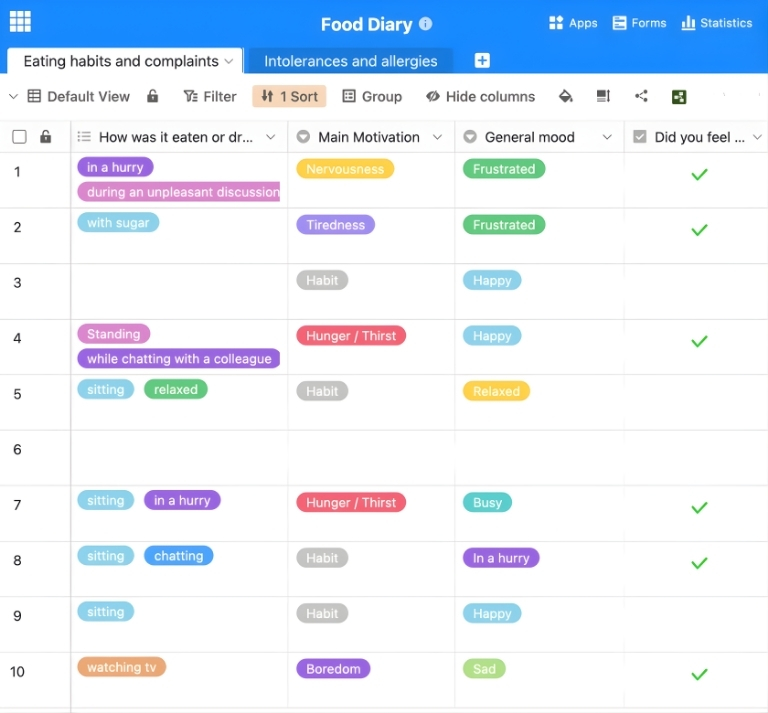
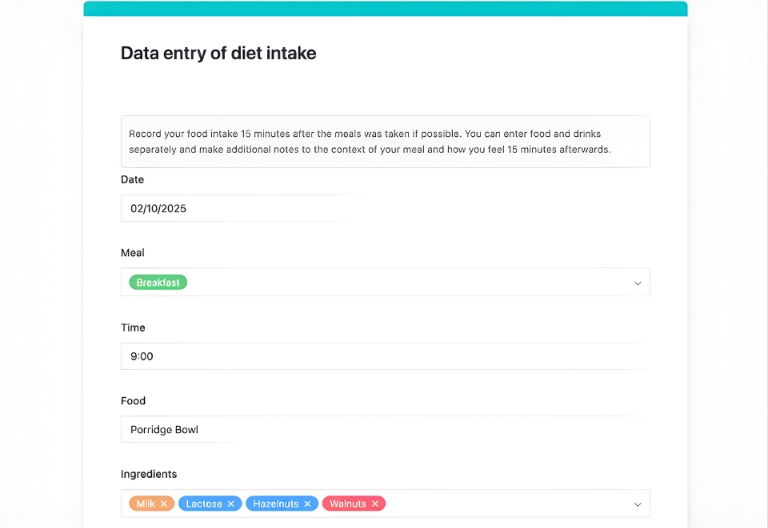
Record all meals and snacks along with their ingredients. You can easily enter all data via a customizable web form in the Universal App and adjust it at any time. Group and filter your entries or create new views to recognize patterns.
Database for Intolerances and Allergens
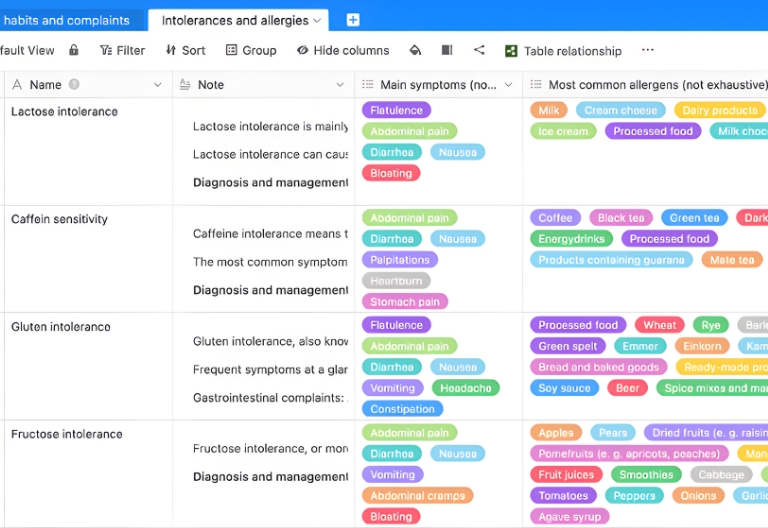
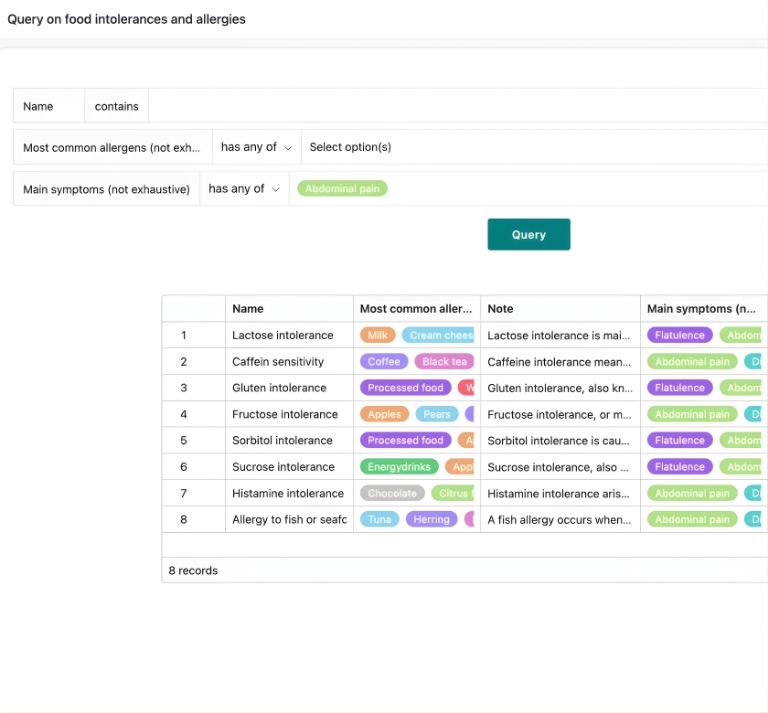
SeaTable’s food diary template is more than a simple food log. The integrated and expandable database on food intolerances helps you find the most common symptoms and allergenic foods for the most widespread intolerances.
Universal App for Data Entry and Analysis
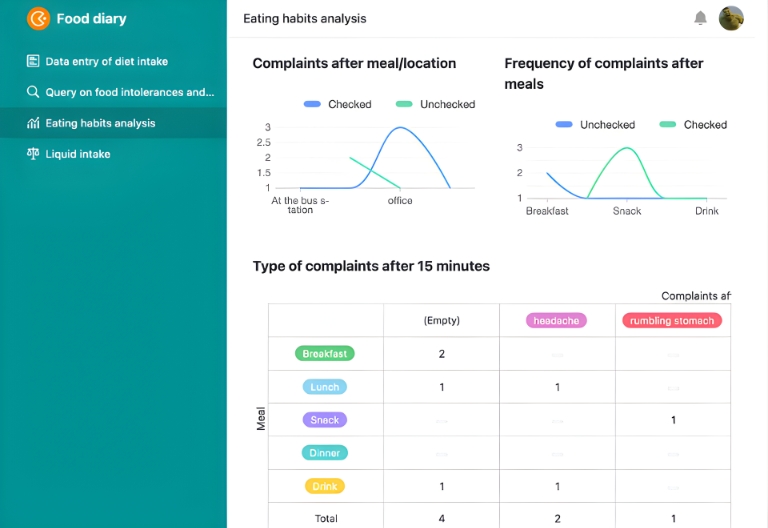
Your food log app consists of two parts: an Excel-like database and a no-code Universal App as a frontend. Here you will find the data entry form, an analysis dashboard, a daily fluid intake overview, and the search mask for the intolerance database.
Register now for free and use the Food Diary Template
Create Your Own Food Diary with SeaTable
With SeaTable’s integrated no-code template, you can create your completely personalized nutrition plan in just a few steps. In addition to meals, eating times, and symptoms, you can also track nutrients or detailed information on the eating situation or exercise patterns. Your requirements and wishes determine what your digital food diary looks like!
Identify patterns, use data smarter
AI-Powered Food Diary with SeaTable
With SeaTable, AI features are available to support you in evaluating your food diary. Analyze text, extract information from documents, and summarize insights automatically.
Automatic Categorization with Classify
Have entries automatically classified into categories like “Breakfast,” “Snack,” “High Sugar,” or “Suspicious symptoms.” This helps you recognize patterns in your eating behavior faster and discuss them more specifically with experts.
Automatic Text Recognition with OCR
Scan or photograph food packaging, handouts from nutritionists, or plans from clinics and have relevant information recognized automatically. The OCR function reads text from images and makes it available for further analysis.
Intelligent Data Extraction
Use the Extract function to pull specific information like calorie counts, allergens, or recommended daily amounts from texts and write them into dedicated columns. This reduces manual effort and ensures consistent data structures.
Summaries with Summarize
Automatically summarize long notes or free-text descriptions—such as physical symptoms or eating situations. The Summarize function creates short summaries that you can use for doctors, nutritionists, or personal reviews.
Custom AI Rules with Custom Prompt
Define your own AI instructions for your food diary using Custom Prompts. Examples: hints regarding unusual patterns with certain foods, suggestions for questions for your next doctor’s appointment, or short weekly reports on eating habits and well-being.
Reports at the Push of a Button
Automatically generate reports on your eating habits, documented symptoms, and possible triggers. The AI summarizes your data in a structured way so you can easily export it or discuss it with medical professionals.
Your Advantages with SeaTable
Digital Food Diary with SeaTable
SeaTable offers a unique combination of a familiar spreadsheet interface, the advanced features of a no-code database, and a Universal App Builder. Create your own food log template for free with just a few clicks and keep track of your eating habits.
Identify Allergies
Undiagnosed food intolerances or allergies can cause serious long-term problems. Careful documentation of your diet and any symptoms helps identify allergies early and provides clarity.
Transparency
This template simplifies communication with doctors and nutritionists. With structured, real-time data, you save time and facilitate better exchange. A template is especially helpful during ongoing therapy.
FAQ – Food Diary Template
-
Can the food diary template be shared with third parties?
-
Yes, you can share your digital food diary in various ways with third parties, such as doctors, therapists, or nutritionists, and give each user individual access rights. People without a SeaTable account can access selected data in read-only mode via shared views.
-
Is my food log plan safe with SeaTable?
-
Yes, SeaTable meets high standards for data protection and security. The SeaTable Cloud is hosted exclusively on certified servers in Germany and is fully GDPR-compliant. You decide at all times who can see or edit which data.
-
Is the food diary template free to use?
-
Yes, you can use the food log template for free. With a Free account, you can start without any time limit and customize the template directly to your needs. If your project grows, you can switch to a paid plan with additional features at any time.
-
Can I customize and expand my food diary?
-
Yes, you can add extra columns, tables, or automations—for example, for recipes, weekly plans, exercise logs, or mood tracking. SeaTable can be individually expanded without programming knowledge and remains flexible.
-
Can I export or print my food diary?
-
Yes, you can export your data as a file or prepare it for printing using appropriate views, for example, as an overview for doctor’s appointments, nutritional counseling, or your own documentation. This way, you keep an overview of your entries even offline.
-
Can I combine the food diary template with other templates?
-
Yes, you can combine the food diary with other SeaTable templates, such as a medication plan or a general electronic health record . This gradually creates a central, holistic overview of your health data—all in one solution.
-
Can I set up reminders for entries or specific times?
-
Yes, with automations, you can set up reminder emails or notifications—for example, to document meals promptly or plan regular check-ins for symptoms and well-being. This helps you maintain your food diary consistently.
-
Is the food diary template suitable for multiple people?
-
Yes, you can also use the food diary template for several people, such as family members or clients in a counseling setting. To do this, simply create separate tables or filters/views per person and control who can see which data via permissions.