Action Plan Template for Project Management and Team Organization
No more unclear responsibilities or lost to-do lists! Our digital action plan template is the perfect solution for centrally managing actions, responsibilities, and deadlines. The action plan template provides automatic status updates, clear priorities, and comprehensive documentation. Whether you’re a project manager, team leader, or part of a leadership team—you’ll always have a clear overview of all planned activities. Perfect for action plans, improvement projects, or process optimizations! Make your life easier and turn strategies into measurable results.
Digital Measurement Recording and Tracking
Action Plan Template – From Planning to Successful Implementation
-
Automatic status updates
Track tasks centrally and update status, progress, and results in real time. All changes are immediately visible to your entire team—collaborative rather than isolated, transparent rather than confusing.
-
Assign responsibilities
Assign each task to a responsible person and define clear responsibilities. In the web form, employees select their tasks and can see exactly who is responsible for which tasks.
-
Flexible Views: Gantt, Kanban
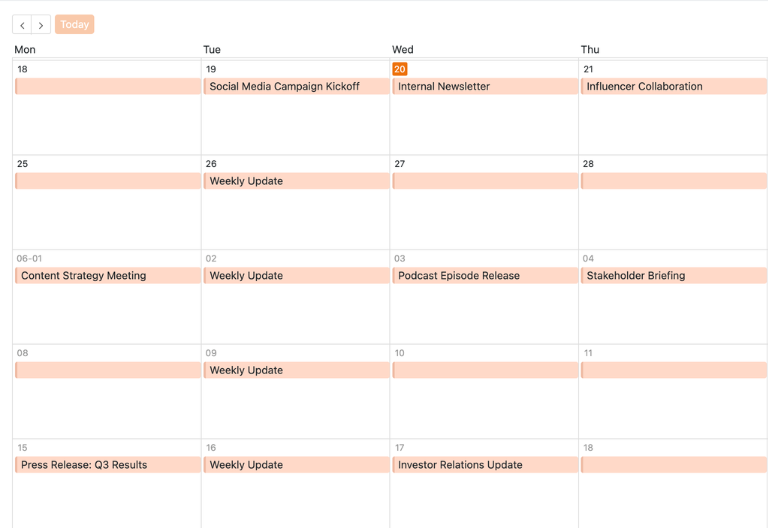
Visualize your action plan using Gantt charts, Kanban boards, calendars, or timeline charts. Switch between views as needed to immediately identify bottlenecks, overlapping tasks, and missed deadlines.
-
Documentation of results
Save results, files, reports, and notes directly in your action plan template. This creates a central repository that is traceable, audit-proof, and accessible to your team at all times.
-
Customizable
Add fields such as priority, budget, milestones, or metrics to your template. Flexibly customize columns, views, and web forms, and use SeaTable as an action plan for project management and team organization.
-
Mobile Data Entry & Reminders
Record task updates on the go using your smartphone and receive automatic emails when deadlines are missed. Collaborate in real time across devices – your action plan template becomes a truly shared workspace.
Who uses SeaTable?
Leading companies around the world rely on SeaTable

















100.000+
Downloads in Docker Hub's first year
1.500+
Daily users on SeaTable Cloud
4.6
Review on Capterra
Your benefits at a glance
Use the action plan template online
Discover the ultimate solution for your action item management! With SeaTable’s digital action plan template, you can say goodbye to PDF lists and static Excel spreadsheets. The template is perfect for project management and team leadership and adapts to your individual processes. Take advantage of interactive features such as web forms, Gantt charts, and detailed status overviews. Whether it’s audit actions, improvement plans, or strategic action plans—you’ll have all activities under control at all times. Give it a try and see how easy and time-saving action item management can be!
Clear Responsibilities: Each task is assigned to a specific person, who receives an overview of their responsibilities, deadlines, and status—ensuring that no action items are lost or forgotten.
True collaboration: Project teams, managers, department heads, and stakeholders work together in a shared database—with clearly defined responsibilities, comments, and status fields to ensure transparency and efficiency.
Interactive Action Plan Template: Combine a task list, timeline, milestones, and deliverable documentation all in one system, and switch between Gantt, Kanban, calendar, and table views.
Centralized storage for documentation: All tasks, responsible parties, deadlines, results, and related documents are stored in one central location—no more scattered Excel files or manual imports.
Action Plan: A Real-World Example
How to Use the Action Plan Template
Annual Planning Schedule for Actions and Deadlines
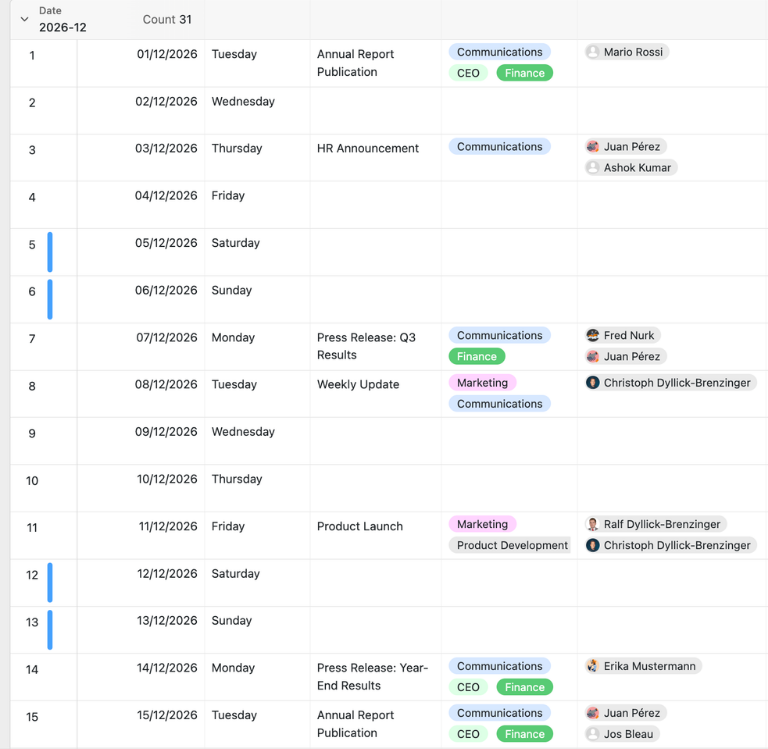
In the “2026 Communication Dept.” table, every day of the year is already set up. This is where you centrally plan all initiatives, deadlines, and activities—such as meetings, publications, launches, or internal coordination. For each action, you can record the location, departments involved, responsible employees, and additional notes. This creates a structured action plan that enables project managers and team leaders to reliably coordinate even extensive annual plans, campaigns, or cross-departmental activities.
Strategy Table for Goals and Priorities
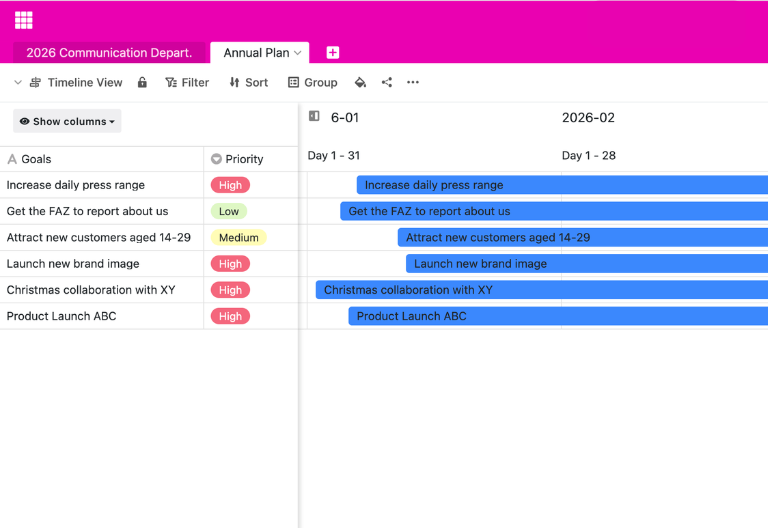
The second table centrally records and prioritizes all strategic goals and links them to responsible parties and departments. The actions from the annual plan can be directly assigned to a specific goal, ensuring that the purpose of each activity is always clear. This makes the action plan template ideal for aligning operational tasks with strategic objectives and transparently tracking progress across projects, departments, or communication plans.
Your interactive action plan app
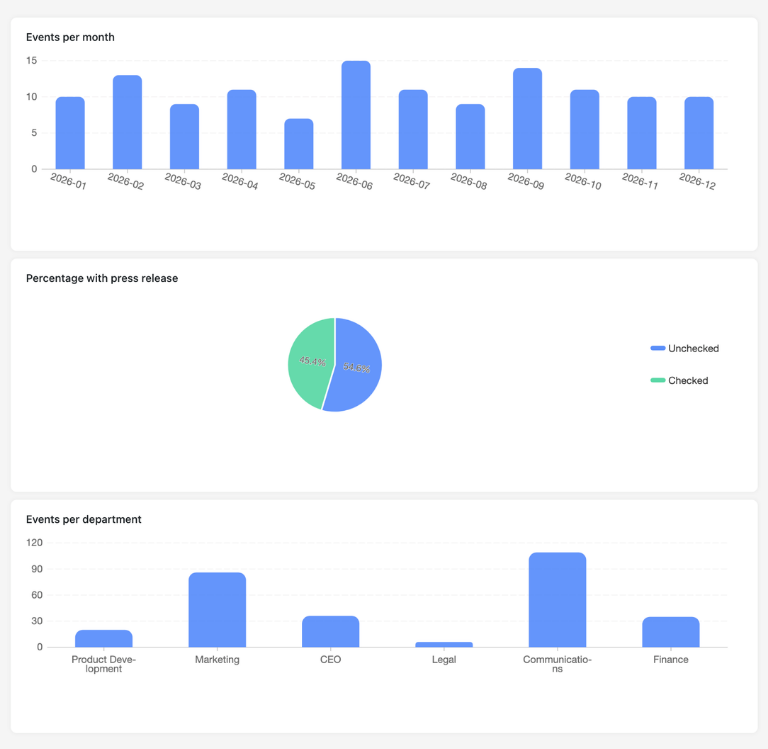
Revamp your action item management with this customizable action plan template! Perfect for project managers and team leaders. Turn the template into an interactive app that combines web forms for task management with Gantt charts, Kanban boards, and status dashboards. Visualize action plans in clear timelines and gain valuable real-time tracking. Specialized for audit actions, improvement plans, and strategic action plans, you can share specific sections with project teams, managers, and stakeholders. With custom permissions, you decide who can view, enter, or evaluate actions.
Plan, track, and document tasks – with SeaTable
Smart Automation for Project Management and Team Leadership
AI-powered action management
With SeaTable, your action item management gets a major upgrade! Powerful AI automations turning your action plan template into a smart hub for task management, priority management, and documentation. Say goodbye to PDFs, Word documents, and Excel spreadsheets. With SeaTable, you’ll save time and always have a handle on all your tasks. Perfect for anyone who values efficiency and strategic planning!
Automatic Priority Classification
With Classify, the AI automatically ranks tasks by urgency, impact, or category. It reads existing text fields such as titles or descriptions and enters the determined priority into a designated field—keeping your action plan and to-do list organized, filterable, and focused on the most important items.
Data extraction from meetings and audits
With Extract, you can transfer content from meeting minutes, audit reports, or strategy documents into your action plan template in a structured format. The AI identifies action items, responsible parties, and timelines, and automatically fills in the appropriate columns—saving you time on documentation.
OCR for signatures and approvals
With OCR, you can extract content from photos—such as signed approvals, handwritten notes, or audit marks. The AI recognizes names, numbers, and descriptions of actions directly from image files and transfers them to your template, enabling even analog processes to be documented digitally.
Automatic status and progress reports
With Summarize, the AI automatically generates concise status reports based on your project data. It summarizes table values and provides overviews of completion rates by team, department, or project—ideal for stakeholder reporting and management updates.
Deadline tracking and smart reminders
With Custom Prompt, you can define your own AI rules for your action plan template—such as automatic reminders when deadlines are missed, escalations to higher-level roles, or notifications about missing documentation of results and approvals.
Real-time risk and delay detection
With AI-powered status views, you can automatically see which tasks are overdue, where resource bottlenecks are looming, or which critical activities have not yet begun—enabling proactive project management rather than reactive crisis management.
Transparency and real-time collaboration
Action Plan Template: Transparent and Flexible
SeaTable is a modern AI-powered no-code database solution with automation features and an app builder, offering all the functionality you need for a professional, digital action plan template. The focus is on traceability, collaboration, and flexible customization—from simple task lists with actions, responsible parties, and deadlines to integrated action descriptions with goals, prioritization, and results documentation—as a scalable alternative to static PDF, Excel, or Word lists and traditional standalone project management solutions.
Alternative to static action plans
Organize your tasks with SeaTable, a powerful Excel alternative significantly more efficient—thanks to linked spreadsheets, personalized views, web forms, and automations for project management and team organization.
Integrating projects and processes
Link your action plan template to other SeaTable project management templates and use SeaTable as your central project management tool. This is how you bring together goals, actions, responsibilities, and results in a single system.
Security and Access Control
SeaTable supports two-factor authentication and single sign-on, allowing you to precisely control who can access your action plan template—including tasks, goals, and outcomes—making it ideal for sensitive business processes and confidential planning.
GDPR-compliant, German hosting
When you use SeaTable Cloud or the built-in AI, all project data and action plans remain in Europe—the infrastructure is hosted exclusively on servers in Germany and meets the highest compliance and data protection standards.
FAQ – Frequently Asked Questions About SeaTable's Action Plan Template
-
Can I use the SeaTable action plan template for free?
-
Yes, you can use the action plan template for free in the SeaTable Cloud. All you need is a free account to start digitally tracking your actions, deadlines, and responsibilities right away.
-
How does the SeaTable solution differ from an Excel task list?
-
Unlike a traditional Excel task list, SeaTable uses linked tables, web forms, automatic status updates, and real-time analytics. Multiple people can work on the action plan template at the same time without version conflicts or manual imports. Automatic deadline alerts improve reliability.
-
What are the benefits of a digital action plan template?
-
A digital action plan template reduces errors caused by manual data entry, enables real-time tracking and centralized documentation, and keeps action management organized even for large projects. With SeaTable, you can also use Gantt charts, automations, and custom views for your processes.
-
How do I create an action plan correctly in SeaTable?
-
Use the 5W framework: Who (person in charge), What (description of the action), When (deadline and timeline), Where (location/department), Why (related goals). SeaTable guides you through this framework and stores all the information in a central location within your action plan template.
-
Can the action plan template be used for audit management and quality management?
-
Yes, this template is ideal for audit management and quality assurance in accordance with ISO 9001 or other standards. It documents findings, assigns corrective actions, tracks deadlines, and centrally stores supporting documentation—making it perfect for audit reports.
-
Can I import existing action plans into SeaTable?
-
Yes, you can import existing Excel, CSV, or PDF-based action item lists into your action plan template. You can then add additional action items digitally and benefit from automatic status updates, real-time collaboration, and professional action item management.
-
Is this template suitable as an example of an action plan?
-
Yes, SeaTable offers predefined action plan templates that you can use as examples and starting points. This action plan template showcases best-practice structures and can be customized to suit your needs—for project management and team organization.
-
What Gantt chart features does the action plan template include?
-
The built-in Gantt chart view lets you visualize tasks, deadlines, and dependencies over time. You can see concurrent tasks, critical paths, and delays at a glance—ideal for complex project management and resource planning.
-
Is the action plan template suitable for agile project management methods?
-
Yes, with Kanban boards, calendar views, and flexible status definitions, SeaTable supports agile workflows. The template adapts to Scrum, Kanban, or hybrid approaches and combines structured task management with iterative work methods.