
What are time wasters at work? #
A quick web search will provide you with countless tips and tricks for better time management and efficient work processes. Most of them are aimed at changes in individual behavior. However, the causes of the biggest time wasters in the office are usually the wrong tools, isolated solutions, a lack of data integration and unstructured databases and workflows.
The patterns are often the same: information has to be searched for, data is duplicated in the system and maintained in different places, meetings only serve as a “status round” and every small process adjustment ends up in IT.
With modern no-code and low-code solutions , you can gradually eliminate these stumbling blocks, for example by automating recurring tasks, connecting data sources and creating transparency and data integrity. Business departments are empowered to create their own processes and applications without having to wait for IT support.
No-code benefits 1: Avoid time-consuming information procurement #
Most employees are probably familiar with the often time-consuming search for the right information. In fact, studies show that office workers spend a considerable amount of their working time searching for and preparing information.

An example: An important offer has to go out quickly. You first open the CRM to check the latest conditions, then the price list in Excel and finally an old quotation template in Word, which already contains reasonably suitable service modules. In between, you search your emails for a special agreement with the customer. After time-consuming copy-pasting, formatting and recalculating, you send off the quotation. A little later, it turns out that some of the information was out of date and not maintained in the right place.
What happened? Information is spread across several systems and mailboxes, templates are compiled anew each time. Errors creep in if there is no central, transparent database with up-to-date prices and conditions.
How can you make information procurement easier with no-code technology? #
With no-code platforms like SeaTable you
-
create dynamic quotation and report templates directly in central data sources. The appropriate prices, texts and customer data are automatically pulled from the system. You can generate a PDF document at the touch of a button.
-
store or link relevant customer communication directly in the database.
-
create an automated approval and notification workflow to inform the person responsible directly in the event of certain events.
-
establish data integrity.
No-code benefits 2: Avoid time-consuming dashboard creation #
Modern reporting tools are a blessing if you want to turn abstract figures into appealing graphics. And there is a large selection of suitable tools. However, in the end, dashboards are only as good as the underlying database.

An example: You create a monthly report for the management. You export current sales figures from the ERP and the lead pipeline from the CRM. You also add daily forecasts and effort estimates from individual teams. You combine all this information in a spreadsheet and analyze your data using formulas, pivot tables and graphics. You can then link your data to a dashboard tool or create a PowerPoint presentation based on the spreadsheet. When you finally present the figures, they are already a few days old. And the next month it starts all over again.
How can you create appealing dashboards with no-code? #
If you need efficient reporting software, no-code databases like SeaTable are an interesting alternative to expensive or complex specialized software. Thanks to data integration with external systems via the SeaTable API , manual data migrations are a thing of the past. As a result, you create a dashboard with no-code, …
-
that updates data in real time.
-
where the graphics draw information directly from your database.
-
on which you can provide different views for different authorizations.
-
on which you can arrange graphics using drag-and-drop and customize them with just a few clicks.
No-Code advantages 3: Eliminate time wasters Task Management #
Task management has not necessarily become any easier in modern, digitalized working life. Email, chat, phone, tickets, meeting notes, comments in documents: New tasks or relevant information on ongoing work are communicated via a variety of channels. An important message is casually dropped in a subordinate clause during a meeting or in a private conversation in the office corridor, or it comes at the end of an email that was actually about something completely different.
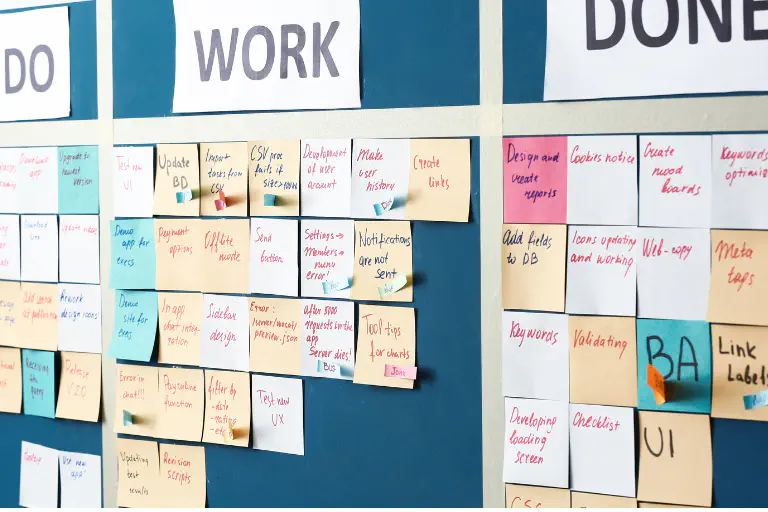
Individual to-do lists , project boards and team Kanban boards often exist in parallel. Hardly anyone has a real overview of who is supposed to do what by when and what the current status of a task is. Deadlines are missed, queries pile up, regular status update meetings are necessary: transparency looks different.
What has happened? Tasks are not recorded and maintained centrally, but stored in a decentralized manner. Automatic reminders of important deadlines are therefore not possible and notifications to superiors, colleagues and other stakeholders depend on how attentive employees are.
How can you set up efficient task management with no-code? #
No-code solutions like SeaTable offer integrated AI-powered automations, an app builder and seamless integration of external software. So you can
-
create a central task board with different views for department managers, project managers and employees.
-
create and assign tasks automatically, e.g. from form submissions or e-mail notifications.
-
communicate directly in the task chat transparently for everyone.
-
define notification rules to automatically keep stakeholders up to date on new tasks, status changes or approaching deadlines.
-
replace regular status meetings with transparent status displays and automatic notifications.
No-code advantages 4: Eliminate time wasting data entry #
Cleanly maintained data is a prerequisite for efficient processes, whether it’s for preparing quotations and invoices, customer service or business analysis. Manual data entry is still the rule rather than the exception in many companies and areas. Apart from the time involved, this is a potential source of error. If you also lack a clear data structure, duplicates can quickly arise.

An example: A customer contacts the sales department by email. The employee responsible enters the contact details manually in the CRM and the order with the delivery information in the sales system. The delivery department creates a shipping order and stores the corresponding information in its own system. Finally, Accounts Receivable also creates the customer and sends the invoice. At some point, there are different versions of the same customer and nobody knows exactly which one is the right one.
What has happened? Data has been entered and revised several times, validations or uniform data structures are missing and duplicates remain unrecognized.
How can you manage data efficiently with no-code? #
With no-code tools you can …
-
create a cleanly structured database without programming knowledge or IT effort.
-
create data records once and link them to other databases and tables. Changes are applied automatically.
-
lock entire data records or individual data for editing to increase data integrity.
-
use input forms with mandatory fields and selection options to minimize input errors.
No-code benefits 5: Eliminate time-wasting data silos #
Sales maintains customer data in CRM, the project team works in a project tool, accounting in ERP and your marketing department uses a marketing automation platform. Each department maintains information in its own system according to its own rules. While your sales department knows exactly when the customer bought what and the accounting department provides information about their payment behavior, marketing can say which approach on which channel the respective customer reacted to. No one provides a holistic picture and, in the end, the figures and information are not really consistent.
What has happened? Relevant, meaningful information is stored in different systems without a consistent data flow. Because the overall picture is missing or has to be established first, operational and strategic decisions take longer than necessary.

How does no-code help you to break down data silos? #
With no-code databases like SeaTable you can …
-
create master data once as a single source of truth and synchronize it with CRM, ERP and accounting.
-
integrate existing internal and external systems with each other and enable seamless data exchange without having to program extra interfaces.
-
model data flows and links with an integrated whiteboard and plugins.
-
link tables with each other to reduce duplicates.
-
create a customized, flexible database environment.
No-code benefits 6: Reduce time-wasting IT waiting times #
IT departments are chronically overloaded. New tickets end up in a long priority list and, if you’re unlucky, it takes several weeks before the new feature or interface is available. In the meantime, everyone works with workarounds or uses other tools for the transition without consultation. Slowly but surely, shadow structures and new isolated solutions and manual efforts are created that nobody wants.
What has happened? Departments are dependent on limited development resources and lengthy processes. Improvements are slow to be implemented. Parallel structures and shadow processes emerge for which no one is officially responsible.

How can you save IT resources and speed up development with no-code? #
No-code tools such as SeaTable enable Citizen Developer in the specialist departments to do this:
-
create required applications independently and in harmony with IT.
-
integrate external systems into their own database via the ready-made SeaTable API.
-
customize database structures and web applications flexibly.
-
set up automations.
Eliminate time wasters at work with no-code benefits #
Isolated solutions and manual habits have usually grown over years and decades. However, they are not an unchangeable fate that employees and companies have to resign themselves to. With a systematically introduced no-code tool, you first remove the most visible obstacles and gradually create a working environment in which data flows, work is transparent, specialist departments become faster and your IT no longer has to worry about every little requirement.
With its cloud environment hosted exclusively in Germany, the AI no-code platform SeaTable offers a GDPR-compliant, scalable and flexibly customizable solution. The permanently free Free Account already offers all the functions you need for efficient production systems or extensive test phases. And if you do need more capacity, users or functions, you can easily switch to the next subscription level.
FAQ - Efficient everyday work with no-code technology #
Does no-code software also help me to integrate different tools?
For which companies is the use of no-code software worthwhile?
How can we specifically start to eliminate time wasters in the office?
Can I protect sensitive data from unauthorized access in no-code tools?
Is no-code now replacing my IT department?
TAGS: No Code & Low Code