No-Code App Builder: turn your tables into an app
You manage your processes in tables and want to turn them into an app for your team – with forms, views for each role and permissions, without developers? With SeaTable, you build the app directly on your database. You don’t need a second tool that connects to Airtable or Google Sheets: data, automations and app live in one platform, in data centers in Germany or on your own servers.
Database and app in one
What SeaTable’s No-Code App Builder can do
-
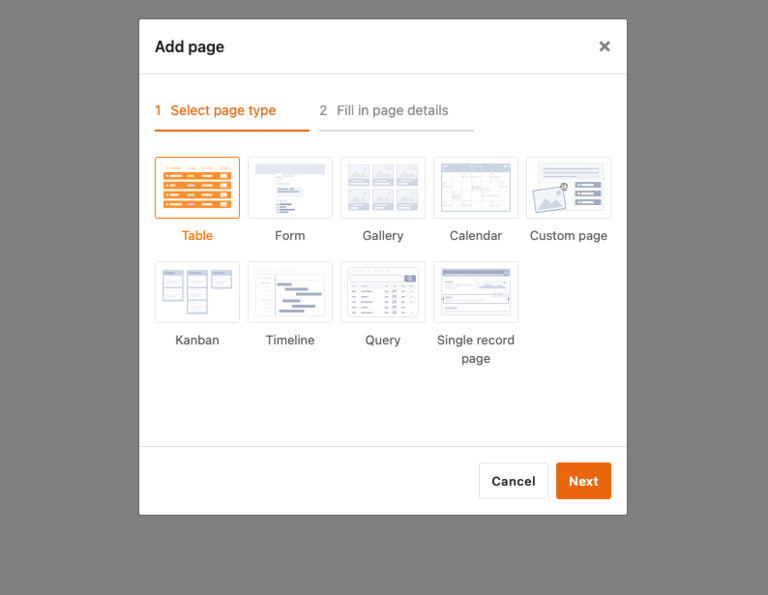
Ready-made page types
Table, form, gallery, calendar, Kanban, timeline, query, single record and dashboard: you choose a page type, connect it to a table and, within minutes, have a page that works with your data.
-
Roles and permissions
You create roles, invite people and control for each page who can view, add, edit or delete. A preset filter on the current user ensures that each person sees only their own entries.
-
For external users, too
Apps can be shared publicly or via an invitation link with a password. Anyone who uses a public app doesn’t need a SeaTable account – customers, partners or applicants, for example.
-
Custom HTML pages
If the ready-made page types aren’t enough, you add your own HTML pages that access your tables via an SDK – written yourself or created by the AI. Our AI in SeaTable page shows how this works with AI.
-
Your own look
Name, icon, color, light or dark mode and a custom URL: every app gets its own look. With snapshots, you back up versions of the app and restore them when needed.
-
Data in Germany
SeaTable Cloud runs in Exoscale data centers in Frankfurt and Munich. Alternatively, you run SeaTable on your own servers and keep your database and apps entirely in your own hands.
Why database and app belong together
Internal apps without developers
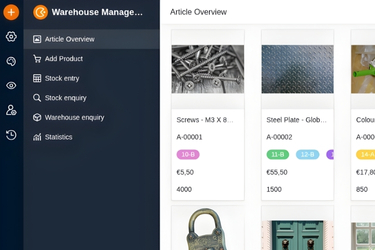
Many app builders sit on top of an external data source: the data lives in Airtable, Google Sheets or a SQL database, the app in a second tool. With SeaTable, both are one. Every app is based on a no-code database with linked tables, formulas and automations.
One tool instead of two: no synchronization between table and app, no second permission management
Changes visible immediately: what is entered in the app appears directly in the base – and vice versa
Automations included: notifications, rules and AI automations run on the same data
Start small: the App Builder is included in all plans, including SeaTable Free
Cloud or self-hosted: hosting in Germany or on your own servers
Real-world examples
What teams build with the App Builder
Turn Excel lists into a team app
You import your existing lists, choose the right page type for each task – for example, a form for new entries, a table for the overview and a calendar for appointments – and share the app with your team. With a preset filter on the current user, each person sees and edits only their own entries.
Handle requests and tickets
Requests reach the base via a form, the Kanban shows you what is open, in progress or done, and a knowledge base sits right next to it. This way, you build a ticketing system for internal IT requests or customer inquiries without introducing separate help desk software.

Overviews for management
Dashboard pages show key figures from your tables as charts, and single record pages bring together everything about a project or process. Management gets a clear view of the data without having to open the base.

Your first app in just a few minutes – with SeaTable
An honest assessment
When the App Builder fits – and when it doesn’t
The No-Code App Builder is designed for apps that work with your own data: internal tools, portals and forms for teams, customers or partners. For some tasks, other tools are the better choice.
-
Well suited
Internal apps for teams, data entry via forms, portals with permissions for each person, ticketing and request systems, overviews for management – wherever the data should live in SeaTable anyway.
-
Other tools
For apps that should appear in the app store, for analyzing large volumes of data in a BI tool or for interfaces on top of existing SQL databases, specialized tools such as Glide, Power BI or Retool are a better fit.
-
Mobile in the browser
SeaTable apps are web apps and run in the browser on computers, tablets and smartphones. Native SeaTable apps for iOS and Android have been announced.
AI in the App Builder
Create pages with AI
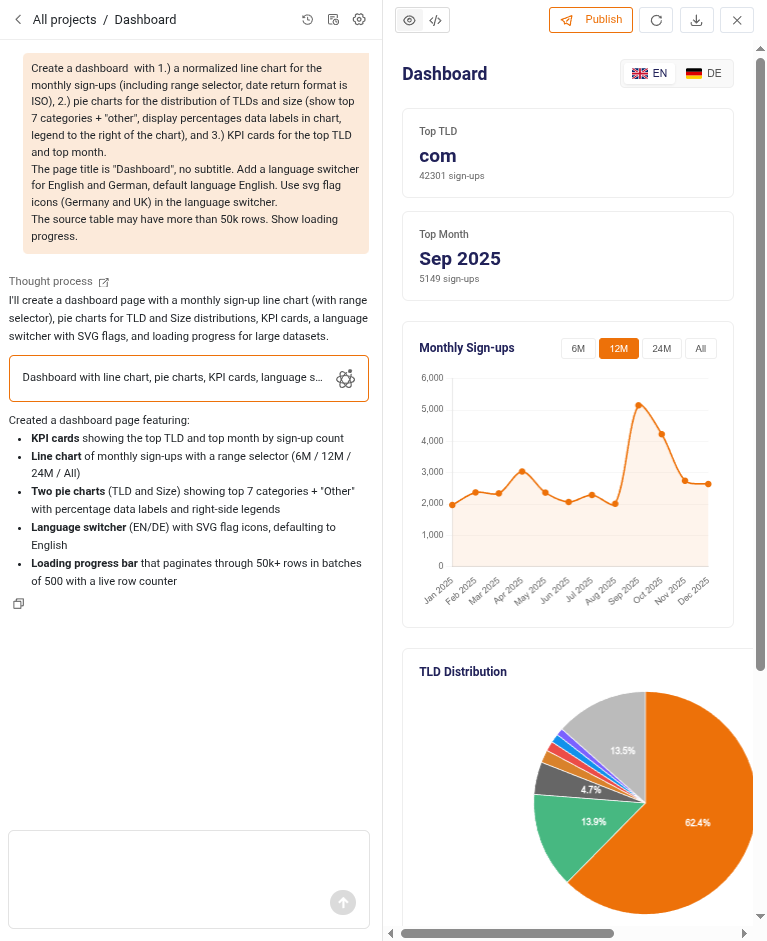
If the ready-made page types aren’t enough, you describe to the AI what a page should do and how it should look. It turns this into an HTML page that accesses your tables and fits into the navigation and permissions of the app.
Describe a page in natural language, refine it in the chat and publish it
Define data sources and permissions for each table
The data in your base is not sent to the AI model
Don't start from scratch
Templates with a ready-made app
Some SeaTable templates already include an app that you can adopt and customize – for example, the Project Portfolio with a form for new project ideas, project overviews and a dashboard, or HR Recruiting with an interview calendar for the hiring departments. Our guide Create an app without code shows you step by step how to set up your own app.

Database and app in one – try SeaTable for free
FAQs – SeaTable's No-Code App Builder
-
Which tool can we use to build internal apps based on our data without developers?
-
There are three approaches: app builders that sit on top of an existing data source (such as Softr on Airtable, Glide or AppSheet on Google Sheets, Power Apps on Microsoft 365), developer tools such as Retool for existing SQL databases – or a platform that combines database and app, such as SeaTable. SeaTable is a good fit if your data is still in Excel or scattered lists, you want to work without programming and you want data, automations and app in one tool, hosted in Europe or on your own servers.
-
How do I turn Excel lists into an app where everyone sees only their own entries?
-
Import the lists into SeaTable as tables and add a Collaborator column that shows who an entry belongs to. In the App Builder, you create a table page and set a preset filter on this column with the condition “includes current user”. Each person then sees only their own entries in the app. With page permissions (from the Enterprise subscription), you also define who can view and edit which pages.
-
Is SeaTable an alternative to Softr or Glide?
-
Yes, if you want database and app in one tool. Softr and Glide are strong at quickly turning an existing data source into an app, Glide especially for mobile applications. With SeaTable, you don’t need a second data source: tables, links, automations and app live in one platform, with shared permission management.
-
Can people without a SeaTable account use the app?
-
Yes. You can share an app publicly so that anyone with the link can use it without signing in, or create an invitation link with a role and an optional password. No user account is required to use public apps. Anyone who needs to enter or edit data in the app signs in.
-
How much does the No-Code App Builder cost?
-
The App Builder is included in all plans, including SeaTable Free for up to 25 team members. Page permissions for each page and role are available from the Enterprise subscription. You can find current prices on our pricing page.
-
Can I publish my app in the app store?
-
No. SeaTable apps are web apps that run in the browser – on smartphones and tablets, too. If your app should appear in the App Store or on Google Play, a tool for native apps is the better choice. Native SeaTable apps for iOS and Android, which let you use your bases on mobile devices, have been announced.
-
Where is the app's data stored?
-
The app has no data of its own; it shows the data in your base. SeaTable Cloud stores this data in Exoscale data centers in Frankfurt and Munich; you conclude the data processing agreement (DPA) online. Alternatively, you run SeaTable Server on your own servers.