Table of Contents
When you connect an AI agent to your SeaTable base, you are granting it access to business data. This article explains how to control that access, what happens to your data and what options you have to adjust the security level to your requirements.
Control access via API token
An AI agent’s access is entirely controlled by the API token that you create in SeaTable. Three important principles apply:
-
One token, one base. Each API token is tied to exactly one base. The agent cannot access other bases in your account, including bases that have been shared with you. If the agent needs to work with multiple bases, create a separate token for each one.
-
Read or read and write. When creating the token, you choose the permission. A read token only allows the agent to query and analyze data. Changes are not possible — even if the agent is asked to make them. A read-write token additionally allows creating, editing and deleting entries.
-
Revocable at any time. You can delete an API token in SeaTable at any time. The agent’s access is terminated immediately.
Start with a read token. This allows you to try out the AI agent risk-free and get familiar with how it works. Once you are confident that you also want to use write operations, create a read-write token.
Confirmation before changes
Even with a read-write token, the AI agent does not make changes on its own. AI assistants like Claude Desktop show you exactly what will happen before each write action — for example “I would like to add 3 new rows to the Contacts table” — and wait for your confirmation. You can approve or reject each action individually.
This behavior is not dictated by the MCP Server but is a feature of the AI assistant. Most MCP-capable clients work this way. Check whether this security prompt is active in your assistant.
Which data is transmitted to the AI provider?
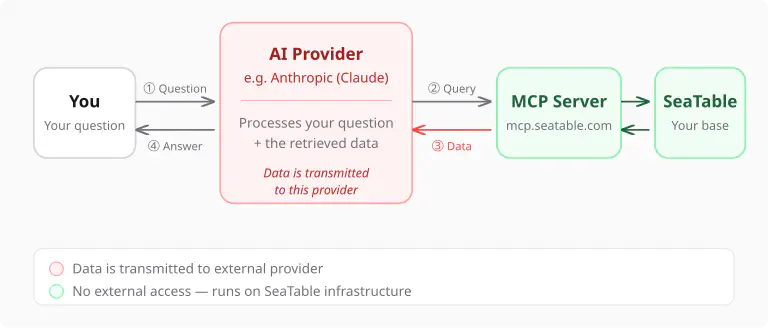
When the AI agent answers a question, the data flow works as follows:
- Your question is sent to the AI provider (e.g. Anthropic for Claude).
- The AI agent decides which data it needs and queries it via the MCP Server.
- The query results — i.e. the specific rows and columns from your base — are transmitted to the AI provider so the language model can evaluate them.
- The agent formulates its answer and sends it back to you.
This means: The data that the agent queries is transmitted to the AI provider. This is technically unavoidable — a language model can only work with data it can process.
Is my data used for training?
The major AI providers clearly distinguish between usage via their web interface and usage via their API. For API access — and MCP connections run via the API — stricter rules apply:
- Anthropic (Claude): Data processed via the API is not used to train models, according to Anthropic’s terms of use.
- OpenAI (ChatGPT/GPT-4): OpenAI also does not use API data for model training by default.
Check the current terms of use of your AI provider, as these may change.
How can I minimize data exposure?
Even though AI providers assure that API data is not used for training purposes, you may still want to limit the scope of transmitted data. There are several approaches:
Separate base for the agent. Instead of giving the agent access to your main base, create a dedicated base with only the data the agent should see. This separates sensitive data from the data the agent works with.
Use a read-only token. If you only use the agent for analysis, a read token is sufficient. This ensures that the agent cannot modify any data, even if asked to do so.
Ask targeted questions. The agent only queries the data it needs for your question. If you ask about a single customer, not all customers are transmitted. The more targeted your questions, the less data flows.
Maximum control: Self-hosting
For those who process sensitive data and do not want it transmitted to external AI providers, SeaTable offers a special option: self-hosting with a local language model.
In this configuration, you run both SeaTable and the MCP Server on your own infrastructure and connect it to a locally running language model (for example via Ollama or LM Studio). This way, your data never leaves your network.
This option is aimed at technically experienced users and organizations with strict data privacy requirements. Details on setup can be found in the technical documentation on GitHub .
Summary
| Aspect | Details |
|---|---|
| Access scope | One API token = one base, no access to other bases or the account |
| Permissions | Read or read-write, revocable at any time |
| Confirmation | AI assistants ask for approval before write actions |
| Data transmission | Queried data is transmitted to the AI provider |
| Model training | API data is not used for training according to providers |
| Maximum control | Self-hosting + local language model possible |