SeaTable – Your flexible IT roadmap for clear, confident decisions
Say goodbye to scattered Excel spreadsheets! With our IT roadmap, you bring IT projects, software rollouts, system migrations and infrastructure measures together in one place. Visualize dependencies, coordinate responsibilities and manage resources efficiently. Use timeline, Kanban and AI support to plan your technology roadmap dynamically and keep it permanently up to date. Instead of static files, your IT organization works with one shared data foundation that connects strategic goals with day-to-day delivery – transparent for teams, department heads and management alike.
Create your IT roadmap online
IT roadmap for strategic technology planning
-
Central project control
Bring IT projects, software rollouts, infrastructure measures and system migrations together in one shared roadmap. Instead of scattered files, your team works with a central data foundation that reliably connects strategy and delivery.
-
Clear milestone planning
Record initiatives, project phases, deadlines and target states in a structured way. Your IT roadmap shows which steps come next, how they are prioritized and by when the responsible teams are expected to deliver measurable results.
-
Transparent dependencies
Link systems, projects, owners and milestones with one another. This way you recognize early when a software rollout depends on a system migration, or when scarce resources affect several initiatives in your IT roadmap at the same time.
-
Secure role management
With individually configurable permissions, you decide who may create initiatives, update progress or view budgets. IT management, business departments and external partners all work together in the same digital roadmap in a controlled way.
-
Flexible roadmap structure
Adapt tables, fields and views to your IT strategy without any programming. Whether ITIL processes, agile initiatives or a project portfolio: your technology roadmap maps exactly the information that really matters to your organization.
-
Always current status info
Automatic notifications inform owners about new entries, rescheduled dates and overdue milestones. This keeps the roadmap up to date across the entire company, and stakeholders receive a reliable basis for their decisions in good time.
Who uses SeaTable?
Leading companies worldwide rely on SeaTable

















100,000+
Downloads in year one on Docker Hub
1,500+
Daily users on SeaTable Cloud
4.6
Rating on Capterra
Your benefits at a glance
Use your IT roadmap online with SeaTable
SeaTable, the AI no-code solution, connects strategic IT management with the operational control of your initiatives. With this IT roadmap you plan technologies, projects and resources centrally, map existing processes flexibly and keep deadlines, budgets and dependencies in view at all times in one dynamic technology roadmap. Instead of maintaining separate spreadsheets per department, your teams work in a single database that grows with your IT landscape. Views, filters and automations turn raw project data into a clear decision basis for IT managers, CIOs and enterprise architects.
Connect strategy and delivery: Link your long-term technology roadmap directly to concrete initiatives, milestones and a dedicated roadmap for every IT project, from first idea to go-live.
Plan visually: Use timeline and Gantt chart views to present project progress, time frames and dependencies in a way that IT management and stakeholders understand immediately.
Stay up to date together: Changes become visible in real time, so teams, executives and external partners always work with the same digital roadmap and the same set of facts.
Evaluate flexibly: Create Kanban boards for project status and pivot reports for budgets, priorities or resource planning within your IT project portfolio at any time.
Connect processes: Combine your IT roadmap with ITIL to manage strategic and operational workflows without any media discontinuity.
Initiatives and owners
How the IT roadmap template works
Plan technology initiatives strategically
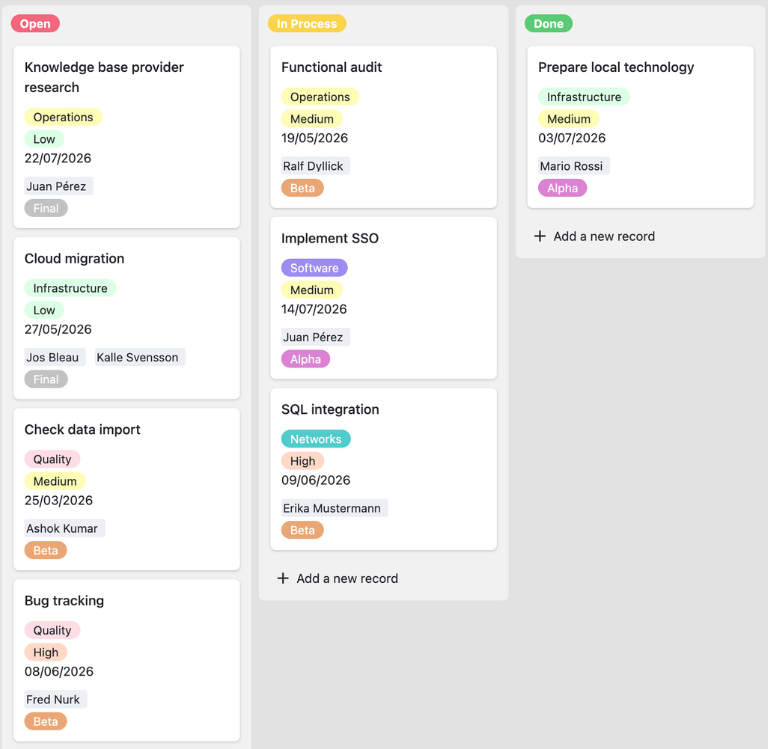
In the “Initiatives” table you record all strategic goals, technology initiatives and project measures of your IT roadmap. Describe each step clearly, assign it to a strategic intention and a business unit, and prioritize which projects should be implemented soon. This is how your IT organization structures complex IT projects in one roadmap and creates a shared basis for the IT strategy.
Visualize time frames and progress
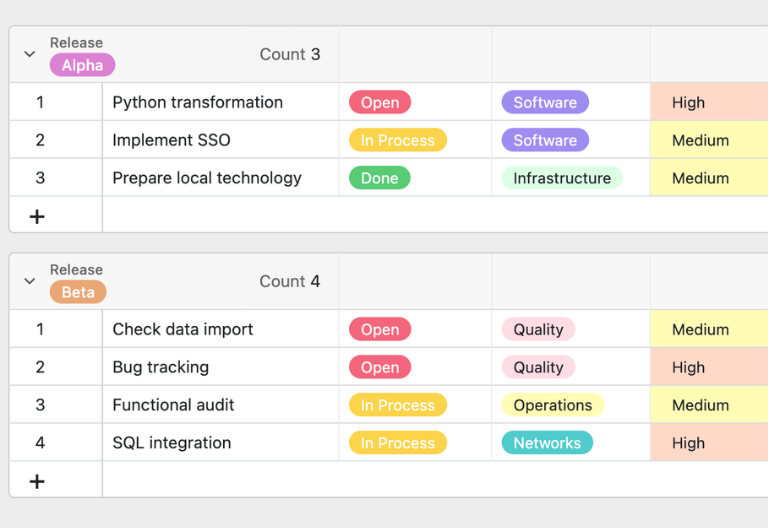
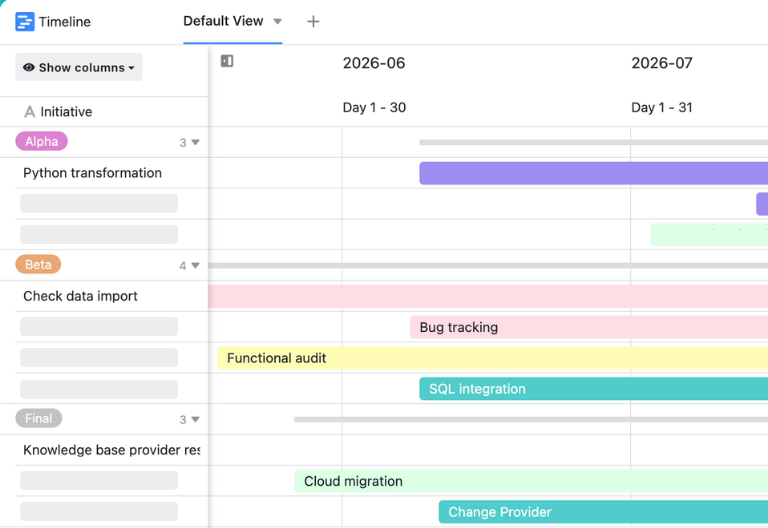
Define the planned period, the target date and the current development status for every initiative. The timeline plugin displays this information visually and makes the schedule of your technology roadmap easy to grasp at a glance. In addition, a Kanban board shows the individual phases and helps teams track progress, open tasks and shifting priorities in the IT roadmap.
Assign responsibilities centrally
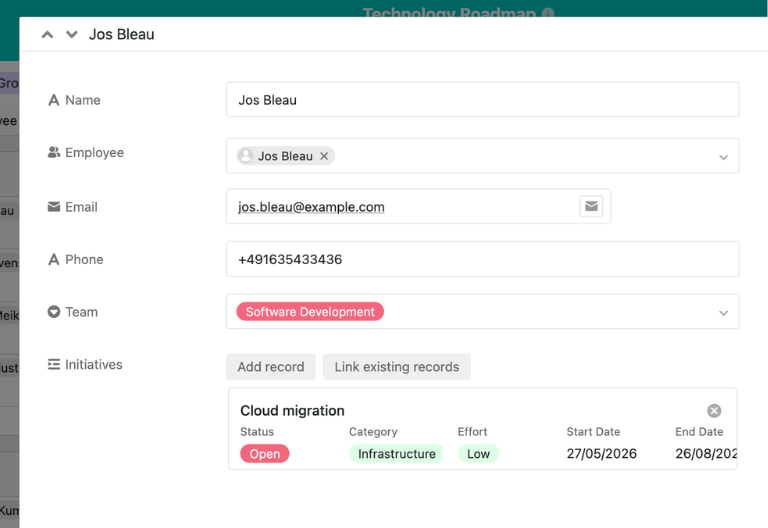
The “Supervisors” table gives you a quick overview of the responsible managers and the initiatives assigned to them. Link every initiative to a dedicated owner so that decisions, questions and status updates stay clearly assigned. This reduces standstill in the roadmap of your IT project and supports transparent stakeholder communication across teams, departments and management levels.
Your custom IT roadmap app
With the built-in SeaTable App Builder, you create a custom front end for your IT roadmap with very little effort. Use filtered overviews for project managers, Gantt charts for milestone planning, Kanban views for operational teams and statistics dashboards for CIOs and executives. Share targeted extracts with stakeholders, involve external partners in a controlled way and manage access through granular permissions. This turns the template into a tailored solution for project management , digitalization and resource planning.
Get your IT strategy on track – with the IT roadmap from SeaTable
Smart automation
Create your IT roadmap with AI
With SeaTable you benefit from powerful AI features that extend your roadmap intelligently. Automate recurring tasks in IT management, reduce manual maintenance and gain time for strategic prioritization, resource planning and transparent stakeholder communication. SeaTable supports Summarize, OCR, Extract, Classify and freely definable Custom Prompts.
Classify initiatives
The “Classify” AI function automatically assigns new initiatives to matching categories based on title, description and objective – for example infrastructure, software rollout or system migration. Your roadmap stays consistently structured and priorities become visible faster.
Extract project details
With “Extract”, the AI reads key information from unstructured project briefings, status reports or requirement documents. Deadlines, budgets, systems, risks and responsibilities are transferred into defined fields. This speeds up maintenance and improves data quality.
Evaluate images via OCR
Upload photos of whiteboards, scanned project documents or architecture sketches and use OCR for text recognition. The extracted content is available directly in your roadmap for search, review and further automation, so results from workshops are never lost again.
Condense status reports
The “Summarize” function condenses long project updates, risk analyses or notes from status meetings into concise summaries. Decision-makers see progress, open points and possible delays faster, and your digital roadmap provides a solid basis for management reviews.
Use custom AI prompts
With Custom Prompts you define your own AI instructions for the roadmap. Have risks assessed, next steps formulated or project descriptions standardized. Field values can flow into the prompt, so every automation takes the context of each single initiative into account.
Generate roadmap reports
Generate structured reports on running initiatives, critical milestones and resource conflicts directly from your roadmap. The AI prepares the information for CIO updates, portfolio reviews and stakeholder communication – without time-consuming manual compilation.
Transparency and teamwork
An IT roadmap for every organization
SeaTable is a modern AI no-code database solution with automations and an App Builder, and it offers every function you need for a professional IT roadmap. The focus is on strategic clarity, dependable collaboration and flexible adaptation to existing ITIL or agile processes – combined with high security standards and hosting that meets European requirements.
GDPR-compliant EU hosting
When you use SeaTable Cloud or the built-in AI, all data stays in Europe – the infrastructure runs exclusively on servers located in Germany. That gives your IT roadmap and every project record a compliant, dependable foundation.
Secure access with 2FA and SSO
SeaTable supports common authentication methods such as two-factor authentication and single sign-on, so you control exactly who may access your IT roadmap and project information – down to the level of individual teams and partners.
Frequently asked questions about the SeaTable IT roadmap
-
What is an IT roadmap and why do IT managers need one?
-
An IT roadmap visualizes how an organization translates its IT strategy into concrete initiatives, projects, technologies and milestones. It makes priorities, time frames, responsibilities and dependencies centrally visible, so investments and resources can be managed with confidence.
-
How does a technology roadmap differ from a project roadmap?
-
A technology roadmap focuses on the long-term development of systems, platforms, architectures and digital capabilities. A classic roadmap for an IT project concentrates on a single initiative with tasks, dates and results. In SeaTable you connect both levels in one roadmap.
-
Can I adapt the template to a specific IT project roadmap?
-
Yes, you can adapt fields, tables, views and automations flexibly. Add costs, risks, involved systems or additional phases and create targeted filters. For detailed operational planning you can also combine it with a project plan .
-
Is this IT roadmap template free to use in SeaTable?
-
Yes, you can use the roadmap template free of charge in SeaTable Cloud. All you need is a free account. You can then manage initiatives, owners, time frames and milestones centrally and extend your technology roadmap individually.
-
How does SeaTable show dependencies and milestones in IT planning?
-
SeaTable links initiatives with owners, time frames and further information. The timeline plugin visualizes planned windows and milestones, while the Kanban plugin shows development phases and progress. Bottlenecks and delays in your IT roadmap become visible early.