SeaTable – Your Time Tracking Template for HR and Managers
Tracking work hours with Excel quickly reaches its limits in day-to-day HR operations: no real-time data, manual maintenance, and a high risk of errors in timesheets, overtime calculations, and break times. With SeaTable’s digital time tracking, your employees can conveniently record their working hours, breaks, project hours, vacation requests, and sick leave via a web form. HR and managers receive automatic reports on positive and negative hours and vacation entitlement—get started now with SeaTable’s time tracking template!
Digital Time Tracking
Time Tracking Template for Your HR Processes
-
Time Tracking Without Excel Chaos
Track working hours, overtime, break times, and absences in a structured manner that complies with legal time-tracking requirements. This allows you to replace error-prone time tracking in Excel with a centralized, digital system for HR and managers.
-
Submission via web form
Your employees can track their working hours, project time, vacation requests, and sick leave via a web form or the Universal App. The data is automatically imported into your time tracking template, so you no longer need to manually maintain timesheets.
-
Calculation of working hours
Automatically calculate hours worked, break times, overtime, and negative hours—including reports by day, month, and employee. The template transforms into a clear and concise overtime calculator with a dashboard view for HR and managers.
-
Granular permissions
Control exactly who is allowed to track time, submit requests, or approve them. This way, HR and management can view all working hours and absences, while employees only have access to their own personal time tracking and can view only their own time balance and vacation entitlement.
-
Customizable to fit your HR processes
Expand the template to include custom fields such as pay grade groups, departments, project time tracking, or payroll data. This allows you to integrate time tracking with other HR processes and create a central database for HR and management.
-
Dashboards and Calendars
Use dashboards, calendars, and statistics to keep track of overtime, vacation days, sick days, and peak workloads within your team. This helps ensure compliance with time-tracking requirements and enables you to make informed decisions based on your digital time-tracking data.
Who uses SeaTable?
Leading companies around the world rely on SeaTable

















100.000+
Downloads in Docker Hub's first year
1.500+
Daily users on SeaTable Cloud
4.6
Review on Capterra
Your benefits at a glance
Use the online timesheet template
With SeaTable, a flexible, AI no-code platform, you can implement a digital time tracking template that adapts perfectly to your HR processes. Replace traditional timesheets with automated workflows, form-based data entry, and dashboards for overtime, break times, project time tracking, and vacation entitlement—a modern alternative to isolated time tracking tools or rigid setups as a Personio alternative .
Always up to date: All time-tracking data—including breaks, vacation, sick leave, and overtime—is updated in real time. Changes can be traced at any time, and manual updates are no longer necessary.
Access from anywhere: Employees and managers can record and review their working hours via a browser or app—whether in the office, working from home, or on the go. This turns digital time tracking into a modern, legally compliant timesheet.
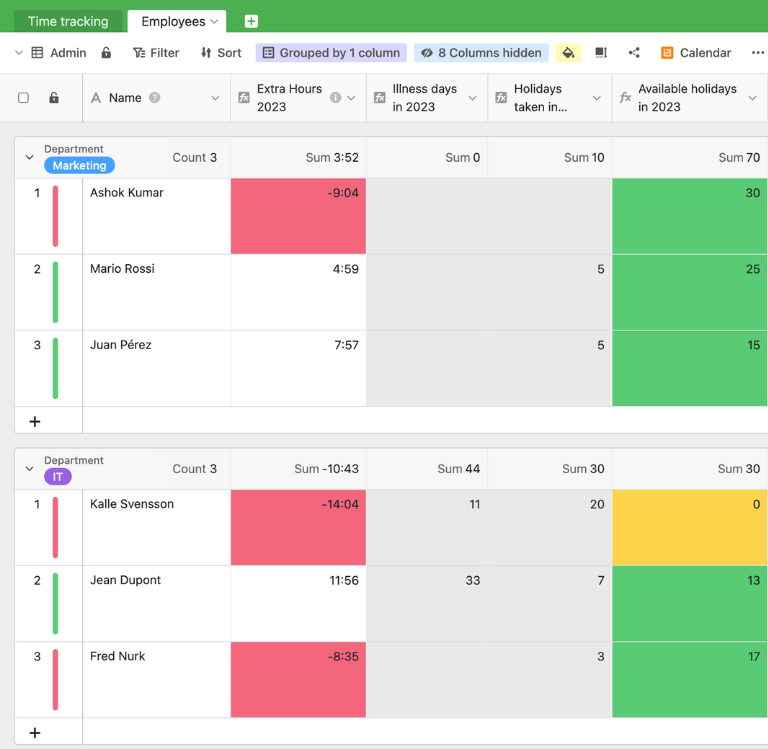
Track Absences at a Glance: Automatic calculations and color-coded labels show positive and negative hours, vacation days, and sick days at a glance. Dashboards turn time tracking into a central management tool.
Scalable: Start with a simple timesheet template and easily expand it to include project hours, shift schedules, payroll exports, or HR reports—your solution grows with your business.
Automated & integrated: Combine your time tracking with automations, reminders, and email notifications for requests and approvals. This allows time tracking to integrate seamlessly into your HR processes .
Real-world example from HR and everyday team life
How the Time Tracking Template Works
Manage work hours, vacation, and sick days centrally
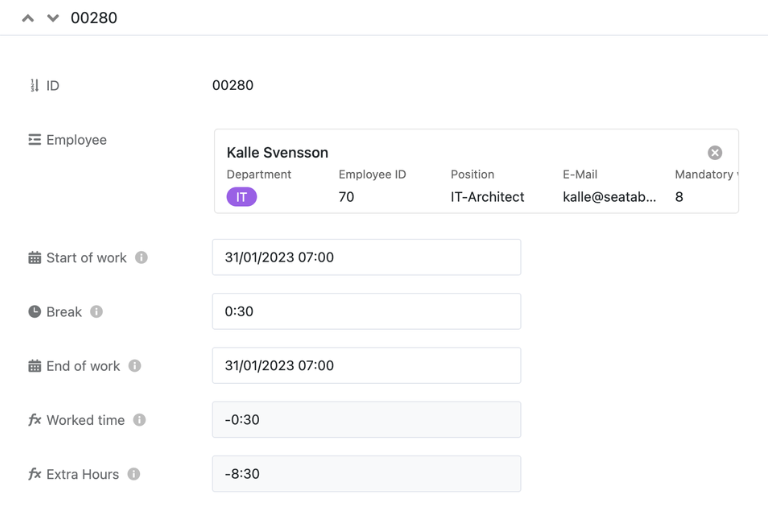
The first table in the timesheet template consolidates all of your employees’ working hours, vacation requests, and sick leave reports—including start and end times, break times, project assignments, and approval status. HR and managers can use different views to get a complete overview of working hours, overtime, and absences without having to reconcile multiple Excel files.
Working Hours: Overtime and Under-time at a Glance
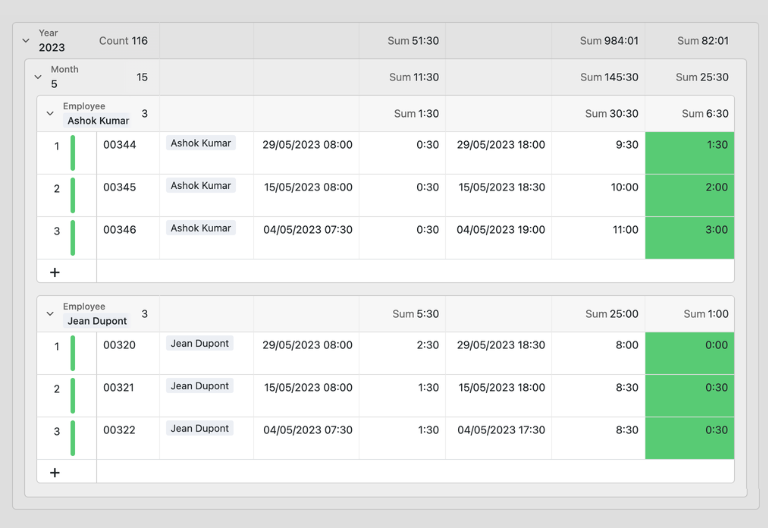
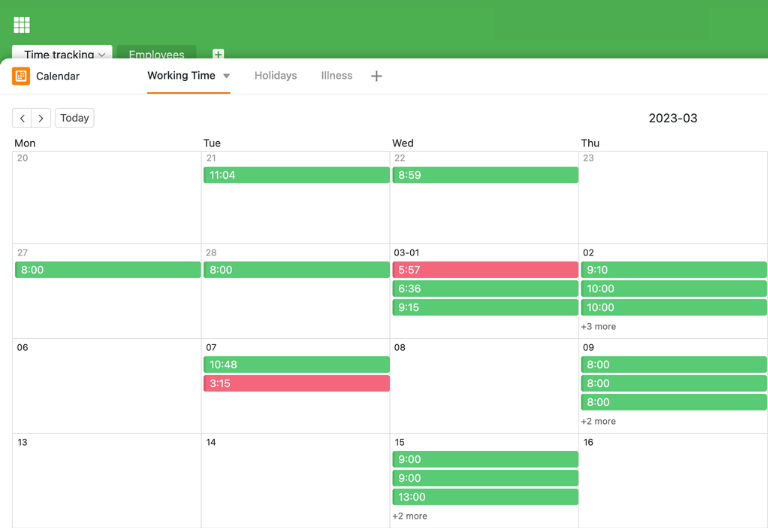
In the “Working Time” view, managers can see the hours worked by each employee—grouped by year, month, and employee. The template automatically calculates planned and actual hours, highlights overtime and negative hours in color, and thus eliminates the need for any manual overtime calculator.
Keep track of absences and vacation time
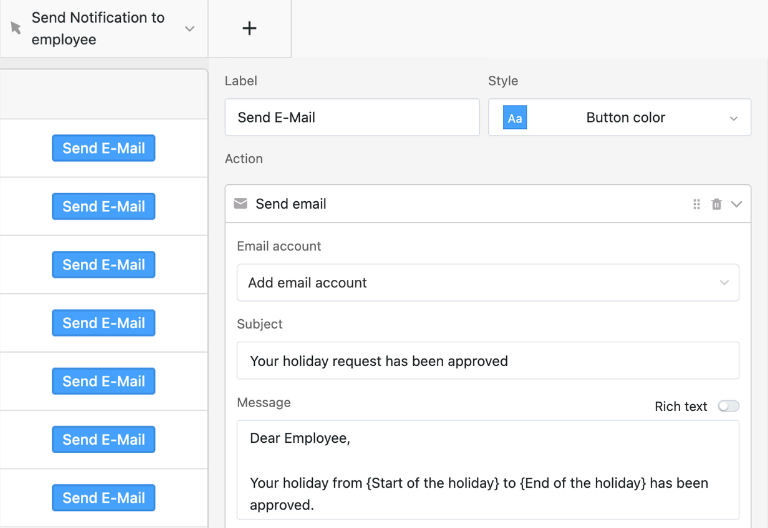
Separate views for vacation and sick leave provide HR and managers with real-time information on who is absent and when, which requests are pending, and each employee’s current vacation balance. Using status fields and automations in the time tracking template, requests can be approved or denied with just a few clicks, including optional email notifications to employees.
Calendars, dashboards, and data export
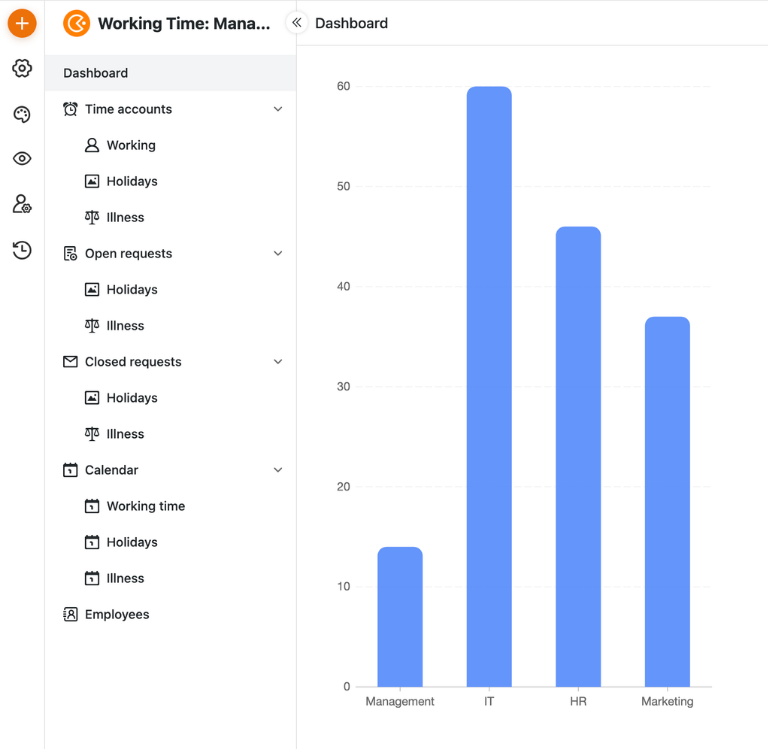
Calendar and dashboard views display working hours, vacation days, and sick days in a visual annual or monthly overview—ideal for workforce planning and project time tracking. In addition, you can export data from the template at any time—for example, for payroll or reporting—without having to merge individual files.
Your custom time-tracking app
With the built-in App Builder, you can use the time tracking template to create a custom time tracking app for employees, HR, and managers. Combine forms for work hours, project time tracking, vacation requests, and sick leave with clear time accounts, dashboard views for overtime, and calendar views—all the way to specialized apps for departments or locations, which you can link to additional HR templates as needed. Share specific sections as a frontend with the respective roles and use permissions to control who can record times, view accounts, or approve requests—thus transforming the time tracking template into a customized HR time tracking app.
Track working hours, overtime, and vacation time transparently – with SeaTable
Smart Automation for HR
AI-powered time tracking
With SeaTable, you can use powerful AI features that automate your timesheet template, HR reports, and compliance tasks. This turns your timesheet template into a smart hub for working hours, overtime, vacation entitlement, and project time tracking—significantly more efficient than traditional timesheet tracking in an Excel file.
Automatic categorization of times
With Classify, tracked hours are automatically assigned to projects, cost centers, locations, or work models. This allows you to always keep track of how working hours are distributed across teams, tasks, and projects, and how resources are being utilized.
Data extraction from applications and emails
With Extract, you can automatically extract data from vacation requests, sick leave notifications, or emails and transfer it in a structured format to your time tracking template. This reduces manual effort and ensures a complete, up-to-date data set.
Document Capture with OCR
With OCR, you can automatically capture content from uploaded images—such as sick notes or scanned timesheets—and link it directly to the corresponding entries. This allows you to digitize and automate your processes step by step.
Summaries for HR Reports
With Summarize, you can automatically generate brief summaries from your time-tracking data—for example, on overtime trends, absence rates, or the workload of individual teams. These analyses make management reports and employee reviews easier.
Custom Automation with Custom Prompt
With Custom Prompt, you can create your own AI rules that, for example, automatically flag violations of break times, recommend adjustments to shift schedules, or summarize monthly time logs. This allows you to make your time tracking even smarter.
Status overviews at the click of a button
Using AI-powered status reports, you can generate reports on time-tracking compliance, overtime distribution, and your company’s vacation status. The AI compiles these into clear, easy-to-understand overviews for HR and management.
Transparency and Collaboration in HR
Transparent and Secure Time Tracking Template
SeaTable is a modern AI no-code database solution with automation features and an app builder, offering all the functionality you need for a professional digital timesheet template. The focus is on transparency, teamwork, and flexible customization—from simple time tracking templates with vacation entitlement and break times to integrated project time tracking and HR reporting structures as a scalable alternative to traditional time tracking with Excel.
Alternative to Excel
Organize your time tracking with SeaTable much more efficiently than in Excel—thanks to linked tables, personalized views, forms, and automations for HR, employees, and managers.
Connecting Projects & HR
Integrate time tracking, project time tracking, and other HR templates into a unified structure, and consolidate work hours, vacation, and sick days into a single, easy-to-use system.
GDPR-compliant
If you use SeaTable Cloud or the built-in AI, all personal data related to working hours remains in Europe—the infrastructure is hosted exclusively on servers in Germany.
2FA and SSO
SeaTable supports two-factor authentication and single sign-on, allowing you to precisely control who can access time tracking data, timesheets, and reports.
FAQs About the SeaTable Timesheet Template
-
Can I use the SeaTable timesheet template for free?
-
You can use the template for free in the SeaTable Cloud. All you need is a free account, and you can immediately start digitally tracking your team’s working hours, vacation days, and sick days—without the need for additional Excel timesheet files.
-
How does SeaTable's time tracking differ from time tracking in Excel?
-
When tracking work hours in Excel, you’ll quickly run into limitations: manual data entry, missing links, no real-time data, and a high risk of errors. The SeaTable template offers forms, custom views, automations, and dashboards for work hours, overtime, break times, and vacation entitlement—making your time tracking more robust, transparent, and easier to integrate into HR processes.
-
Can I import existing timesheets from Excel into SeaTable?
-
Yes, you can import existing timesheet or work log lists from Excel into your template via CSV import. After importing, you can customize fields and views and take advantage of the benefits of the digital solution, including forms, dashboards, and automations.
-
Is this template suitable for project time tracking?
-
Yes, you can optionally assign times to projects, clients, or cost centers in the template. This allows you to combine traditional time tracking with project-based time tracking, providing a consistent basis for analyses in HR and Controlling.
-
Does the bill support mandatory time tracking in the company?
-
The time tracking template helps you implement your legal time tracking requirements in a structured manner. Employees use the form to record their working hours and break times, while HR and managers can centrally monitor compliance with working hour regulations, overtime, and vacation entitlement.
-
How many users can work on the template at the same time?
-
Multiple users can simultaneously track their hours, submit requests, or view reports. You can use permissions to control who can only view their own hours, who is authorized to approve requests, and who, as an HR administrator, can access all data in the template.
-
Can I create my own fields, views, and workflows in the template?
-
Yes, you can add additional columns, tables, views (such as calendars, timelines, or grouped team views), and automations at any time. This allows you to flexibly adapt your template to working time models, shift systems, and HR reporting requirements.
-
Is SeaTable suitable as an HR tool for tracking work hours?
-
Yes, SeaTable is a modern, collaborative alternative to traditional Excel timesheets and specialized time-tracking tools. With the timesheet template and other HR templates, you can combine time tracking, leave management, project time tracking, and reporting into a single flexible platform.