SeaTable – Your professional project structure plan template
Easily structure your projects into phases, work packages, and tasks—all in one central location. With this template, you can clearly define responsibilities, deadlines, and dependencies, and promote transparent communication within your team. Benefit from a clear, collaborative, and flexibly customizable template—get started now and optimize your project planning!
Use project planning online
Project structure plan template for your project
-
Intuitive
The user-friendly project structure plan templates are easy to use, reduce planning errors, and can be flexibly adapted to your project structure planning template—in a team and in an agile manner.
-
Structured
A clearly defined structure ensures that each project structure plan template maps phases, work packages, subtasks, responsible parties and milestones in a consistent, easy-to-understand way.
-
Clear Overview
With just a few clicks, you see progress per phase or work package, spot bottlenecks early and use your project structure plan template as a practical basis for project planning, reporting and team coordination.
-
Permissions
With granular permissions, you can control who can view, edit, or comment on phases, work packages, or tasks in the template—ideal for project teams, stakeholders, and external partners.
-
Web Form
Conveniently record new tasks or work packages on the go using a web form—information flows into the project structure plan in a structured manner and remains traceable for everyone at all times.
-
Notifications
Quickly see progress per phase or work package, detect bottlenecks early and use your project structure plan template as a practical basis for planning, reporting and team coordination.
Who uses SeaTable?
Leading companies worldwide rely on SeaTable

















100.000+
Downloads in the first year of Docker Hub
1.500+
Daily users on SeaTable Cloud
4.6
Review on Capterra
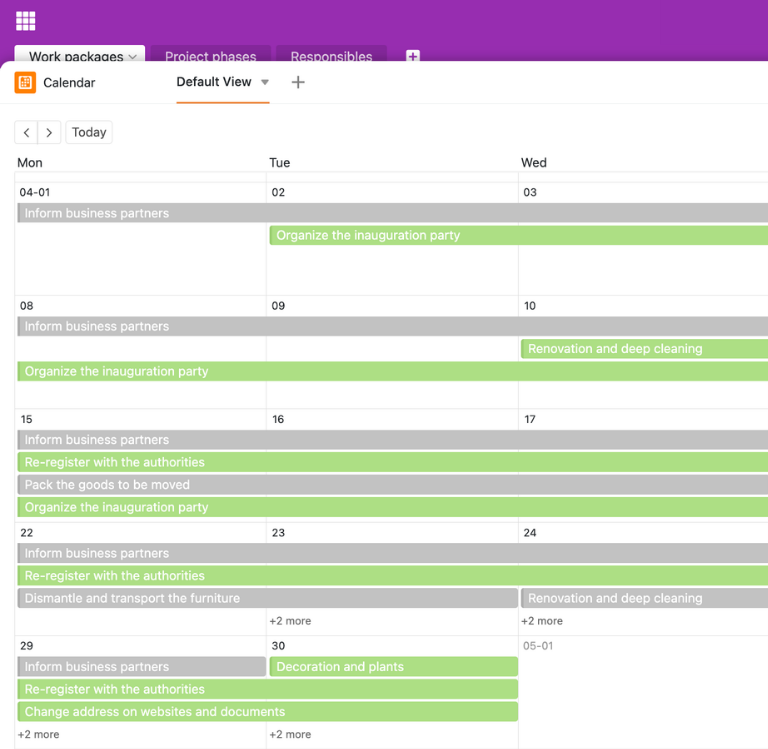
Your advantages at a glance
Use the project structure plan template online with SeaTable
The AI no-code solution SeaTable impresses with its flexibility and adaptability. With the project structure plan template, you can plan projects from the rough structure to individual tasks, keep track of resources, and create a common basis for project structure planning across the entire team—with features that many teams would otherwise only find in Asana and similar project management tools similar to, but significantly more flexible and database-driven.
Always up to date: Thanks to comments, change history, and real-time updates, your project structure plan templates are always up to date—from the first project structure plan example to ongoing implementation.
Access from anywhere: With an online project structure planning template, you can access your project structure plan at any time—in the office, at home, or at a client’s location.
Transparency in the project: Link phases, work packages, and tasks in a project structure plan template—this allows you to see which tasks belong to which package and how far along parts of the project are.
Scalable: Your project structure plan templates grow with your requirements—regardless of how many projects, subprojects, or team members you manage.
Automated & integrated: Use SeaTable as a central project planning tool that flexibly adapts to your processes and seamlessly complements other applications.
Project structure plan Example from practice
How the project structure plan template works
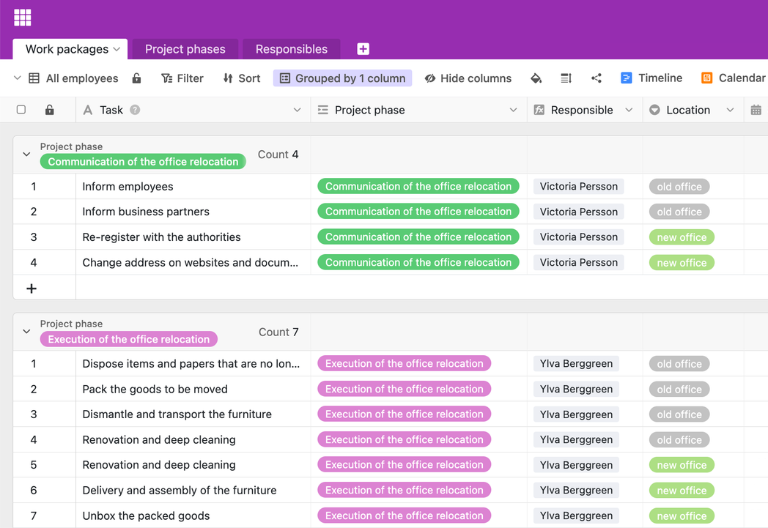
Manage work packages
In the first table of the project structure plan template, you create all work packages. You describe the task, assign it to a project phase, name a responsible person, and add the location, start date, and deadline. In addition, you can record subtasks and hours worked—this creates a practical project structure plan example with clear responsibilities and traceable effort.
Structure and link project phases
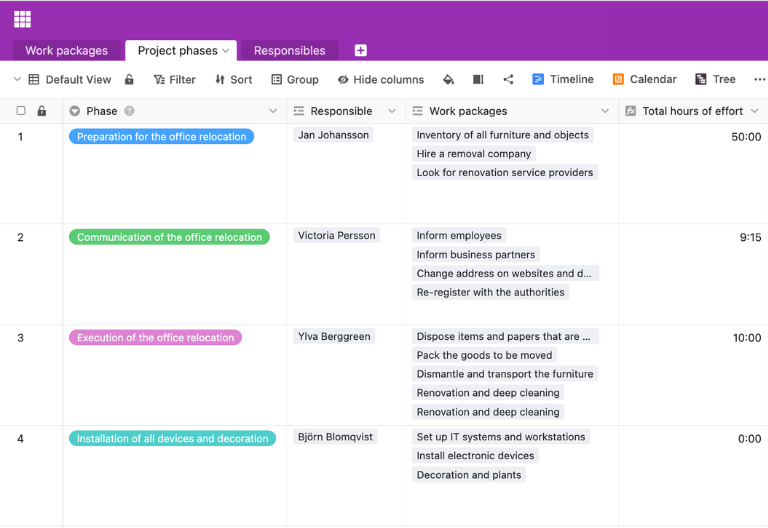
A second table groups together the higher-level project phases, functions, or objects into which your project is divided. Since this table is linked to the work packages, you can assign each package to a phase and see at a glance in the project structure plan template the progress, number of work packages, and accumulated hours per phase—ideal for structured project planning and reporting.
Manage responsible persons centrally
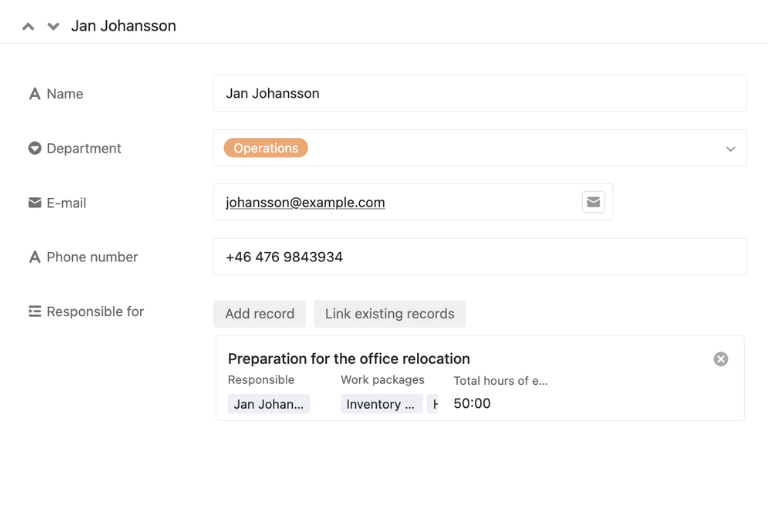
In a third table, list all persons involved in the project with their department, email address, and phone number. Use links to connect this overview to the work packages in your project structure planning template so that you can see at any time who is responsible for which work package and how the workload is distributed within the project.
Tree view for clear structure
Use the tree view to display your project structure plan as a real hierarchy: projects, phases, work packages, and tasks appear in a tree structure that you can expand and collapse as needed. This turns every project structure plan template into an intuitive navigation interface where you can quickly identify relationships, the depth of the structure, and possible gaps in project planning.
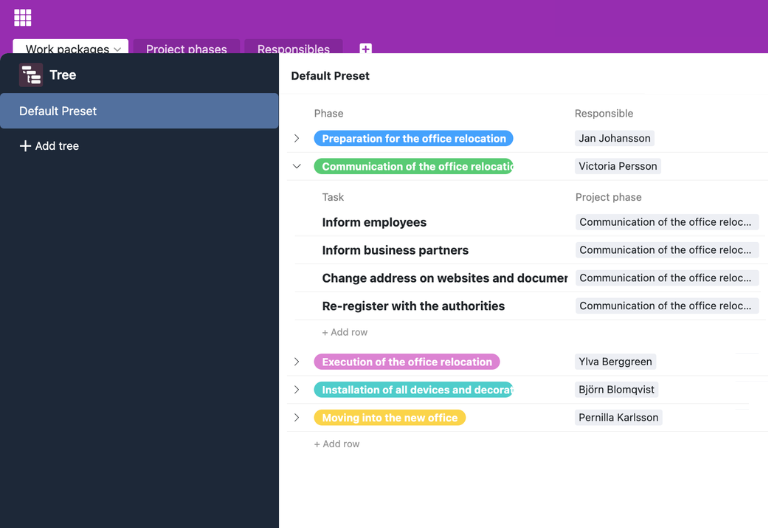
Your customized project structure plan app
With the integrated App Builder, you can easily create your own custom front end based on the work breakdown structure template. Combine forms for new work packages, tree views for structure overviews, calendar or timeline views for appointments, and focused filter views for individual roles. Share specific sections with stakeholders via links and use permissions to control who can view or edit which elements of the project structure plan template—turning every project structure plan template into a customized solution for your team.
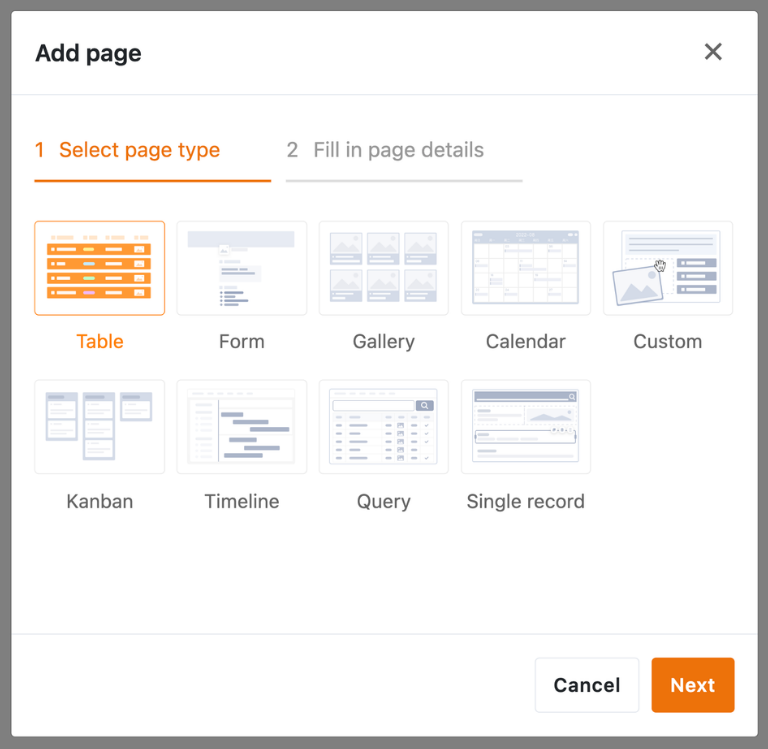
Keep structure and progress under control—with SeaTable's project structure plan template
Smart automation
AI-powered project structure plan templates
With SeaTable, you can use powerful AI features , that take your project structure plan templates to a new level. Automate recurring tasks in project planning, reduce manual routine work, and gain time for analysis, coordination, and informed decisions about priorities and resources.
Classification with Classify
Classify automatically assigns new tasks to appropriate phases or work packages based on their title and description. New entries are placed directly in the correct structure in your project structure plan template, allowing you to see at a glance which areas require more work.
Data extraction with Extract
With Extract, you can evaluate unstructured project information such as logs or emails and automatically extract relevant data such as responsible persons, deadlines, or effort. This data is entered into separate fields in your project structure planning template, facilitating further planning.
Text recognition with OCR
Upload scans or screenshots of your project plans and use the OCR function to automatically recognise any text they contain. This means that milestones, budgets and risks are immediately available in your project structure plan template.
Automated summaries with Summarize
Summarize automatically summarizes long status reports or extensive comment threads in just a few sentences. In combination with your project structure plan template, you can grasp the essence of a project section more quickly and prepare status rounds efficiently.
Tailor-made automation with Custom Prompt
With custom prompts, you can define your own AI instructions that support typical routine tasks in your project structure plan templates. Examples include suggestions for priorities, notes on conflicting deadlines, or automatically generated descriptions of work packages.
Status and risk overviews at the touch of a button
Generate structured reports on open and completed scope per phase, project, or time period directly from your project structure planning template. AI prepares trends and anomalies so that you can create reviews, audits, and management reports with just a few clicks.
Transparency and cooperation
Project structure plan template for every use case
SeaTable is a modern AI no-code database solution with automation and app builder, offering all the features you need for professional work breakdown structure templates. The focus is on traceability, teamwork, and flexible customization with the highest security standards—from the initial work breakdown structure template to a scalable multi-project environment.
GDPR compliant
When you use SeaTable Cloud or the integrated AI, all data remains in Europe—the infrastructure is operated exclusively on servers in Germany.
2FA and SSO
SeaTable supports common authentication techniques such as two-factor authentication and single sign-on, allowing you to control who can access your data.
FAQs about SeaTable's project structure plan template
-
Can I use SeaTable's project structure plan template for free?
-
You can use the project structure plan template free of charge in SeaTable Cloud. All you need is a free account, and you can start mapping out your project planning in a structured way right away.
-
How does the project structure plan template differ from a project plan template?
-
The project structure plan template focuses on the breakdown into phases, work packages, and tasks, while a project plan template stronger emphasis on dates, resources, and processes. In SeaTable, you can combine both approaches in one base and switch flexibly between structure and time view.
-
Can I import existing project structure plans into SeaTable?
-
Yes, you can import existing project structure plans from Excel or other systems via CSV import. After importing, you can customize the project structure planning template and benefit from all the features of the digital solution.
-
Does the project structure plan template support tree views?
-
Yes, you can display your project structure plan in tree view and click through phases, work packages, and tasks hierarchically. This makes every project structure plan template particularly clear and helps you quickly grasp the relationships between different elements.
-
Can I link the project structure plan template to a project management tool?
-
Yes, you can combine the project structure plan template with other templates and external solutions. This allows you to seamlessly connect structure planning, scheduling, and reporting.
-
How many users can work with the project structure plan template at the same time?
-
Multiple users can work on the same base simultaneously, entering and updating tasks. Permissions allow you to control who can read, comment, or edit—ideal for collaborative project planning.
-
Can I create my own fields and workflows in the project structure plan template?
-
Yes, you can add additional columns, tables, views, and automations at any time. This allows you to flexibly adapt each project structure plan template to your internal processes, roles, and reporting requirements.
-
Is SeaTable a good alternative to traditional project management tools such as Asana?
-
Yes, SeaTable is a very good, cost-effective alternative to Asana and other project management tools. Unlike rigid boards, the project structure plan template, project plan template, and other templates combine flexible database logic with views such as tree, calendar, timeline, and report dashboards.