Digital Wish List Template for Families and Friends
Gift ideas pop into your head spontaneously throughout the day and then end up scattered on scraps of paper, in chats, or just in your head. And as Christmas, birthdays, or weddings approach, it’s hard to keep track of everything. The result is uncoordinated plans, duplicate gifts, and forgotten wishes. With our free wish list template from SeaTable, you can consolidate all your gift ideas into one organized system. You can create a wish list, use your digital wish list as an app, and share it online with family and friends. That way, everyone knows exactly what’s right for whom and for what occasion—and you can look forward to seeing their eyes light up.
The benefits of your digital wish list
With SeaTable’s wish list template, you can keep track of every gift idea
-
Organize Your Wish List
Keep track of your wishes and gift ideas in an organized way with clear prioritization. You can create a separate wish list for each person and define categories such as birthday, Christmas, or wedding.
-
Links, Pictures, and Details
Add links, prices, and photos to each entry. This helps you avoid misunderstandings and manage online wish lists that consist not just of keywords, but of clear gift ideas.
-
Use with Friends and Family
Create separate wish lists for different people and occasions, and share them with friends and family. This way, everyone can easily coordinate, and you’ll avoid duplicate gifts.
-
AI-Powered Automation
Take advantage of the built-in AI-powered automation features to streamline workflows and optimize data processing. For example, you can create automated short notes and reduce manual effort.
-
Mobile Access Anytime
Access your digital wish list anytime, anywhere via your smartphone to add spontaneous ideas right away. This way, your digital wish list is always up to date, and no wish gets lost.
-
One Database, Multiple Apps
Save all your specific requests and ideas in a structured database and create separate apps for different occasions or groups of people—no programming knowledge required.
Who uses SeaTable?
Leading companies worldwide trust SeaTable

















100,000+
Downloads in the first year on Docker Hub
1,500+
Daily users on SeaTable Cloud
4.6
Rating on Capterra
Organize your wishes with SeaTable
Collect gift ideas and create wish lists
With SeaTable’s AI no-code solution, you can manage your wishes in one place and share them with family and friends as needed. Keep your digital wish list in a flexible, customizable database rather than a rigid app. This way, every wish list stays organized, whether you’re creating it just for yourself or for the whole family.
Your Own Database Instead of a Paper Wish List: Enter every gift idea directly into your wish list template and digitally link ideas, prices, links, and people.
Always at your fingertips: You can access your digital wish list at any time to spontaneously add ideas or edit entries. This way, your collection of gift ideas grows throughout the year.
No prior knowledge required: SeaTable offers an intuitive interface and can be customized to your needs without any programming knowledge.
Create wish lists for any occasion: Manage Christmas wish lists, birthday wishes, baby shower gifts, or wedding registries all in the same system.
Data protection compliant: With SeaTable, your data is hosted on servers operated by the Swiss company Exoscale in Frankfurt in compliance with the GDPR.
Here's how easy it is
Your Digital Wish List with Numerous Features
Create a gift overview with all the details
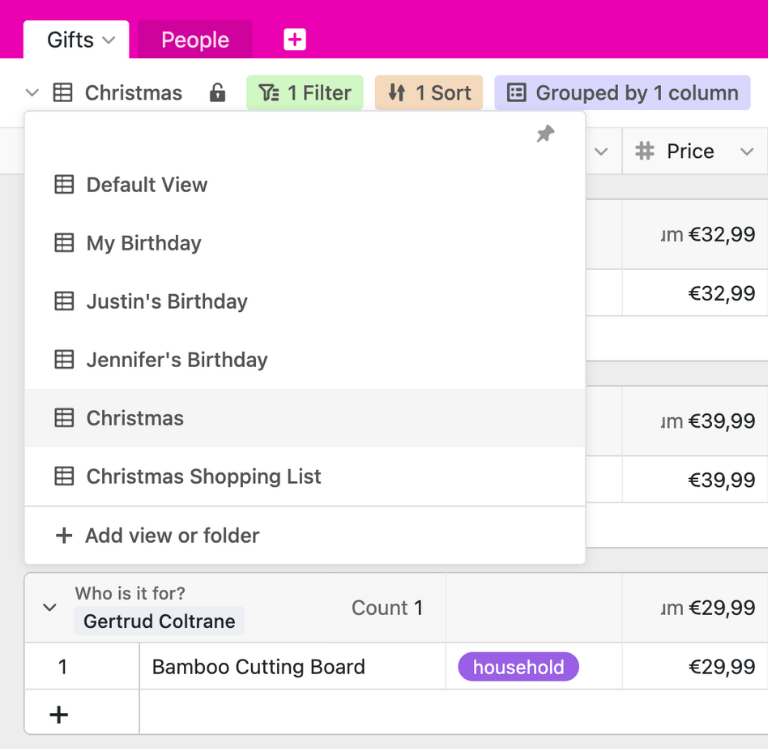
At the heart of the wish list template is the “Gifts” table, where you can collect all your gift ideas. Use an intuitive form to enter the category, price, a product URL, and the recipient for each wish. This turns a simple list into a structured digital wish list with clear statuses and responsibilities.
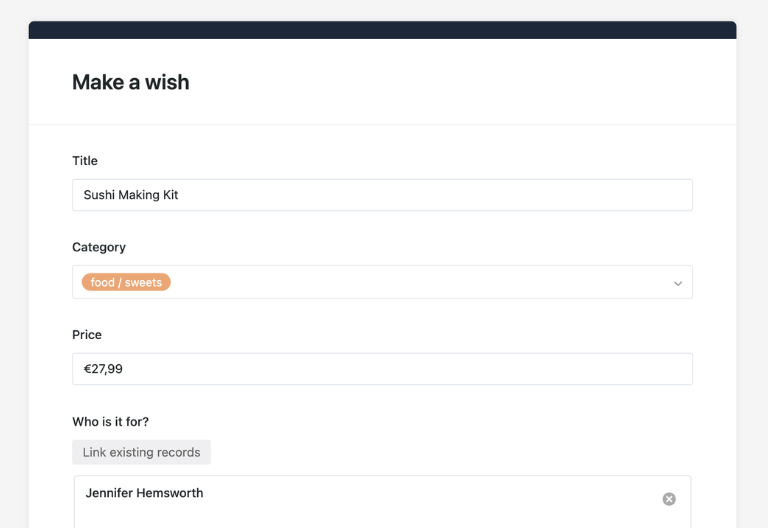
People and Budget Management
In the second table, “People,” you can enter all the people for whom you want to buy gifts or whose wishes you want to share. This table is linked to “Gifts,” so you can select recipients and gift-givers and, for example, add up the total amounts per person to stay within your budget.
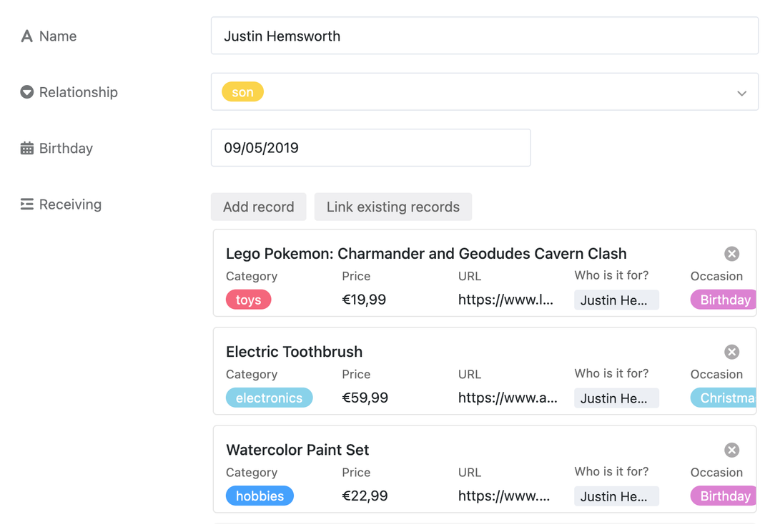
Create and Share a Wish List
With SeaTable’s digital wish list template, you can collect and prioritize your wishes clearly and centrally in one place. You can easily share the entire list with friends and family, check off fulfilled wishes, and track in real time which gift ideas are still available.
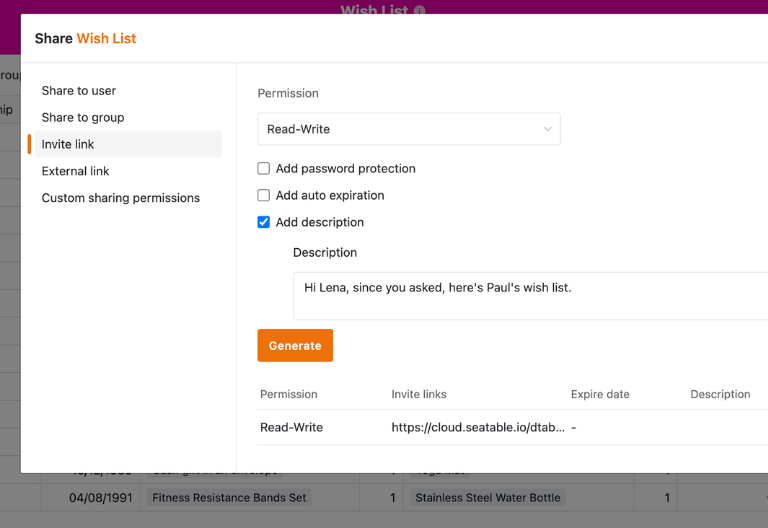
Easily Manage Access
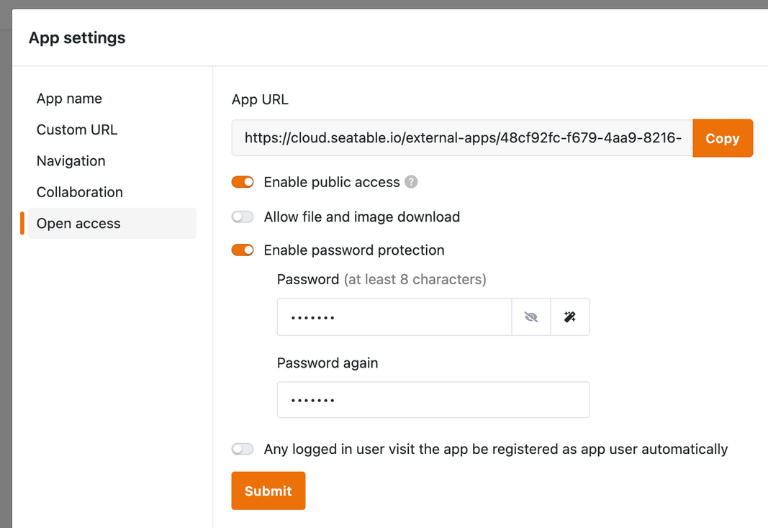
Control read and edit permissions in detail so that only certain people can make suggestions, while others can, for example, only view and reserve entries. This way, you can create a personalized wish list for each person, which keeps the surprises intact and makes planning easier.
Because your requests deserve more than loose pieces of paper and chaotic chat groups
Your Wish List Template as an App
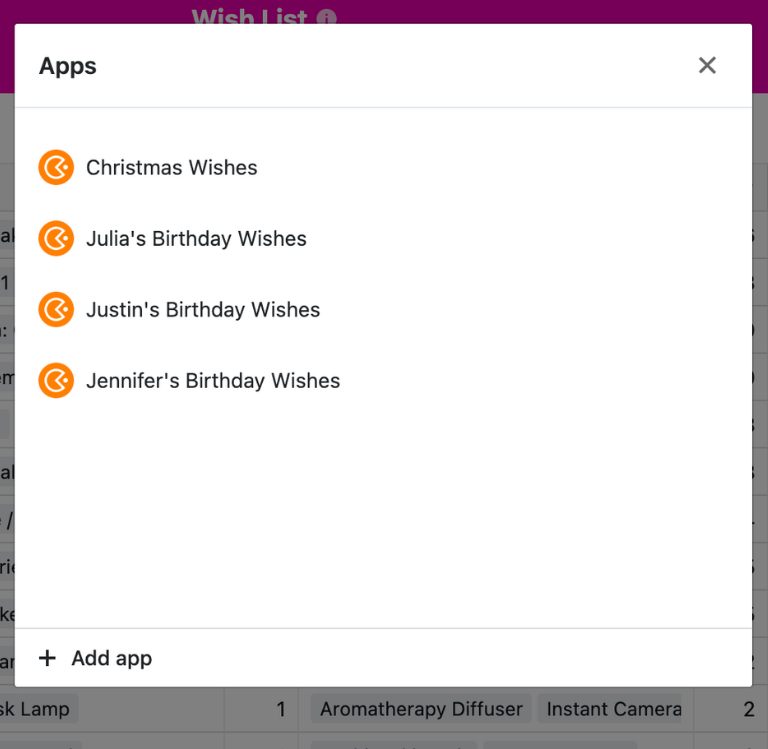
SeaTable not only provides the database in the background, but also a user-friendly front end with as many no-code apps as you like. The “Christmas Wishes” app, for sharing within the family, and the “Birthday Wishes” app, for an individual’s wishes, are already integrated. This allows you to conveniently access the gift overview, contact management, form pages, and query views, and see all relevant information in attractive dashboards. This allows you to manage wish lists online, create a wish list, coordinate family wishes, and organize your entire gift-giving plan just as conveniently as you would with a family planner.
Your Smart Assistant for Finding Gifts
Wish List Template with Built-in AI Features
With SeaTable, you benefit from powerful, built-in AI-powered automations. This allows you to enhance your wish list template with smart tools for gift ideas, voting, and budget planning—all GDPR-compliant with your own AI server in Germany.
Summarize Descriptions
With the Summarize feature, you can automatically create short summaries—for example, from longer wish list descriptions or notes from chat conversations. This turns freely expressed ideas into a clear, easy-to-read description on your digital wish list.
Automatically Organize Your Wishes
Categorize your wish list based on predefined criteria, such as occasion, target audience, or price range. Your wish list template will organize gift ideas in a clear and easy-to-follow way, without you having to manually maintain each category.
Extract Text from Images
Take photos of handwritten wish lists, brochure pages, or gift ideas from catalogs, and use the OCR feature to automatically recognize the text. You can then process the content further and add it to your digital wish list.
Extract Product Descriptions
Automatically extract relevant information from product descriptions, such as prices, retailer names, or item numbers. The Extract feature transfers this data directly into your wish list template.
Define Your Own AI Rules
With the Custom feature, you can define your own prompts to flexibly expand your wish list template—for example, to automatically generate short gift ideas from different columns or to suggest personalized gift messages for cards.
Quality Check for Your Entries
Use AI-powered automations to review your entries—for example, to check whether the description is clear, whether a link or image is missing, or whether the price align with your budget guidelines. This ensures your gift budget remains easy to plan.
Create a Transparent Wish List
The Benefits of SeaTable's Wish List Template
From your first gift idea to a coordinated wish list for the whole family: SeaTable’s Wish List Template offers all the features you need for structured gift planning. It focuses on transparency regarding your wishes, a digital wish list with easy data entry, and the ability to share it with others.
Transparency
See at a glance which wishes are on the list for each occasion, who has already reserved or purchased something, and what the planned spending per person is. With table, gallery, and query views, you can create a digital wish list that’s easy for everyone involved to follow.
Collaboration
Forget verbal agreements, cluttered chat histories, and rigid list apps. The digital wish list template can be easily shared and used collaboratively with others. In SeaTable, users work together in real time, so everyone always sees the latest status.
FAQs – Digital Wish List with SeaTable
-
Can I share my wish list online with family and friends without them needing an account?
-
Yes, you can create an app from your wish list template and share it via a link. Many views—such as form pages or simple gift overviews—can be configured so that recipients or gift-givers don’t need a SeaTable account to view the wish list online or make suggestions.
-
“Is SeaTable free for individuals?”
-
Yes, to use the free template for a digital wish list, all you generally need is a SeaTable Free account, which is free forever. This allows individuals to create, customize, and maintain their digital wish list long-term without any additional subscription costs.
-
How can I prevent duplicate purchases when I create a wish list?
-
In your wish list template, family members can mark items as “reserved” or “purchased” using the columns provided for this purpose. Read permissions can be set so that only gift-givers see this information, while the recipient remains in the dark. This helps prevent duplicate purchases.
-
Can I add photos, product links, and prices to the wish list template?
-
Yes, the “Gifts” table is designed specifically for this: it includes product links, prices, and images for each gift. The gallery view lets you see all wishes visually, while the table view provides detailed price and budget overviews.
-
Can I manage different wish lists online separately for various occasions?
-
Yes, you can map occasions such as Christmas, birthdays, weddings, or baby showers in your online wish list using custom fields and filter views accordingly. Alternatively, you can create separate apps based on the same wish list template—for example, a Christmas wish list for the family and a personal wish list for your birthday.
-
Is the wish list template also suitable for shared lists, such as a wedding registry or baby shower?
-
Thanks to the contact and link structure, you can easily create a shared wish list that allows multiple people to access the same online wish list. Everyone can add ideas, set priorities, and manage reservations—ideal for wedding registries, baby showers, or other occasions where many gifts need to be coordinated.