SeaTable - Your warehouse management software
Keep an overview of your stock levels at all times - without expensive special software or confusing warehouse management in Excel. With SeaTables warehouse software, you can manage your warehouse easily, quickly, clearly and automatically.
Intuitive, flexible, secure
Your warehouse management software in the cloud
-
Central
Simple warehouse management with an overview of all products - including stock, storage location and delivery time.
-
Flexibility
Simply adapt the template to your needs - without any programming effort or IT knowledge.
-
Input
Record goods movements quickly and easily using the integrated form - booking errors are reduced.
-
Notifications
Integrated notifications prevent stock levels from falling below minimum levels - without any manual effort.
-
Product catalog
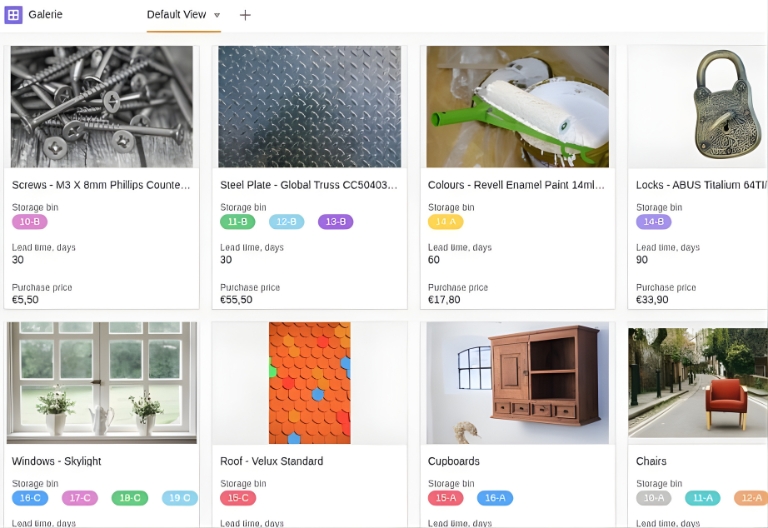
Your products are displayed with images and relevant information in a gallery - for a better overview.
-
Universal App
Use the app as a front end for your warehouse software - with forms, analysis dashboard and stock queries.
Who uses SeaTable?
Leading companies worldwide rely on SeaTable

















100.000+
Downloads in the first year of Docker Hub
1.500+
Daily users on SeaTable Cloud
4.6
Rating on Capterra
App for warehouse management
Simple online warehouse management with SeaTable
The SeaTable no-code solution impresses with its flexibility and adaptability. This means that even dynamic processes can be easily mapped in your warehouse management software.
Up-to-date data: Stock changes can be entered quickly and are immediately available to everyone.
Real collaboration: Work on data together as a team - without time delays or system crashes.
Simply scalable: Your warehouse software grows with your requirements - without expensive additional functions.
Simple integrations : With the SeaTable API, third-party providers such as shipping service providers or e-commerce platforms can be easily integrated.
Warehouse management online
Build your warehouse management app with SeaTable
All article data at a glance
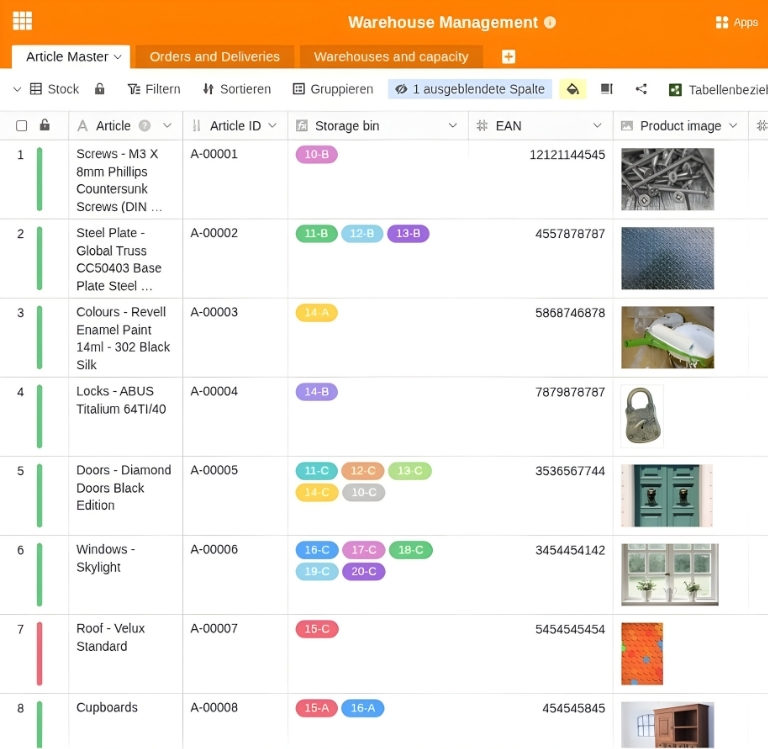
Create your products and articles in the “Article Master” table and link it to the “Warehouses and Capacity” table to have the current stock level at all times. You can easily create new articles or products using a form.
Easily record incoming and outgoing goods
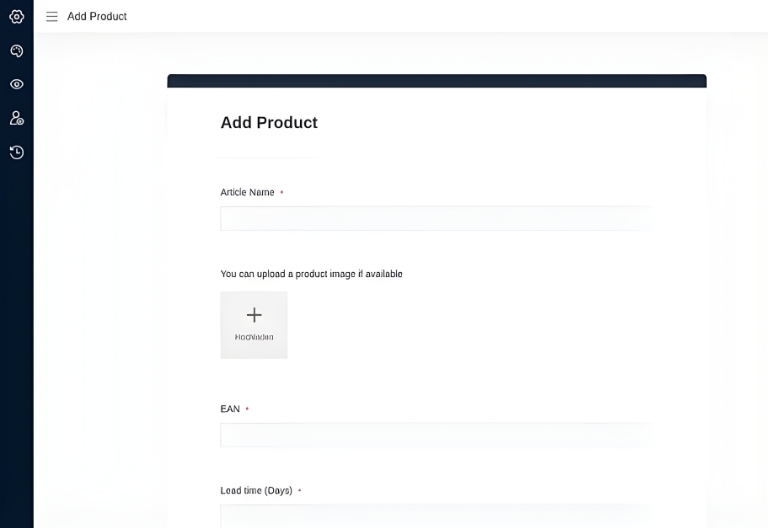
Post incoming and outgoing stock via a form in the warehouse management app. In addition to the stock and, if necessary, a status description, also enter the storage location from which the stock is to be posted. This keeps your warehouse data up to date at all times!
Storage bin occupancy and warehouse utilization at a glance
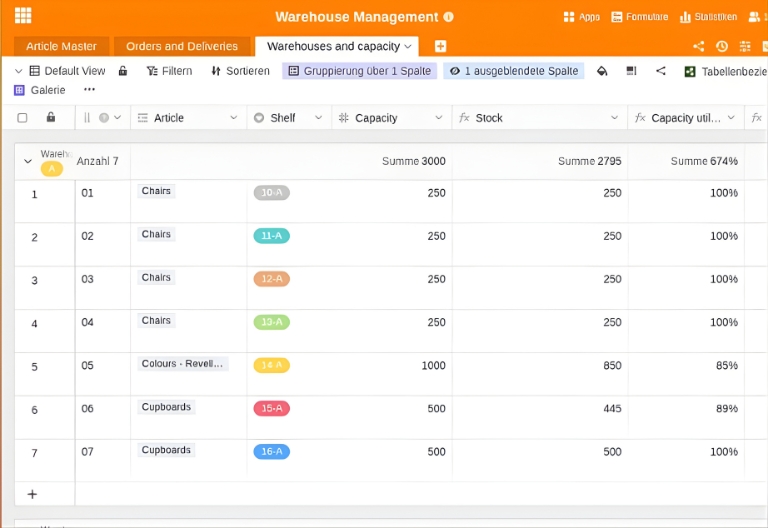
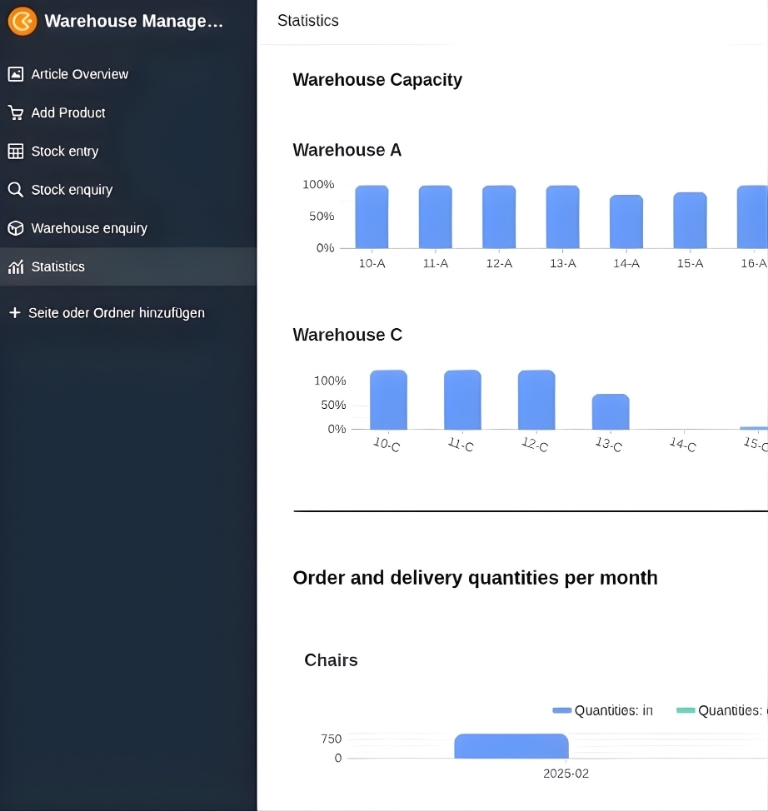
Link the storage location occupancy and utilization with your product overview and incoming and outgoing goods. In addition to goods turnover, you can also evaluate the degree of storage space utilization - and thus react in good time to excess or reduced requirements.
Integrated notifications
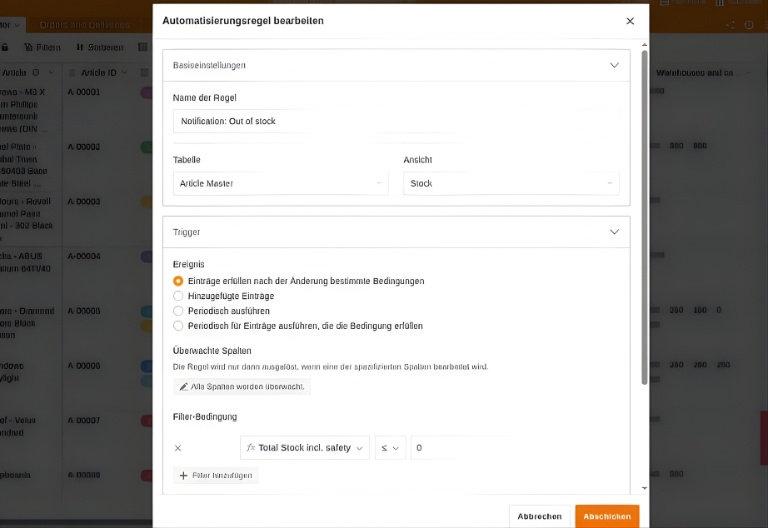
Is a storage bin overbooked? The safety stock has been undercut and needs to be reordered? Use automated notifications so that critical stock changes are no longer overlooked.
The perfect alternative to expensive warehouse management software - all data always in view
Clear front-end app for warehouse management
Use the no-code universal app as a warehouse management online front end and create forms, clear views or dashboards with relevant KPIs for your analyses with just a few clicks. The stock and warehouse query provides specific information on individual products or occupancy information on storage locations - without cumbersome manual searches.
Smart automation
AI-supported warehouse management with SeaTable
With SeaTable, you benefit from powerful AI features , that take your warehouse management to a new level. Automate recurring tasks, reduce errors, and make better decisions based on your inventory data.
Automatic article classification with Classify
Have new items categorized automatically: The AI function “Classify” recognizes the appropriate category based on product names, descriptions, or supplier assignments and assigns your items independently—ideal for rapidly growing product ranges.
Order suggestions and notes with Custom Prompt
With the custom prompt function, you can generate order suggestions and recommendations for action—e.g., based on current stock levels, safety stock levels, and delivery times. The AI highlights critical items and helps identify bottlenecks at an early stage.
Extract data from documents with Extract
Import delivery notes, order confirmations, or PDF lists and use the extract function to automatically read relevant information such as item numbers, quantities, or delivery dates and transfer it to your warehouse management system.
Concise summaries with Summarize
Create automatic summaries of warehouse reports, inventory comments, or deviation lists with the Summarize function. This gives you an overview of the most important developments in the warehouse in just a few sentences.
Automatic alerts in case of anomalies
Combine automation with AI capabilities to detect irregularities in the warehouse—such as unusual booking patterns, highly fluctuating inventory levels, or above-average returns for certain items.
Create audit and inventory reports
Create structured inventory or audit reports for internal audits, tax advisors, or auditors at the touch of a button. AI summarizes inventory discrepancies, adjustment entries, and special occurrences, supporting you in meeting your documentation requirements.
Warehouse management online
Your warehouse management software from SeaTable
With SeaTables warehouse management software, you record everything in a flexible no-code database and always have an overview. Thanks to the integrated statistics, you can, for example, analyze stock turnover rates, storage range or storage space utilization in real time.
Productivity
Reduce errors and increase your readiness to deliver through optimized warehouse and inventory management. The warehouse management template helps you to control resources, speed up processes and reduce costs.
Transparency
With this template, you have all relevant warehouse information accessible to everyone in one place. This helps you avoid misunderstandings and planning errors. The app displays information clearly.
FAQs on the warehouse management software from SeaTable
-
Can I use SeaTable's inventory management template for free?
-
Yes, you can use SeaTable and the inventory management template free of charge for an unlimited period of time. With a free account, you have access to all the basic features you need to digitally manage inventory, storage locations, and goods movements.
-
Is SeaTable an alternative to Excel for inventory management?
-
Yes, SeaTable is a powerful Excel alternative fFor inventory management. Unlike inventory management in Excel, SeaTable offers multi-user capability, real-time access, automation, permissions, and app front ends—ideal for teams and growing businesses.
-
Can I import my existing Excel inventory list into SeaTable?
-
Yes, you can easily import existing Excel or CSV files containing your warehouse data into SeaTable. After importing, you can customize columns, create relationships between tables, and enjoy all the benefits of the warehouse management template.
-
Can SeaTable's inventory management system be expanded?
-
Yes, you can customize the template to suit your needs at any time. Our simple warehouse management software is just the starting point and can be expanded into a comprehensive warehouse and inventory management system—e.g., with supplier management, ordering, or batch and serial number management.
-
Who is SeaTable suitable for as warehouse software?
-
SeaTable is particularly suitable as warehouse management software for small and medium-sized businesses, start-ups, and craft businesses that want to organize their warehouse more efficiently and are looking for an alternative to expensive specialized software or warehouse management in Excel.
-
Can I map minimum stock levels and automatic reorders?
-
Yes, you can set minimum and safety stock levels for each item and set up automations that trigger notifications or generate order suggestions when stock levels fall below these levels. This reduces the risk of supply bottlenecks.
-
Can I manage multiple warehouse locations and storage locations?
-
Yes, the template supports multiple warehouse locations, zones, shelves, and storage locations. Links and filters allow you to keep track of occupancy, capacity, and inventory, even with complex warehouse structures.
-
Can inventory management be connected to other systems?
-
Yes, you can connect your inventory management system to shop systems, ERP, shipping, or accounting solutions via API, n8n, or Zapier. This allows you to avoid duplicate data entry and ensure that all systems are working with up-to-date inventory levels.
-
Can I also use inventory management on my mobile device?
-
Yes, the SeaTable web interface and universal app are mobile-friendly. You can record inventory via smartphone or tablet, check storage locations, or make bookings—directly in the warehouse, in the field, or from your home office.
-
Is there support available for setting up warehouse management?
-
Yes, you can contact our support team if you have any questions. Either post a question in our community forum or contact us directly by email. We are happy to assist you with setting up and customizing your warehouse management system.