Study Plan Template for School & College
Say goodbye to chaotic study sessions! Our digital study plan template will help you organize your studies. SeaTable’s interactive study plan template combines everything you need: subjects, topics, study times, and deadlines. No more scattered materials or confusing calendars! Our template offers a clear structure with calendar and Kanban views to make your exam preparation more efficient. Whether you’re a college student, high school student, professor, or test-taker—keep track of your study progress at all times. Everything is organized centrally, flexibly, and digitally. Get started now and turn your study time into success!
Digital Learning Management
Study Plan Template for School, College, and Exams
-
Flexible study schedule
Create your personalized study plan template and organize your learning time flexibly. With smart time management, you will stay on top of things even during the stressful exam period and reliably achieve all of your important learning goals.
-
Prioritization by subject
Decide which subjects and topics should take priority in your study plan. You will be much more successful in preparing for exams if you prioritize based on relevance and focus your energy specifically on the most important learning objectives.
-
Track your study progress
Monitor your learning progress with clear progress bars and stay motivated throughout. See at a glance how far along you are in the syllabus, what you still need to cover, and whether you are on schedule with your exam preparation.
-
Roles & Study Groups
Manage access rights and roles specifically for your learning groups. Whether you are an instructor, a student, or an exam candidate—everyone sees exactly what they need. This makes collaborative learning and effective self-management much easier.
-
Your flexible study template
Customize your study plan template with drag-and-drop to match your individual learning needs. Add your own fields for course content, learning objectives, or deadlines, and structure your studies in the way that works best for you.
-
Calendar & Kanban View
Switch easily between calendar, Kanban, and timeline views for your study plan. Keep all your important exam dates clearly in view, plan your entire exam period in a structured way, and simply choose the view that suits you the most.
Who uses SeaTable?
Leading companies around the world rely on SeaTable

















100.000+
Downloads in Docker Hub's first year
1.500+
Daily users on SeaTable Cloud
4.6
Review on Capterra
Your benefits at a glance
Use the lesson plan template online
With SeaTable, a flexible, AI-powered no-code platform, you can create a digital study plan template that adapts perfectly to your learning pace for school, college, and exam preparation. Replace rigid PDF or Excel study plans with an interactive template featuring drag-and-drop functionality, a calendar view, and a Kanban board—ideal for time management, organizing course material, and collaborative daily learning in study groups, for instructors, students, and exam candidates. If needed, connect your template directly to other databases, such as a central project management tool .
Up-to-date information: Any changes to class schedules, syllabi, or deadlines are immediately visible to everyone—no more dealing with outdated versions.
True collaboration: Students, teachers, instructors, and study groups work together on a study plan template—with comments and clearly defined responsibilities.
Interactive Template: Switch between a calendar view for exam dates, a Kanban view for study progress, and a tabular detailed schedule with a timeline.
Centralized Storage: Scripts, notes, study materials, and exam information are all stored directly in your study plan template—no need for separate Word documents or scattered file folders.
Real-world example
How to Use the Study Plan Template
Curriculum Table for Topics & Subjects
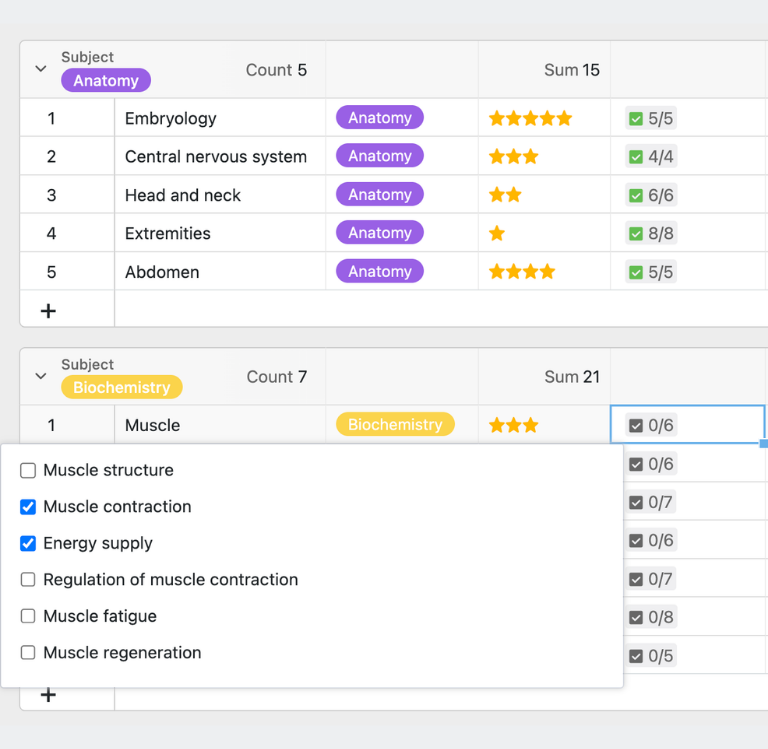
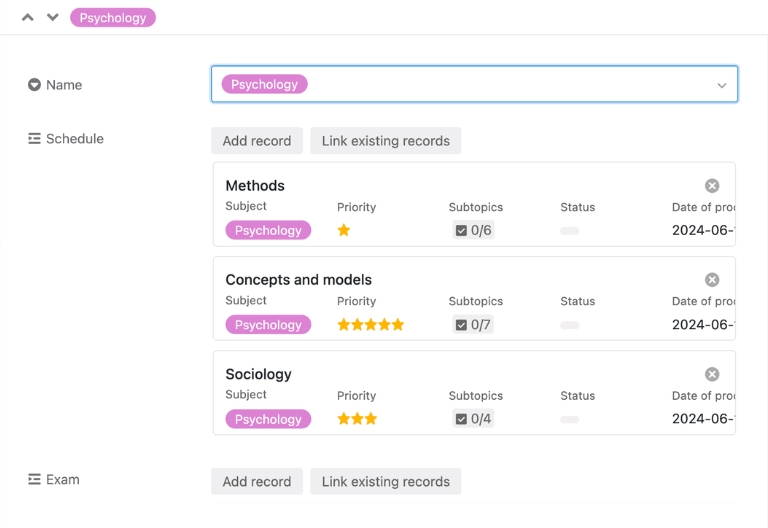
In the “Study Plan” table, you can plan each topic in detail: from subject and module to priority and learning objectives, as well as planned study time, milestones, and progress. This allows you to organize all the content of your exam preparation in a structured way, add additional notes on lecture notes, study materials, and deadlines as needed, and also use the study plan as a template for a study journal.
Subject Table for Organizational Information
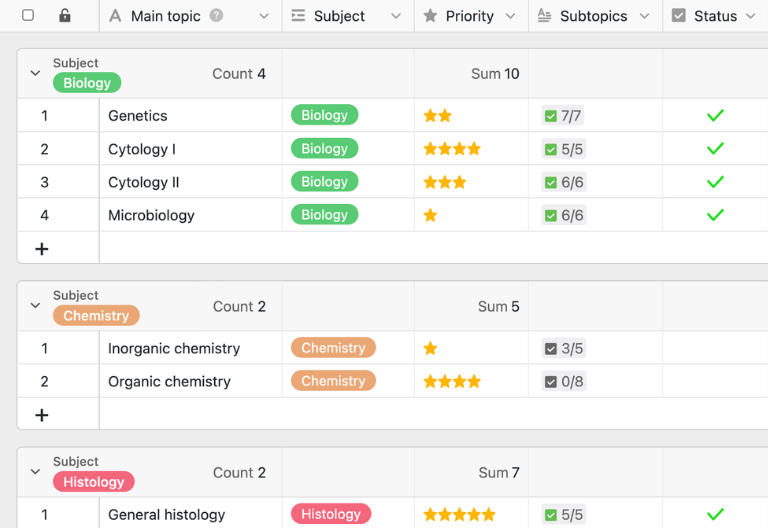
In the “Courses” table, you can enter all relevant organizational information for each course and document important details such as exam dates, course content, and instructor contact information. This allows students and exam candidates to see at any time what requirements apply to each course and how the material is structured.
Exam Schedule: Deadlines & Dates
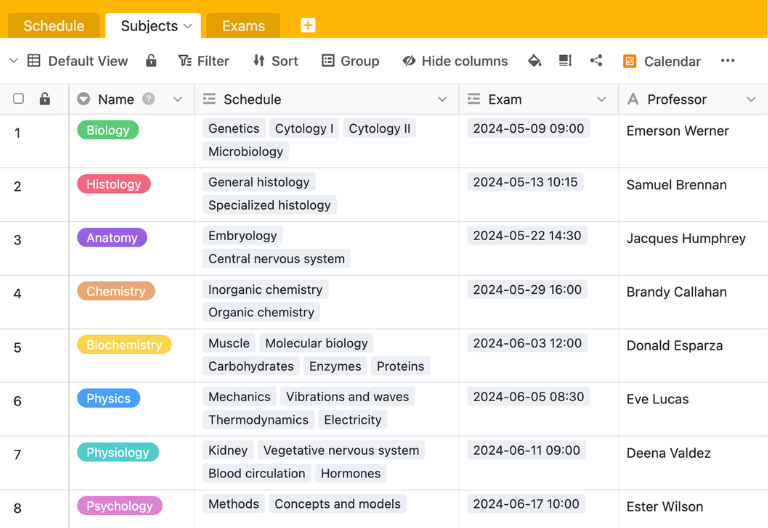
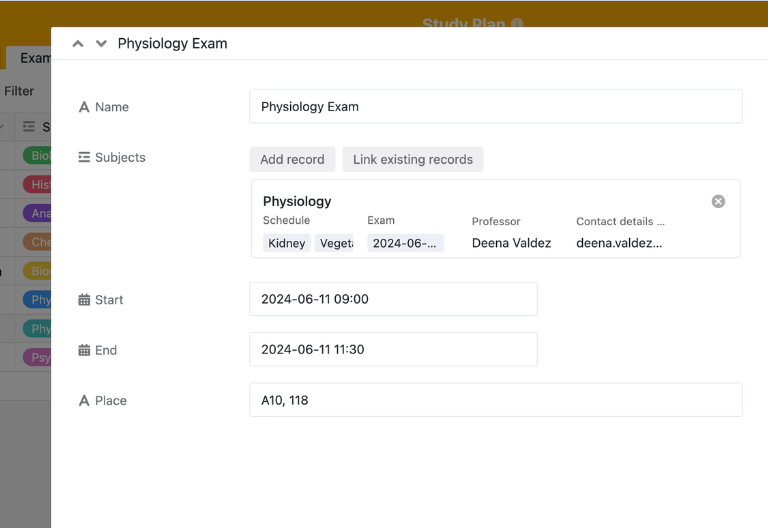
In the “Exams” table, you can accurately manage all important exam dates and record the location, time, and duration of each exam. The built-in calendar view shows you not only the dates but also the duration of each exam—so you won’t miss a single appointment during the entire exam period.
Three Steps to Finding Your Learning Rhythm
Once all subjects, courses, and exams have been entered into the study plan template, you can immediately get into your own study rhythm: You set milestones, align your priorities, and enter each exam period fully prepared with a clearly structured study plan created using the template.
Your interactive study plan app
With the built-in no-code app builder, you can use the study plan template to create an interactive study plan app for students, teachers, and study groups. Combine forms for new topics, fields for subjects, modules, and learning objectives with calendar views, Kanban boards, and timeline views—all the way to specialized apps for exam periods, theses, or continuing education while working. Share specific sections as a frontend with the respective roles and use permissions to control who can create, comment on, or check off topics in the learning process—this turns the digital template into a central study plan for your individual self-organization.
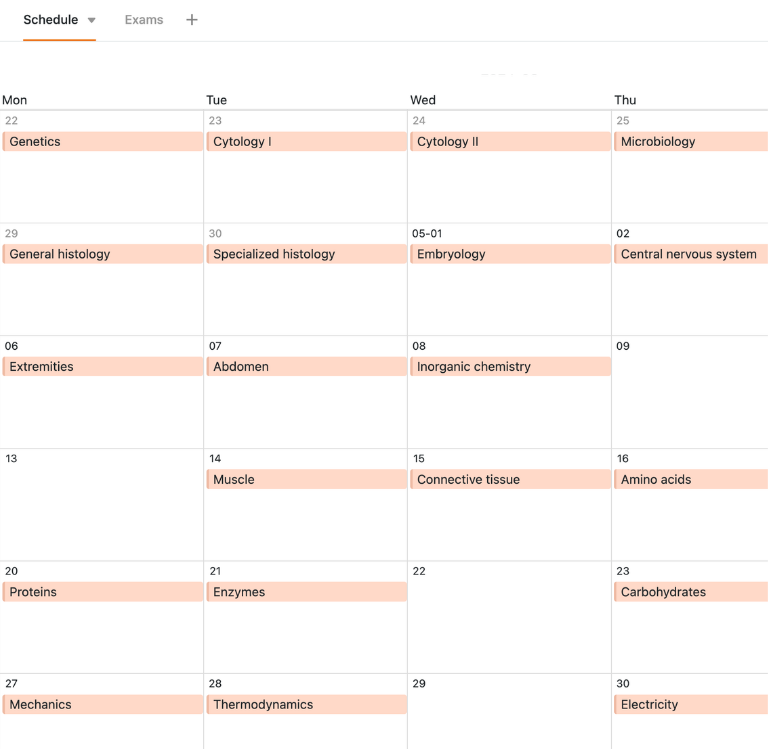
Organize your study plan, course outline, and exam dates digitally—with SeaTable
Smart Automation for Students and Instructors
AI-powered learning management
Discover the powerful AI features in SeaTable! Your “Study Plan Template” becomes a smart assistant that revolutionizes your exam preparation and self-management. Turn your study plan template into a smart hub for curriculum planning, learning goals, a learning journal template and exam dates. Say goodbye to rigid PDF or Excel files—experience maximum efficiency and progress in a whole new way. Turn your learning process into a success story!
Sort topics automatically
The AI feature “Classify” automatically organizes your study topics into categories. This lets you see at a glance which subjects or topics you have already covered and where you still have gaps in your knowledge. Use this to plan exactly which content should be next on your study schedule.
Extract specific data
With Extract, the AI extracts relevant information directly from your study materials. Exam details, learning objectives, and key terms are automatically identified and added to your study plan in a structured format. This helps you save valuable time while studying.
Recognize text from images
The OCR feature converts photographed lecture notes, notes, or study materials into editable text. This allows you to use and work with all materials directly within your study plan. No more manual typing is necessary.
Create summaries
Summarize automatically summarizes extensive learning materials. You’ll save valuable time preparing for exams, as the AI filters out the most important points from your texts and presents them clearly in a concise format. More focus, significantly less effort.
Define your own AI rules
Custom Prompt lets you set specific instructions for the AI. For example, you can have it automatically generate learning objectives, evaluate assignments, or request specific feedback on your current progress. Flexible and fully customizable.
Use AI status views
AI-powered progress reports automatically track your learning progress. Based on your entries in the study plan, the AI identifies which topics you’ve already completed and which areas still need more attention and review. Always stay on top of things.
Transparency and real-time collaboration
Transparent and flexible curriculum template
SeaTable is a modern AI-powered no-code database solution with automation features and an app builder, offering all the functionality you need for a professional digital lesson plan template. The focus is on traceability, collaboration, and flexible customization—from a simple digital lesson plan with topic, subject, and learning objectives to an integrated template with an overview of subjects, exams, and curriculum as a scalable alternative to static PDF, Excel, or Word lesson plans and traditional standalone solutions.
Alternative to static files
Organize your learning materials much more efficiently with SeaTable than with PDF, Excel, or Word—thanks to linked tables, personalized views, forms, and automations for students, teachers, and test-takers.
Learning & Knowledge
Link your study plan template to task scheduling, content calendars, and other knowledge bases, and use SeaTable for your knowledge management . Here is how to consolidate topics, materials, and deadlines into a single system.
German-standard data privacy
If you use SeaTable Cloud or the built-in AI, all your learning materials and personal data remain in Europe—the infrastructure is hosted exclusively on servers in Germany.
Secure login & your own access
SeaTable supports two-factor authentication and single sign-on, ensuring that only you and the people you choose have access to your study plan, materials, and exam notes.
FAQ – Frequently Asked Questions About SeaTable's Study Plan Template
-
What should a good study plan include?
-
A professional study plan typically includes all relevant subjects and topics, a prioritization by relevance, scheduled study times and milestones, exam dates, and an overview of your current progress. With SeaTable’s digital template, you can organize all these elements clearly and adjust them flexibly at any time using drag-and-drop.
-
Can I use the study plan for my degree program for free?
-
You can use the study plan template for free in the SeaTable Cloud. All you need is a free account, and you can start preparing for school, college, or professional exams right away—without having to rely on rigid PDF or Excel study plans.
-
How does the study plan template help me stay motivated?
-
The study plan template makes your progress visible: progress bars, status fields, and checked-off milestones show you at any time what you’ve already accomplished. This visual way of tracking your progress helps combat procrastination and loss of motivation—especially during long exam periods.
-
Can I save files like PDFs or images directly in the study plan?
-
Yes, you can save scripts, notes, images, and PDF files directly in your study plan template and link them to the relevant topic or subject. This way, all your study materials are stored in one place and always at your fingertips—without the need for separate folders or scattered files.
-
Can the study plan also be used as a study journal template?
-
Yes, in the “Progress” and “Notes” columns, you can document your progress and any unanswered or follow-up questions for each study unit. With the built-in study journal template, you can evaluate your study units and learning strategies and compare your goals with your actual results.
-
Is this template also suitable for study groups?
-
Yes, SeaTable supports collaborative learning in groups. With clear access rights and role-based permissions, students, instructors, and exam candidates can work together on a study plan—using comments, status fields, and transparent task assignment throughout the entire exam period. The study plan can also be used as a study journal template to track your progress and note any questions you still have.
-
How does SeaTable differ from a traditional study plan template in Excel?
-
Static Excel or PDF study plans quickly become outdated when delays occur and are difficult to adapt. With SeaTable, you work in an interactive study plan template featuring drag-and-drop functionality, calendar views, Kanban boards, and automations—ideal for recurring exam periods and complex academic structures.
-
Can I import my existing study plan into SeaTable?
-
Yes, you can import existing topic lists, syllabi, or exam schedules into SeaTable via CSV. You can then add learning materials, notes, and deadlines and enjoy the benefits of this digital, collaborative solution.
-
Is SeaTable also suitable as a central learning management tool?
-
Yes, SeaTable can be used as a flexible learning management tool beyond just the curriculum template. Integrate your curriculum with task planning, knowledge management, and reporting to map every step—from the first learning module to passing the exam—within a single system.