Supply Chain Management Tool: Template for End-to-End Visibility
Opaque supply chains, inventory data in Excel spreadsheets, supplier contacts in emails, and deadlines in Outlook calendars: Traditional supply chain management tools quickly reach their limits in day-to-day operations. Delays aren’t detected until it’s too late, and rigid ERP systems are difficult to adapt flexibly. With SeaTable’s Supply Chain Management Tool template, you can consolidate supplier master data, SKUs, real-time inventory levels, delivery dates, and shipping documents into a single, collaborative platform—including a Kanban board for status tracking, a logistics dashboard, and automated notifications for your supply chain management. End-to-end visibility across the entire value chain—from procurement to delivery.
Digital Supply Chain Management
Ending Data Silos in the Supply Chain
-
Finally Break Down Data Silos
Consolidate supplier data, inventory levels, delivery dates, and shipping documents in one template. Replace scattered Excel spreadsheets and Outlook calendars with a single collaborative platform for your supply chain management.
-
Where is my shipment now?
Track every shipment live—from order placement through production and shipping to warehousing. Your supply chain management tool displays each delivery status in real time, so your team can respond immediately when delays occur.
-
Spot bottlenecks early on
Visualize your procurement process on a Kanban board: Ordered, In Production, Shipped, Customs, In Stock. The integrated logistics dashboard instantly highlights bottlenecks and risks—no manual reporting or follow-up questions needed.
-
Manage risks proactively
Catch delivery delays before they turn critical: Automated notifications alert your team the moment inventory falls below defined thresholds. Strengthen your supply chain strategy and minimize operational risks before they escalate.
-
Changes without IT tickets
Customize your supply chain management tool without any IT support: Add fields for SKUs, ABC ratings, or risk scores with ease. The scalable no-code structure grows flexibly alongside your procurement processes and entire supply chain.
-
All suppliers, one system
Manage all supplier master data centrally: contacts, terms, delivery times, and ratings in a single database. The supply chain management tool automatically links every supplier to the relevant products, purchase orders, and incoming goods.
Who uses SeaTable?
Leading companies around the world rely on SeaTable

















100.000+
Downloads in Docker Hub's first year
1.500+
Daily users on SeaTable Cloud
4.6
Review on Capterra
Your benefits at a glance
Your entire supply chain in one place
With the flexible, AI-powered no-code platform SeaTable, you can implement a supply chain management tool that adapts precisely to your workflows in logistics, procurement, and operations. Replace rigid Excel spreadsheets and opaque ERP processes with an interactive supply chain management tool featuring drag-and-drop functionality, a Kanban board, and a logistics dashboard—ideal for real-time tracking, supplier management, and collaborative procurement processes within supply chain teams, logistics managers, and operations managers. If needed, connect your template directly to other databases, for example as a central tool for your procurement.
Real-time data: Any changes to inventory levels, delivery dates, or order status are immediately visible to everyone—no more comparing outdated Excel spreadsheets.
True collaboration: Supply chain managers, logistics managers, and suppliers work together in a single tool—with comments, status fields, and clearly defined responsibilities.
Interactive Template: Switch between the Kanban view for process progress, the logistics dashboard for inventory overviews, and tabular detailed planning with delivery dates.
Centralized Storage: Shipping documents, supplier master data, SKUs, and risk assessments are all stored directly in your supply chain management tool—no need for separate folders or file storage systems.
Real-world example
From order placement to storage—seamless
Supplier Database for Master Data
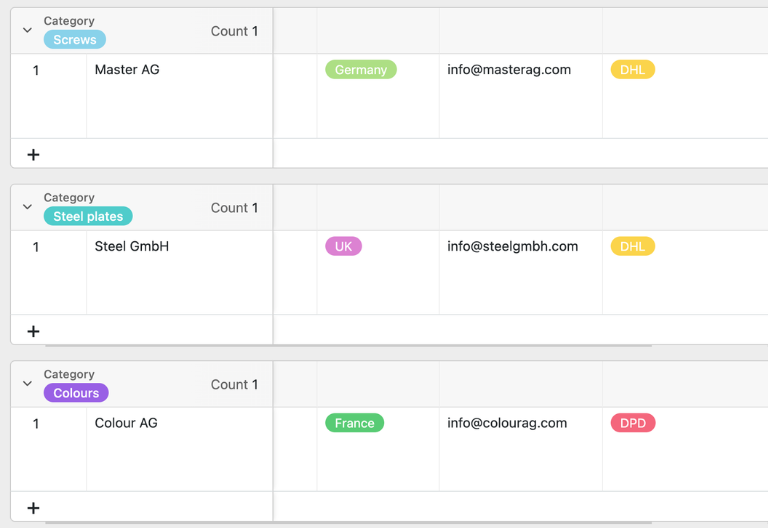
In the “Suppliers” table, you maintain all supplier master data: from contact information and terms and conditions to delivery times, ratings, and certificates. The supplier ID is assigned automatically. This database is directly linked to the “Article Master” and “Incoming Goods” tables, ensuring that all procurement processes remain fully traceable.
Product catalog with SKUs and inventory levels
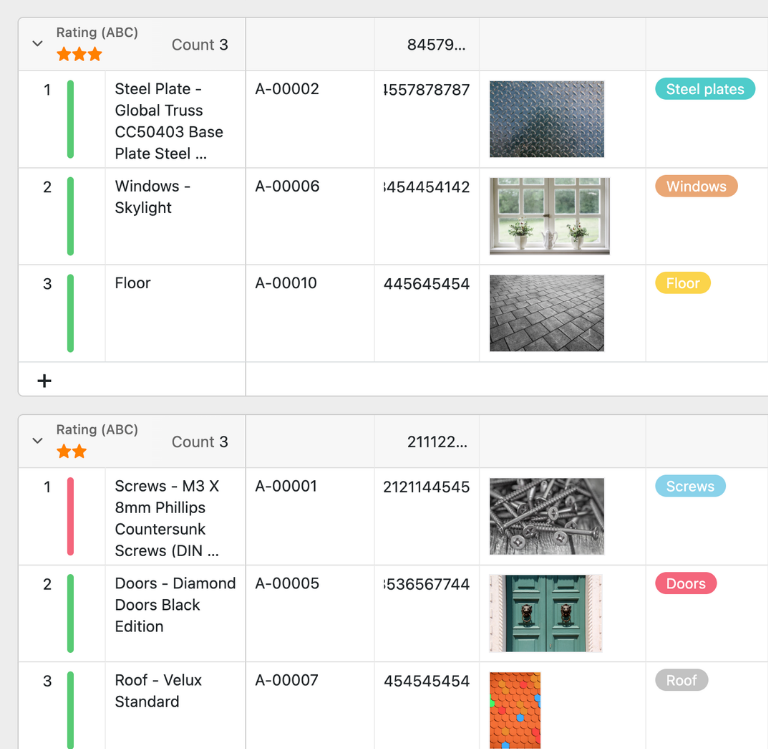
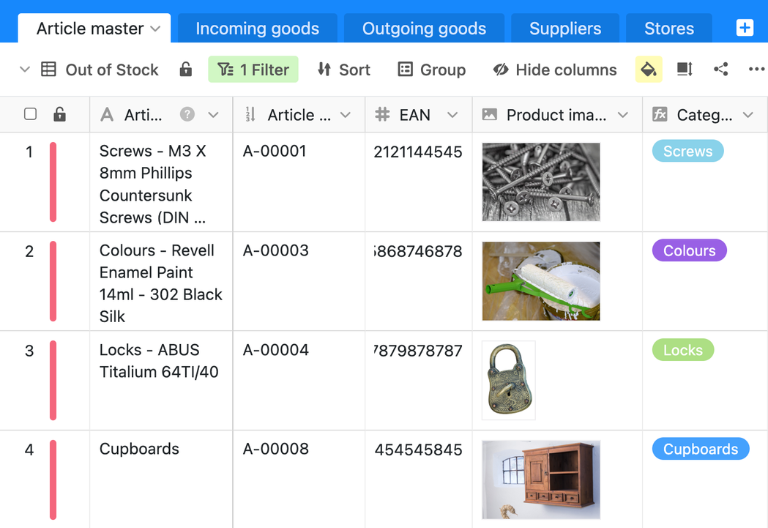
In the “Article Master” table, you can manage all items by item number, EAN, product image, delivery time, purchase price, safety stock, and ABC rating. Incoming and outgoing quantities are automatically imported from the linked tables—so you always have a real-time view of your inventory and can immediately see which items need to be reordered.
Record goods received using a web form
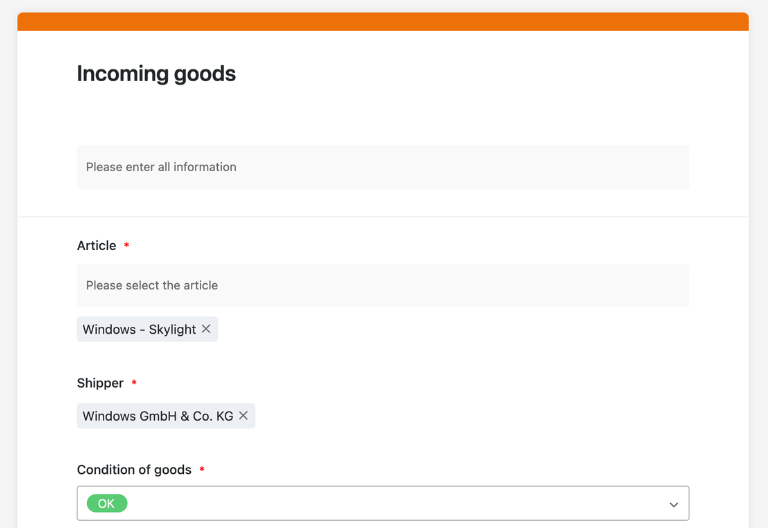
In the “Incoming Goods” table, your employees can easily record all incoming goods using a web form. The supplier ID, item number, and EAN are automatically retrieved from the product master. The row color (green or red) indicates the status of the goods at a glance—ideal for seamless risk management in your supply chain.
Seamless transition to delivery
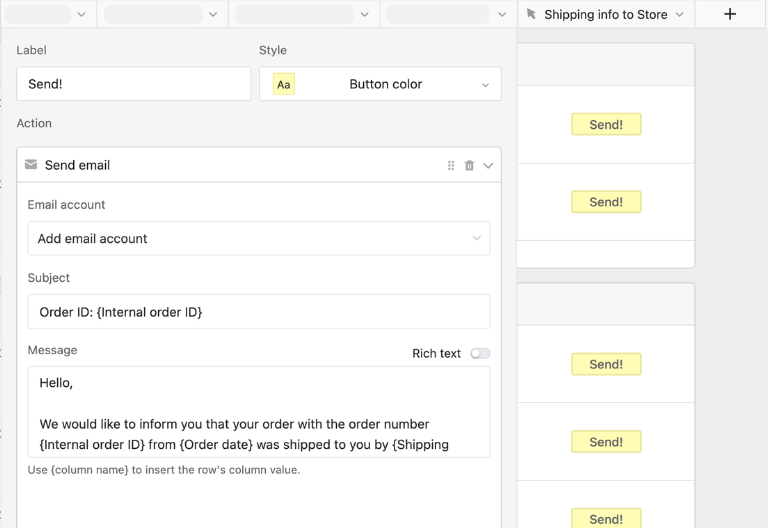
Once all supplier data, items, and goods receipts have been entered into the supply chain management tool, you can proceed directly to fulfillment: Stores place orders via a web form, the shipping status is updated with the click of a button, and an automated email notifies the respective store—providing end-to-end visibility from procurement to fulfillment.
Turning data chaos into a streamlined logistics app
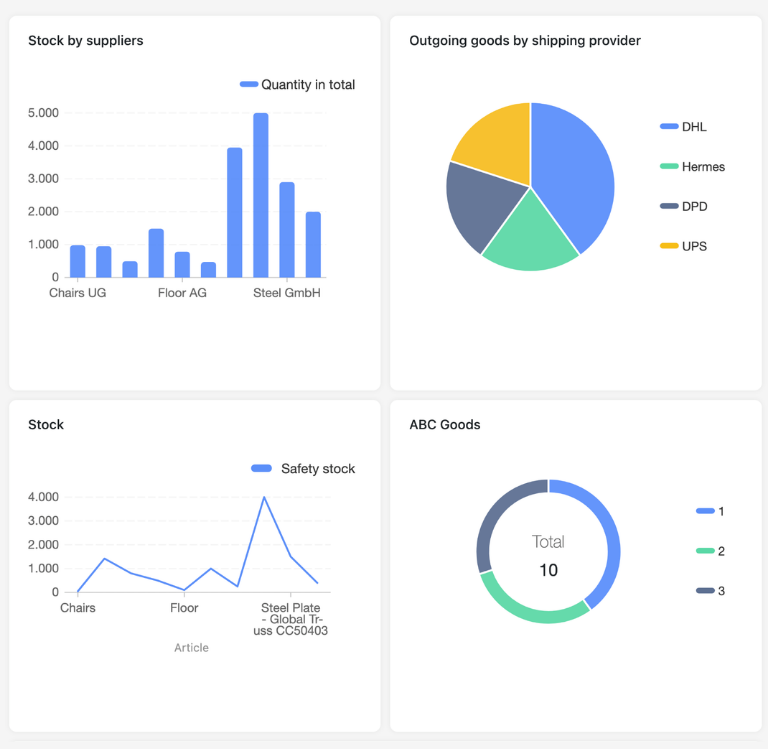
With the integrated no-code app builder, you can turn the supply chain management tool into an interactive logistics app for supply chain managers, purchasing managers, and operations teams. Combine forms for goods receipts and orders with Kanban boards for process progress, logistics dashboards for inventory overviews, and map views for store locations—all the way to specialized apps for real-time tracking, supplier management, or risk assessments. Share specific sections as a frontend with the respective roles and use permissions to control who can adjust inventory, comment on deliveries, or approve status fields—this transforms the template into a central, cloud-based tool for your supply chain management.
Address delays before they occur
Smart Automation for Supply Chain Teams
AI in Supply Chain Management Tools – Data Works for You
SeaTable’s Supply Chain Management Tool takes your supply chain management to the next level! Effortlessly automate your procurement processes and risk management with powerful AI features. Transform your tool into an intelligent hub for supplier data, inventory optimization, and real-time tracking. Enjoy end-to-end visibility like never before. Say goodbye to rigid ERP or Excel systems and experience just how efficient and flexible modern supply chain management can be. SeaTable gives you the ability to seamlessly integrate and optimize the entire process. Trust in the future of your supply chains!
Automatically categorize SKUs
With Classify, SeaTable assigns items to product groups, suppliers, or ABC classes. The AI extracts fields such as item name or category and enters the classification into the supply chain management tool—ensuring that your supply chain’s filters and views are always up to date.
Data extraction from documents
With Extract, the AI transfers data from delivery notes or order confirmations into the supply chain management tool. Item numbers, quantities, and delivery dates are recognized and entered into the appropriate columns—eliminating the need for manual data entry in your procurement processes.
OCR for shipping documents
Using OCR, SeaTable extracts text from images such as delivery notes, customs documents, or warehouse notes. The text is automatically assigned to the corresponding shipments in the supply chain management tool—eliminating the need for manual entry and making the documents immediately searchable.
Reports on delivery status
With Summarize, SeaTable generates concise status reports: open orders, overdue deliveries, or risk assessments by supplier. The AI aggregates table fields and delivers clear reports for coordination meetings and your supply chain strategy.
AI Guidelines for Procurement
With Custom Prompt, you can define AI prompts for your supply chain management tool—such as risk warnings for long delivery times or suggestions for inventory optimization. The AI analyzes your spreadsheet data and provides recommendations.
Real-time inventory reports
With AI-powered status views, you can automatically analyze inventory and delivery data: Which items are below the safety stock level, and which deliveries are overdue? The supply chain management tool aggregates your data to enable quick decision-making.
Transparency and real-time collaboration
Scale flexible, quick, and reliable
SeaTable is a modern AI-powered no-code database solution with automation features and a built-in app builder, offering all the functionality you need for a professional, cloud-based supply chain management tool. The focus is on end-to-end visibility, collaboration, and flexible customization—from a simple supplier database with SKUs and inventory levels to an integrated supply chain management tool with risk assessment, shipping documents, and real-time tracking—as a scalable alternative to rigid ERP systems, Excel spreadsheets, and traditional supply chain management in standalone solutions.
An alternative to rigid ERP systems
Organize your supply chain management with SeaTable much more efficiently than with Excel, ERP, or Outlook—thanks to linked tables, personalized views, web forms, and automations for supply chain managers, logistics managers, and operations teams.
Integrating Procurement and Logistics
Integrate your supply chain management tool with procurement processes, inventory, and other operational databases. This allows you to consolidate suppliers, products, inventory, and delivery dates into a single centralized system—ensuring maximum process transparency.
GDPR-compliant
If you use SeaTable Cloud or the integrated AI, all supply chain-related data remains in Europe—the infrastructure is hosted exclusively on servers in Germany.
2FA and SSO
SeaTable supports two-factor authentication and single sign-on, allowing you to precisely control who has access to your supply chain management tool, supplier data, and operational reports.
FAQ – Frequently Asked Questions About SeaTable's Supply Chain Management Tool
-
What are the advantages of a cloud-based supply chain management tool over Excel?
-
A cloud-based tool like SeaTable offers significant advantages over Excel: real-time team collaboration, automated notifications for delays or low inventory levels, linked tables for suppliers, items, and goods movements, as well as a logistics dashboard for end-to-end visibility. Excel spreadsheets are static, prone to errors when edited simultaneously, and offer no native automation or process flows for professional supply chain management.
-
Can I integrate the supply chain management tool with my existing ERP software?
-
Yes, SeaTable can be integrated with many existing ERP systems, accounting solutions, and logistics platforms via its open API and integrations with Zapier or Make. This allows you to use the tool as a flexible complement to rigid ERP systems and synchronize data in both directions—without the need for complex IT projects or custom programming.
-
Is the supply chain management template free to use indefinitely?
-
You can use the Supply Chain Management template for free in the SeaTable Cloud. All you need is a free account, and you can start managing your supply chain right away—including a supplier database, inventory overview, and Kanban board. Paid plans are available for advanced features such as AI automation, unlimited rows, and advanced permissions.
-
Who is the supply chain management template particularly suitable for?
-
This tool is designed for supply chain managers, logistics managers, operations managers, and procurement managers who want to manage their supply chain transparently and efficiently. Thanks to digital templates, real-time collaboration, and automated procurement processes, everyone involved—from procurement to warehouse management—always maintains control over their entire supply chain.
-
How do I set up shipment status tracking in the tool?
-
With the built-in Kanban board in your supply chain management tool, you can visually map every step of your supply chain: Ordered, In Production, Shipped, Customs, In Stock. Each shipment moves through the defined columns, your team updates the status with a single click, and automated notifications alert you to any delays—for seamless real-time tracking without manual reporting.
-
Can I import existing supplier data into SeaTable?
-
Yes, you can import existing Excel lists, supplier master data, or product overviews into your supply chain management template via CSV import. You can then link suppliers to products and inventory transactions and immediately start enjoying the benefits of this digital, cloud-based solution for your supply chain management.
-
Does the tool support risk management in the supply chain?
-
Yes, SeaTable supports your risk management with automated notifications when thresholds are breached, status fields for risk assessments and overdue deliveries, as well as AI-powered analyses of critical suppliers. This enables supply chain managers to identify potential disruptions in the supply chain early on—before they have any operational impact.
-
Is SeaTable also suitable as a central operational tool?
-
Yes, SeaTable can be used as a flexible operations tool beyond just supply chain management. Integrate supply chain management with inventory planning, procurement processes, and reporting to map every step from procurement to delivery in a single centralized system. You can find additional relevant templates in the Operations template category.