Storyboard Template for Film & Marketing
Analog storyboard templates on paper or in static PDF files quickly reach their limits in day-to-day marketing work: changes to scenes render printouts unusable, sketches are scattered across folders, dialogues are in Word documents, and image files are scattered across folders. With SeaTable’s digital template, you can consolidate scene descriptions, sketches, dialogues, camera settings, and timelines into a single interactive template—including gallery and Kanban views for visual storytelling. This allows marketing teams, directors, and UX designers to maintain an overview of every scene, while all content is centrally managed, versioned, and organized within a flexible storyboard template.
Digital Storyboarding
Storyboard Template for Marketing, Film, and Video
-
Digital Storyboard Template
Consolidate scene numbers, dialogue, camera setups, and descriptions in one digital storyboard template. Replace cluttered Word or PDF files with a flexible, searchable, and collaborative workspace that keeps every scene organized for your entire creative and production team.
-
Visual storytelling in one hub
Bring sketches, reference images, text, and notes together directly inside your storyboard instead of searching through scattered folders. Add images via drag-and-drop, enrich them with dialogue, sound notes, and music, and keep all visual storytelling elements aligned in one shared workspace.
-
Timeline and scene planning
Plan shots, scene durations, and transitions using a structured timeline that fits your production workflow. Use it for social media clips, product videos, or tutorials while your storyboard displays sequence, dependencies, and timing to simplify planning, editing, and the overall approval process.
-
Roles, access, and approvals
Collaborate on your storyboard with clearly defined roles and access permissions for every team member. Decide who may edit, comment on, or approve scenes and maintain a transparent, audit-ready approval trail that supports marketing teams, agencies, and film productions at every stage.
-
Flexible fields and layout
Extend your storyboard with custom fields such as campaign name, target audience, channel, or call to action. Adapt the structure to match your video, film, or marketing workflows and keep scripts, assets, and scene details configurable without losing consistency across your projects.
-
Gallery, Kanban, and timeline
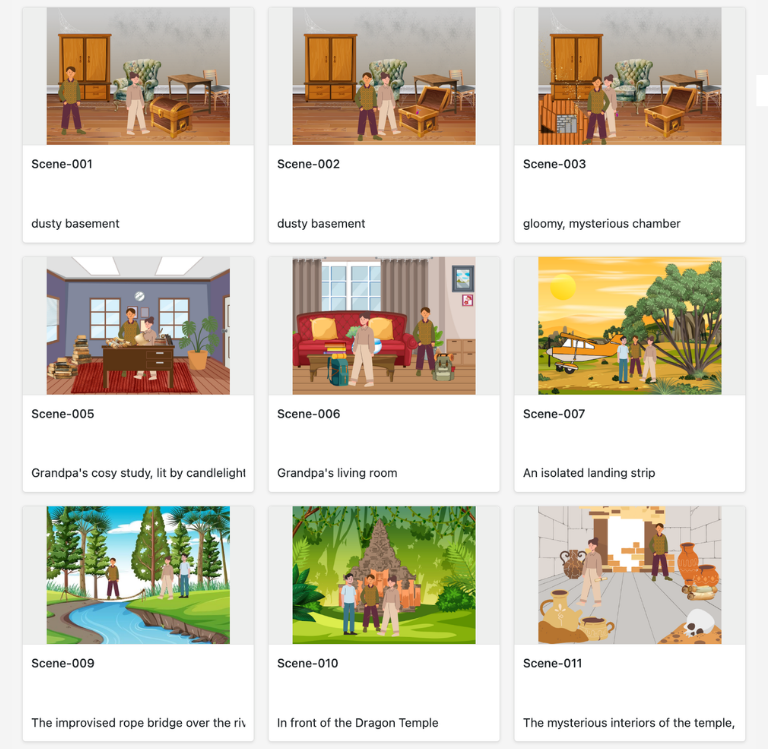
Use a gallery view for quick visual overviews of frames, a Kanban board to track production status, and a timeline view for scheduling scenes. Switch between perspectives as needed so your storyboard always reflects current priorities, deadlines, and responsibilities for the whole team.
Who uses SeaTable?
Leading companies around the world rely on SeaTable

















100.000+
Downloads in Docker Hub's first year
1.500+
Daily users on SeaTable Cloud
4.6
Review on Capterra
Your benefits at a glance
Use a storyboard template online
With SeaTable, a flexible, AI-powered no-code platform, you can create a digital storyboard template that adapts perfectly to your film, video, and marketing workflows. Replace static PDF or Excel storyboards with an interactive template featuring drag-and-drop, gallery view, and Kanban board—ideal for storyboarding, visual storytelling, and the collaborative approval process among marketing teams, directors, UX designers, and content creators. If needed, connect your template directly to other databases, for example as a central marketing tool.
Real-time updates: Any changes made to scene descriptions, timelines, or sketches are immediately visible to everyone—no more dealing with outdated versions.
True collaboration: Marketing teams, directors, content creators, and UX designers work together on a storyboard template—with comments and clearly defined responsibilities.
Interactive Template: Switch between gallery view for visual storytelling, Kanban view for production status, and tabular detailed planning with a timeline.
Centralized Storage: Images, sketches, audio notes, and text blocks are all stored directly within your storyboard template—no need for separate Word documents or scattered image files.
Real-world example
How to Use the Storyboard Template
Storyboard Table for Scenes & Takes
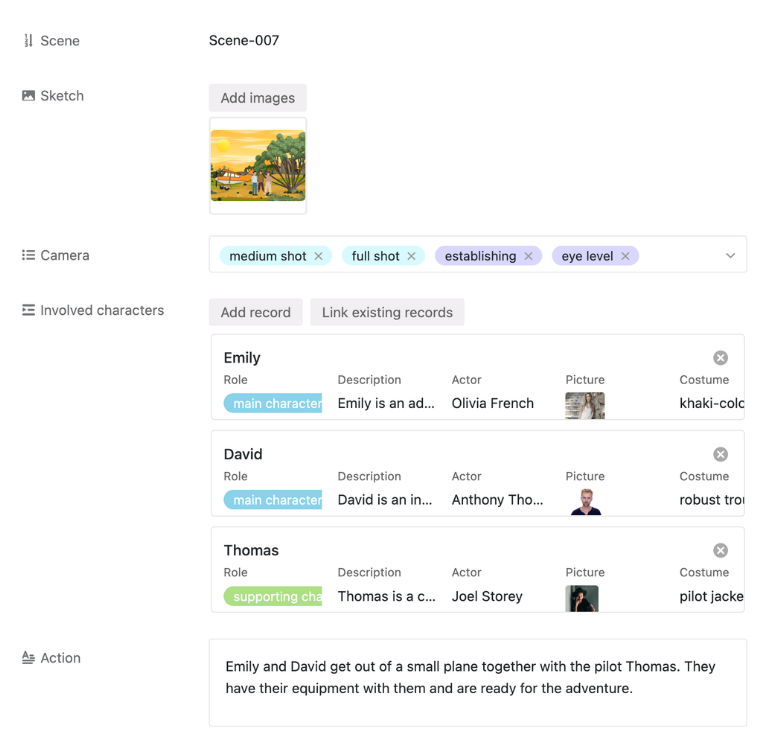
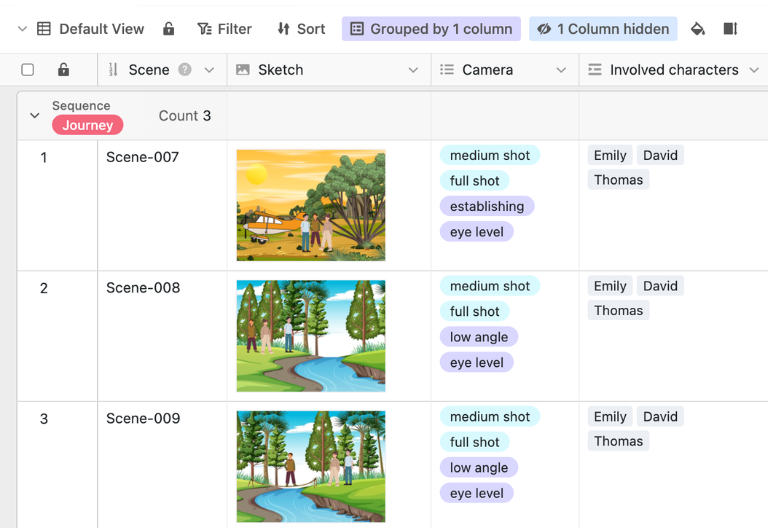
In the “Storyboard” table, you plan each scene in detail: from scene numbers and takes to sketches and images, as well as dialogue, voice-over text, music, camera shots, and duration. This allows you to document the entire content of your film or video in a structured way and add additional notes on camera, audio, and editing as needed.
Cast and Character Descriptions Table
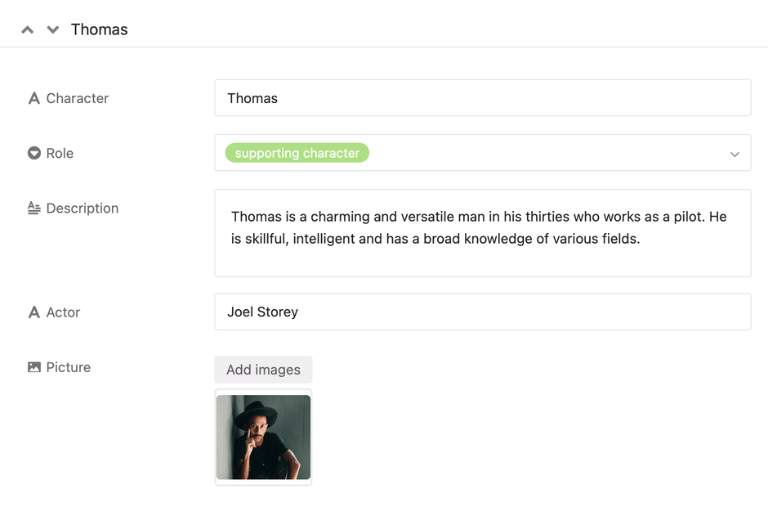
In the “Roles” table, you can list all the roles in your project and document key information such as casting, role descriptions, and selected costumes. This allows marketing teams, directors, and content creators to see at any time which person appears in which scene and what their character and visual design are.
Props Table for Prop Management
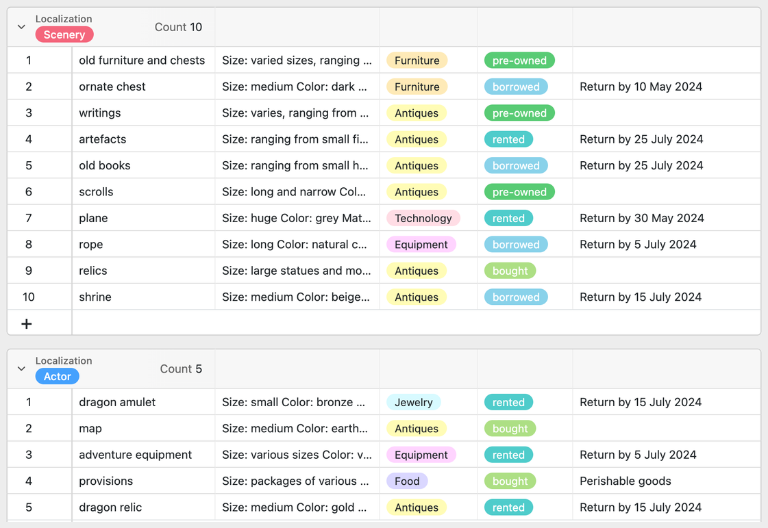
In the “Props” table, list all the props you need for your project and note whether they are purchased, rented, or borrowed. Additional management notes ensure that nothing is missing on set and that you can keep track of the availability of your props at all times.
Seamless transition into the creative phase
Once all the scenes, roles, and props have been planned in the storyboard template, you can move straight into the creative phase: brief your team, finalize the details, and start filming with a clearly structured storyboard.
Your interactive storyboard app
With the built-in App Builder, you can turn a storyboard template into an interactive storyboard app for marketing teams, directors, and content creators. Combine forms for new scenes, storyboarding fields for scene descriptions, sketches, and dialogues with gallery views, Kanban boards, and timeline views—all the way to specialized apps for film projects, social media campaigns, or UX tests. Share specific sections as a frontend with the respective roles and use permissions to control who can create, comment on, or approve scenes during the approval process—turning the storyboard template into a central, digital storyboard template for your visual storytelling.
Organize storyboards, scenes, and approvals digitally – with SeaTable
Smart Automation for Marketing Teams
AI-powered storyboarding
With SeaTable, you can use powerful AI features, that automate your storyboard template, production planning, and approval processes. This turns your storyboard template into a smart hub for scene descriptions, dialogue, camera shots, and timing—more efficient than a traditional storyboard in a rigid PDF or Excel file.
Automatic scene tagging
With Classify, you automatically tag scenes with campaigns, channels, or formats like YouTube, Instagram, or website. The AI reads fields such as scene descriptions and notes, writes the right category into a dedicated column, and keeps your storyboard filters and saved views clean over time for the entire team.
Smart data extraction
With Extract, you move content from briefings, scripts, or emails into your storyboard template in a structured way. The AI scans selected text sections such as an email body or script field, identifies dialogue, camera directions, and scene notes, and then fills columns like Dialogue, Camera Shot, or Scene Goal automatically in the right rows.
OCR for sketches and frames
With OCR, you capture text from uploaded images such as handwritten notes, whiteboard photos, or annotated storyboard frames. The AI recognizes the text and links it to the correct scene in your storyboard so you no longer have to retype comments, timecodes, or technical pointers when processing feedback or updating production details.
Summaries for reports
With Summarize, you generate short and useful overviews directly from your storyboard data, for example on shooting status, pending approvals, or planned scenes per channel. The AI reads tables and text fields, condenses them into clear summaries, and provides concise reports you can share in check-ins or management updates at any time.
Custom AI automations
With Custom Prompt, you design AI rules that match your storyboard template, such as alternative wording for voice-over lines, refined scene descriptions, or reminders about missing mandatory fields. The AI works on existing storyboard data and returns text suggestions right inside the views your team already uses every day for planning.
Instant status overviews
With AI-powered status views, you create instant overviews from existing status and date fields, such as how many scenes are in each production step or which approvals are overdue. The AI turns raw data into understandable summaries and text blocks that support marketing teams and directors when planning, prioritizing, and reporting progress.
Transparency and real-time collaboration
Transparent and flexible storyboard template
SeaTable is a modern AI-powered no-code database solution with automation and an app builder, offering all the features you need for a professional digital storyboard template. The focus is on traceability, collaboration, and flexible customization—from simple storyboard templates with scene numbers and sketches to integrated storyboard templates with role, prop, and campaign overviews—as a scalable alternative to static PDF, Excel, or Word storyboards and traditional standalone solutions.
Alternative to static files
Organize your storyboarding with SeaTable much more efficiently than with PDF, Excel, or PowerPoint—thanks to linked tables, personalized views, forms, and automations designed for marketing teams, directors, and content creators.
Combining Marketing & Production
Link your template to campaign planning, content calendars, and other marketing databases, and use SeaTable as your central marketing tool. This allows you to consolidate scenes, assets, and timelines into a single system.
GDPR-compliant
If you use SeaTable Cloud or the built-in AI, all project-related data remains in Europe—the infrastructure is hosted exclusively on servers in Germany.
2FA and SSO
SeaTable supports two-factor authentication and single sign-on, allowing you to precisely control who can access your storyboards, media assets, and project-related reports.
FAQ – Frequently Asked Questions About SeaTable's Storyboard Template
-
What should a storyboard include?
-
A professional storyboard typically includes scene numbers and take numbers, a brief scene description, sketches or reference images, dialogue or voice-over text, notes on camera angles and audio, and the planned duration of each take. With SeaTable’s storyboard template, you can capture all these elements in a digital template and easily adjust them at any time using drag-and-drop.
-
Is the storyboard template available for free?
-
You can use the template for free in the SeaTable Cloud. All you need is a free account, and you can start storyboarding for film, video, or marketing projects right away—without having to deal with rigid PDF or Excel storyboards.
-
Can I use the storyboard template for YouTube videos?
-
Yes, this storyboard template is ideal for YouTube videos, social media shorts, promotional videos, or explainer videos. Plan your sequence of scenes, visual concepts, dialogue, music, and camera angles in your storyboard template, and easily adapt it as needed for different channels and formats.
-
Who is this storyboard template particularly suitable for?
-
This template is designed for marketing specialists, directors, content creators, UX designers, and teams who want to plan film and video projects collaboratively. Thanks to the digital template, collaboration, and approval process, everyone involved can stay on top of things.
-
How does SeaTable differ from a traditional storyboard template in PowerPoint?
-
Static PowerPoint or PDF storyboards quickly become outdated when changes are made and are difficult to version. With SeaTable, you work in an interactive template featuring drag-and-drop functionality, gallery views, Kanban boards, and automations—ideal for recurring campaigns and complex productions.
-
Can I import my existing storyboard into SeaTable?
-
Yes, you can import existing lists, scene tables, or cast lists into your storyboard via CSV. You can then add images, sketches, and dialogue and enjoy the benefits of this digital, collaborative solution.
-
Does the template support the team's approval process?
-
The template supports your approval process with status fields, comments, and role-based permissions. This allows marketing teams, directors, and stakeholders to see at any time which scenes have been approved and where feedback is still needed.
-
Is SeaTable also suitable as a central marketing tool?
-
Yes, SeaTable can be used as a flexible marketing tool beyond just the storyboard template. Combine storyboarding with campaign planning, content calendars, and reporting to map out every step—from the initial idea to the finished video—all within a single system.