Project Portfolio Tool – Your flexible template from SeaTable
Bundle all your company’s projects in a central project portfolio tool and create transparency regarding status, priority, budget, and resources. Link projects, goals, tasks, and departments, and evaluate their strategic contribution. Benefit from a clear, collaborative, and flexibly customizable project portfolio tool—get started now and professionalize your project portfolio management!
Keep an eye on the project portfolio
Project portfolio template for your company
-
Strategic
The user-friendly project portfolio template links project data with strategic goals and supports resource planning, prioritization, and tracking to keep teams aligned and projects on course.
-
Structured
A clearly defined structure ensures that each project portfolio template uniformly maps projects, programs, goals, budgets, risks, and responsible parties—ideal for professional project portfolio management.
-
Transparent
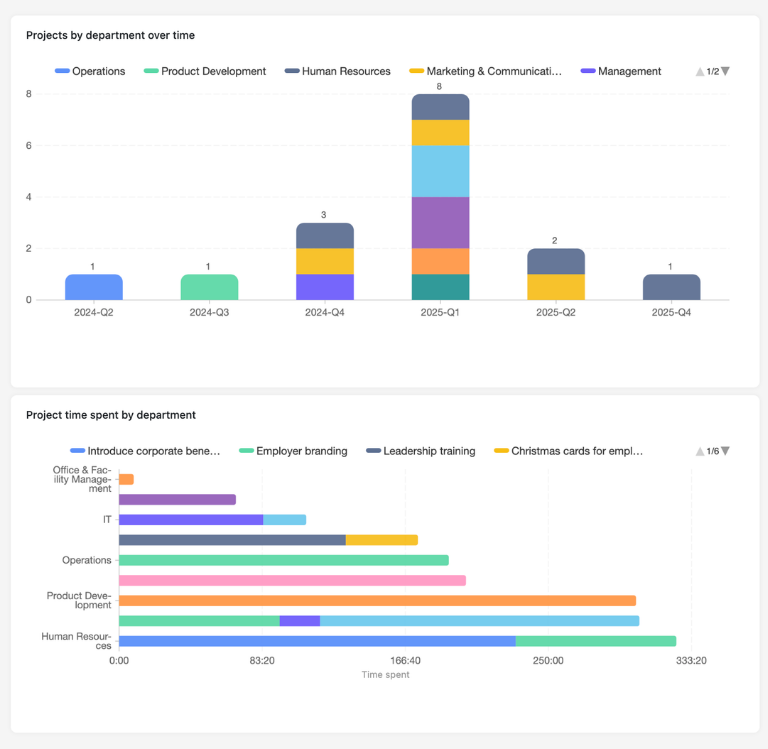
With just a few clicks, you can view utilization, status, and strategic contribution per project, identify bottlenecks early on, and use your project portfolio tool as a basis for reporting and management reviews.
-
Permissions
With granular permissions, you can control who can view, evaluate, or edit projects in the Project Portfolio Tool—suitable for PMOs, management, departments, and external partners.
-
Web Form
Record project ideas directly via a web form – suggestions are structured in your template and can be evaluated, prioritized, and incorporated into planning in project portfolio management.
-
Notifications
Use automatic notifications to inform those responsible when new, changed, or critical projects arise—for transparent project portfolio management within the team.
Who uses SeaTable?
Leading companies worldwide rely on SeaTable

















100.000+
Downloads in the first year of Docker Hub
1.500+
Daily users on SeaTable Cloud
4.6
Review on Capterra
Your advantages at a glance
Project portfolio tool – use the template online
The AI no-code solution SeaTable impresses with its flexibility and adaptability. With the template for the project portfolio tool, you can map your entire project portfolio from idea to completion, keep track of resources, and create a common basis for decision-making for project portfolio management throughout the company. Use the central, data-based PPM tool as a flexibly adaptable project management tool for planning, collaboration, visualization, and automation of your projects.
Always up to date: Thanks to comments, change history, and real-time updates, your project portfolio in the Project Portfolio Tool is always up to date—from the initial project idea to the completed project.
Access from anywhere: With an online project portfolio tool, you can access your project portfolio at any time—in the office, at home, or in a management meeting.
Transparency in your portfolio: Link projects, goals, tasks, and departments in a project portfolio template—this allows you to see which projects contribute to which goals and how much resources are already committed.
Scalable: Your project portfolio tool grows with your requirements—regardless of how many projects, programs, locations, or team members you manage.
Automated & integrated: Use SeaTable as a central database in project portfolio management that adapts flexibly to your processes and seamlessly complements other applications such as reporting or collaboration tools.
Practical project portfolio template
How the project portfolio template works
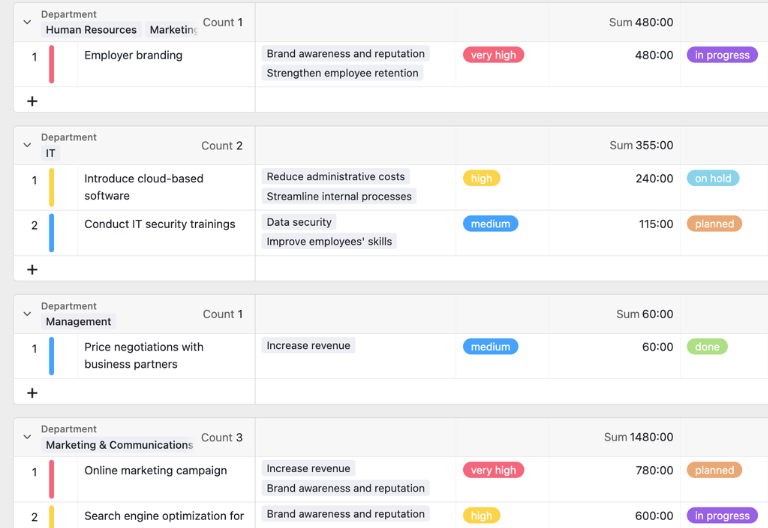
Manage projects centrally
In the first table of the project portfolio template, you create all projects—including status, priority, budget, strategic fit, and responsible person. Links to goals, tasks, and departments create a project portfolio example that combines both operational details and strategic metrics in a project portfolio tool.
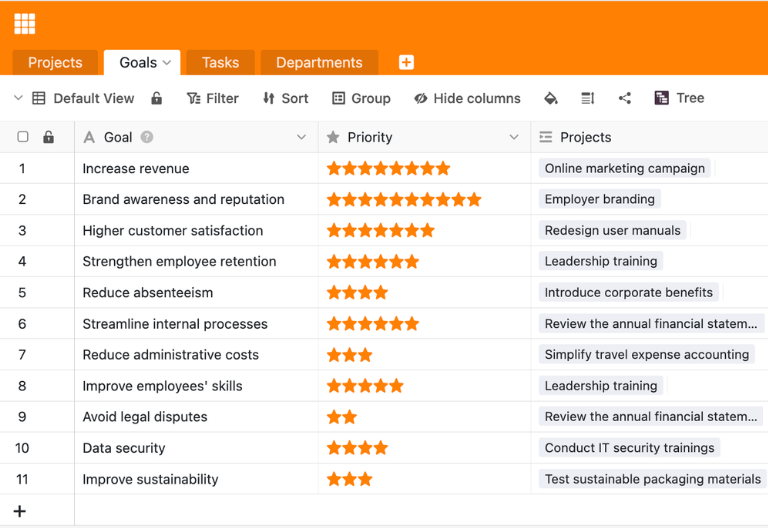
Linking strategic goals
A second table bundles the overarching corporate goals, programs, or initiatives. Since this table is linked to the projects, you can see at a glance in the project portfolio template which projects contribute to which goals and how high the strategic benefit is in relation to the effort involved—an important component of project portfolio management.
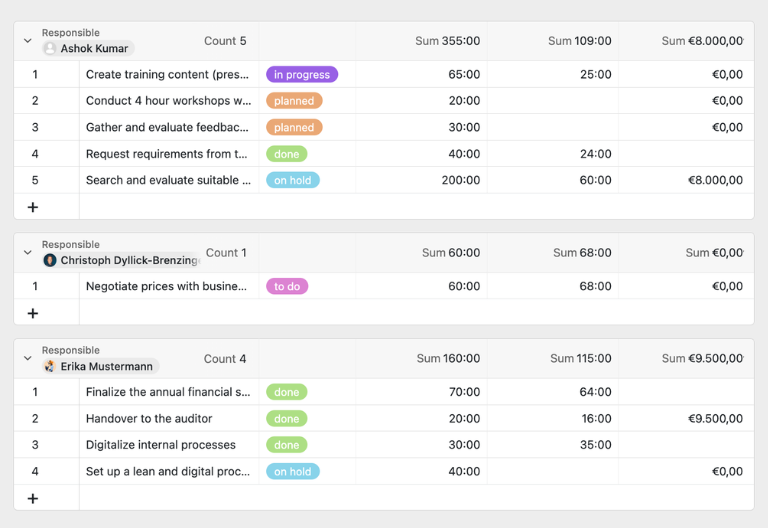
Tasks and costs at a glance
In a third table, you list all project-related tasks with effort, actual times, and costs. Using links to the project, the project portfolio tool automatically totals these values for each project, so that you can see at any time in the project portfolio template how effort and budget are distributed across your entire project portfolio.
Tree view for clear portfolio structure
Use the tree view to map your project portfolio as a hierarchy: corporate goals, programs, or areas, including projects and related tasks. This turns every project portfolio template into an intuitive navigation interface where you can quickly identify connections, dependencies, and focal points in project portfolio management.
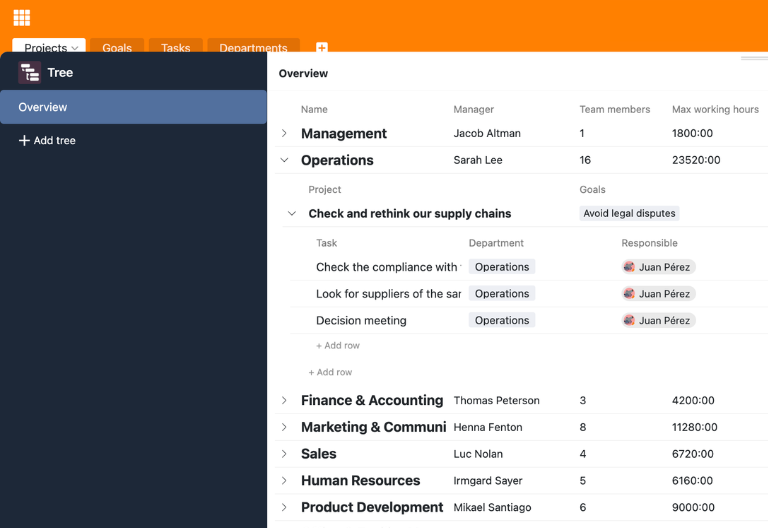
Your personalized project portfolio app
With the integrated App Builder, you can easily create your own custom front end for the project portfolio tool. Combine forms for new project ideas, tree views for structural overviews, calendar or timeline views for durations, and focused filter views for PMO, management, or specialist departments. Share specific sections with stakeholders via links and use permissions to control who can view or edit which elements of the project portfolio template – turning every project portfolio tool into a tailor-made solution for your project portfolio management.
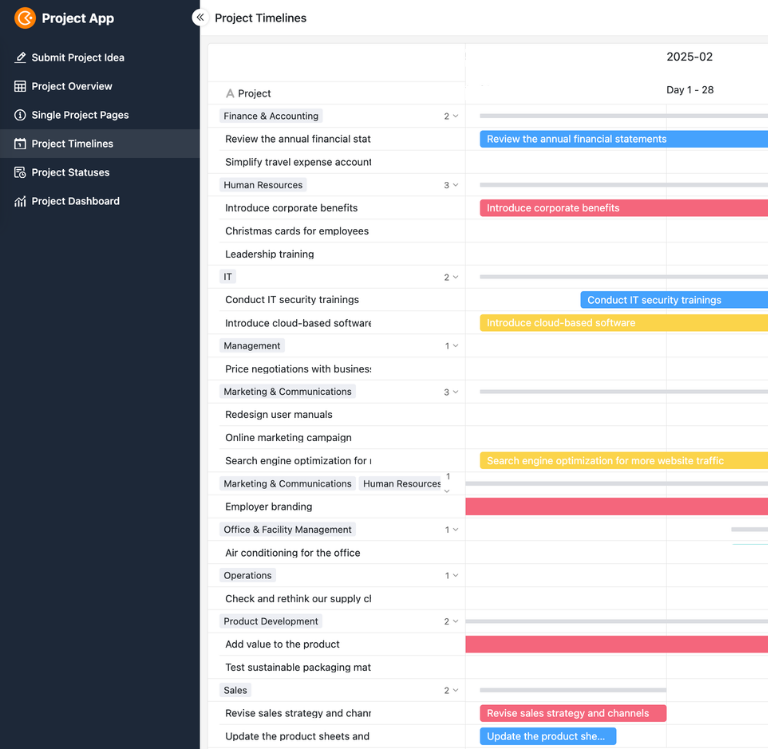
Keep priorities and workload under control—with SeaTable's project portfolio tool
Smart automation in the portfolio
AI-supported project portfolio tool
With SeaTable, you can use powerful AI features , that take your project portfolio tool to a new level. Automate recurring tasks in project portfolio management, reduce manual routine activities, and free up time for analysis, coordination, and informed decisions about priorities and resources.
Classification with Classify
Classify automatically assigns new project ideas to appropriate categories, areas, or programs based on their title and description. In your project portfolio template, new entries are placed directly in the correct structure, allowing you to see at a glance which areas are accumulating projects and effort.
Data extraction with Extract
With Extract, you can evaluate unstructured information such as emails, logs, or pitch decks and automatically extract relevant data such as budget, benefits, risks, or sponsors. This data is stored in separate fields in the project portfolio tool, facilitating further evaluation in project portfolio management.
Text recognition with OCR
Upload scans, screenshots, or PDF documents to projects and use the OCR function to automatically recognize text. This way, key figures, milestones, or risk indicators are available directly in your project portfolio template.
Automated summaries with Summarize
Summarize automatically summarizes long status reports or extensive comment threads in just a few sentences. In combination with your project portfolio tool, you can grasp the essence of a project section more quickly and prepare portfolio reviews efficiently.
Tailor-made automation with Custom Prompt
With custom prompts, you can define your own AI instructions that support typical routine tasks in your project portfolio tool—such as suggestions for priorities, notifications of resource bottlenecks, or automatically generated project profiles.
Status and risk overviews at the touch of a button
Generate structured overviews of status, risks, and progress per project, program, or time period directly from your project portfolio template. AI prepares trends and anomalies so that you can create portfolio reviews, audits, and management reports with just a few clicks.
Transparency and cooperation
Project portfolio template for every use case
SeaTable is a modern AI no-code database solution with automation and app builder, offering all the features you need for a professional project portfolio tool. The focus is on traceability, teamwork, and flexible customization with the highest security standards—from the initial project portfolio template to a scalable multi-project environment.
GDPR compliant
When you use SeaTable Cloud or our integrated AI, all your data remains in Europe. Our infrastructure is hosted exclusively on servers in Germany.
2FA and SSO
SeaTable supports all common authentication techniques and enables two-factor authentication and SSO. Because you decide who gets access to your project data.
FAQs about SeaTable's Project Portfolio Tool
-
Can I use SeaTable's project portfolio tool for free?
-
You can use the Project Portfolio Tool for free in SeaTable Cloud. All you need is a free account, and you can start mapping your project portfolio in a structured way right away.
-
How does the project portfolio tool differ from a project structure plan template?
-
The project portfolio tool focuses on the strategic management of multiple projects, including prioritization, capacities, and portfolio metrics, while a work breakdown structure template emphasizes the division of a single project into phases and work packages. In SeaTable, you can combine both approaches in one base and flexibly switch between work breakdown structure, project plan, and portfolio views.
-
Can I import existing project portfolios into SeaTable?
-
Yes, you can import existing project lists or portfolios from Excel or other systems via CSV import. After importing, customize the project portfolio template and benefit from all the features of the digital project portfolio tool.
-
Does the project portfolio tool support visualizations such as timelines and trees?
-
Yes, you can display your project portfolio in tree, calendar, and timeline views and click through projects hierarchically or chronologically. This makes each project portfolio template particularly clear and helps you quickly grasp connections and overlaps.
-
Can I link the project portfolio tool to a project management tool?
-
Yes, you can combine the project portfolio tool with other templates and external systems. This allows you to seamlessly connect project portfolio management, operational task management, and reporting—SeaTable acts as a flexible project management tool.
-
How many users can work with the project portfolio tool at the same time?
-
Multiple users can work on the same base simultaneously, creating and updating projects. Permissions allow you to control who can read, comment, or edit—ideal for collaborative project portfolio management in distributed teams.
-
Can I create my own fields and workflows in the Project Portfolio Tool?
-
Yes, you can add additional columns, tables, views, and automations at any time. This allows you to flexibly adapt each project portfolio template to your internal processes, roles, and reporting requirements in project portfolio management.
-
Is SeaTable a good alternative to Asana as a classic PPM tool?
-
Yes, SeaTable is a very good, cost-effective alternative to Asana and other PPM tool solutions. Unlike rigid boards, the project portfolio tool, project structure plan template, and other templates combine flexible database logic with views such as tree, calendar, timeline, and report dashboards.
-
Is the project portfolio template suitable as an alternative to Excel?
-
Yes, SeaTable is a modern, collaborative Excel alternative , which allows you to map your project portfolio in a much more structured way than in traditional tables. Thanks to linked tables, views such as tree, calendar, and timeline, as well as automations, static lists are transformed into a dynamic project portfolio tool for your project portfolio management.