Free NPS calculator from SeaTable
Easily assess your customers’ satisfaction with our Net Promoter Score template - integrated into your system without collecting data via external survey tools. Simple, flexible and GDPR-compliant.
Intuitive, flexible, uncomplicated
Your NPS calculator for full data control
-
Central
Record all data in your own system and retain control over your customer data at all times.
-
Flexibility
Simply customize the template to suit your needs - without IT knowledge or additional costs.
-
Clearly arranged
Group your customers clearly in NPS clusters to better recognize correlations.
-
Data protection
With SeaTable’s GDPR-compliant cloud solution, you retain control of your data at all times.
-
Evaluation
Create dashboards in the Universal App to display the results of your survey - without extra tools.
-
Universal App
Use the Universal App as an NPS survey front end, with a customizable survey page in your corporate design.
Who uses SeaTable?
Leading companies worldwide rely on SeaTable

















100.000+
Downloads in the first year of Docker Hub
1.500+
Daily users on SeaTable Cloud
4.6
Rating on Capterra
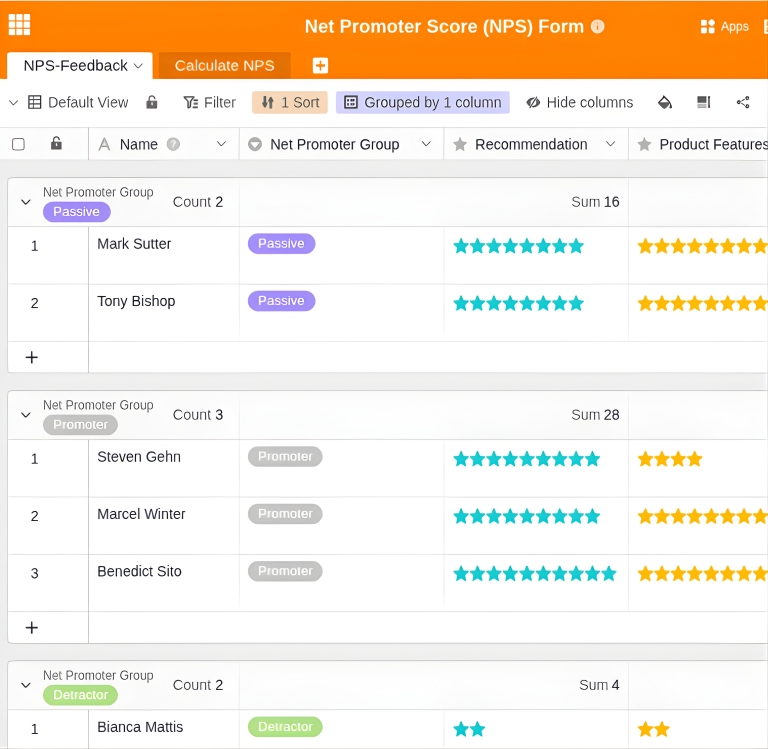
Evaluate customer satisfaction with Net Promoter Score
Integrate NPS calculators into your systems with SeaTable
The AI no-code database SeaTable offers all the functions you need for an NPS calculator - and is as simple as a spreadsheet.
Up-to-date data: All new form submissions are immediately visible in the backend and can be processed immediately.
Real collaboration: Work on your data together as a team - without time delays or inconsistencies.
Simply scalable: Your NPS computer grows with your requirements - without complex or expensive additional functions.
High data protection: SeaTable is hosted exclusively on servers in Germany and is 100% GDPR-compliant.
Easily record customer satisfaction
Use our NPS calculator template
All results at a glance
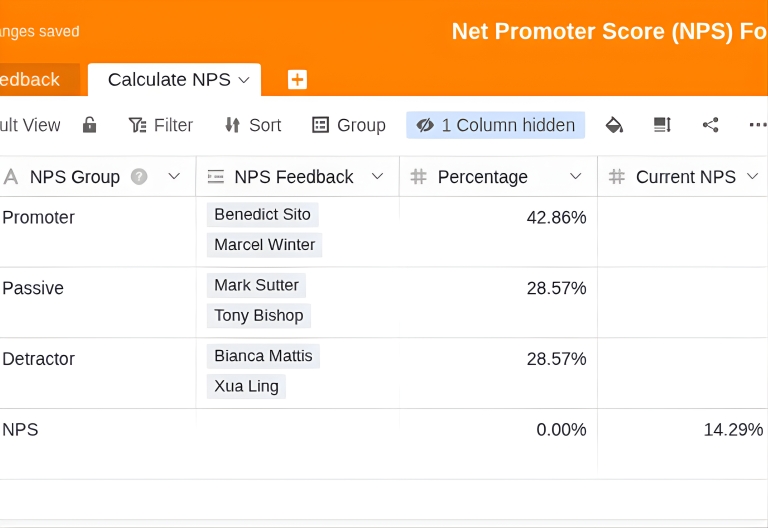
Automatically record your survey results in the “NPS feedback” table and cluster your customers into promoters, passives and detractors. By linking to the “Calculate NPS” table, you can evaluate your current Net Promoter Score at any time.
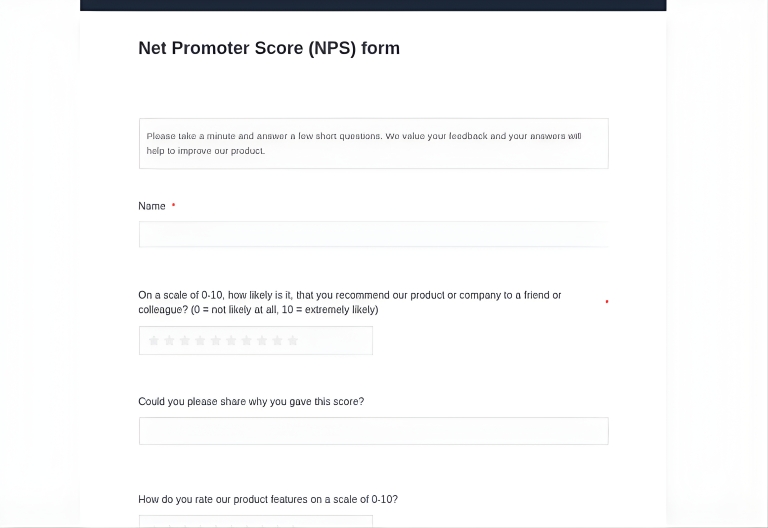
Create surveys easily
Create a flexibly expandable survey form in the Universal App in your corporate design. Add further questions or free text fields to the survey to obtain additional information on customer satisfaction.
Clear dashboards in the universal app of the NPS calculator
Create appealing dashboards for analyzing and reporting your NPS. In addition to the overall value, you can visualize the individual NPS groups and their development. This allows you to quickly identify changes in the relative distribution and derive targeted measures to continuously improve customer satisfaction.
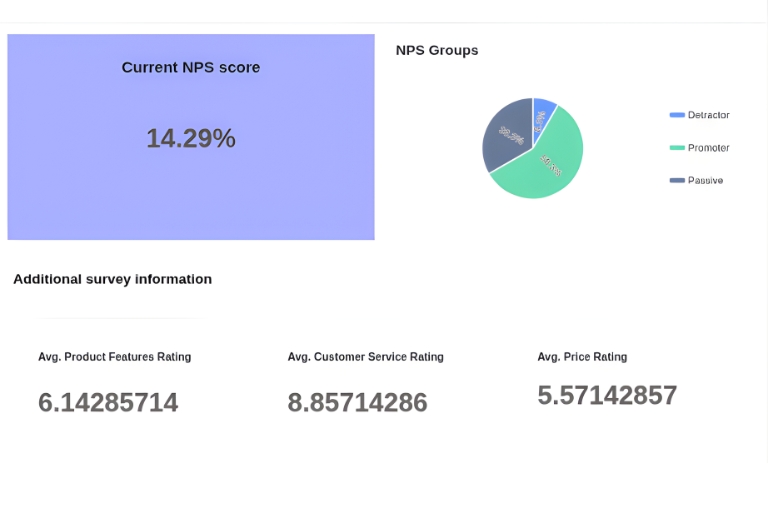
The perfect alternative to external survey tools: SeaTable's NPS calculator.
Smart automation
AI-powered feedback analysis with SeaTable
With SeaTable, you benefit from powerful AI features , that take your NPS surveys and feedback analyses to a whole new level. Automate evaluations and gain deeper insights into customer opinions.
Automatic sentiment analysis with Classify
Automatically classify free-text comments by sentiment: The AI function “Classify” evaluates customer feedback as “Positive”, “Neutral” or “Negative” and recognises emotional tone – perfect for quickly assessing large amounts of feedback without manually reading each response.
Compact feedback summaries with Summarise
The Summarise function automatically creates concise summaries from long customer reviews and free-text responses. Quickly gain an overview of key statements for yourself and your team – ideal for management reports and sprint reviews without having to work through all comments in detail.
Extracting topics and problems with Extract
The Extract function automatically recognises recurring themes, product names, problem areas or suggestions for improvement in customer feedback and enters them in separate columns in a structured manner. Identify systematic weaknesses and prioritise improvement measures based on data.
Tailored analysis with Custom Prompt
Use the custom prompt function to create individual evaluations: let the AI automatically generate specific recommendations for action based on detractor feedback, create categorisations according to product features, or identify churn risks – flexibly according to your analysis requirements.
Automatic reports for stakeholders
Automatically generate structured feedback overviews with the most common topics, top issues and recurring improvement requests. AI summarises hundreds of comments into clear lists – perfect as a basis for stakeholder presentations and action planning.
Processing multilingual feedback
Use Custom Prompt to automatically translate international customer feedback into your working language. Collect reviews in different languages and have them automatically translated into the desired target language – perfect for global teams without separate manual translations.
Cloud oder On-Premises
NPS calculator for every application
SeaTable is a modern AI no-code database solution with App Builder and offers all the features you need for a digital, integrated survey tool. You decide how you use SeaTable.
DSGVO compliant
SeaTable Cloud: The GDPR-compliant solution for companies that want to get started quickly and without their own IT infrastructure. Flexible, scalable and secure.
Data sovereignty
SeaTable Server: The solution for companies that want to retain full control over their data or have to meet strict compliance requirements.
FAQs about the NPS calculator from SeaTable
-
Can I use the SeaTable NPS template free of charge?
-
Yes, you can use SeaTable and all templates free of charge for an unlimited period of time. With a free account, you have access to all the features you need to conduct even extensive surveys. You can evaluate your Net Promoter Score directly in SeaTable and create attractive reporting dashboards.
-
How does an NPS score calculator work?
-
In an NPS survey, your customers rate on a scale of 0-10 how likely they are to recommend your company or product to others. Based on their answers, your customers are divided into detractors (0-6), passives (7-8) and promoters (9-10). Your current NPS is calculated from the relative share of promoters minus the relative share of detractors and can range from -100 to +100. A good Net Promoter Score template should include an integrated NPS calculator.
-
Can I customise the Net Promoter Score template?
-
Yes, you can customise each SeaTable template to suit your individual needs. The survey form in our Net Promoter Score Calculator template already includes additional questions on customer satisfaction and can be expanded as required, e.g. to create a comprehensive customer survey. Add additional free text fields, multiple-choice questions or rating scales – no programming knowledge required.
-
Is SeaTable an alternative to SurveyMonkey, Typeform or Google Forms for NPS surveys?
-
Yes, SeaTable is a powerful alternative to external survey tools. Unlike SurveyMonkey, Typeform or Google Forms, SeaTable gives you full control over your customer data – no data leaves your system. In addition, SeaTable offers AI-powered feedback analysis, flexible dashboards and seamless integration with your existing systems – all in a GDPR-compliant platform.
-
Can I send NPS surveys automatically by email?
-
Yes, SeaTable can be connected to email systems and marketing automation tools. Using n8n or Zapier, you can automatically send personalised survey links to customers – e.g. after a purchase, support interactions or at regular intervals. Reminders for uncompleted surveys can also be automated.
-
Can I be notified automatically when detractor feedback arrives?
-
Yes, the NPS calculator template supports smart notifications. You can set up automatic alerts for critical ratings (0-6 points), which are immediately forwarded to the relevant teams via email or integrated tools such as Slack. This allows you to respond quickly to dissatisfied customers and proactively resolve issues.
-
Does SeaTable support multilingual NPS surveys?
-
Yes, you can create NPS surveys in as many languages as you like. The survey form can be adapted for different markets, and the AI functions can automatically evaluate and translate multilingual feedback. Perfect for international companies that want to measure customer satisfaction across national borders.
-
Can I analyse NPS trends over time?
-
Yes, SeaTable stores all historical data and enables comprehensive trend analyses. You can visualise the development of your Net Promoter Score over weeks, months or years, filter by time periods and track changes in the distribution of promoters, passives and detractors. Dashboards show trends graphically at a glance.
-
Can I connect my NPS calculator to CRM systems?
-
Yes, SeaTable offers seamless integrations with n8n and Zapier. You can connect your NPS calculator to CRM systems such as Salesforce, HubSpot or Pipedrive to automatically synchronise customer reviews with contact profiles. This allows sales teams to view NPS scores directly in the CRM and respond to feedback in a targeted manner – without having to switch systems.
-
Can I create different NPS surveys for different products or touchpoints?
-
Yes, you can create as many NPS surveys as you like for different products, services, customer segments or touchpoints. Each survey can be customised with its own questions, designs and evaluations. The results can be analysed separately or combined – perfect for product- or department-specific evaluations.
-
Is there support available for setting up the NPS calculator?
-
Yes, you can contact our support team with any questions you may have. Either post your question in our community forum or contact us directly by email. Our support team will be happy to help you set up, customise and optimise your NPS surveys and dashboards.