SeaTable – Your modern IT help desk template
A modern IT help desk centralizes all IT support requests, ensures clear processes, and makes the status of each request transparent at all times. With a structured help desk ticket system featuring automated ticket assignment, prioritization, and documentation, IT managers can increase support efficiency, reduce waiting times, and create better service quality for departments and end users—ideal for digital transformation and scalable IT services.
Map processes online
IT Helpdesk Template for Structured IT Services
-
Clearly define processes
The template visualizes your support process—from receiving IT support requests through classification, prioritization, and resolution to final documentation in the help desk system—clear and transparent for all.
-
Status tracking & prioritization
Status fields, SLA flags, and priorities help you track which tickets are new, in progress, escalated, or resolved at any time—ideal for transparent and well-structured IT support processes.
-
Automated ticket assignment
Rules automatically assign tickets to the right teams or experts based on the category, urgency, or location of IT support requests—ensuring fast routing and efficient handling.
-
Integrate knowledge management
Link the IT help desk with your knowledge management system: Use a central knowledge database to provide solutions, how-to guides, and standard answers, and process recurring IT support requests more quickly.
-
Bundle channels
Whether via email, web form, or internal portal, all support requests are consistently directed to the IT help desk template, recorded directly as tickets, and follow a standardized process in the help desk ticket system.
-
Notifications and SLAs
Automatic notifications inform agents and end users about status changes, deadlines, evaluation requests, and resolved tickets—helping you comply with SLAs and build trust in your help desk IT support.
Who uses SeaTable?
Leading companies worldwide rely on SeaTable

















100.000+
Downloads in the first year of Docker Hub
1.500+
Daily users on SeaTable Cloud
4.6
Review on Capterra
Your advantages at a glance
Use the IT help desk template online with SeaTable
The AI no-code solution SeaTable is the flexible basis for your IT help desk: you can record support requests in a structured manner, control processing workflows, and create a central knowledge management system—with functions that many teams are otherwise only familiar with from specialized ITSM tools, but which are significantly more flexible and database-driven.
Always up to date: Thanks to comments, change history, and real-time updates, you can keep track of open, in-progress, and completed tickets in the template at all times—from the initial support request to completion.
Access from anywhere: With an online IT help desk, your teams can access all tickets, status information, evaluations, and documentation from the office, their home office, or on the go, and efficiently process IT support requests.
Transparent processes: Link tickets, categories, services, and contact persons in one system—so you can see which tickets belong to which service, what their priority is, and how far processing has progressed.
Scalable: Your help desk system grows with your business—regardless of how many tickets, service categories, or support staff you manage, and how your help desk IT support evolves.
Automated & integrated: Use SeaTable as a central IT help desk tool that flexibly adapts to your processes, complements other applications, and provides workflows for ticket routing, evaluation processes, escalation, and notifications.
IT Helpdesk Real-life example
How the IT Helpdesk Template Works
Record IT support requests in a structured manner
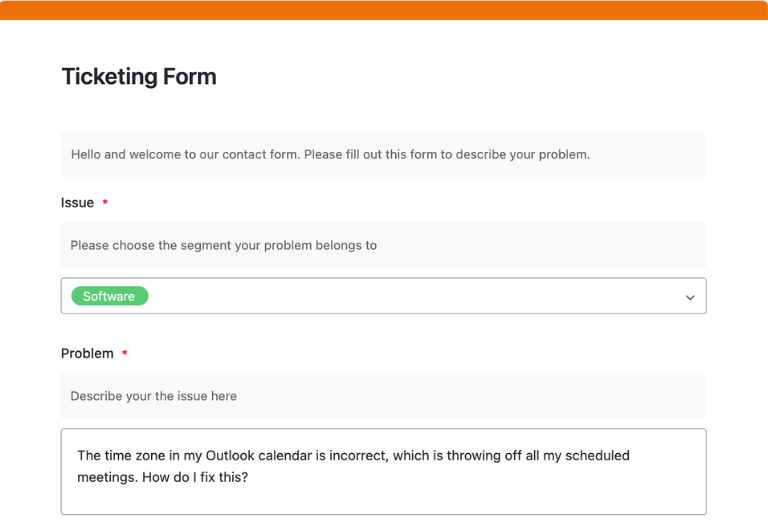
In the first table of the template—the ticketing form—you record all support requests as tickets, including category, priority, channel, description, and attachments. Each ticket goes through a clearly defined workflow with status fields such as “New,” “In Progress,” “Waiting for User,” or “Resolved,” so that your help desk ticket system provides meaningful overviews at all times. The “Assigned to” column is automatically filled in via a link to the responsible person, while requesters can conveniently create the ticket using a web form.
Control ticket assignment and escalation
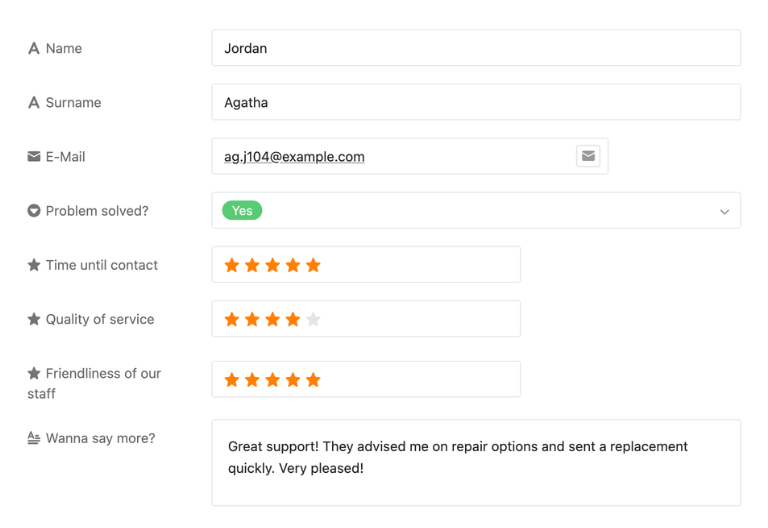
The second table displays your rating form: Once a ticket has been closed, a button in the ticketing form triggers an automated email with a link to the rating form. In the rating form, requesters rate their contact with the IT support help desk—for example, using rating columns—and provide brief feedback. This feedback is incorporated into evaluations and helps to improve processes and service quality in the help desk ticket system in a targeted manner.
Map responsibilities
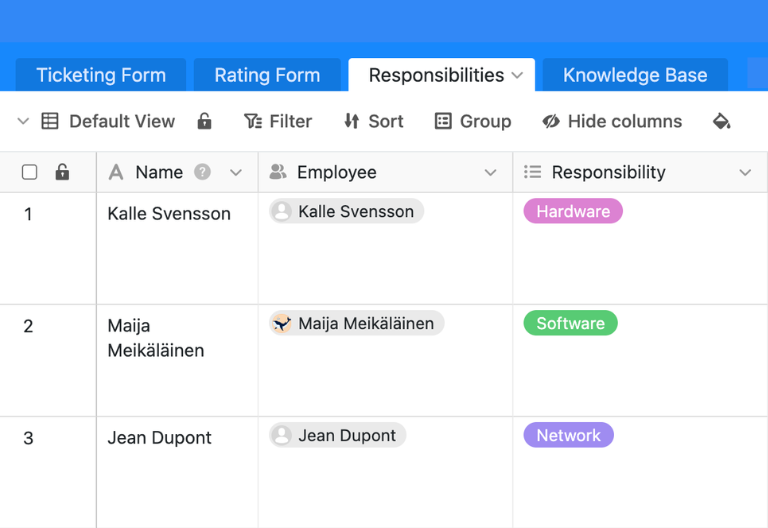
The third table, “Responsibilities,” manages teams, responsibilities, and escalation levels. Here, you can store brief information about all IT help desk employees, such as their role, contact details, and areas of responsibility. This table is linked to the ticketing form via link columns, so that tickets are automatically assigned to the responsible team member and escalated to the 2nd or 3rd level if necessary.
Integrate knowledge base and knowledge management
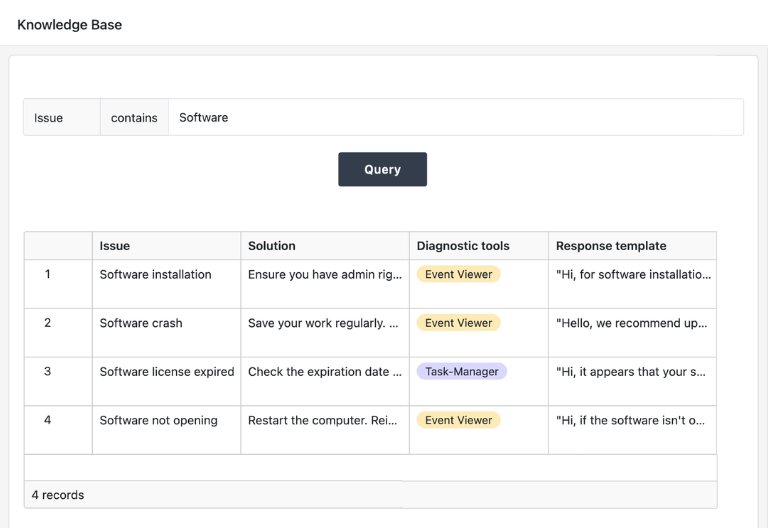
In the fourth table, you maintain your knowledge base: helpful resources, instructions, standard processes, and SOPs. Tickets can be linked directly to relevant knowledge entries so that support staff can find and document known solutions more quickly. This ensures that everyone in the IT help desk works with the same knowledge base and that recurring requests are resolved in record time.
Your personalized IT helpdesk app
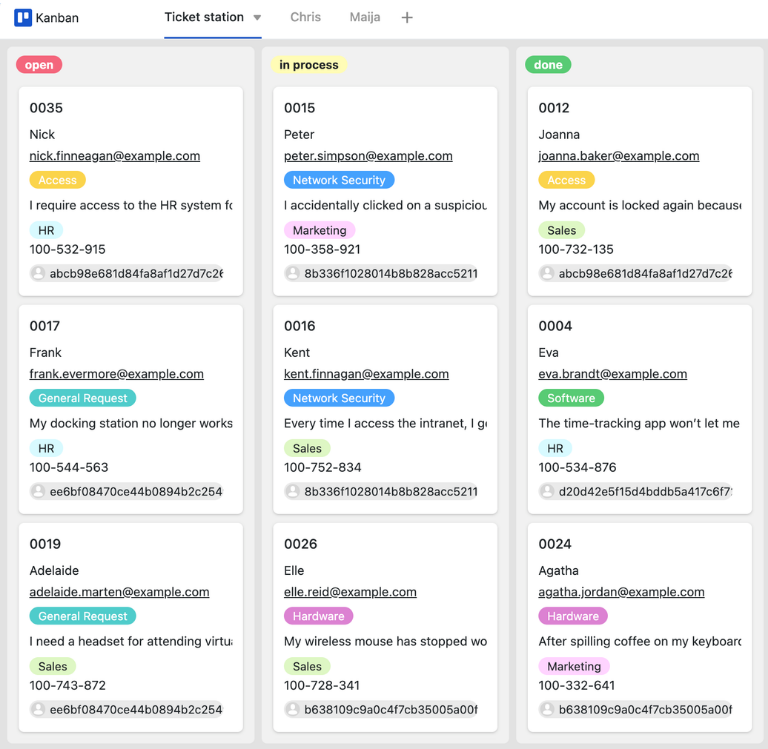
With the integrated no-code app builder, you can easily create your own custom front end based on the IT help desk template. Employees can submit new IT support requests using an intuitive web form and process their tickets in a personal Kanban view where only their own tickets are visible. They can drag and drop tickets from “Open” to “Done,” search the knowledge base for relevant keywords, and use dashboards in the app to keep track of ticket statistics, satisfaction, and utilization.
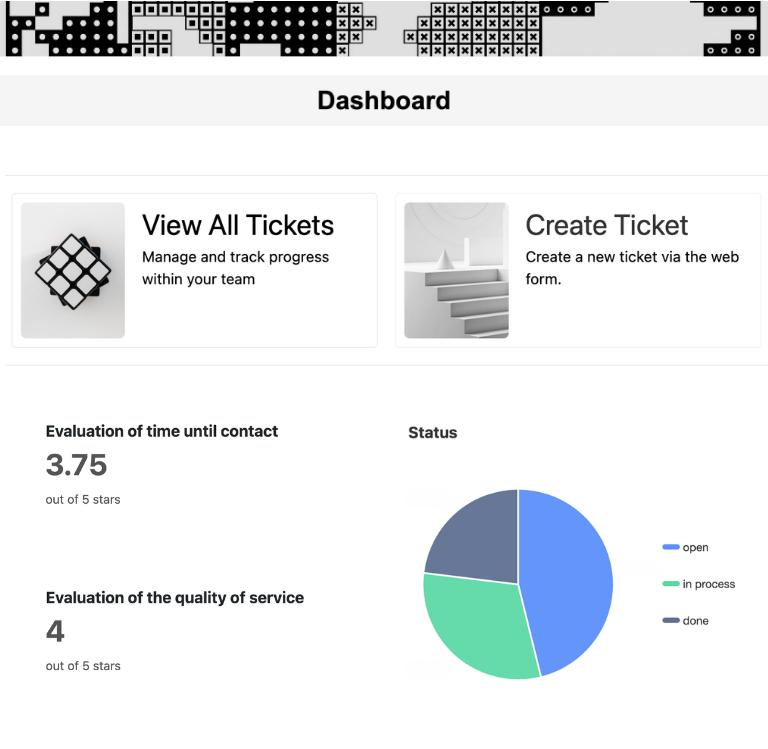
Keep IT tickets and service quality under control—with SeaTable's IT help desk template
Smart automation
AI-powered help desk ticket system
With SeaTable, you can use powerful AI features, that take your IT ticket system to a new level. Automate recurring steps, reduce manual routine work, and free up time for analysis, service improvement, and strategic decisions in IT.
Classification with Classify
Classify automatically assigns new support requests to appropriate service categories, priorities, or teams based on subject and description. New tickets are thus placed directly in the right context, which reduces processing times and improves support quality.
Data extraction with Extract
With Extract, you can extract relevant data such as users, systems, error codes, or urgency from unstructured text in emails and forms and automatically transfer it to structured fields—ideal for consistent documentation.
Text recognition with OCR
Upload screenshots with error messages to your IT help desk and use OCR to automatically recognize the text they contain. This makes ticket information such as error messages or IDs directly available in the ticket, facilitating error analysis.
Automated summaries with Summarize
Summarize summarizes extensive ticket histories, chat histories, or comment threads in just a few sentences. IT managers and support staff can quickly grasp the current status of a ticket and handle transfers or escalations more efficiently.
Tailor-made automation with Custom Prompt
With custom prompts, you can define your own AI rules that support typical tasks—such as suggestions for next steps, formulating response templates, or flagging tickets that require special attention.
Status and risk overviews at the touch of a button
Create structured reports on open, overdue, and resolved tickets per service, location, or time period. AI prepares trends, SLA violations, and recurring problem areas so that reviews, audits, and management reports can be generated with just a few clicks.
Transparency and cooperation
IT help desk template for every use case
SeaTable is a modern AI no-code database solution with automation and app builder, offering all the features you need for a professional IT help desk. The focus is on traceability, knowledge management, Teamwork and flexible adaptation with high security standards – from the initial template to a scalable IT service management environment.
GDPR compliant
When you use SeaTable Cloud or the integrated AI, all data remains in Europe—the infrastructure is operated exclusively on servers in Germany.
2FA and SSO
SeaTable supports common authentication techniques such as two-factor authentication and single sign-on, allowing you to control who can access your data.
FAQs about SeaTable's IT Helpdesk Template
-
Can I use SeaTable's IT help desk template for free?
-
You can use the template free of charge in SeaTable Cloud. All you need is a free account, and you can start mapping support requests in a structured way right away.
-
What is the template particularly suitable for?
-
The template is suitable for companies that want to centrally collect, prioritize, and document their support requests and are looking for a flexible, customizable help desk IT support system.
-
Can I import existing data into SeaTable?
-
Yes, you can import existing help desk data from Excel or other systems via CSV import. After importing, you can customize the template to suit your processes and benefit from all the features of the digital solution.
-
Does the template support status tracking and SLAs?
-
Yes, you can freely configure status fields, SLA data, and escalation rules. This allows the template to accurately replicate your status tracking and SLA management in the help desk ticket system.
-
Can I link the template to other ITSM processes?
-
Yes, you can use the template with other templates for asset management, change management, or incident management combine and thus create an integrated IT service management build up.
-
How many users can work with the IT Helpdesk template at the same time?
-
Multiple users can work on the same base simultaneously, creating and updating tickets. Permissions allow you to control who can read, comment, or edit—ideal for collaborative work within your organization.
-
Can I create my own fields and workflows in the template?
-
Yes, you can add additional columns, tables, views, and automations at any time. This allows you to flexibly adapt the template to your internal processes, roles, and reporting requirements.