SeaTable — your professional inventory list template
Forget about rigid Excel inventory lists. Manage your inventory with our modern inventory list template. Customizable – scalable – GDPR-compliant – with AI support.
Use inventory list online
Inventory list software for your company
-
Intuitive
The user-friendly inventory list template is easy to use, less prone to errors than an Excel inventory list template, and can be customized.
-
AI automation
SeaTable’s integrated AI-powered automations enable even more efficient inventory processes – GDPR-compliant thanks to its own AI server.
-
Analysis
With just a few clicks, you can create attractive analysis dashboards to analyze your inventory and optimize purchases.
-
Permissions
With individually adjustable permissions, you can determine who is allowed to view or edit inventory lists and specific asset information.
-
Mobile record
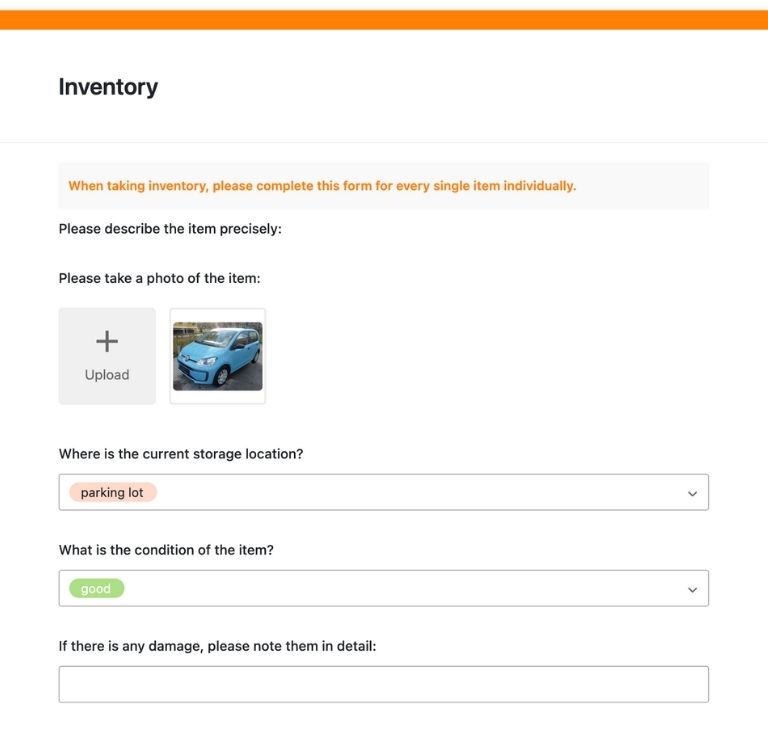
Record inventory on the go with the web form—take pictures, synchronize immediately, and document anywhere.
-
Alerts & Forecasts
Take advantage of intelligent alerts and forecasts—automatic warnings for critical inventory, maintenance, and end-of-life.
Who uses SeaTable?
Leading companies worldwide rely on SeaTable

















100.000+
Downloads in the first year of Docker Hub
1.500+
Daily users on SeaTable Cloud
4.6
Review on Capterra
Your advantages
Use inventory lists online with SeaTable
The AI no-code solution SeaTable impresses with its flexibility and adaptability. With our inventory list software, you benefit from many advantages and can also manage complex inventory processes .
Always up to date: Stay up to date with communication features, complete change history, and real-time updates.
Access from anywhere: With an online inventory list, you have access at any time and protect your data from loss.
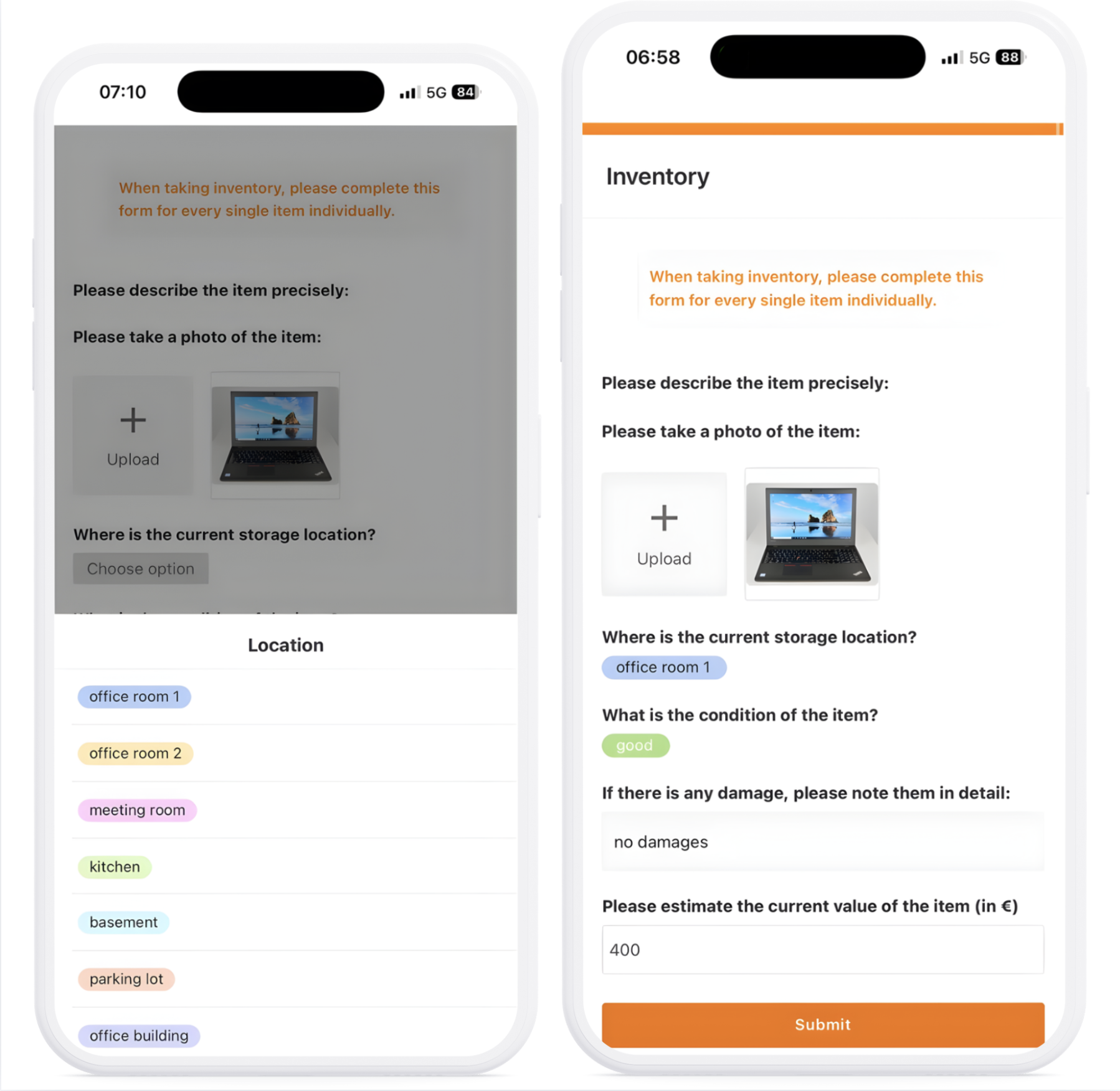
Mobile recording: Record inventory on the go using the web form—in the warehouse, in the field, or on site with a smartphone or tablet.
Scalable: Our inventory list template grows with your requirements—regardless of how many assets or locations you manage.
Automated & integrated: Connect your inventory list via n8n and Zapier with other systems – for seamless processes without media discontinuity.
Manage inventory
How the inventory list template works
Manage inventory
Simply create new items using a form and assign them directly to locations, departments, or employees. All assets can be viewed in the “Inventory” table, either as a spreadsheet or in various views such as gallery or calendar.
Categorize and filter inventory
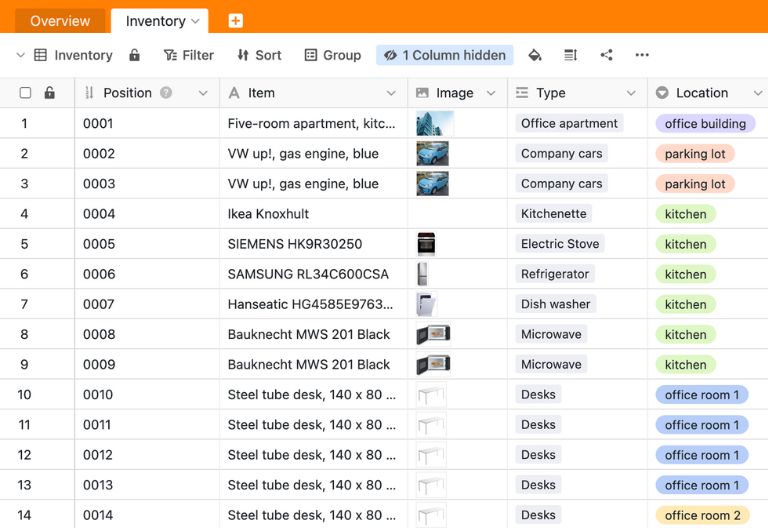
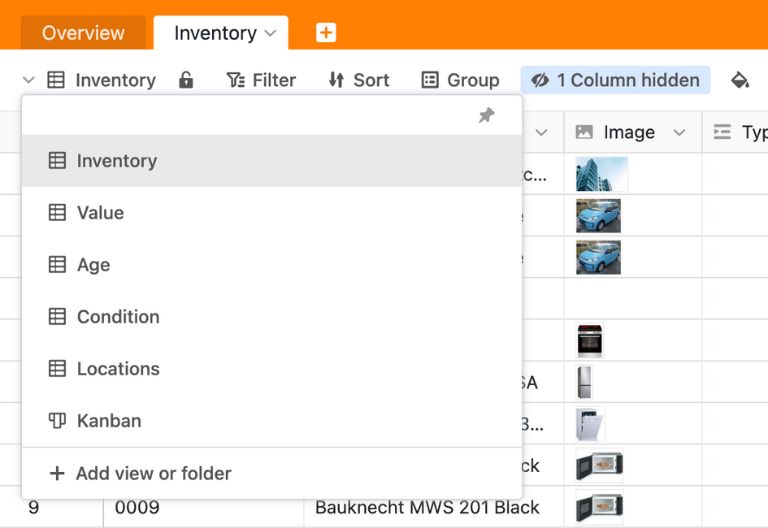
SeaTable offers extensive filtering and grouping options. This allows you to display your inventory exactly as you need it—by category, location, cost center, or status. Sort and filter with just a few clicks.
Communication and maintenance
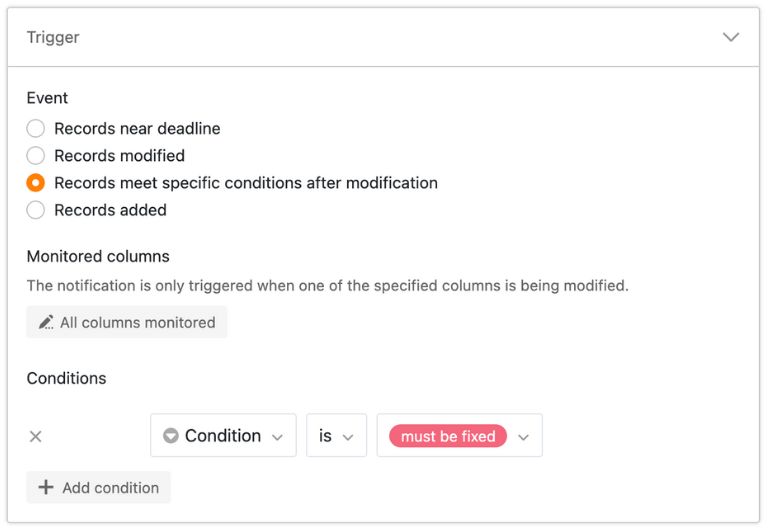
Simply comment on an asset entry and tag all the people who need to be informed. Or create notification rules to stay informed about maintenance dates, expiring warranties, or critical inventory levels.
Inventory overview and evaluations
Visualize your inventory with different views: gallery view for images, calendar view for maintenance dates, or statistics view for value analyses. Export reports or create dashboards for management.
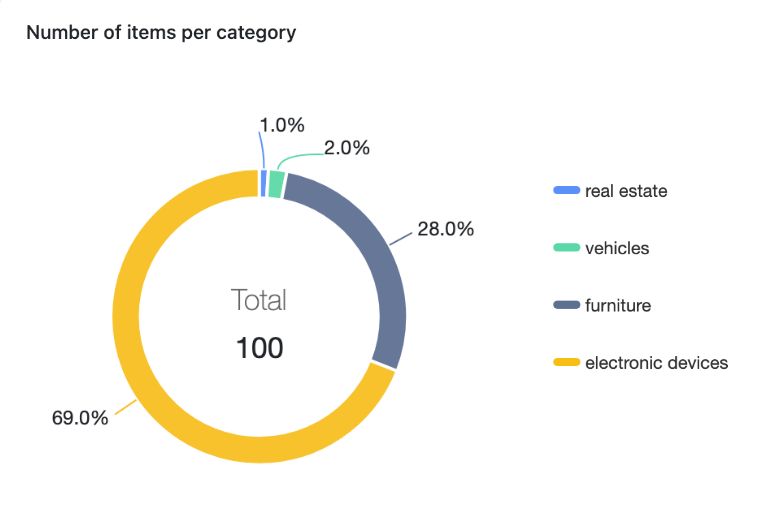
Your personalized inventory app
With SeaTable’s integrated no-code app builder, you can create your own custom inventory front end with minimal effort. Use the web form from the template for your inventory processes and guide your employees through step-by-step instructions. Create gallery views for clear overviews, Kanban views for managing different item statuses, or statistics dashboards for management. Share focused views with external parties via links, store purchase receipts and inspection reports, and use granular permissions for access rights.
Keep track of your inventory at all times – with SeaTable
Smart automation
AI-powered inventory management with SeaTable
With SeaTable, you benefit from powerful AI features , that take your inventory management to a whole new level. Automate recurring tasks and save valuable time.
Automatic classification with Classify
Have new assets categorized automatically: The AI function “Classify” uses descriptions, manufacturers, or product names to identify the appropriate category and automatically assigns items to the correct class—perfect for fast and error-free inventory recording.
Automated text recognition with OCR
Upload purchase receipts, invoices, or inspection reports, and the OCR function automatically recognizes important information such as purchase date, price, manufacturer, and serial number. This data is transferred directly to your inventory list—no manual data entry required.
Intelligent data extraction with Extract
The Extract function analyzes unstructured information and automatically extracts relevant data—e.g., service life, warranty expiration, maintenance intervals, or condition assessments from descriptions or uploaded documents. Saves time and reduces errors.
Summaries with Summarize
The Summarize function automatically creates short summaries of longer asset descriptions or inspection reports. This gives you a quick overview without having to read every detail—ideal for management reports.
Tailor-made automation with Custom Prompt
With the custom prompt feature, you can define your own AI instructions to automate specific inventory tasks. Examples: Automatic risk classification based on age and value, or smart alerts for critical inventory items—tailored to your requirements.
Audit reports at the touch of a button
Automatically generate complete inventory audit reports for auditors, insurance companies, or internal audit departments. AI summarizes inventory changes, losses in value, and missing documentation in a structured manner—compliance-ready in seconds.
Security and transparency
Inventory list template for every application
SeaTable is a modern AI no-code database solution with automation and app builder, offering all the features you need for a digital, integrated inventory tool. Protecting your data is our top priority.
GDPR compliant
When you use SeaTable Cloud or our integrated AI, all your data remains in Europe. Our infrastructure is hosted exclusively on servers in Germany.
2FA and SSO
SeaTable supports all common authentication techniques and enables two-factor authentication and SSO. Because you decide who gets access to your inventory data.
FAQs about SeaTable's inventory list template
-
Can I use SeaTable's inventory list template for free?
-
Yes, you can use the inventory list template for free with SeaTable. All you need is a free account, and you can start managing your inventory digitally right away.
-
Is SeaTable an alternative to Excel for inventory management?
-
Yes, SeaTable is a powerful Excel alternative specifically for collaborative processes. Unlike an Excel inventory list template, SeaTable offers real-time collaboration, automatic notifications, granular permissions, and AI-powered features—perfect for modern inventory management.
-
Can I import my existing Excel inventory list into SeaTable?
-
Yes, you can easily import your existing inventory list Excel template into SeaTable. SeaTable supports importing Excel files (.xlsx, .xls) and CSV files. After importing, you can customize the data structure and benefit from all SeaTable features.
-
Can I also record inventory on the go?
-
Yes, the web form of the inventory list template is fully optimized for mobile devices. You can record inventory using a smartphone or tablet, take photos directly, and document new assets—whether in the warehouse, in the field, or on site. All data is synchronized immediately.
-
I want my employees to only see their own assigned inventory. Is that possible?
-
When you create a digital inventory list online with SeaTable, you can set individual read and access rights. For example, you can create separate views for different departments or set personal filters so that each employee only sees the assets assigned to them.
-
Does SeaTable also support the management of IT assets and serial numbers?
-
Yes, the inventory list template can be customized flexibly. You can add any columns you want—e.g., for serial numbers, MAC addresses, licenses, warranty expiration dates, or condition assessments. File attachments such as purchase receipts or manuals can also be stored directly with the asset.
-
Can I receive automatic warnings about critical inventory levels?
-
Yes, the inventory list template supports smart alerts and inventory forecasts. You can define automatic notifications for critical inventory, expiring warranties, upcoming maintenance, or changes in value. The forecast also predicts when assets will reach end-of-life.
-
Can I connect my inventory list to other systems?
-
Yes, SeaTable works seamlessly with n8n and Zapier. You can easily connect your inventory list to ERP systems, accounting software, CRM, Slack, email, or many other tools—without any programming. n8n and Zapier offer hundreds of preconfigured integrations.
-
I would like to use SeaTable as an inventory tool. Is there any support available?
-
Yes, you can contact our support team if you have any questions. Either post a question in our community forum or contact us directly by email.