SeaTable – Your template for modern fleet management
Organize your fleet management clearly in a central template—from vehicle master data and drivers to bookings, damage, and appointments. With this template for digital fleet management, you can control availability, costs, and obligations in a clearly structured manner and replace rigid Excel spreadsheets with a flexible, collaborative system.
Use digital fleet management online
Fleet management template for your vehicle fleet
-
Intuitive
Introduce the template without a lengthy introduction and enable your team to organize the entire vehicle fleet in a structured manner right away. This will significantly reduce queries, media breaks, and coordination efforts in day-to-day business.
-
Structured
Record vehicles, drivers, bookings, costs, and appointments uniformly in a central, clearly structured view and replace scattered Excel spreadsheets. This minimizes errors and duplicate maintenance and creates a reliable, consistent data basis.
-
Clear Overview
See at a glance which vehicles are available, how busy the fleet is, and which appointments are coming up. This allows you to respond more quickly to bottlenecks, plan routes more accurately, and increase the availability of your vehicles.
-
Permissions
Control granularly who can request vehicles, approve bookings, or view sensitive cost data. This allows you to separate operational use from controlling and ensure that only authorized persons can change critical information.
-
Web Form
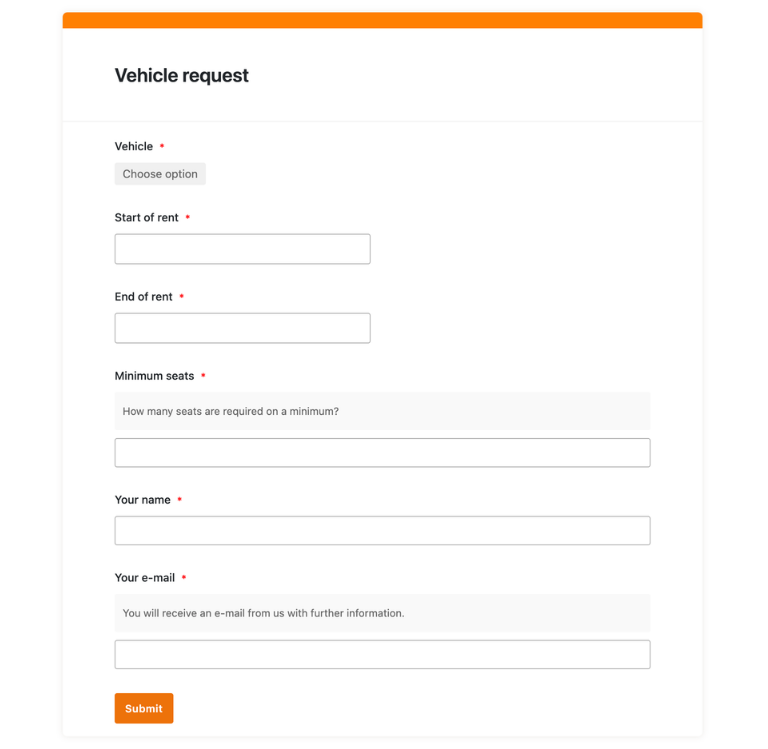
Collect vehicle requests via a web form in which employees specify the time period, purpose, and desired vehicle. All requests are automatically organized in your overview so that you can review, approve, and document them.
-
Notifications
Get automatic reminders for HU, UVV inspections, maintenance, or tire changes and avoid missed appointments. This reduces downtime, lowers risk, and keeps your fleet legally compliant and ready for use at all times.
Who uses SeaTable?
Leading companies worldwide rely on SeaTable

















100.000+
Downloads in the first year of Docker Hub
1.500+
Daily users on SeaTable Cloud
4.6
Review on Capterra
Your advantages at a glance
Use the fleet management template online
The AI no-code solution SeaTable impresses with its flexibility and adaptability. With the template for digital fleet management, you can centrally record all vehicles, bookings, damage, and appointments, keep track of costs, and create a common basis for your fleet management—much more structured than traditional fleet management Excel files.
Always up to date: Thanks to comments, change history, and real-time updates, you always stay up to date—from the initial vehicle installation to ongoing use across multiple locations.
Access from anywhere: With an online template, you can access vehicle data, bookings, and appointments at any time—in the office, on the road, or directly from the vehicle.
Transparency in your vehicle fleet: Link vehicles, drivers, repairs, and trips in a digital template—so you can see which vehicles are heavily used, where cost drivers lie, and which appointments are coming up.
Scalable: Your fleet management grows with your requirements—regardless of whether you manage a few company vehicles, a regional fleet, or a large fleet with different locations.
Automated & integrated: Use SeaTable as a central platform that flexibly adapts to your processes, supplements a digital logbook, and replaces rigid Excel spreadsheets in the long term.
Fleet management Practical example
How the fleet management template works
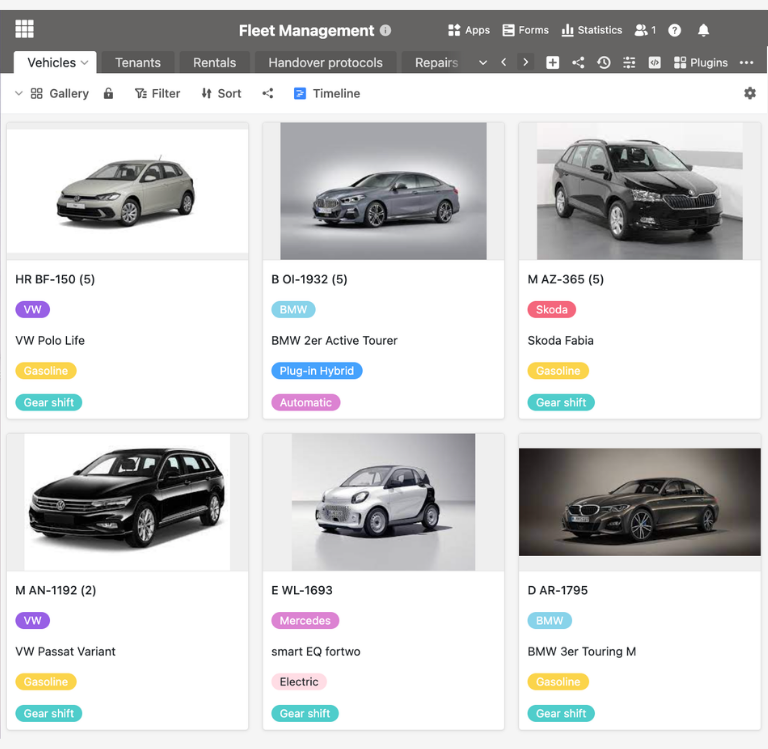
Manage vehicles centrally
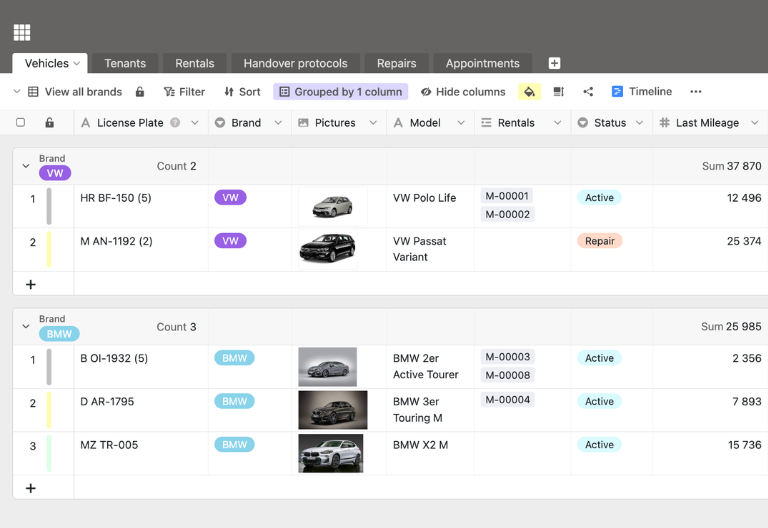
You can add all your vehicles to the first table in the template. You can enter license plate numbers, vehicle types, mileage, technical data, purchase or leasing information, and cost center assignments. Links allow you to see at a glance which bookings, damage reports, and appointments belong to a particular vehicle, creating a practical digital fleet management system with complete vehicle files.
Structured mapping of drivers and users
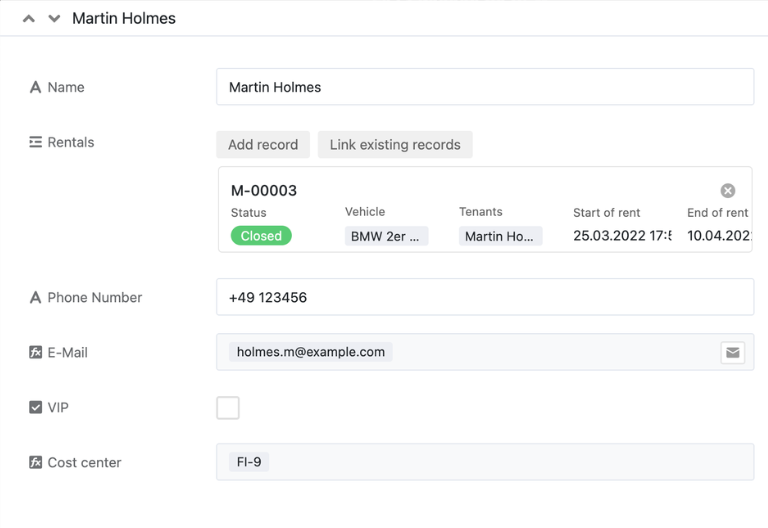
A second table lists all drivers and employees with contact details, department, and, if applicable, driver’s license class. Links to the booking table allow you to see who used which vehicles and when—ideal for transparency, traceability, and evaluations.
Manage bookings and reservations
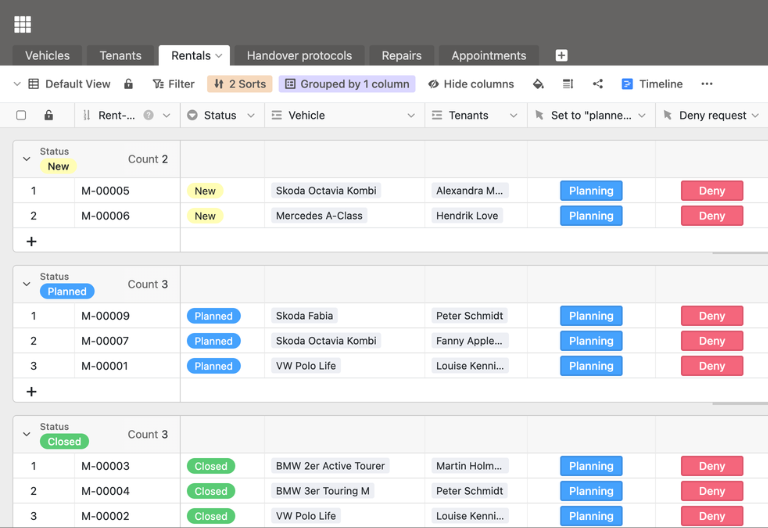
You can manage all bookings and reservations in a third table. Employees send their requests via a web form; you add status, approvals, and vehicle assignment in your digital fleet management system. You can check availability and avoid double bookings using timeline views—much more efficient than an Excel fleet management list.
Document handover reports, damage, and deadlines
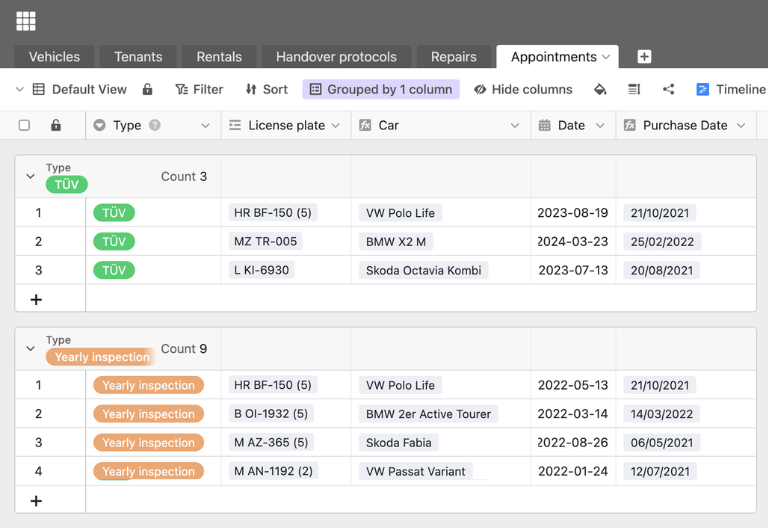
Additional tables are used to document handovers, returns, damage, repairs, and mandatory appointments. Link logs to vehicles and bookings, record costs, and receive automatic reminders before important appointments such as vehicle inspections, accident prevention regulations, or tire changes—this ensures that your digital fleet management remains complete and audit-proof.
Your personalized fleet management app
With the integrated App Builder, you can easily create your own customized front end based on the fleet management template. Combine forms for vehicle requests, overviews for dispatchers and fleet managers, calendar or timeline views for maintenance appointments, and focused filter views for locations. Share specific sections with stakeholders via links and use permissions to control who can view or edit which elements of fleet management—turning the digital template into a customized solution for your fleet.
Keep track of vehicles, costs, and deadlines with SeaTable's fleet management template.
Smart automation
AI-supported fleet management
With SeaTable, you can use powerful AI features , that take your fleet management to a whole new level. Automate recurring tasks in everyday fleet operations, reduce manual routine work, and free up time for evaluations, optimization, and strategic decisions in fleet management.
Classification with Classify
With Classify, you can automatically assign new vehicles or booking requests by type, area of use, or location. This ensures that data records end up in the right category and you can immediately see which parts of your fleet are being used particularly heavily.
Data extraction with Extract
With Extract, you can automatically extract information such as costs, mileage, or types of damage from workshop invoices, damage reports, or emails. The recognized values are structured in fields in your table, making evaluations and cost control much easier.
Text recognition with OCR
With OCR, you can automatically recognize text from scanned invoices, handover reports, or logbooks and transfer the content directly to your digital fleet overview. License plate numbers, amounts, mileage, and other data are available without having to type them in manually.
Automated summaries with Summarize
With Summarize, you can automatically summarize extensive damage reports, email exchanges with repair shops, or monthly reports in just a few sentences. You can grasp the essence of complex processes more quickly and prepare decisions or management updates much more efficiently.
Tailor-made automation with Custom Prompt
With Custom Prompt, you can define your own AI instructions that support typical routines in your fleet—such as notifications about unusual costs, suggestions for using pool vehicles, or automatically generated reminders about upcoming appointments in your fleet.
Status and cost overviews at the touch of a button
With AI-supported status and cost overviews, you can automatically generate clear analyses of utilization, costs, repair frequency, and appointment status by vehicle, location, or time period. The AI highlights anomalies so that you can identify potential and risks at an early stage.
Transparency and cooperation
Fleet management template instead of fleet chaos in Excel
SeaTable is a modern AI no-code database solution with automation and app builder, offering all the features you need for professional, digital fleet management. The focus is on traceability, teamwork, and flexible customization with the highest security standards—from small fleet management to scalable multi-location fleets.
Alternative to Excel
With SeaTable, you can manage your vehicle fleet more efficiently than in Excel—with linked tables, views, and automations. A powerful alternative to Excel .
Digital logbook
Use SeaTable to create a digital logbook and link trips directly to your fleet management system – this allows you to keep track of usage and costs.
GDPR compliant
When you use SeaTable Cloud or the integrated AI, all data remains in Europe—the infrastructure is operated exclusively on servers in Germany.
2FA and SSO
SeaTable supports two-factor authentication and single sign-on, allowing you to control who has access to your fleet data.
FAQs about the SeaTable fleet management template
-
Can I use SeaTable's fleet management template for free?
-
You can use the template free of charge in the SeaTable Cloud. All you need is a free account, and you can immediately begin to digitally map your fleet management in a structured manner.
-
How does the fleet management template differ from fleet management in Excel?
-
Fleet management in Excel quickly reaches its limits: manual maintenance, missing links, and high susceptibility to errors. The fleet management template in SeaTable links vehicles, drivers, bookings, damage, and appointments, offers views such as calendars and timelines, and enables automation—making your fleet management significantly more robust and transparent.
-
Can I import existing data from Fleet Management Excel into SeaTable?
-
Yes, you can transfer existing vehicle lists, bookings, or cost overviews from Excel to SeaTable via CSV import. After importing, customize the template and benefit from all the features of the digital solution.
-
Does fleet management support mandatory appointments such as vehicle inspections, accident prevention regulations, or tire changes?
-
Yes, you can store all relevant dates, set reminders, and display them in calendar or timeline views. This way, you’ll never miss inspections, tests, or seasonal tire changes again.
-
Can I combine fleet management with a digital logbook?
-
Yes, you can connect your fleet management system to a digital logbook and assign trips directly to vehicles, drivers, and cost centers. This creates comprehensive documentation of usage, costs, and evidence for your fleet.
-
How many users can work with the fleet management template at the same time?
-
Multiple users can work on the same database simultaneously, booking vehicles, recording logs, or evaluating data. Permissions allow you to control who can read, comment, or edit—ideal for centralized fleet management, locations, and service partners.
-
Can I create my own fields and workflows in the template?
-
Yes, you can add additional columns, tables, views, and automations at any time. This allows you to flexibly adapt the template to your internal processes, reporting requirements, and the specific characteristics of your fleet.
-
Is SeaTable a good alternative to traditional Excel spreadsheets and fleet management tools?
-
Yes, SeaTable is a modern, collaborative alternative to traditional Excel spreadsheets and specialized fleet management tools. With the fleet management template, you can combine flexible database logic with views such as calendars, timelines, and app front ends to implement your digital fleet management exactly as you need it.