The smart energy tracker for your home
Electricity, gas, water—and then, at the end of the year, a surprise additional utility bill that catches you off guard. With SeaTable’s free energy tracker, you can record your meter readings digitally, spot fluctuations early on, and keep track of your costs. This helps you avoid unpleasant surprises when your annual bill arrives. Simple, secure, and without the hassle of Excel.
No More Consumption Estimates
With the Energy Tracker, you can get a clear picture of your costs
-
Flexible and intuitive
Simply customize our template to create your own tailored energy consumption tracker—no programming required.
-
Easy data entry
Easily enter your meter readings or new contracts using customizable input forms—with attached files or images if needed.
-
Clear presentation
With a variety of plugins, views, filters, and grouping options, you can organize your data exactly as you need it.
-
AI-powered automation
Take advantage of the built-in AI-powered automations for streamlined workflows and smart data processing. This will help you reduce manual work.
-
All in one place
The energy tracker for electricity, gas, water, contract details, and annual statements—all in one place and at a glance.
-
Dashboards
Informative dashboards show you at a glance how your usage fluctuates throughout the year. This allows you to spot outliers immediately.
Energy Tracker by SeaTable
Meter readings made easy
With the AI no-code solution SeaTable, you get an energy tracker that’s much more than just a spreadsheet. Whether you want to calculate your gas consumption or analyze consumption trends over the course of a year, SeaTable gives you everything you need in a single, easy-to-use platform.
Always up to date: With SeaTable, you can record your meter readings in seconds and access updated data in real time.
Always at your fingertips: You can access your consumption tracking app anytime, anywhere, and do things like enter new electricity rates.
Share with friends or roommates: Give your family or friends access, or use the energy tracker together with your roommates.
GDPR-compliant: SeaTable is GDPR-compliant and is hosted exclusively on servers in Germany.
Here's how you can benefit
Free energy tracker with lots of features
Reading the meter: Easy data entry
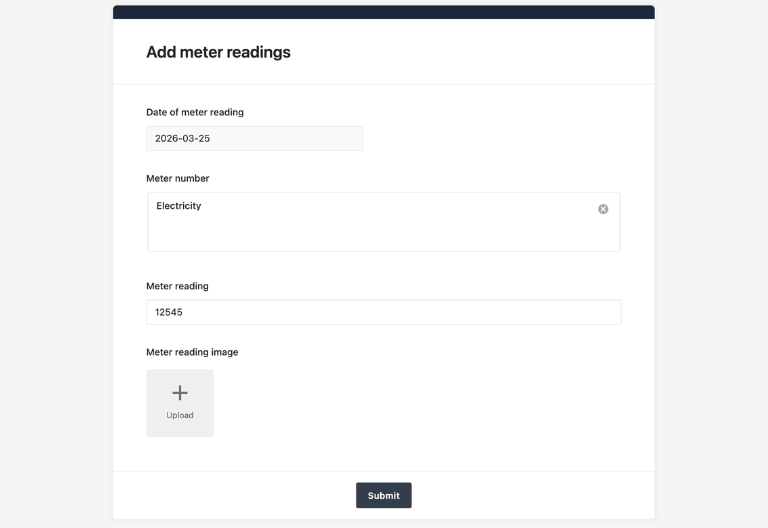
If you’re tired of filling out spreadsheets in Excel, you’ll love SeaTable. Enter your meter readings conveniently via a web form. Just select the appropriate meter, enter the reading, and you’re done. The new entry is automatically saved with the current date in the “Consumption Tracker” table.
Contract Management: All contract data in one place
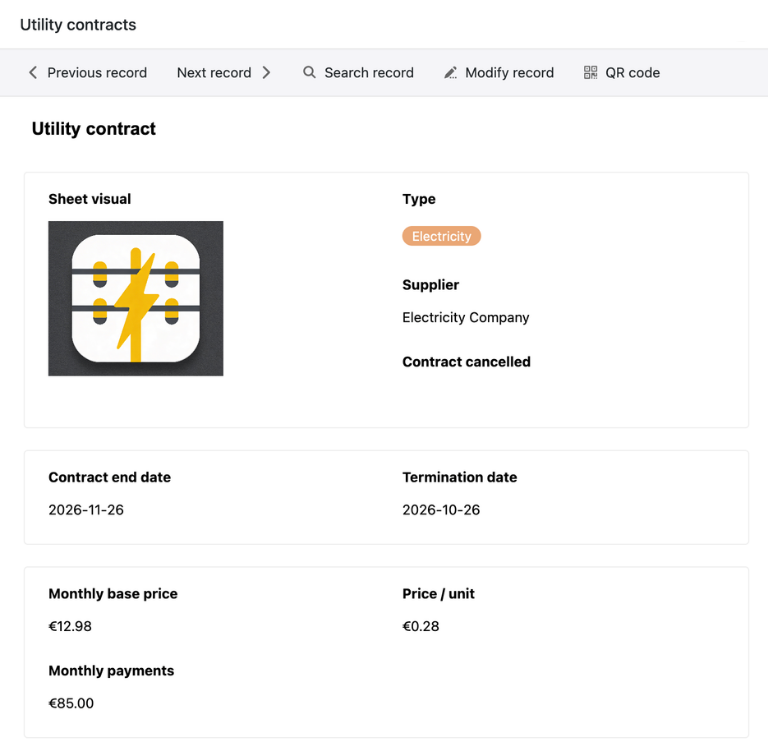
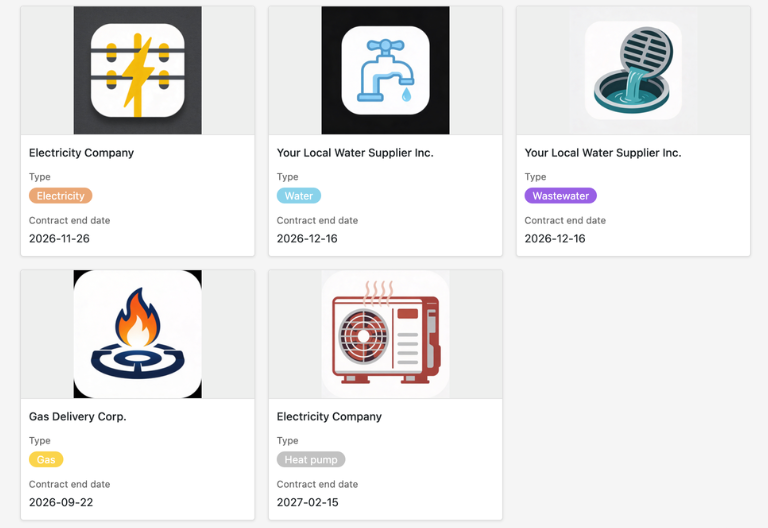
For example, to calculate your heating costs, the meter reading alone isn’t enough—you also need your current rate. This is where SeaTable really shines as an online database . Simply save all relevant contract information directly in the energy tracker, and you’ll have a fully-fledged consumption and cost tracker—with all contracts at a glance in the convenient gallery view.
Cost Barometer: Discounts vs. Usage
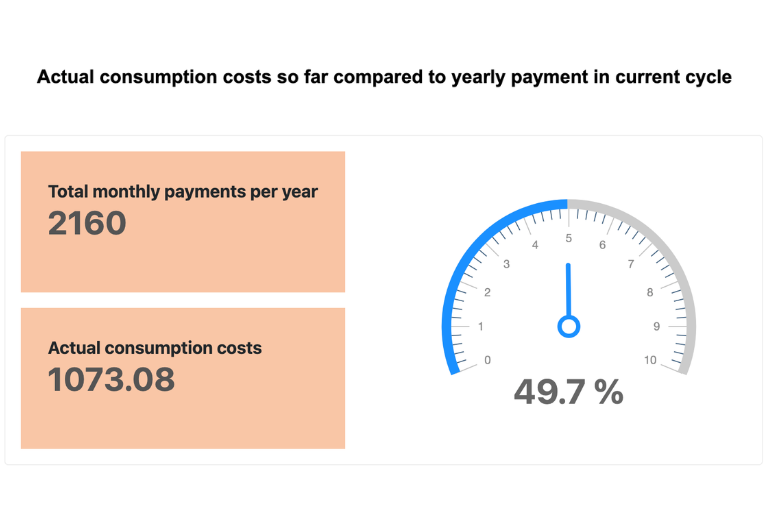
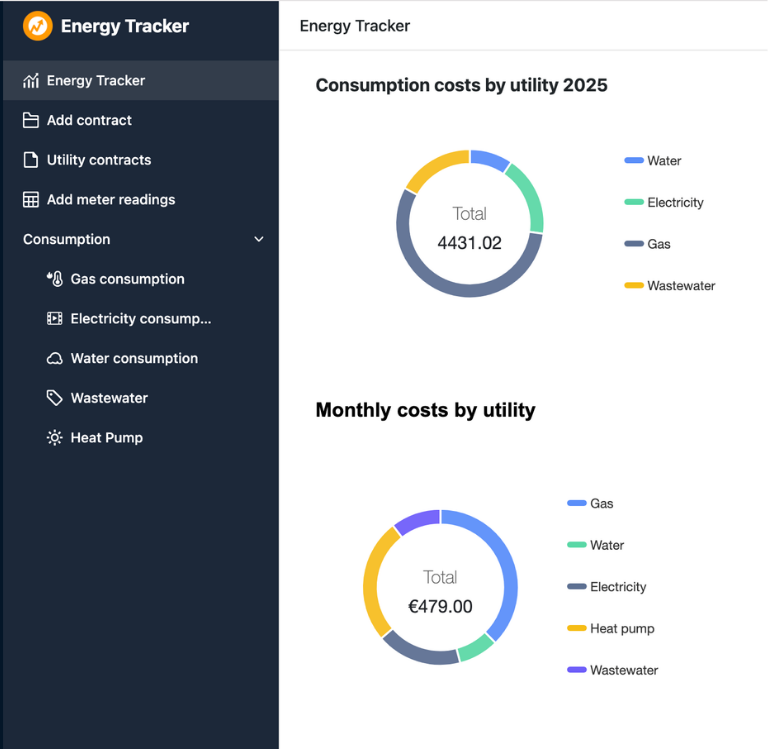
Your energy tracker consists of a database with an Excel-like table structure and a no-code app as the front end. Here you’ll find the heart of your energy tracker: the analytics dashboards. Compare your consumption and actual costs on a monthly basis, compare your estimated annual payment with actual costs, and easily create additional reports using drag-and-drop.
Automation and notifications: Less manual effort
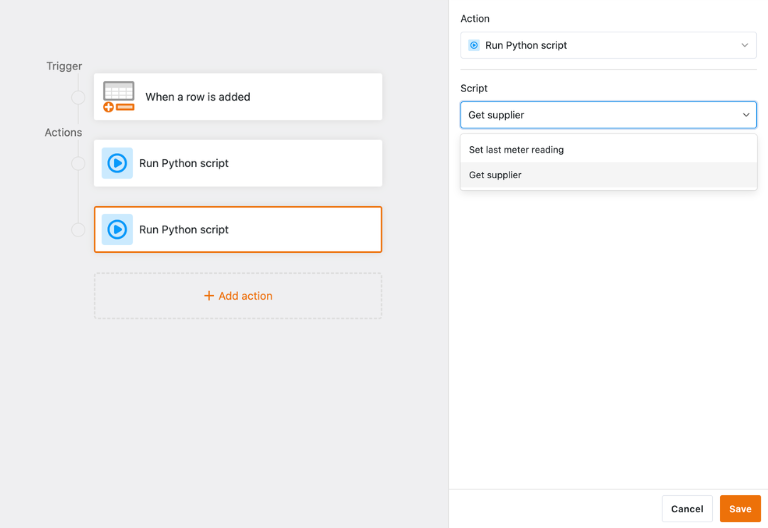
One of SeaTable’s major strengths compared to other expense tracking tools or spreadsheets is its built-in automations and notifications, which are easy to set up. The template already includes automation for data linking and automated notifications. This way, you’ll never miss a contract cancellation deadline again.
Sign up for free and use the energy tracker
Your personal energy tracker app
With SeaTable’s built-in no-code app builder, you can create a custom app tailored to your needs in no time. Set up flexible analytics dashboards to calculate your gas or electricity usage and compare actual costs with advance payments. Use forms to easily record new meter readings and contracts anytime, anywhere. A clear design and structured views provide additional insight into your consumption and potential savings.
Smart everyday helper
Your Energy Tracker with built-in AI features
With SeaTable, you benefit from powerful, integrated AI-powered automations . Summarize key contract information, extract relevant details such as termination dates or price guarantees, or have termination letters pre-drafted—GDPR-compliant on European servers in Germany.
Automatic summaries with Summarize
With the Summarize feature, you can automatically generate short summaries, such as of your contract documents or rate adjustments. For a quick overview.
Automatic Classification with Classify
Have your usage automatically categorized based on the previous month’s recorded values, such as “Normal,” “Slightly elevated,” or “High.”
Automatic data extraction with Extract
Automatically extract relevant information from contract documents and invoices and update your contract data. This will reduce your manual workload.
Automatic text recognition from images with OCR
Take photos of letters from your utility provider and use the OCR feature to extract the text for further processing. This is how analog communication becomes digital.
Custom AI rules with custom prompts
Track your usage and create automated notes using a custom prompt, such as your current usage, costs, and changes from the previous month.
Recommendations for switching plans at the touch of a button
Enter comparison rates and automatically calculate whether switching is worth it and how much you can save. This makes it easy to build your own comparison portal.
Available at any time
Your Energy Tracker for Full Control
SeaTable is a modern AI-powered no-code database with an app builder, offering all the features you need to track your usage and costs. It focuses on usage transparency, easy data entry, and flexible customization, all while adhering to the highest data protection standards.
Energy consumption
Avoid unpleasant surprises on your annual bill. By tracking your energy usage with the energy tracker, you can see at a glance how much your costs are likely to be in the end.
Potential savings
Are your bills still reasonable? Do you need to call a repairman? Calculate your monthly electricity or heating costs and identify unusual spikes in usage and opportunities to save.
FAQs – Energy Tracker by SeaTable
-
Can I import my previous meter readings from Excel?
-
Yes, you can easily import CSV or XLSX files into SeaTable. This allows you to import existing data from Excel or another spreadsheet tool.
-
Can multiple apartments be managed in the energy tracker?
-
Yes, if you want to calculate heating costs or track water usage for multiple properties, for example, you can do so easily. The best way to do this is to create another table for the properties. You can use our Property Management Template as an example..
-
What happens if my monthly payment changes?
-
For example, if you want to calculate electricity costs, the energy tracker uses the contract data you have entered to calculate your actual monthly consumption costs. To prevent older entries from being altered as a result, you should treat contract changes as if they were a new contract and create a new entry with a new active rate, base rate, and monthly down payment. The Tracker automatically uses the most recent entry.
-
Can I use the energy tracker to convert my gas usage into kilowatt-hours (kWh)?
-
If you want to calculate your gas consumption, read the meter to determine your usage in cubic meters. However, your utility company bills you per kWh. To convert your meter reading, you’ll need the conversion factor and the calorific value from your utility company. Alternatively, you can use the standard reference values already stored in the tracker to calculate an estimated gas consumption in kWh.
-
Do I need any technical knowledge to use the energy tracker?
-
No, SeaTable is a no-code solution and generally requires no technical knowledge or programming skills. You can customize all settings in the template just like you would in a spreadsheet.
-
Where does SeaTable store my data?
-
The SeaTable Cloud is hosted exclusively on servers belonging to a Swiss provider in Germany, while SeaTable AI is hosted on German servers in a data center in Frankfurt.
-
How often should you record your meter readings?
-
The reading interval depends on your goals. For example, if you want to calculate your gas consumption in order to track your usage and respond promptly to unusual changes or damage (e.g., to the expansion tank), you should read your meters monthly.
-
Does SeaTable's energy tracker work on smartphones too?
-
Yes, you can easily use SeaTable on the go and conveniently record your meter readings using your smartphone.