SeaTable – Your digital onboarding plan template for new employees
Inspire new employees from day one with our customized onboarding plan template! Plan your onboarding concept in a structured and efficient way. Use the onboarding checklist to bundle tasks and clearly assign responsibilities. Keep track of deadlines and progress at all times and benefit from flexible customization to suit your needs. Get started now and take your onboarding to a new level!
Use the onboarding plan template online
Onboarding plan template for new employees
-
Structured onboarding
The user-friendly onboarding plan template is easy to use, maps out all steps from preboarding to integration, and supports managers, HR, and departments in the systematic onboarding of new employees.
-
Clear checklists
With your onboarding checklist in SeaTable, you can ensure that no task is forgotten—from IT access to introductory meetings and training sessions, every activity is documented in the onboarding plan.
-
Transparent progress
With just a few clicks, you can view progress, open tasks, and responsible persons for each new employee, role, or location, and use the onboarding plan template as a basis for feedback meetings and HR reporting.
-
Roles and permissions
With granular permissions, you can control who has access to the onboarding plan, onboarding checklist, or sensitive HR data—ideal for HR teams, managers, and buddies.
-
Self-service for new employees
New employees get access to their own “My Onboarding” view, where they can see their personal onboarding plan, open tasks, and contact persons—so everyone knows what is coming up next at all times.
-
Reminders & Deadlines
Automatic notifications ensure that managers are informed of new, overdue, or critical tasks in the onboarding plan—keeping your onboarding plan running smoothly.
Who uses SeaTable?
Leading companies worldwide rely on SeaTable

















100.000+
Downloads in the first year of Docker Hub
1.500+
Daily users on SeaTable Cloud
4.6
Review on Capterra
Your advantages at a glance
Use the onboarding plan template online with SeaTable
The AI no-code platform impresses with its flexibility and adaptability. With the induction plan template, you can digitally map your entire onboarding process—from preparation before the first day of work to integration into everyday work—keep track of tasks and responsibilities, and create a common basis for structured HR processes throughout the entire company.
Always up to date: Thanks to comments, change history, and real-time updates, your onboarding plan is always up to date—from the initial onboarding plan template to ongoing adjustments for different roles.
Access from anywhere: With an online onboarding plan template, HR, managers, and new employees have access to the onboarding plan, to-do lists, and documents at any time—whether in the office, working from home, or on the go.
Transparency in onboarding: Link tasks, onboarding checklists, and team members in an onboarding plan template—this allows you to see which tasks have been completed, where support is needed, and how far along the onboarding process is.
Scalable: Your onboarding plan template grows with your requirements—regardless of how many new employees, locations, or job profiles you are onboarding at the same time.
Automated & integrated: Use SeaTable as a central database for HR processes that flexibly adapts to your onboarding concept and seamlessly complements other applications such as email, DMS, or collaboration tools.
Practical onboarding plan template
How the onboarding plan template works
Control onboarding checklist
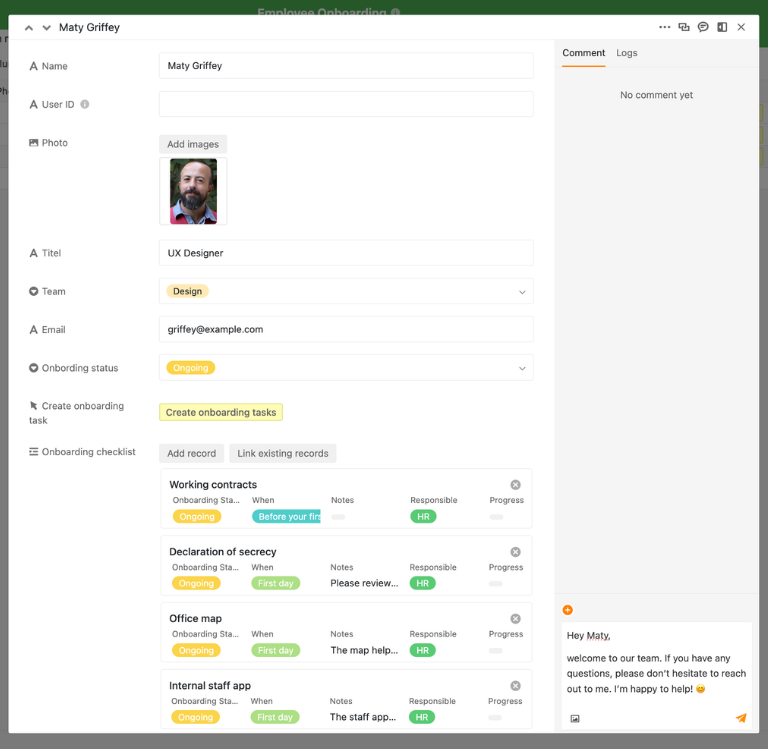
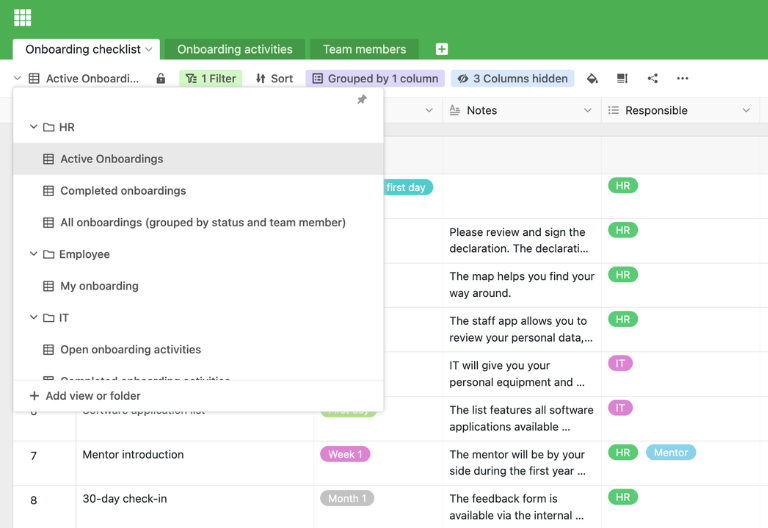
In the first table of the onboarding plan template, you can manage the onboarding checklist for all new employees. You can record tasks, responsible persons, due dates, status, and notes, thereby mapping all steps of your onboarding concept from preboarding to integration—the result is a practical onboarding plan template with clear responsibilities and deadlines.
Maintain standard activities in the onboarding plan
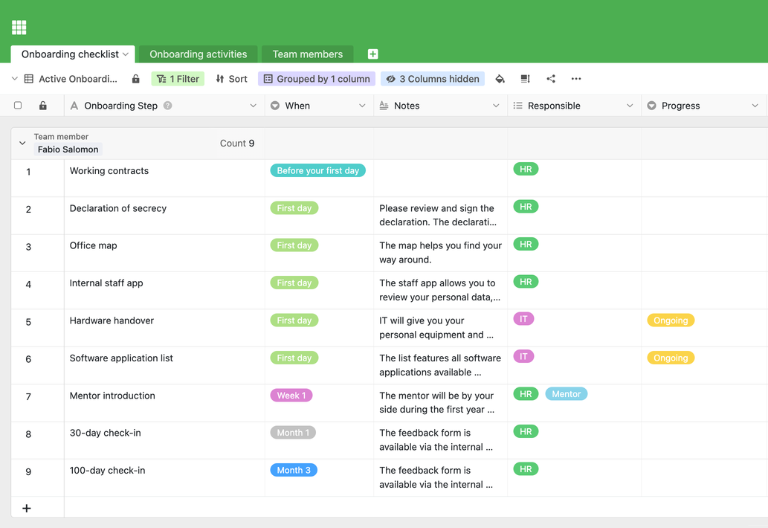
A second table bundles all standard onboarding activities, such as IT setup, introductory meetings, training, and feedback discussions. These activities form the basis of your onboarding plan template and can be customized according to role, location, or working time model. For new employees, they can be added to the checklist as an individual onboarding plan template at the touch of a button.
Team members and status at a glance
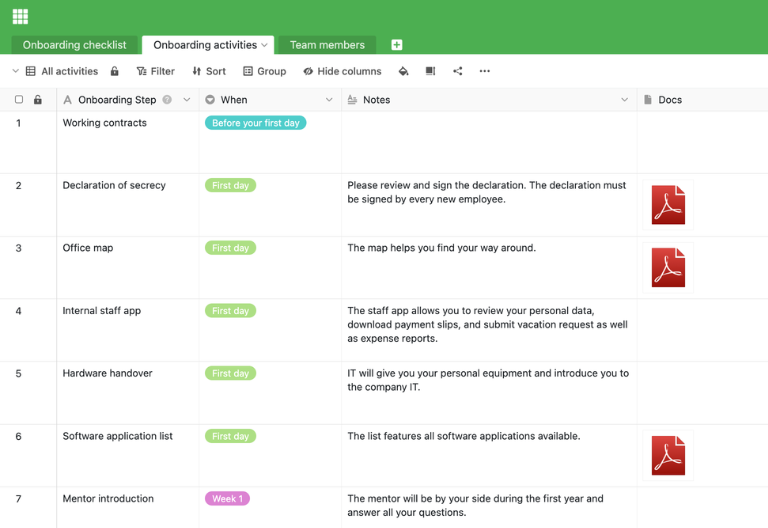
In a third table, you list all employees with their position, start date, supervisor, buddy, and onboarding status. Using a button, you can automatically generate all tasks from the standard activities for the respective employee—this turns the onboarding plan template into a concrete, individualized training plan.
My Onboarding for New Employees
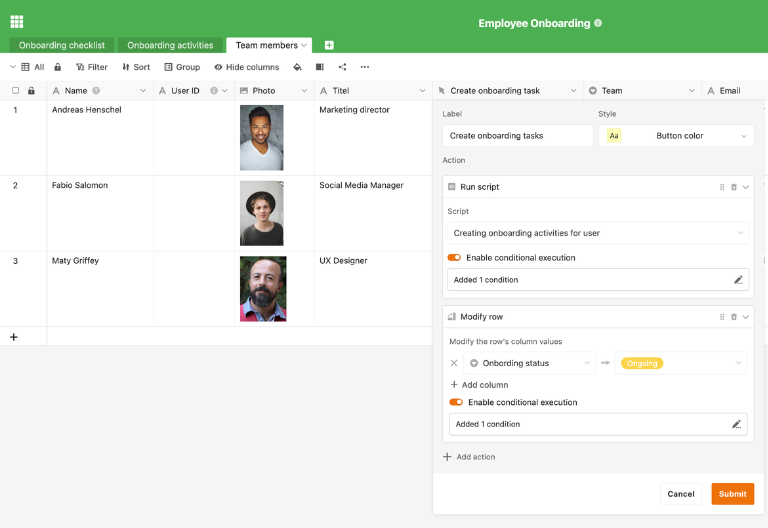
Use a filtered view of “My Onboarding” to show new employees only their own tasks and appointments. This turns the onboarding plan template into a personal to-do list for each employee, ensuring that expectations, content, and the timing of the onboarding process are clear at all times.
Your customized onboarding app for new employees
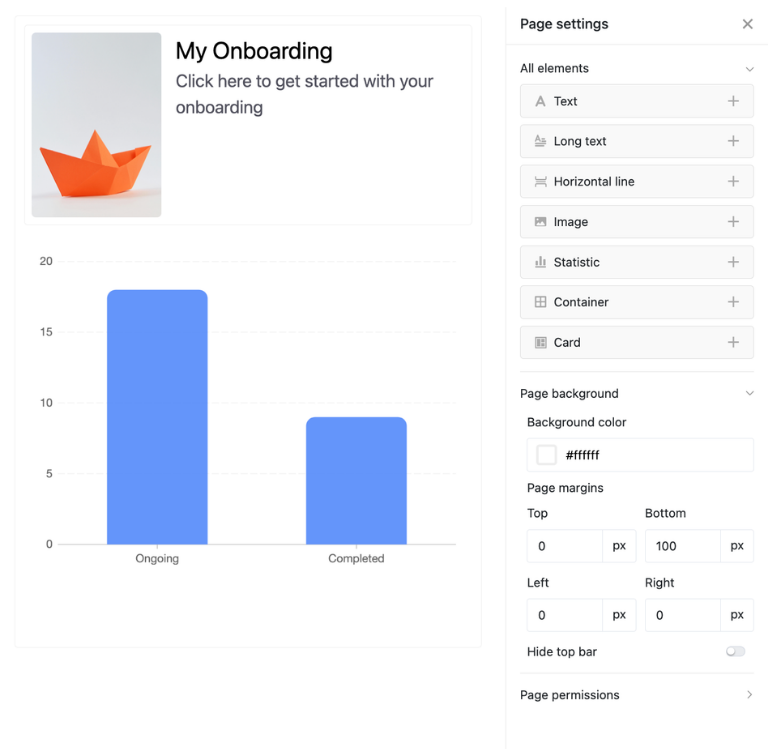
With the integrated App Builder, you can easily create your own customized front end based on the onboarding plan template. Combine forms for new employees, checklist views for buddies and managers, calendar or timeline views for important dates, and focused filter views for HR. Share specific sections via link and use permissions to control who can view or edit which elements of the onboarding plan template—turning every onboarding plan template into a customized solution for your HR processes.
Inspire new employees from day one—with SeaTable's onboarding plan template.
Smart automation in onboarding
AI-supported onboarding plan template
With SeaTable, you can use powerful AI features , that take your onboarding plan template to the next level. Automate recurring steps in the onboarding process, reduce manual routine tasks, and free up time for feedback, support, and personal conversations with new employees.
Classification with Classify
Classify automatically assigns new positions or employees to the most suitable onboarding package based on role type, location, department, or seniority level. Each new case is instantly added to your onboarding plan template with a matching checklist, so HR no longer needs to compile all tasks manually and can focus on strategic work.
Data extraction with Extract
With Extract, you can evaluate unstructured information such as job descriptions, internal memos, or emails and automatically extract relevant data such as contact persons, training needs, or compliance issues. This information is entered into separate fields in the onboarding plan and forms a reliable basis for your onboarding concept.
Text recognition with OCR
Upload scans of contracts, paper forms, or handwritten onboarding checklists and use the OCR function to automatically recognize the text they contain. This way, contract data, dates, or notes are immediately available in a structured format in your onboarding plan template, without the need for time-consuming manual transfers.
Automated summaries with Summarize
Summarize automatically summarizes feedback discussions, notes from the first few weeks, or longer comment threads in just a few sentences. Together with your onboarding plan template, this gives you a quick overview of the status of new employee onboarding and allows you to identify early on where additional support is needed.
Tailor-made automation with Custom Prompt
With custom prompts, you can define your own AI instructions that support typical routine tasks in onboarding—such as reminders for feedback appointments, suggestions for suitable training modules, or automatically generated welcome texts. This turns your onboarding plan template into an active assistant in your daily HR work.
Status and HR overviews at the touch of a button
Generate structured overviews of onboarding status, open tasks, and completed onboarding processes by department, location, or time period directly from your onboarding plan template. AI recognizes patterns and anomalies, allowing you to prepare HR reports, presentations, and audits with just a few clicks and make fact-based decisions.
Structure, clarity, and employee retention
Onboarding plan template for your company
SeaTable is a modern AI no-code platform with automation and app builder, offering all the features you need for a professional onboarding plan template. The focus is on traceability, teamwork, and flexible customization with the highest security standards—from the initial onboarding plan template to a scalable onboarding concept across multiple locations.
GDPR compliant
When you use SeaTable Cloud or the integrated AI, all data remains in Europe—the infrastructure is operated exclusively on servers in Germany.
2FA and SSO
SeaTable supports common authentication techniques such as two-factor authentication and single sign-on, allowing you to control who can access your onboarding plans and HR data.
FAQs about SeaTable's onboarding plan template
-
Can I use SeaTable's onboarding plan template for free?
-
You can use the onboarding plan template free of charge in SeaTable Cloud. All you need is a free account, and you can immediately begin to map out the onboarding and training of new employees in a structured manner.
-
How does the onboarding plan template differ from a simple onboarding checklist?
-
A simple onboarding checklist usually only lists tasks in list form. The onboarding plan template in SeaTable links tasks, standard activities, and employees, offers views such as “My Onboarding,” and aggregates status information—turning a checklist into a transparent, evaluable onboarding plan.
-
Can I import existing training plans into SeaTable?
-
Yes, you can import existing training plans or onboarding checklists from Excel or other systems via CSV import. After importing, you can adapt the training plan template to your training concept and benefit from all the features of the digital solution.
-
Does the onboarding plan template support different roles and locations?
-
Yes, you can define separate onboarding packages for different roles, locations, or contract models and store them in the onboarding plan template. For new employees, simply select the appropriate package and generate a customized onboarding plan in seconds.
-
Can I link the onboarding plan template to other HR processes?
-
Yes, you can combine the onboarding plan template with other templates and workflows—for example, for applicant management, time tracking, or learning content. This creates an integrated environment for your digital HR processes.
-
How many users can work with the training plan template at the same time?
-
Multiple users can work on the same base simultaneously, entering and updating tasks. Permissions allow you to control who can read, comment, or edit—ideal for HR, managers, buddies, and new employees.
-
Can I create my own fields and workflows in the onboarding plan template?
-
Yes, you can add additional columns, tables, views, and automations at any time. This allows you to flexibly adapt each onboarding plan template to your onboarding concept, HR processes, and reporting requirements.
-
Is SeaTable a good alternative to traditional project management tools like Asana for onboarding processes?
-
Yes, SeaTable is a very good, cost-effective alternative to Asana and similar tools. Unlike rigid boards, the onboarding plan template, onboarding plan templates, and other HR templates combine flexible database logic with views such as calendars, timelines, and app front ends—ideal for modern, digital onboarding of new employees.