Business Plan Template: Manage Strategic Planning and Financial Data Consistently
Anyone maintaining business plans in Word, PowerPoint, or Excel knows the problem: fragmented media, inconsistent financial data, and a high coordination effort. Market analysis, executive summary, revenue forecast, and liquidity planning are maintained separately, departmental data is consolidated laboriously, and versions are sent back and forth. With the free business plan template from SeaTable, you bring business-critical data, strategies, and key figures together centrally on a collaborative platform. This lets you create an investor-ready template for your business plan, link milestones with budgets, and prepare a professional decision basis for stakeholders and investor pitches.
Digital business planning, not fragmented docs
Why Traditional Business Plan Templates Fall Short for Modern Teams
-
Centralize market data
Bring market analysis, target groups, and competitor monitoring together in one shared template. Instead of maintaining content across multiple documents, you work with linked tables and create a reliable foundation for strategy, positioning, and management decisions. Everything stays connected, traceable, and ready for review.
-
Integrated financial planning
Connect revenue forecasts, costs, investments, and funding in one digital business plan template instead of maintaining these areas separately. This creates traceable links between assumptions, financial metrics, and capital requirements for internal approvals or investor conversations and sound decisions.
-
Track your progress
Keep an eye at all times on which parts of your business plan are already developed and where content is still missing. Different views and clearly structured tables help you organize editing status, open items, and next steps in a way that stays transparent for everyone involved in the process.
-
Plan for scalability
Make sure your business plan template stays fast and clear even with more data, contributors, and scenarios. Additional years, product lines, or financial views can be integrated without your planning structure reaching its limits, so the template grows with your venture over time.
-
Map your business model
Adapt the template flexibly to different business models, such as SaaS, e-commerce, or traditional sales approaches. The structure stays clearly defined yet can be tailored precisely to your offering and planning process through tables, views, and content as your venture evolves.
-
Present investor-ready
Prepare your content in a structured way for stakeholders, banks, or investors with App Builder as well as Report or Page-Design. This turns your business plan template into a professional working basis that brings figures, strategies, and responsibilities together in a clear, traceable form.
Who uses SeaTable?
Leading companies around the world rely on SeaTable

















100.000+
Downloads in Docker Hub's first year
1.500+
Daily users on SeaTable Cloud
4.6
Review on Capterra
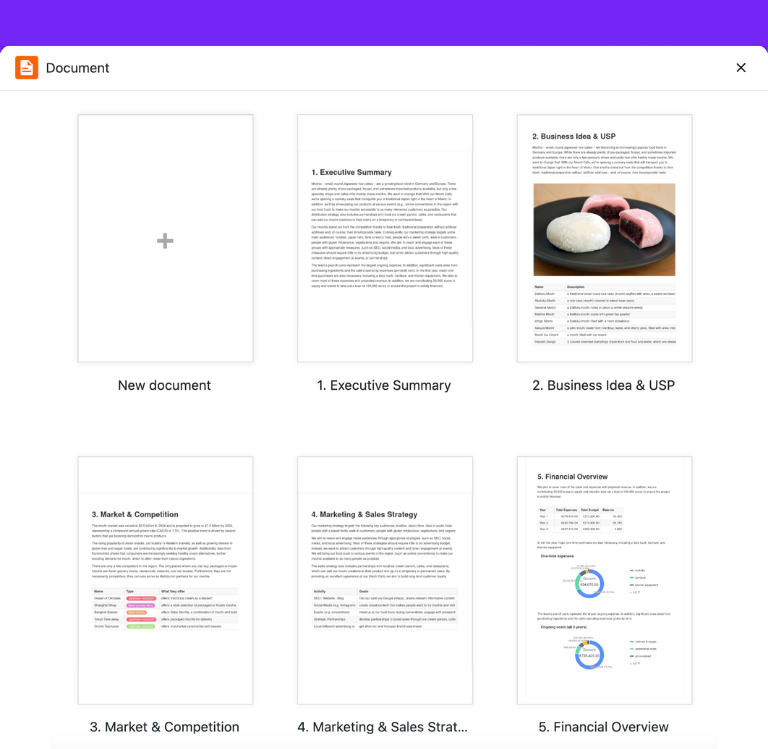
Your benefits at a glance
Business Plan Template for Control and Reliable Financial Data
With the flexible AI no-code platform SeaTable, a simple business plan template becomes an end-to-end, collaborative planning process: you organize target groups, marketing strategy, costs, and financial planning in linked tables, maintain assumptions centrally, and prepare your content professionally for management, banks, and investors. Anyone still working with isolated files gains structure, reduces coordination loops, and creates a digital business plan template that is far more reliable than traditional documents. If needed, dive deeper into specific areas directly through our article on financial planning .
Structure once, use many times: Market analyses, target groups, key figures, and strategic assumptions are maintained centrally and remain consistently available in every analysis – without duplicate data storage.
Financial planning in context: Revenue forecast, investment needs, liquidity, and break-even point can be linked directly, so your business plan template not only stays clear but also supports well-founded decisions.
Better collaboration in the leadership team: Founders, CFOs, and strategy managers work in parallel in the same digital template, see status and open items instantly, and avoid outdated file versions.
Prepare investor pitches professionally: With cleanly structured content, clear KPIs, and well-organized financial data, your business plan becomes a convincing basis for investor conversations and internal approvals.
Real-world example
How to Structure Business Model, Market, and Finances End to End
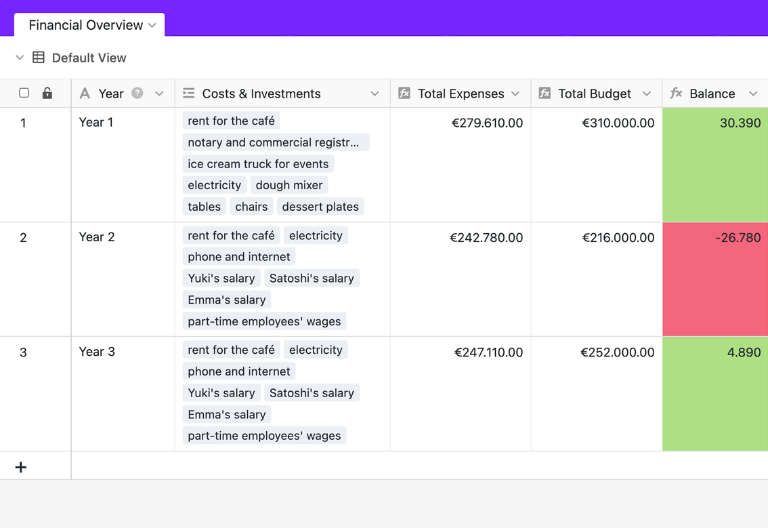
Financial Overview table: years of finances at a glance
In the “Financial Overview” table, you see your venture’s key financial figures for the first years gathered in one place. The template links this overview with expenses from “Costs & Investments” as well as revenue and funding from “Revenue & Funding”. Two rollup columns total the values, and a formula column calculates the resulting balance. This creates a reliable view of budget, expenses, and available capital within your business plan template.
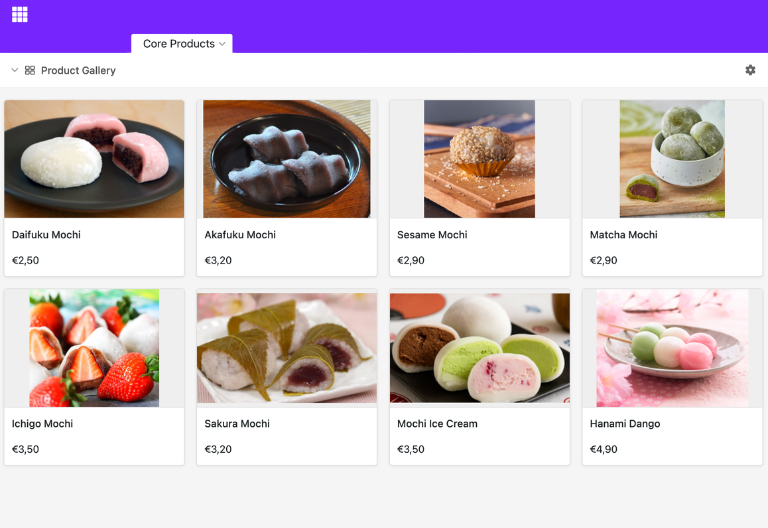
Core Products table: present products and services clearly
In the “Core Products” table, you present your products or services with images, descriptions, and prices. Especially in early business plan phases, this structure helps you document your offering in a traceable way and present it consistently. The gallery view is particularly well suited to showcasing core products visually and providing them clearly to stakeholders or investors in your digital business plan template.
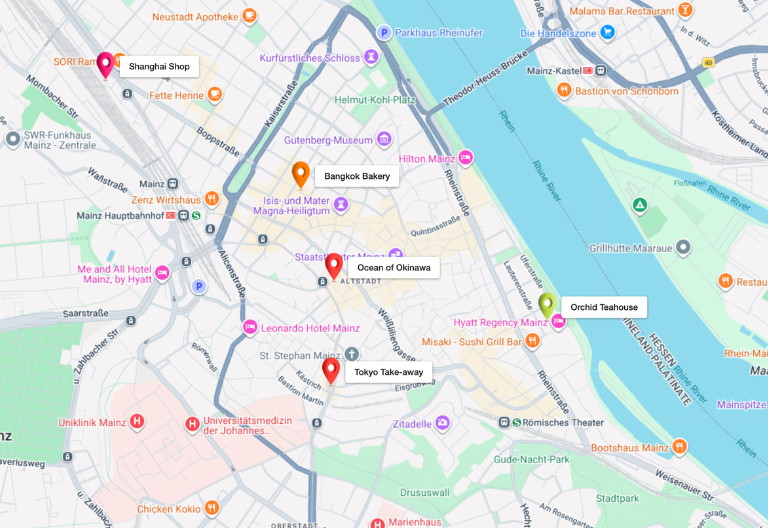
Competitor Analysis table: assess competitors in a structured way
In the “Competitor Analysis” table, you record potential competitors, compare their offerings, and capture your own unique selling points. This way, the market analysis in the template is not just described in text but documented in a traceable, tabular form. Using the location column, competitors can also be displayed on a map to assess regional distribution and market potential more quickly.
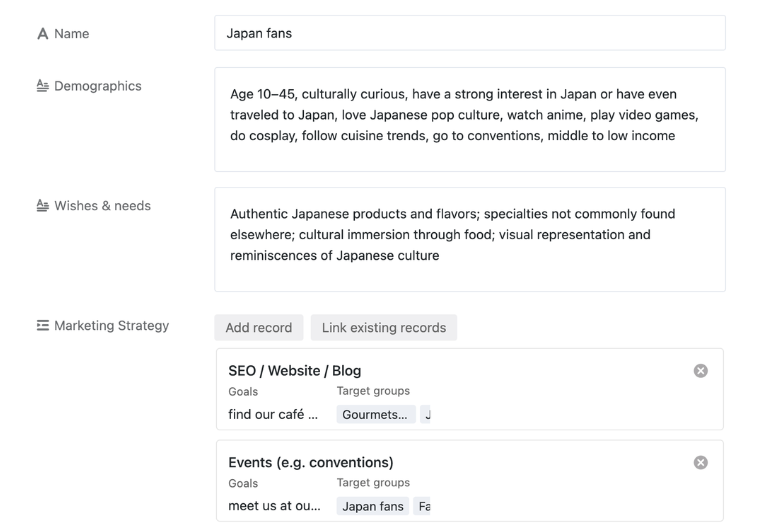
Target Groups table: describe target groups in detail
In the “Target Groups” table, you define target groups, demographic characteristics, as well as wants and needs in structured text fields. This content forms a reliable basis for your target group analysis within the business plan template. In addition, activities from the marketing strategy can be linked directly to individual target groups, so measures and their target-group relevance are brought together traceably.
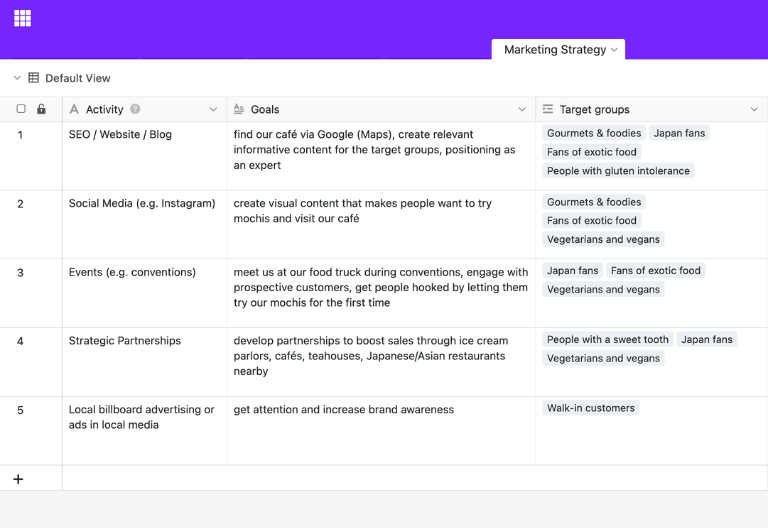
Marketing Strategy table: link measures to target groups
In the “Marketing Strategy” table, you plan strategies and concrete activities to reach defined goals and target groups. Especially in early phases with a limited budget, the structure helps you capture priorities transparently and derive measures systematically. Your template thereby connects target group analysis, market development, and operational planning in one traceable workspace.
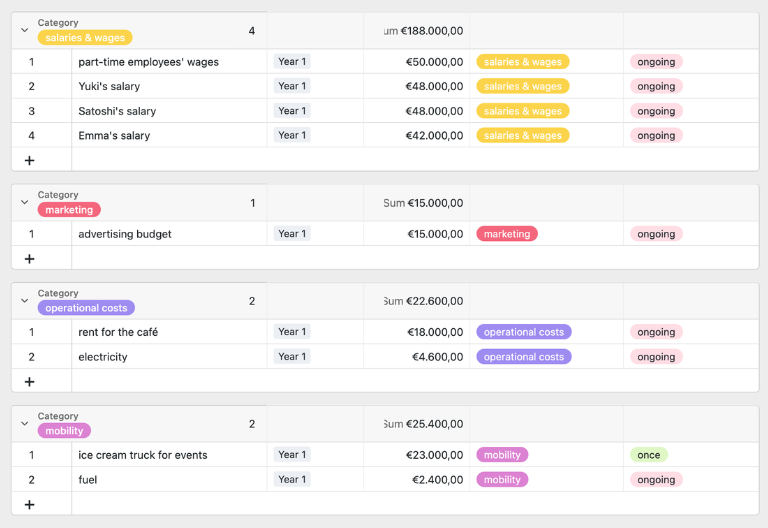
Costs & Investments table: capture expenses realistically
In the “Costs & Investments” table, you list all planned expenses – from one-time purchases to recurring costs. Different views let you group by year and category and sort amounts in a targeted way. This gives you a realistic assessment of your capital requirements and creates a reliable basis for financial planning and investor communication.
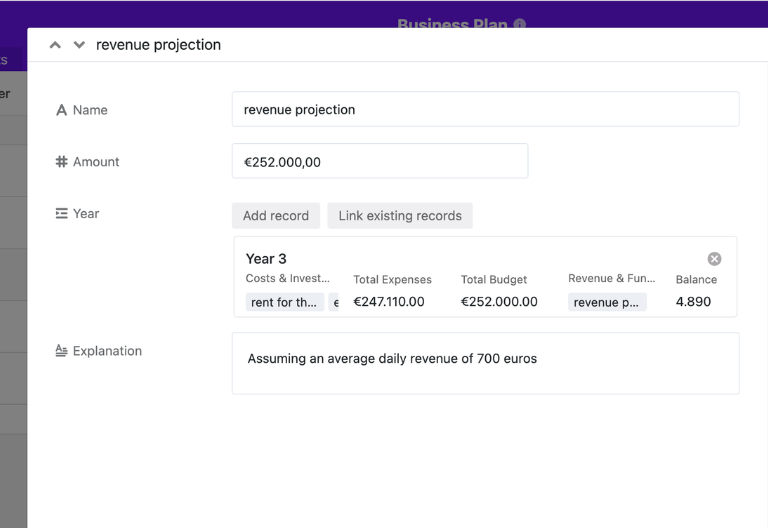
Revenue & Funding table: map revenue and funding
In the “Revenue & Funding” table, you record realistic revenue forecasts as well as equity, bank loans, or investments needed to finance your business idea. Together with the cost and investment data, this creates a coherent basis for the financial planning of your business idea. This lets you present funding needs and economic viability in a structured way.
Start-up Team table: present responsibilities transparently
In the “Start-up Team” table, you introduce yourself and your team with images, areas of responsibility, employment types, skills, and experience. A gallery view helps convey a personal impression quickly and clearly assign roles. This way, you complement strategic and financial content with a professionally prepared overview of the team behind the business model.

Business Plan Template: Your Interactive Planning and Reporting App
With the integrated no-code App Builder, your business plan template becomes an interactive planning app that brings strategic content, financial data, and operational assumptions together in one shared environment. Key figures, milestones, risks, financial planning, liquidity, market analysis, and target groups can be mapped in a structured way across roles and continuously developed further. Different display options – such as tables for the business analysis, galleries for products, statistics for KPIs, or shared read-only pages for investors – create transparency across the entire business model, while permissions precisely control who may edit, add, or only view content.
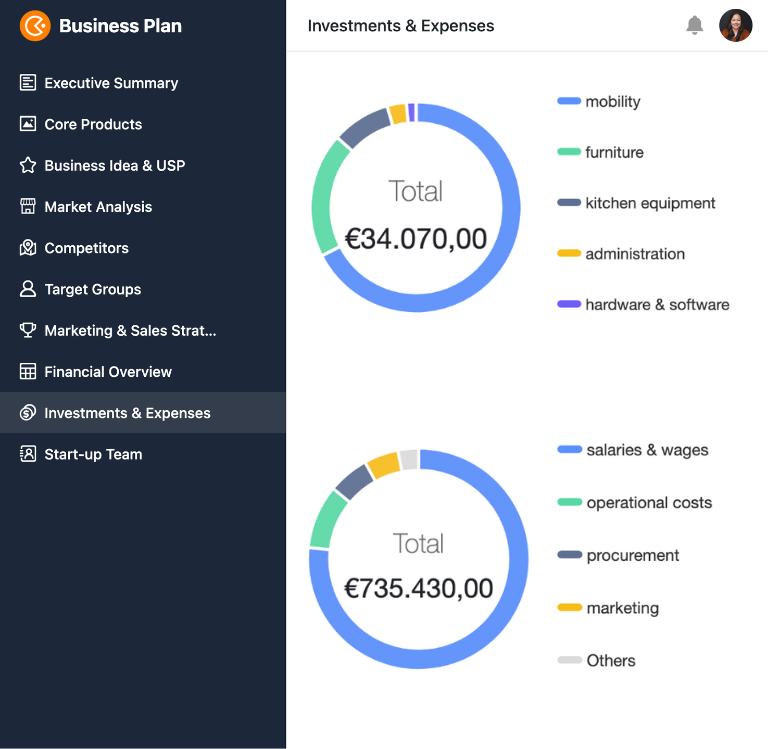
Create, analyze, and present your business plan investor-ready – with the SeaTable business plan template
Smart automation
Automation for Your Business Plan Template
With SeaTable, you use powerful AI automations that intelligently support business analysis and financial planning. This turns your digital business plan template into a connected workspace for executive summary, market analysis, milestone planning, and investor pitch – far more efficient than manually maintained documents and standalone tables.
Organize analyses automatically
Use the AI function Classify to automatically sort market and target-group information into segments, regions, or priorities. Your planning stays consistent, categories are assigned uniformly, and evaluations can be processed more quickly for subsequent analysis and reporting across your business plan.
Extract financial data precisely
With the AI function Extract, you can pull key details on costs, investments, revenue assumptions, or funding sources directly from notes and free text. This way, you transfer scattered information into structured fields and reduce manual transcription effort across your planning and analysis.
Capture documents digitally
The AI function OCR recognizes text from photographed documents, receipts, or files and makes their content directly usable. This way, relevant information can be transferred, reviewed, and integrated into existing planning and analysis processes more quickly across your business plan template.
Condense key figures compactly
With the AI function Summarize, you can condense longer comments, planning notes, or result descriptions down to their essential statements. This lets you provide relevant insights for management, investors, or internal reviews faster and more consistently across your business plan.
Assess milestones flexibly
Using the AI function Custom, you define your own prompts to have milestones, risks, or open items assessed according to your criteria. This way, your template adds individual logic, for example for prioritization, maturity, or escalation needs, without imposing rigid standards on your work.
Summarize changes
Use the AI function Summarize to automatically capture changes to the executive summary, financial planning, or market analysis in short status notes. This keeps your planning traceable, showing what was adjusted and which content is relevant for reviews or approvals.
Transparency and real-time collaboration
More Transparency and Control in Your Business Plan Template
SeaTable is a modern AI no-code database solution with automations and App Builder, offering all the functions you need for a professional, digital business plan template. The focus is on traceability, collaboration, and flexible customization – from a structured business plan template for individual founder teams to an investor-ready solution with market analysis, financial planning, KPI tracking, and approvals as a scalable alternative to static documents. If you also want to dive deeper into figures on earning power, break-even point, and return potential, we recommend our article on profitability forecasting .
Scale with your business model
Whether a SaaS start-up, e-commerce concept, or traditional sales – the template adapts to your business model. Tables, views, and automations can be expanded step by step, without having to set up your entire structure from scratch each time your needs change.
Unite strategy and figures
Link executive summary, market analysis, target groups, financial planning, and milestones in one shared data basis instead of in isolated documents. This way, management teams access the same information consistently and avoid contradictions before important decisions.
Business data secure in Europe
When you use SeaTable Cloud or the integrated AI, your business-critical data stays in Europe – the infrastructure is operated exclusively on servers in Germany.
Control access clearly and securely
SeaTable supports two-factor authentication and Single Sign-on, so you define precisely who may access your business plan.
FAQ – Frequently Asked Questions About SeaTable's Business Plan Template
-
Which core areas must professional business planning cover?
-
A professional business plan template should include at least an executive summary, business model, market analysis, target group analysis, marketing strategy, financial planning, risk analysis, and milestone planning. A digital business plan template additionally helps you cleanly link these areas with key figures, assumptions, and responsibilities.
-
How does this business plan example help prepare for an investor conversation?
-
The business plan example shows how strategic content and financial data come together in an investor-ready structure. This lets founders and CFOs recognize early whether revenue forecast, liquidity, capital requirements, and scalability are presented clearly and where gaps still exist before the investor pitch.
-
Can I flexibly adapt the template to different business models?
-
Yes, the business plan template can be flexibly adapted to SaaS, e-commerce, or traditional sales models. You can configure tables, fields, views, and automations so that your business plan template fits your business model and your business analysis exactly.
-
Is the environment suitable for collaborative editing in the management team?
-
Yes, several people can work in parallel on the same business plan template. This is especially helpful for executives, strategy managers, founders, and business analysts who need to coordinate content, figures, and approvals together.
-
Can I map financial planning and liquidity planning directly in the template?
-
Yes, the digital business plan template is suitable for structured financial planning, revenue forecasts, investment needs, and liquidity. For deeper content, you can additionally combine your business plan template with our resources on financial planning, liquidity planning, and profitability planning.
-
Is the business plan template also suitable for investors and banks?
-
Yes, the template supports a logical, investor-ready structure and helps present figures, market analysis, and strategy in a traceable way. Via App Builder and read-only access, you can provide content in a structured form for investors, banks, or other stakeholders.
-
Does the template replace individual Word and Excel documents?
-
In many cases, yes. Instead of scattered documents, the template brings strategic texts, financial data, target groups, milestones, and KPIs together in one shared environment, significantly reducing consolidation effort and version chaos.