SeaTable – Your professional bug tracker system
Say goodbye to chaotic Excel spreadsheets! With our innovative bug tracker system, you can keep track of software bugs, tests, and versions—all in one place. Enjoy the benefits of customization, scalability, and collaboration. Use features such as Kanban, tree view, and AI support to make your projects more efficient!
Use bug tracking online
Bug tracker system for efficient software testing
-
Intuitive
The user-friendly bug tracker system is easy to use, less prone to errors, and can be adapted to your QA processes—team-based, agile, scalable, and ideally suited for growing product landscapes.
-
Standardized
A clearly defined structure ensures consistent, complete bug reports: they cover the environment, reproducibility, expected and actual behavior, as well as attachments, screenshots, or log files.
-
Analysis
With just a few clicks, you can generate meaningful reports to identify bug clusters per version, module, or time period and better plan upcoming software releases efficiently.
-
Permissions
With individually adjustable permissions, you can determine who is allowed to report, comment on, or close bugs—ideal for development, QA, and IT service.
-
Web Form
Conveniently record new issues using the web form—testers and stakeholders can report bugs without having to know the entire bug tracking system.
-
Notifications
Use automatic notifications—alerts for new, critical, or overdue issues help reduce response times and improve overall team productivity significantly.
Who uses SeaTable?
Leading companies worldwide rely on SeaTable

















100.000+
Downloads in the first year of Docker Hub
1.500+
Daily users on SeaTable Cloud
4.6
Review on Capterra
Your advantages at a glance
Use the bug tracker system online with SeaTable
The AI no-code solution SeaTable impresses with its flexibility and adaptability. With our bug tracker system, you can bundle all information about software errors, tests, and versions in one place, map your existing QA workflows without programming, and always maintain an overview, even with complex projects.
Always up to date: Stay informed about open and closed bugs thanks to comments, complete change history, and real-time updates.
Access from anywhere: With an online bug tracker system, you have access at all times and can keep track of everything—whether you’re in the office, working from home, or visiting a customer.
Transparency in the process: Link issues to tests and versions so you can see where bugs were discovered and in which release they were fixed.
Scalable: Our bug tracker system template grows with your requirements—regardless of how many projects, components, or team members you manage.
Automated & integrated: Connect your bug tracker to your IT Service Management System – for consistent workflows without media discontinuity.
Manage bugs in context
How the Bug Tracker System Template works
Manage issues
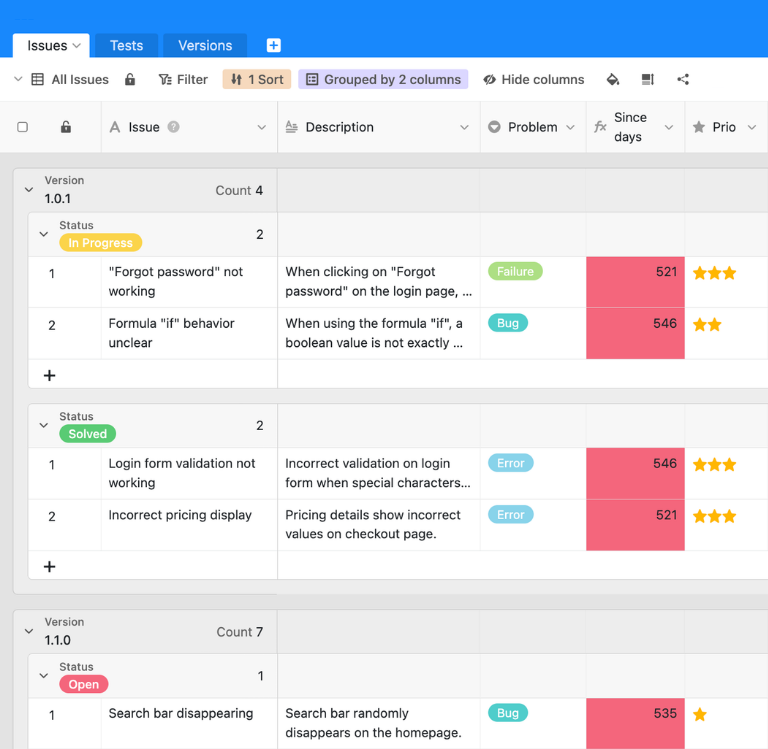
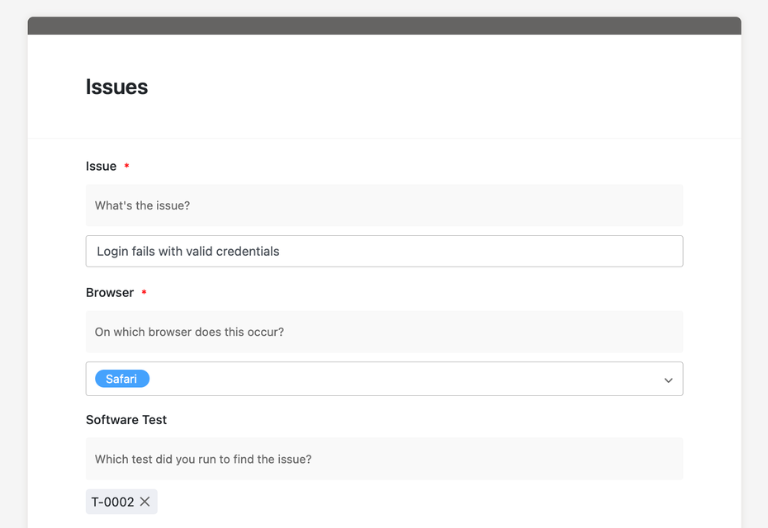
Simply create new issues using a form and assign them directly to a responsible person. All bugs can be viewed in the “Issues” table, including status, priority, category, and linked test. Default values set new entries to “open” and enter the current user as the reporter—this keeps your bug tracker system consistent.
Organize and link tests
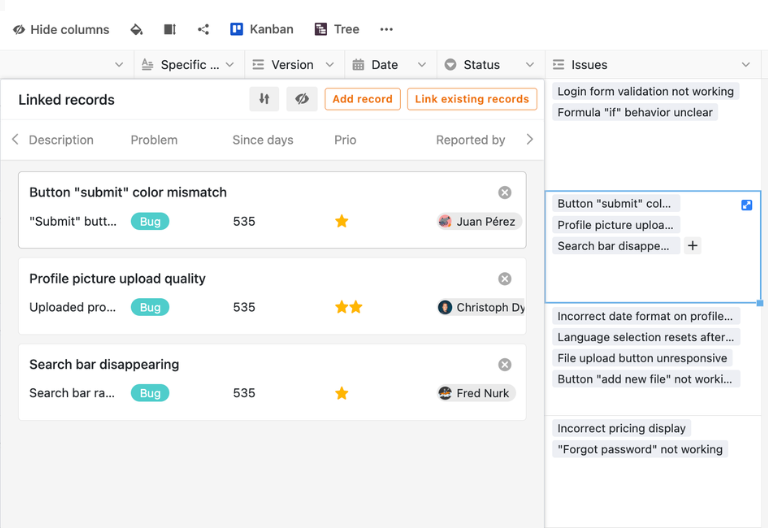
SeaTable offers its own “Tests” table where you can plan and document your software tests. You can record test objectives, time periods, and the version being tested. Select a test in the web form, and the issues found there will automatically appear in a link column—so you can see which bugs occurred in which test.
Document versions
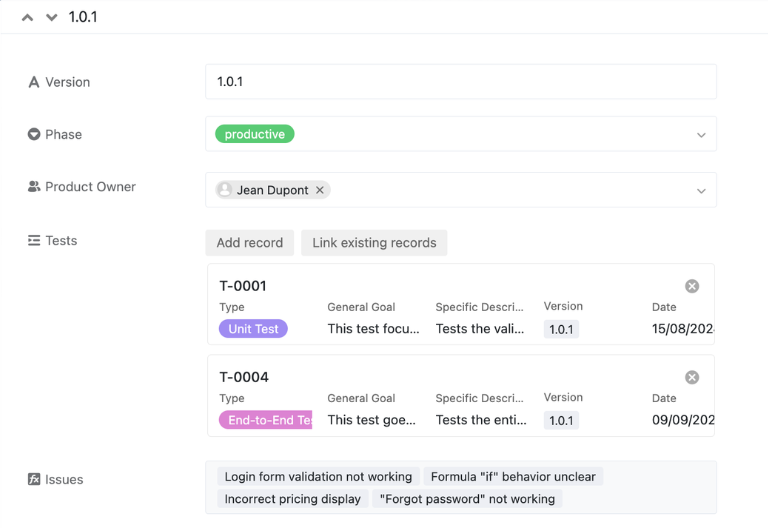
In the “Versions” table, you can list all relevant software versions with product owner and release date. Lookup columns show you how many issues have occurred per version, which bugs are still open, and from which version certain bugs have been fixed—ideal for changelogs and release documentation in the bug tracking system.
Kanban view and tree plugin
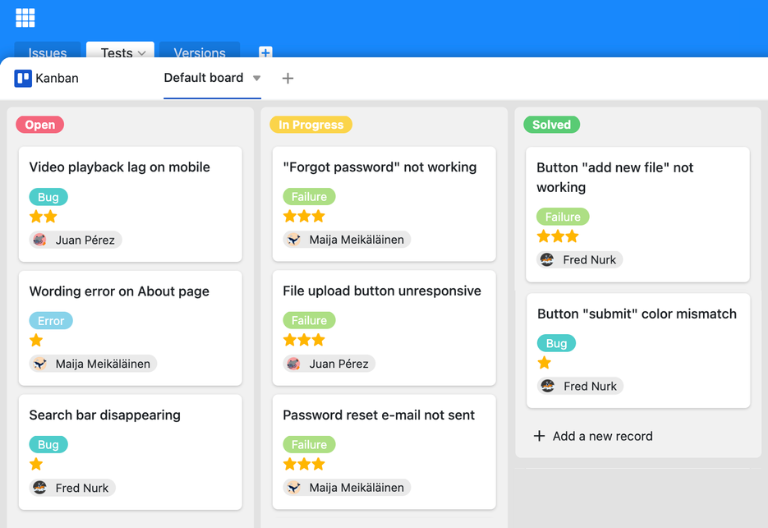
Visualize your issues with a Kanban view by status or responsible person to clearly see processing progress. With the help of the Tree plugin, you can easily navigate through the linked tables and see in three levels which version includes which tests and which issues were found there – so you always have an overview, even with large amounts of data in the bug tracker system.
Your custom bug tracking app
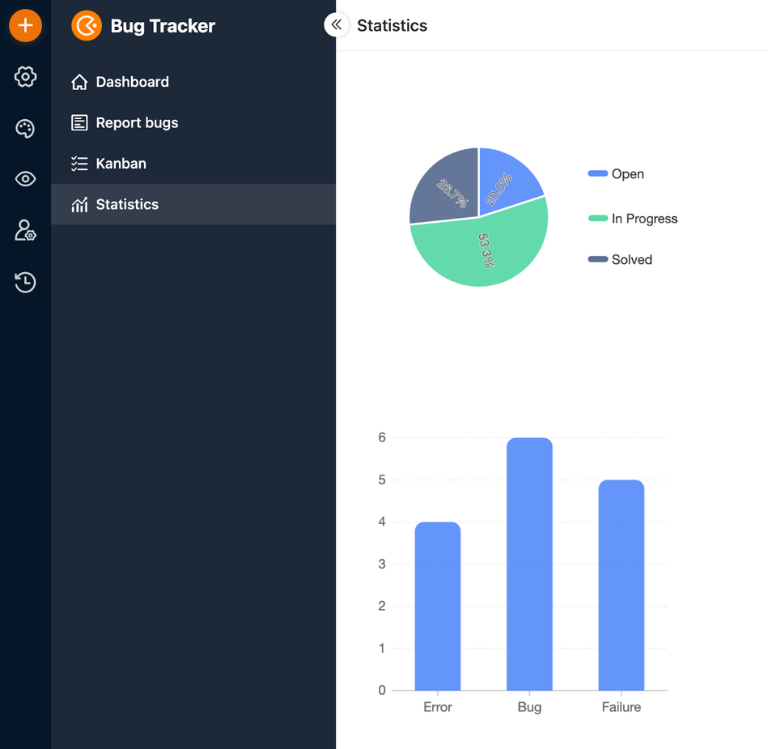
With SeaTable’s integrated App Builder, you can easily create your own custom front end for the bug tracker system. Use web forms for structured bug reports, Kanban views for developers, statistics dashboards for management, or focused filter views for support. Share specific sections with external parties via links and use granular permissions for access control—turning the template into customized bug tracking software for your team.
Keep your software quality under control—with SeaTable's Bug Tracker System
Smart automation
AI-supported bug tracking system
With SeaTable, you benefit from powerful AI features , that take your bug tracking system to a new level. Automate recurring tasks in bug tracking, reduce manual routine work, and gain time for analysis, prioritization, quality assurance, and well-founded release planning with clear decision-making criteria.
Classification with Classify
The AI function “Classify” assigns new issues to appropriate categories or components based on their title and description. This means that bugs end up directly in the right column and teams can identify focal points in specific modules much more quickly.
Data extraction with Extract
The Extract function analyzes unstructured inputs and attachments such as log files or error messages and automatically extracts relevant information. Error codes, affected modules, or timestamps are placed in separate fields, making evaluations in the bug tracker system easier.
Text recognition with OCR
Upload screenshots or log excerpts and use the OCR feature to automatically recognize the text they contain. Relevant information such as error messages, IDs, or paths will then be available directly in your bug tracker for further analysis.
Summaries with Summarize
Summarize automatically summarizes long discussions or extensive bug reports in just a few sentences. This allows you to grasp the essence of a bug more quickly and prepare status rounds or handovers without having to read every comment in full.
Tailor-made automation with Custom Prompt
With custom prompts, you can define your own AI instructions that support typical routine tasks in the bug tracker system. Examples include suggestions for severity levels, notifications of possible duplicates, or automatically generated text modules for release notes.
Reports at the touch of a button
You can generate status reports on open, resolved, and newly added bugs per version, sprint, or component directly from your bug tracker system. The AI presents trends and anomalies in a structured way, allowing reviews, audits, and management reports to be created with just a few clicks.
Transparency and cooperation
Bug tracker system for every organization
SeaTable is a modern AI no-code database solution with automation and app builder, offering all the features you need for a professional bug tracking system. The focus is on traceability, teamwork, and flexible customization with the highest security standards.
GDPR compliant
When you use SeaTable Cloud or the integrated AI, all data remains in Europe—the infrastructure is operated exclusively on servers in Germany.
2FA and SSO
SeaTable supports common authentication techniques such as two-factor authentication and single sign-on, allowing you to control who can access your data.
FAQs about SeaTable's bug tracker system
-
Can I use SeaTable's bug tracker template for free?
-
Yes, you can use the Bug Tracker System template for free in the SeaTable Cloud. All you need is a free account and you can start managing bugs digitally right away.
-
Is SeaTable an alternative to traditional issue tracker tools?
-
Yes, SeaTable is a flexible alternative to many traditional issue tracker solutions. Unlike rigid tools, it combines table logic, automation, app builder, and AI features—ideal for modern development teams.
-
Can I import existing bug lists into the Bug Tracker system?
-
Yes, you can import existing bug lists from Excel or other systems via CSV import. After importing, you can customize the structure and benefit from all the features of the Bug Tracker System template.
-
Does the template support Kanban views and the Tree plugin?
-
Yes, the bug tracker template includes a Kanban view for status display and the Tree plugin for hierarchical display of versions, tests, and issues. This allows you to stay organized in your bug tracking system at all times.
-
Can I link the bug tracker system to IT service management processes?
-
Yes, you can combine the bug tracker system template with IT service management templates or external ITSM tools. This allows you to seamlessly link software bugs to incidents, changes, and problem resolutions.
-
How many users can work with the template at the same time?
-
Multiple users can work on the same base simultaneously, recording and updating bugs. Permissions allow you to control who can read, comment, or edit.
-
Can I create my own fields and workflows in the bug tracker system?
-
Yes, you can add additional columns, tables, views, and automations at any time. This allows you to flexibly adapt the bug tracking system to your release, testing, and support processes.
-
Can SeaTable be used as an Asana alternative for bug tracking?
-
Yes, SeaTable is an excellent Asana alternative , if you want to link task and bug tracking more closely with database logic. Instead of rigid boards, you can create your own structures, link bugs with tests and versions, and build additional project management workflows on the same platform as needed.
-
Does the template support a standardized software bug report template?
-
Yes, the Bug Tracker System template includes a predefined software bug report template with typical fields such as title, description, environment, reproducibility, expected result, actual result, and attachments. You can expand this structure as needed or adapt it to your internal guidelines without having to program.
-
Is there any support available for getting started with the bug tracker template?
-
Yes, in our help section you will find instructions on templates, web forms, views, and automations. This will help you set up your bug tracker system step by step and expand it as needed.