Budget Planner Template for Projects, Departments, and Annual Budgets
Keep your financial planning under control! With our free budget planner template, you can manage annual budgets, project budgets, and cost centers all in one place. Instead of error-prone spreadsheets and manual reconciliations, use this budget planner template for clear budget allocation, real-time transparency, and reliable decision-making. Project managers, department heads, finance teams, and executives can immediately identify variances, track remaining budgets, and collaborate using a database that’s always up to date. Whether it’s a marketing budget, an IT project, or comprehensive departmental planning—the budget planner template helps you allocate financial resources in a structured way and avoid cost overruns early on.
Digital Budget Planning
Budget Planner Template for Finance, Teams, and Projects
-
Präzise Budgetplanung online
Nutzen Sie die Budgetplaner Vorlage, um Jahresbudgets, Projektbudgets und Kostenstellen strukturiert zu planen. So ersetzen Sie unübersichtliche Excel-Dateien durch eine zentrale Basis für transparente Finanzplanung, klare Freigaben und abgestimmte Budgetentscheidungen im gesamten Team.
-
Kostenstellen klar verknüpfen'
Verknüpfen Sie Ausgaben direkt mit Projekten, Quartalen, Abteilungen und Verantwortlichen. So entsteht eine gemeinsame Datenbasis, in der Budgetallokation, Zuständigkeiten und finanzielle Prioritäten sauber zusammenlaufen und jederzeit nachvollziehbar ausgewertet werden können.
-
Soll-Ist-Vergleich in Echtzeit
Analysieren Sie geplante Budgets und tatsächliche Ausgaben ohne Verzögerung. Die Budgetplaner Vorlage zeigt Abweichungen, Restbudgets und kritische Entwicklungen frühzeitig an, damit Projektmanager und Abteilungsleiter gezielt eingreifen und drohende Budgetüberschreitungen rechtzeitig verhindern können.
-
Sensible Finanzdaten schützen
Arbeiten Sie mit einer Budgetplaner Vorlage, die Zugriffe über Rollen und Berechtigungen steuert. Statt Dateien unkontrolliert per E-Mail zu teilen, verwalten Sie sensible Finanzdaten zentral, nachvollziehbar und datenschutzkonform – ideal für Teams mit vertraulichen Budget- und Planungsinformationen.
-
Flexibel für Teams anpassbar
Erweitern Sie die Vorlage um Felder für Quartalsplanung, Investitionen, Umsatzerwartungen oder Freigaben. So passt sich die Budgetplaner Vorlage flexibel an Marketing, Sales, IT und bereichsübergreifende Finanzplanung an und wächst dynamisch mit Ihren Anforderungen und Strukturen mit.
-
Budgetstatus mobil im Blick
Greifen Sie auch unterwegs auf Ihre Budgetplaner-App zu und prüfen Sie Budgets, Ausgaben und Verantwortlichkeiten direkt per Smartphone oder Tablet. So bleibt Ihre Budgetplanung bei Abstimmungen, Meetings und Freigaben stets aktuell, kollaborativ und jederzeit handlungsfähig im gesamten Team.
Who uses SeaTable?
Leading companies around the world rely on SeaTable

















100.000+
Downloads in Docker Hub's first year
1.500+
Daily users on SeaTable Cloud
4.6
Review on Capterra
Your benefits at a glance
Use the online budget planner template
Discover a budget planner template that lets you manage your finances without the hassle of Excel. Use SeaTable to manage annual budgets, project budgets, and cost centers in a single shared database. The template supports target-actual comparisons, transparent expense tracking, and collaborative budget coordination in real time. If you want to take your budget planning to the next level, you can also use SeaTable to create a structured financial plan. This will help you establish a solid foundation for sound business decisions and efficient resource planning.
Current Data: Track budgets and expenses on an ongoing basis in a central budget planner template so that remaining budgets, variances, and financial trends are always up to date and visible.
True collaboration: Project managers, department heads, finance teams, and executives work together using the same database—without version conflicts, data inconsistencies, or the need to manually reconcile figures.
Interactive Template: Link cost centers, managers, prior-year figures, and new budget targets, and switch between tables, filters, groupings, and visual reports.
Centralized Storage: All budget data, documents, notes, goals, and responsibilities are stored in one place—organized, easy to track, and scalable to accommodate growing teams.
Real-world example
How to Use the Budget Planner Template
Budget table for the new fiscal year
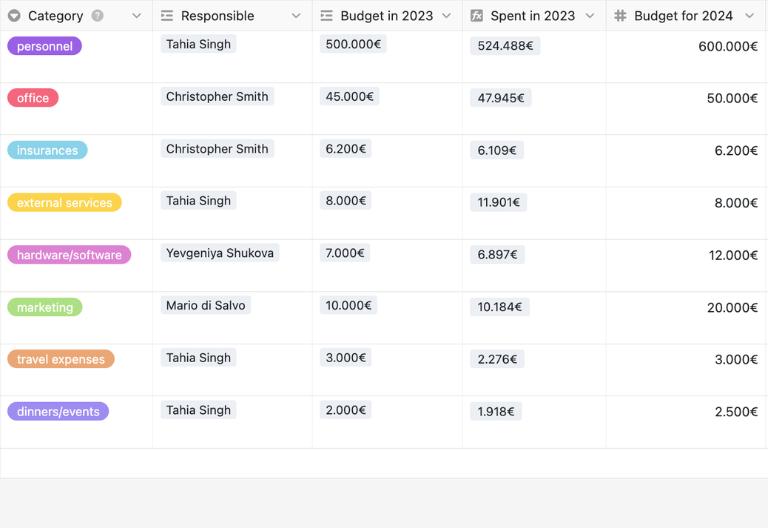
In the “Budget Plan” table, you can create your new budget plan for cost centers, departments, or projects. You define categories, set goals and expectations for the coming year, and assign the managers directly responsible. Links allow you to access both the planned and actual values from the previous year. This way, you can use the budget planner template to set realistic budgets and base financial decisions on reliable data.
Expense Table for Operating Costs
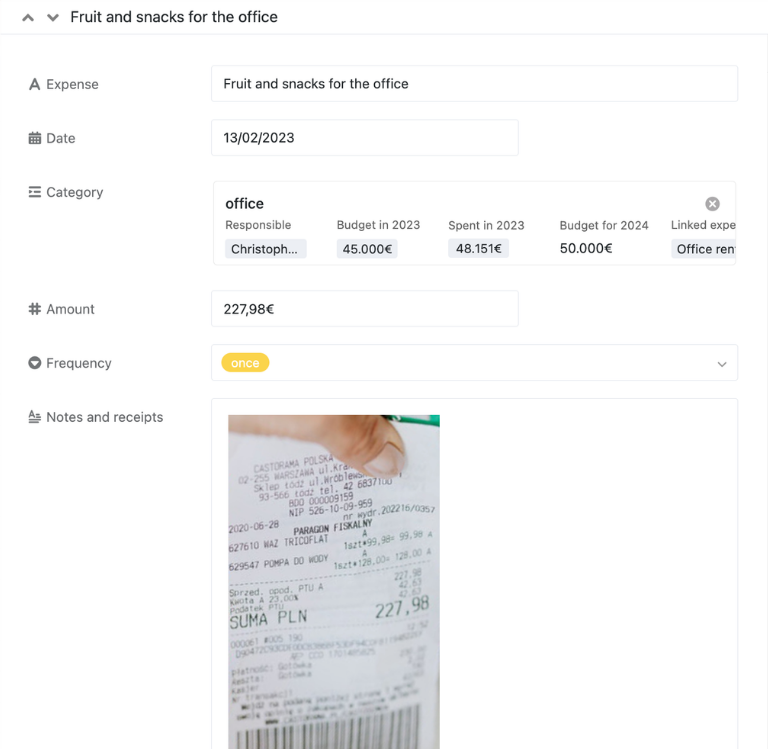
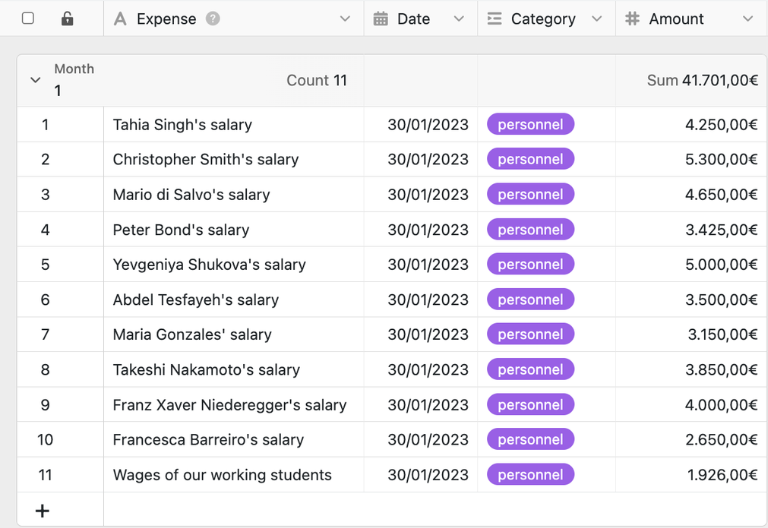
In the “Operating Costs” table, you can track all expenses and organize them by date, month, and category. You can also add amounts, frequencies, notes, and receipts. Various views with filters by cost center show at a glance which areas are particularly relevant to the budget. Employees can enter new entries directly themselves using a web form.
Comparison Table: Planned vs. Actual
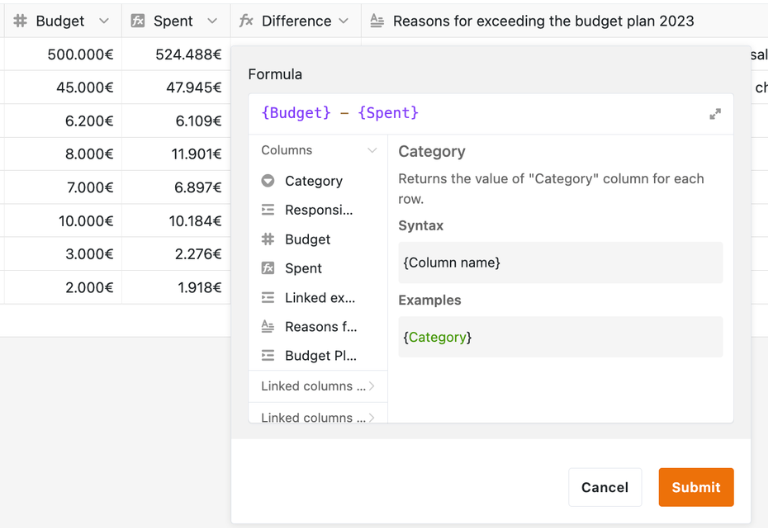
The “Budget Plan” table for the current year consolidates planned budgets, actual expenses, and the responsible parties. Rollup and formula columns total all recorded costs by cost center and automatically calculate the difference between the planned amount and actual expenses. This allows you to immediately identify where budgets have been exceeded and where explanations are needed using the budget planner template.
Manager Table for Responsibilities
In the “Managers” table, you can manage the individuals who plan and monitor budgets and are responsible for specific cost centers. This makes it clear who approves budgets, comments on variances, and prepares financial goals for the coming year. The Budget Planner template thus provides a transparent allocation of responsibilities and control.

Your interactive budget planner app
Turn your budget planner template into an interactive budget planner app for financial planning, controlling, and resource management. Combine budget tables, expense tracking, target-actual comparisons, and department filters in a customizable application. Visualize trends in dashboards, share specific views with managers, and precisely control access to sensitive data via roles. Whether it’s an annual budget, project budget, or investment planning—the Budget Planner app can be flexibly adapted to your processes and helps teams make quick, informed decisions.
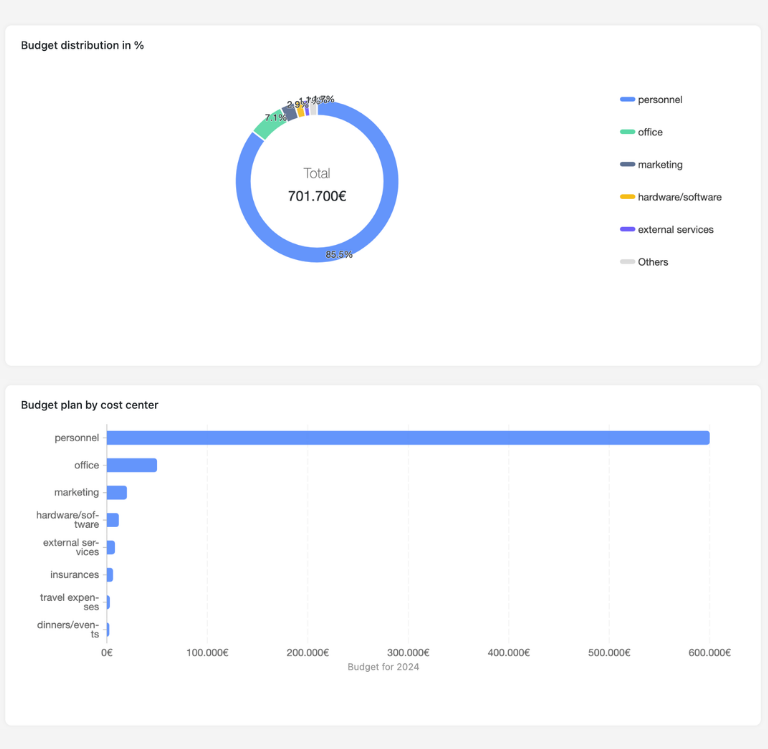
Organize budgets, expenses, and responsibilities digitally—with SeaTable
Smart Automation for Projects & Finance
AI-powered budget planning
With SeaTable, your budget planner template becomes even more powerful. Built-in AI automations help you analyze financial data more quickly, identify discrepancies, and reduce routine tasks in budget management. This transforms a traditional budget planner template into an intelligent system for planning, monitoring, and collaboration.
Automatically classify cost centers
With Classify, you automatically assign expenses, cost centers and budget items to the right categories. The AI analyzes descriptions, notes and booking texts, then writes the correct category into a defined field. This keeps your budget planner template consistent, filterable and easy to analyze, even when thousands of records accumulate over the year.
Extract budget data in one step
With Extract, you import information from invoices, emails, spreadsheets and internal documents straight into your budget planner template. The AI identifies amounts, categories, time periods and responsible managers, then fills the corresponding columns automatically. This reduces manual copy‑and‑paste work and significantly speeds up data maintenance for recurring budget updates.
Capture receipts faster with OCR
With OCR, you can extract information directly from photographs of invoices, receipts or financial documents. The AI recognises relevant details such as the date, amount, cost centre or supplier and enters them into your budget planning app. This allows even paper-based documents to be seamlessly integrated into digital financial processes and reports.
Summarize budget variances clearly
With Summarize, you generate concise overviews of budget variances, remaining budgets and critical trends with one click. The AI condenses values from your budget planner template into understandable status reports for projects, departments or cost centers. These summaries are ideal for management updates, team meetings and quick decisions in the current financial year.
Define custom budget rules with AI
With Custom Prompt, you create individual rules for your budget planning, for example alerts before budget overruns, suggestions for explanatory texts or checks for missing entries. The AI follows your instructions and helps standardize recurring tasks. As a result, the budget planner app adapts perfectly to your internal controlling and approval processes.
Check budget status instantly
With AI‑powered status views, you immediately see which cost centers are on track, where remaining budgets are shrinking or which projects require attention. The system highlights relevant figures, combines them with trends and makes exceptions visible. This gives project managers, finance teams and executives a clear basis for decisions at any time in the budget cycle.
Transparency and real-time collaboration
Transparent and flexible budget planner template
SeaTable is a modern, AI-powered no-code database solution with automation features and an app builder, offering all the functionality you need for a professional budget planner template. It focuses on transparency, financial management, and flexible customization—from simple cost center planning to scalable budget planner apps for annual budgets, project budgets, and cross-departmental financial management—serving as a modern alternative to static Excel files.
An alternative to rigid budget spreadsheets
Organize your financial planning with SeaTable, a powerful Excel alternative significantly more efficient—with linked spreadsheets, filters, sharing options, and real-time updates for team-based budget management.
Manage projects and budgets centrally
Link your budget plan template to the Project Plan Template and centrally manage tasks, resources, costs and responsibilities. This creates transparent processes for project, department and finance teams and keeps the overview clear as demands grow.
GDPR-compliant
When you use SeaTable Cloud or the built-in AI, sensitive financial data remains in Europe—the infrastructure is hosted exclusively on servers in Germany.
2FA and SSO
SeaTable supports two-factor authentication and single sign-on, allowing you to precisely control who has access to budget data, cost centers, and financial reports.
FAQ – Frequently Asked Questions About SeaTable's Budget Planner Template
-
Who is the budget planner template designed for?
-
The budget planning template is ideal for project managers, department heads, finance teams, and executives who want to plan and monitor annual budgets, project budgets, or cost centers in a structured way. It can be flexibly used for marketing, sales, IT, or cross-functional financial planning.
-
Can I use the template to separate the annual budget from project budgets?
-
Yes, you can use the budget planner template to track different cost centers, categories, projects, or departments separately. This allows you to clearly distinguish between the annual budget, project budgets, and individual budget responsibilities, and analyze them together.
-
How does the template help prevent budget overruns?
-
The budget planner template helps you by providing target-actual comparisons, formulas for calculating variances, and clear reports. This allows you to identify early on when expenses exceed the planned budget or when remaining funds are running low.
-
Is the Budget Planner app also available for mobile use?
-
Yes, the Budget Planner app is also available for mobile use. This allows you to check budgets, expenses, and status updates on the go using your smartphone or tablet, so you can stay productive even when you’re away from the office.
-
Can I restrict access to sensitive financial data?
-
Yes, with roles, permissions, and additional security features such as 2FA and SSO, you can precisely control who is allowed to view, edit, or share your financial data.
-
Can I import existing budget spreadsheets into SeaTable?
-
Yes, existing Excel or CSV files can be imported into the Budget Planner template. You’ll then benefit from linked tables, collaborative editing, and transparent, real-time expense tracking.
-
Can the budget planner template be adapted to accommodate growing teams?
-
Yes, the template can be easily expanded—for example, to include additional cost centers, teams, quarters, investments, or approval processes. This ensures that your budget planning remains clear and scalable, even as complexity increases.
-
Can I use the budget planner template for free?
-
Yes, you can use the budget planner template for free in the SeaTable Cloud. This allows you to get started right away with digital budget planning without having to build your own spreadsheet structures first.