
What does SSO mean? #
Employees in companies have to switch between different applications every day. Each one requires a secure and unique password that should be changed regularly—and what that means exactly varies from tool to tool. Password managers are a proven method of preventing your employees from constantly forgetting their passwords; however, they also require a password. This results in unnecessary help desk tickets, lost productivity, and security issues. Single sign-on solves this problem by allowing users to access multiple applications or systems via a central login.
Key Take-aways #
- Single sign-on (SSO) increases IT security in your ITSM through centralized user authentication and simplified access monitoring.
- The use of single sign-on procedures increases productivity by reducing password logins.
- Common protocols such as SAML, OAuth, and LDAP enable flexible integration into cloud and hybrid environments such as SeaTable.
- EU-based or on-premises SSO solutions meet GDPR requirements and avoid data transfers to third countries.
How does SSO authentication work? #
The SSO process is essentially based on token-based communication between the web application and a central identity provider (IdP).
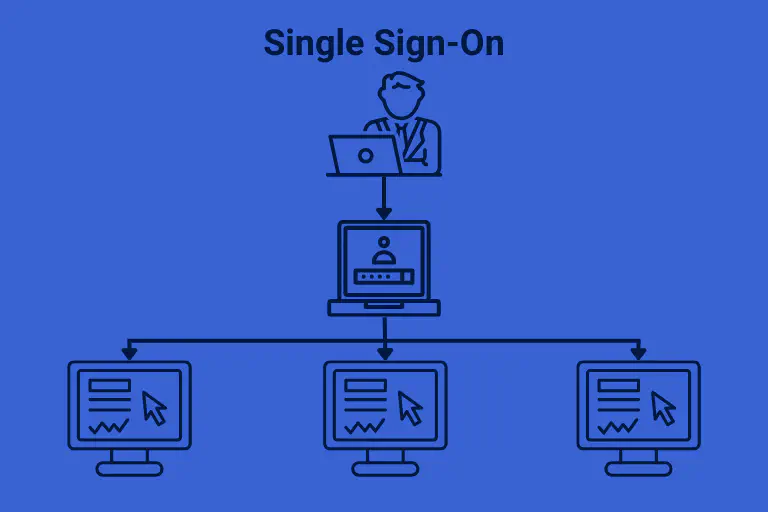
- Users are authenticated once at an IdP – e.g., Okta or Authentik . The responsible system administrator then grants access to all authorized services without the need to re-enter passwords.
- After successful SSO authentication, the IdP generates an SSO token – a type of security certificate, e.g., as a SAML assertion (XML-based) or as a JWT (JSON Web Token) – and stores it either in the SSO system or in the web browser. SSO tokens contain information about the respective user, e.g., the user name and an email address.
- If the user wants to log in to a web application such as SeaTable using the SSO procedure, the application sends a token to the IdP, which is compared with the existing SSO token. If the user can be identified and is approved for the application, the SSO solution validates the authentication token and the user is granted access to the application.
The entire login process takes only a few seconds, without the user noticing anything about the authentication process in the background. If your employee later logs into another integrated application, it first checks whether a valid token already exists from the IdP. If so, the user is automatically logged in without having to log in again. That’s the “single” in single sign-on. And there is also a single logout: When the user logs out of a web application, the token is invalidated and all other linked applications are also logged out.
Why should companies implement SSO? The specific advantages #
-
Centralized administration instead of password silos: Instead of managing access rights in different tools, your IT managers can manage roles and permissions in one central location. This is not only a blessing for your IT staff, but also reduces the attack surface and manual errors.
-
Greater acceptance of digital transformation processes: When the transition to new tools goes smoothly, without password hassles, login frustrations, and security concerns, your employees will accept change more quickly—and save an estimated 30 minutes of work time per day by not having to enter or reset passwords. After just two weeks with SSO login, that adds up to an entire working day gained for productive tasks.
-
Greater IT security and compliance: Many SSO solutions require multi-factor authentication, and audit logs provide a complete record of who accessed which systems and when.
-
Avoiding shadow IT: By giving employees easy and convenient access to approved applications, IT departments can reduce the use of unauthorized and potentially insecure tools. In this way, SSO can help prevent the emergence of shadow IT structures .

What are the most common single sign-on protocols? #
The security of SSO systems is based on various protocols that regulate the exchange of information between the application and the identity provider. Which protocol is most suitable for a company depends largely on the IT environment and requirements. For a better understanding, we present the most important protocols here.
SAML 2.0: The Enterprise Standard #
SAML (Security Assertion Markup Language) has dominated enterprise environments for years and is the de facto standard for enterprise-wide SSO—and is also supported by team management in SeaTable . In this case, the SSO token is an XML-based assertion—a digital certificate, so to speak—that is signed with a certificate. The advantages of single sign-on with SAML are considerable:
-
SAML is browser-based and works seamlessly with traditional enterprise applications.
-
SAML also supports single logout—when a user logs out, the IdP can terminate all sessions simultaneously.
-
For regulated industries such as public administration, SAML is a big plus because of its audit-friendly logs.
But SAML also has disadvantages:
-
The XML format is difficult to debug compared to JSON.
-
SAML is not mobile-friendly.
OAuth 2.0: Modern and mobile-native #
OAuth 2.0 was specifically designed as SSO for the cloud and is suitable for environments with microservices or API connections. Known under the slogan “Sign in with Google” or “Login with Facebook,” OAuth grants delegated access rights without revealing the actual password. It is mobile-native: apps on smartphones and tablets work seamlessly with OAuth. Similar to SAML, this protocol also allows granular access rights to be defined.
The weak point: OAuth was originally intended only for authorization, not for authentication. To remedy this, OpenID Connect (OIDC) was invented, which extends OAuth and provides true authentication. Another drawback is the somewhat more complex refresh token management to prevent users from having to log in again when a token expires.

LDAP: The oldie LDAP #
(Lightweight Directory Access Protocol) is older than SAML and OAuth and has been in use since the 1990s. LDAP stores user directories in a tree structure and is typically used by Microsoft Active Directory (AD) in Windows environments. So if you use a pure Windows environment with on-premises servers, this solution is ideal.
A real drawback: LDAP was developed before the cloud era and is not optimized for web SSO.
JWT: The decentralized token #
JSON Web Tokens (JWT) are more of a technology than a primary SSO protocol, but they are increasingly central to modern authentication. A JWT is a signed, text-based token that contains information about the user, such as user ID, roles, and expiration time. Since each token contains all the information and JSON Web Tokens are mobile-friendly, this solution is well suited for scalable, decentralized systems and microservices—also because APIs can validate JWT authentication very easily.
Of course, there is also a disadvantage here: JSON Web Tokens cannot be deleted and are always valid until they expire. It is not so easy to immediately revoke a user’s access rights, for example after a security incident or termination without notice.
Kerberos: The Windows network classic #
Kerberos was Microsoft’s answer to secure network authentication in Windows domains. It is based on a ticket system: the client obtains a ticket from the Kerberos server that allows it to access a specific service without sharing the password. In a pure Windows domain, you can easily use Kerberos for SSO login.
However, the strict focus on on-premises Windows is also a significant disadvantage. Use as cloud SSO or in hybrid environments only works with supplementary solutions. And modern mobile apps? Kerberos is not designed for that.
Which identity providers are available for single sign-on procedures? #
If you want to use the single sign-on procedure for your company, you need an identity and access management tool, or an identity provider for short. There, you then specify the applications to which each authenticated user is granted access. The market for such tools has now consolidated and been reduced to a few providers, the most important of which we present here:
-
Okta: The cloud-native market leader with over 7,000 preconfigured app integrations. Okta excels with its comprehensive features (adaptive MFA, risk-based policies, analytics) and strong support, but is based in the US and is therefore only recommended to a limited extent in terms of data protection law.
-
Microsoft Entra ID (formerly Azure AD): Entra has grown rapidly and is now Okta’s biggest rival. The system is free for Microsoft 365 users and deeply integrated with Microsoft. However, as a US solution, there are data protection concerns, as with Okta. In addition, integrating apps outside the Microsoft world is complicated.
-
Authentik: This open source solution scores highly across the board (and is used by us at SeaTable as an IdP). Authentik can be self-hosted, is free to use, and supports SAML, OAuth, and LDAP authentication. The downside: setup requires technical know-how, and support is only available from the community.

-
OneLogin: OneLogin offers solid features and has a global infrastructure with servers in Germany. The downside: OneLogin only supports about half as many apps as Okta and does not offer free support.
-
**Authelia: The lightweight among open-source solutions for SSO procedures. Authelia is proxy-based and is ideal if you just need a quick, simple solution for SSO authentication. The major disadvantage: Strictly speaking, Authelia is not a full-fledged IdP, but uses forward authentication via reverse proxies instead of independent protocols.
Is single sign-on really secure? #
If an SSO system is hacked, attackers may have access to all login information. Doesn’t this create a disproportionately high security risk? The objection is certainly justified, but cannot be answered with a clear yes or no.
There’s no question about it: with single sign-on solutions, you concentrate the risk—so a hacked IdP is a very serious matter. However, SSO procedures also offer advantages that outweigh this risk:
1. With SSO, there are fewer passwords in circulation. Every password stored locally increases the risk of hacking.
2. The IdP may require every user to use a second authentication factor. Multi-factor authentication (MFA) blocks 99% of all phishing attacks.
3. SSO tokens are short-lived. A stolen SAML token or JWT, for example, is only valid for one hour and then expires. A stolen password may still work for months.
So yes, using single sign-on does not provide 100% security, especially if MFA is not required. However, when implemented correctly, SSO offers a level of protection that is difficult to achieve across the board with decentralized password management.

SSO and data protection—what do users need to bear in mind? #
Single sign-on solutions can also be used on-premises. However, SSO authentication is most commonly used in cloud environments. IT managers must therefore always consider data protection and legal compliance when selecting an appropriate solution. The following points are particularly important:
1. What data is transferred? When using SSO in the cloud, user information flows from the IdP to the application. This data is personal and therefore relevant under data protection law. With regard to the European GDPR, it becomes particularly critical if the IdP is located in the US and data is transferred there. We therefore recommend using a European identity provider or an on-premises solution such as Authentik.
2. Pay attention to consent and data minimization. The GDPR requires that users must consciously consent to the transfer of their data to third parties. A good IdP therefore makes it transparent which data is shared with the various applications.
3. Work with clean, well-maintained audit logs. GDPR Art. 5 obliges companies that collect personal data to be accountable for lawful and secure processing. In concrete terms, this means that controllers must be able to prove who logged in when and where. The good news is that identity providers usually log this information automatically in pseudonymized form.
4. You must be able to delete users. GDPR Art. 17 regulates the right to erasure. Regardless of this, however, it should be in every company’s own interest to only grant employees the access they actually need and to block access for former employees. An SSO system should therefore make it easy for you to delete a user—immediately, if necessary.
SSO at SeaTable #
SeaTable is more than just a GDPR-compliant AI no-code solution hosted in Germany for flexible databases, AI-powered automations, and app creation. As a tool for the digital transformation of business processes, it already integrates seamlessly into existing IT landscapes thanks to the SeaTable API.
Enterprise subscribers of SeaTable Cloud and users of the on-premises offering SeaTable Server can set up single sign-on for even greater security. The integration is straightforward and only takes a few minutes. Cloud users must register with an identity provider that supports SAML 2.0, which is used by SeaTable as an authentication protocol. You can find all the steps described in our help article about single sign-on . Server customers can also use LDAP or JWT and find detailed information in the admin manual .
FAQ – Single Sign-On #
What do I need to use SSO?
Can granted single sign-on access rights be easily revoked?
Can I also use the single sign-on procedure with multiple identity providers?
What is an SSO token?
Which identity providers can communicate with SeaTable Cloud?