Looking for a Microsoft Lists Alternative?
Flexible, intuitive, AI-powered, and GDPR-compliant: With SeaTable, you manage your lists and processes, automate workflows with AI, and never surrender control of your data. Ideal for companies that prioritize data privacy and prefer not to store their information in the Microsoft Cloud.
The SeaTable Advantage
SeaTable is the perfect alternative to Microsoft Lists
If you know Microsoft Lists, you’ll love SeaTable. Our no-code platform offers integrated AI features for your workflows. We are also the only alternative that allows you to run SeaTable on your own server, in your own data center, using your own domain and corporate identity.
On-Premises
Corporate data belongs in your hands, not with third parties. Microsoft Lists is only available as part of Office 365 in the Microsoft Cloud. With SeaTable, you decide where to install your system, which AI models to connect, and who has access to your data.
More Features and Views
With over 20 column types, SeaTable offers significantly more data entry options than Microsoft Lists. Only SeaTable allows for advanced table linking, web form collection, and data visualization via Kanban or charts—enhanced by AI-driven data analysis and text processing upon request.
A Solution in Your Design
Unlike Office 365 products, Microsoft Lists cannot be customized to your corporate design. With SeaTable, you are in control. Define your own URL, use your company colors, and display your own logo for a fully branded experience.
Free Trial, Affordable Business Plans
SeaTable is available in various versions. SeaTable Cloud includes all user functions and AI automations, making it easy to try out. You can also install and test SeaTable Server for up to three users for free, with no obligation.
Custom Extensions, Plugins, and AI
SeaTable’s plugin system knows no bounds. Need a specific geo-data visualization or want to use AI models for classification, extraction, or summaries? No problem! SeaTable offers a dedicated plugin system and SeaTable AI—a flexible connection for external and self-hosted AI models tailored to your needs.
Flexible Data Entry
SeaTable outpaces Microsoft Lists in data entry functionality. Use web forms, share links, and “Data Collection Sheets” to gather information from employees or partners. Enhance this with AI-powered processing like translation and summarization to consolidate all info into one system.
Who uses SeaTable?
Trusted by companies worldwide

















Standard Integrations
Microsoft Lists alternative with powerful API and AI automation
Microsoft Lists lacks a robust API, making it difficult to integrate with custom solutions. Thanks to SeaTable’s flexible API, seamless third-party integrations, and AI automations, integration is no longer a hurdle.




Cloud or self-hosted?
Comprehensive features across all pricing models

SeaTable Cloud
Perfect for companies looking to start quickly without heavy IT infrastructure—flexible, scalable, and featuring instant AI capabilities for automation and analysis.

SeaTable Server
For companies demanding full data sovereignty, SeaTable Server provides an on-premises option with the ability to connect internal or external AI models as needed.

SeaTable Dedicated
For organizations that need the simplicity of the cloud combined with the flexibility of a self-hosted system.
No compromises on data privacy
Your GDPR-compliant alternative to Microsoft Lists
SeaTable is hosted exclusively on servers in Germany and is 100% GDPR-compliant. We combine the highest standards for protecting sensitive data—even when using AI—with transparent, flexible workflows.
-
On-Premises solutions for full data control
With SeaTable Server, you maintain total control over your data with the same feature set as SeaTable Cloud.
-
Custom security settings
Limit access to sensitive information with granular user permissions and editing rights.
-
Authentication and Single Sign-On
Secure your data with Two-Factor Authentication and SSO available in all subscription models—even for AI automations.
Import data from Microsoft Lists to SeaTable
Already using Microsoft Lists but looking for a self-hosted alternative? Migrating your data is simple via export and import. Once moved, you can enrich your existing processes step-by-step with AI functions.
Easy data migration
Due to the similar data structures of Microsoft Lists and SeaTable, migrating your tables is seamless. Simply export your tables as a CSV file and import them into SeaTable, where you can then add AI automations and smart analytics. It couldn’t be easier.
Free trial subscription
Sign up for SeaTable for free with no strings attached. This allows you to test the data migration risk-free and see how AI automations can accelerate your existing workflows.
Try it for free and discover the SeaTable advantage
Templates for every use case
Try our free templates
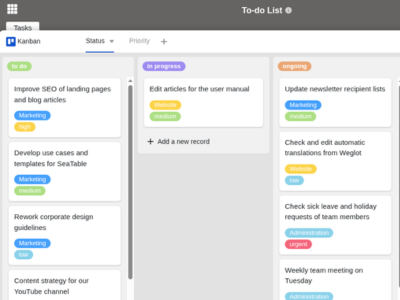
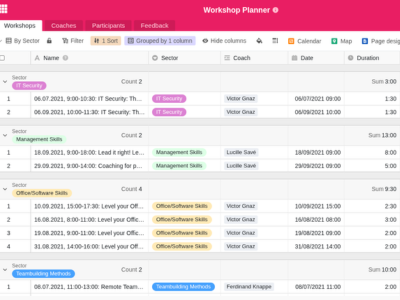
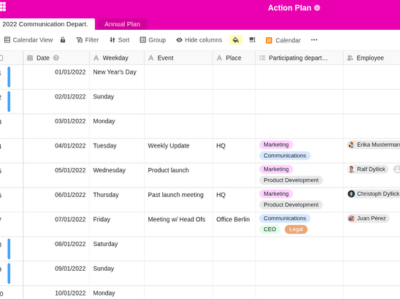
SeaTable offers numerous free templates to help you get started. Import templates with a single click and enhance them with AI-powered automations as needed.
To-do List
Workshop Planner
Action Plan
FAQs – SeaTable as a Microsoft Lists Alternative
-
What features does SeaTable offer?
-
SeaTable offers a wide range of features for transparent data management in real-time. Whether it’s automations, AI-powered workflows, notifications, our App Builder , or reporting dashboards: SeaTable is fully customizable to your needs, available both as a Cloud and On-Premises solution.
-
Is SeaTable really free to use?
-
Yes, you can use the SeaTable Free Plan indefinitely. For advanced features, AI credits, and increased storage, we offer affordable premium versions.
-
Does SeaTable offer free support?
-
We are here to help with any questions regarding SeaTable or specific features. You can reach our support team via the SeaTable Forum or directly by email.